


















Depreciation
On February 1, 2026, Nova Industries put a new NovaPack Labeler PL-200 to work on its packaging floor. The machine cost $48,000, the production team expects to run it for five years, and the accountant estimates it will still sell for about $2,400 at the end. The month-end question is simple: how much of that $48,000 belongs in February's expenses?
Charging all $48,000 to February would make one month look like a heavy loss and the next 59 months look more profitable than they really are, because the labeler keeps earning its keep long after the purchase. It would also remove the machine from the balance sheet while it is still running every shift.
Depreciation solves this by spreading the cost the labeler will use up, $48,000 less the $2,400 it should still be worth, across the 60 months it works. ERPNext turns that policy into a schedule of $760 monthly amounts and posts a Journal Entry for each one when it falls due. By the end of August 2026, seven entries have moved $5,320 into expenses and the labeler's book value is $42,680.
How ERPNext calculates the amount
Depreciation is set up on the Asset record, in the Finance Books table on the Depreciation tab. Each row holds one depreciation policy. When you choose an Asset Category, ERPNext copies the category's default rows, and you can change them for the individual asset. The Production Equipment category defaults to yearly depreciation over five years, but the accountant changed the labeler's row to monthly so the expense follows each month-end close.
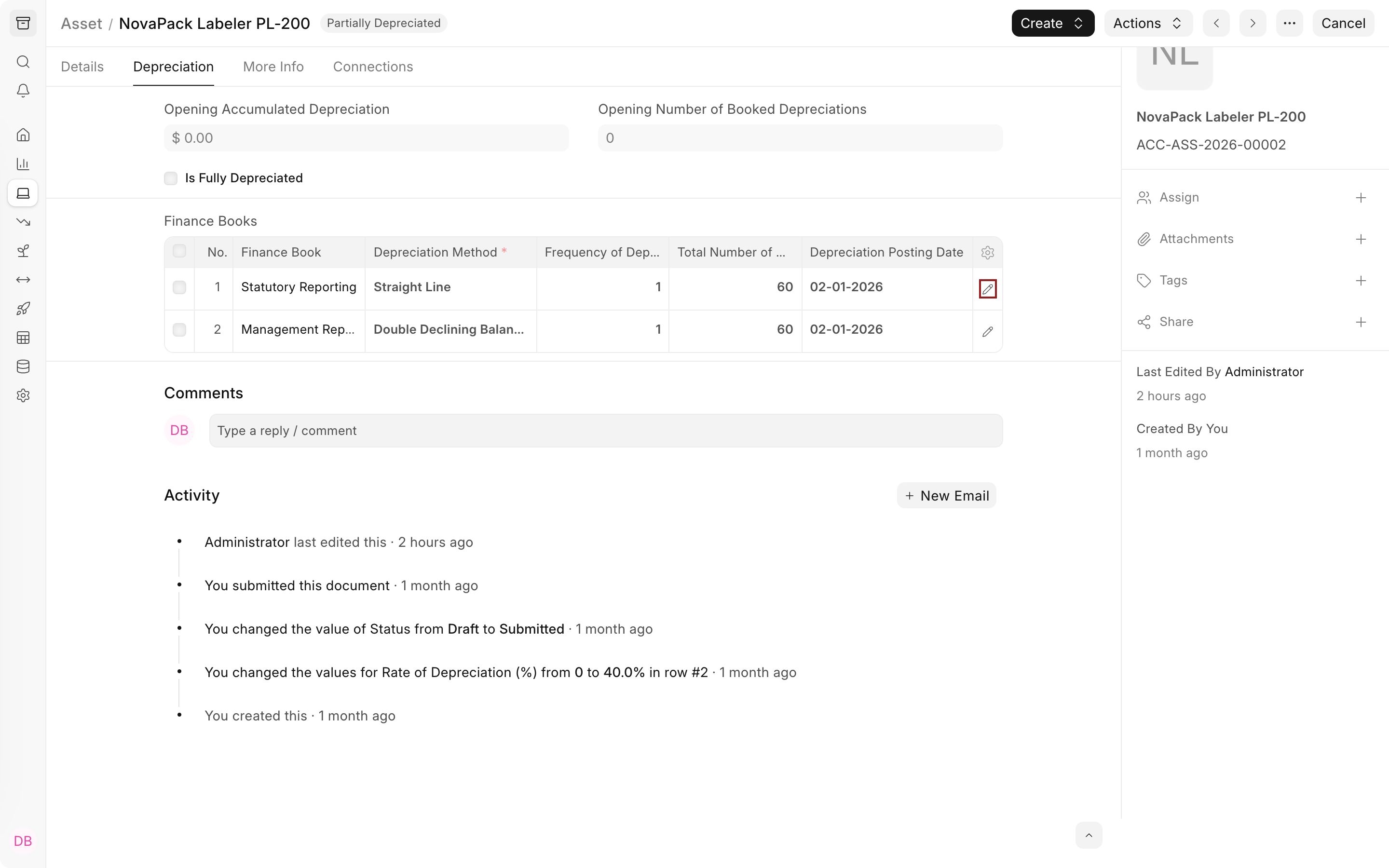
The table shows only some of each row's fields. The pencil icon at the end of a row, highlighted above, opens the full row editor, where you can see and change every input, including the Salvage Value.
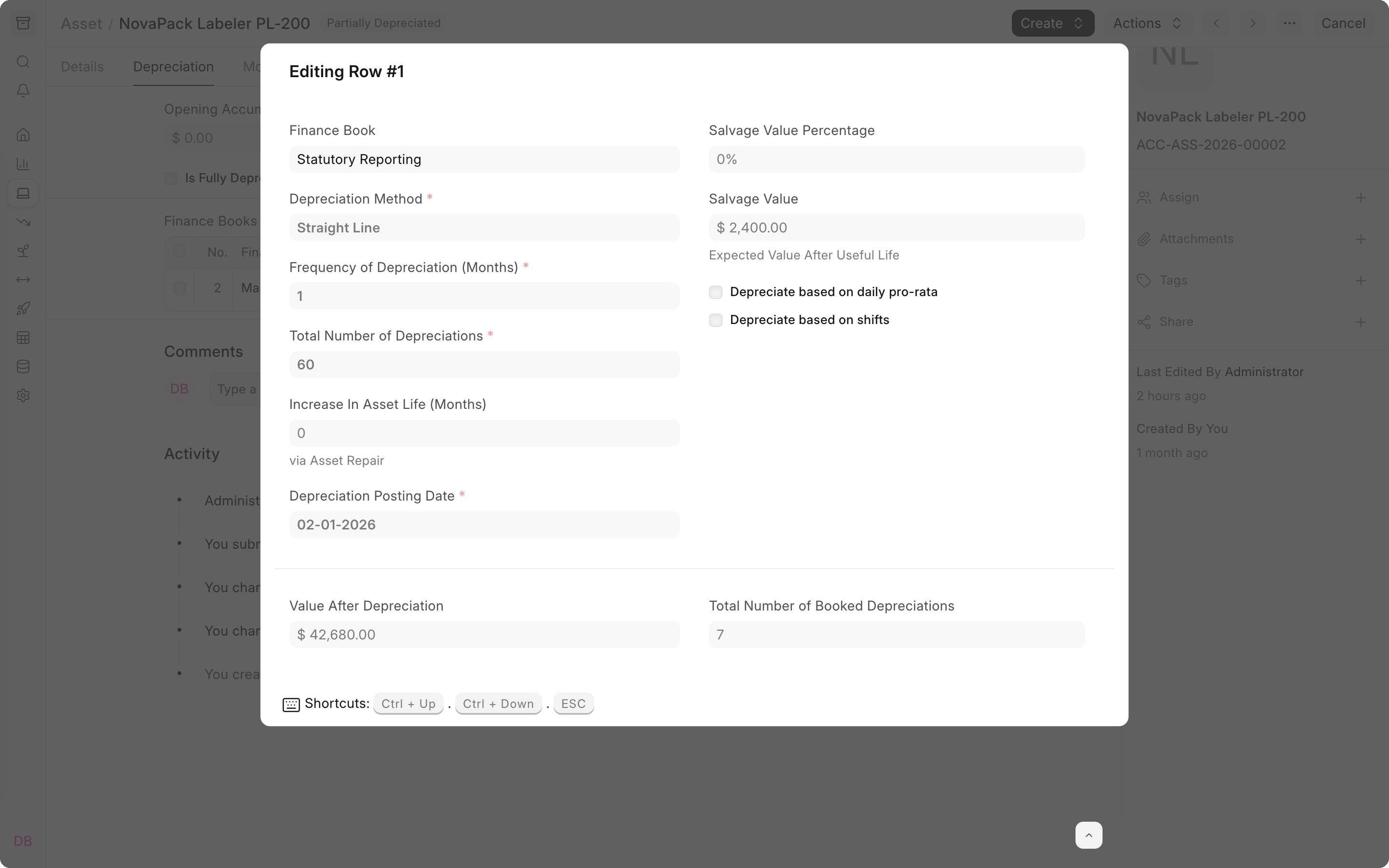
| Input on the labeler's row | Value | What it controls |
|---|---|---|
| Finance Book | Statutory Reporting | The set of books this schedule belongs to. |
| Depreciation Method | Straight Line | How the cost is spread across the periods. |
| Net Purchase Amount | $48,000 | The capitalized cost, taken from the asset. |
| Salvage Value | $2,400 | The value expected at the end of the asset's life. It must be less than the Net Purchase Amount. |
| Frequency of Depreciation (Months) | 1 | The number of months between postings. |
| Total Number of Depreciations | 60 | How many postings the schedule contains. |
| Depreciation Posting Date | February 1, 2026 | The date of the first posting. If you leave it blank, ERPNext uses the last day of the month in which the asset becomes available for use. |
The calculation follows directly: $48,000 minus $2,400 leaves a depreciable value of $45,600, and $45,600 divided by 60 postings is $760 per month. The row editor already reflects the seven entries posted by the end of August: 7 booked depreciations and a value after depreciation of $42,680.
The labeler became available on the same day as its first posting, so every row is a full $760. When an asset becomes available partway through its first period, ERPNext reduces the first amount in proportion to the days it was actually in use and adds one extra row at the end for the remainder. To calculate every period by its actual number of days instead, see Daily Depreciation Calculation.
Choosing a method
Straight Line suits the labeler because it does roughly the same work every month. The other methods suit assets that lose value faster at the start, or policies that dictate their own amounts.
| Method | How the expense is spread | Typical use |
|---|---|---|
| Straight Line | The same amount every period, $760 a month for the labeler. | Equipment that provides a similar benefit each period. |
| Double Declining Balance | A larger amount early and a smaller amount later. | Equipment that loses value or productivity quickly when new. |
| Written Down Value | A fixed percentage of the remaining book value each period. | Policies or tax rules that specify a rate. |
| Manual | The dates and amounts the accountant enters. | Contracts, valuations, or policies with a custom pattern. |
Depreciation Methods works through each method with year-by-year figures.
The depreciation schedule
When you save the asset, ERPNext creates a draft Asset Depreciation Schedule for each Finance Books row. Submitting the asset makes those schedules active. Each schedule row has a date, the amount for that period, the running accumulated total, and a link to the Journal Entry once the row has been posted.
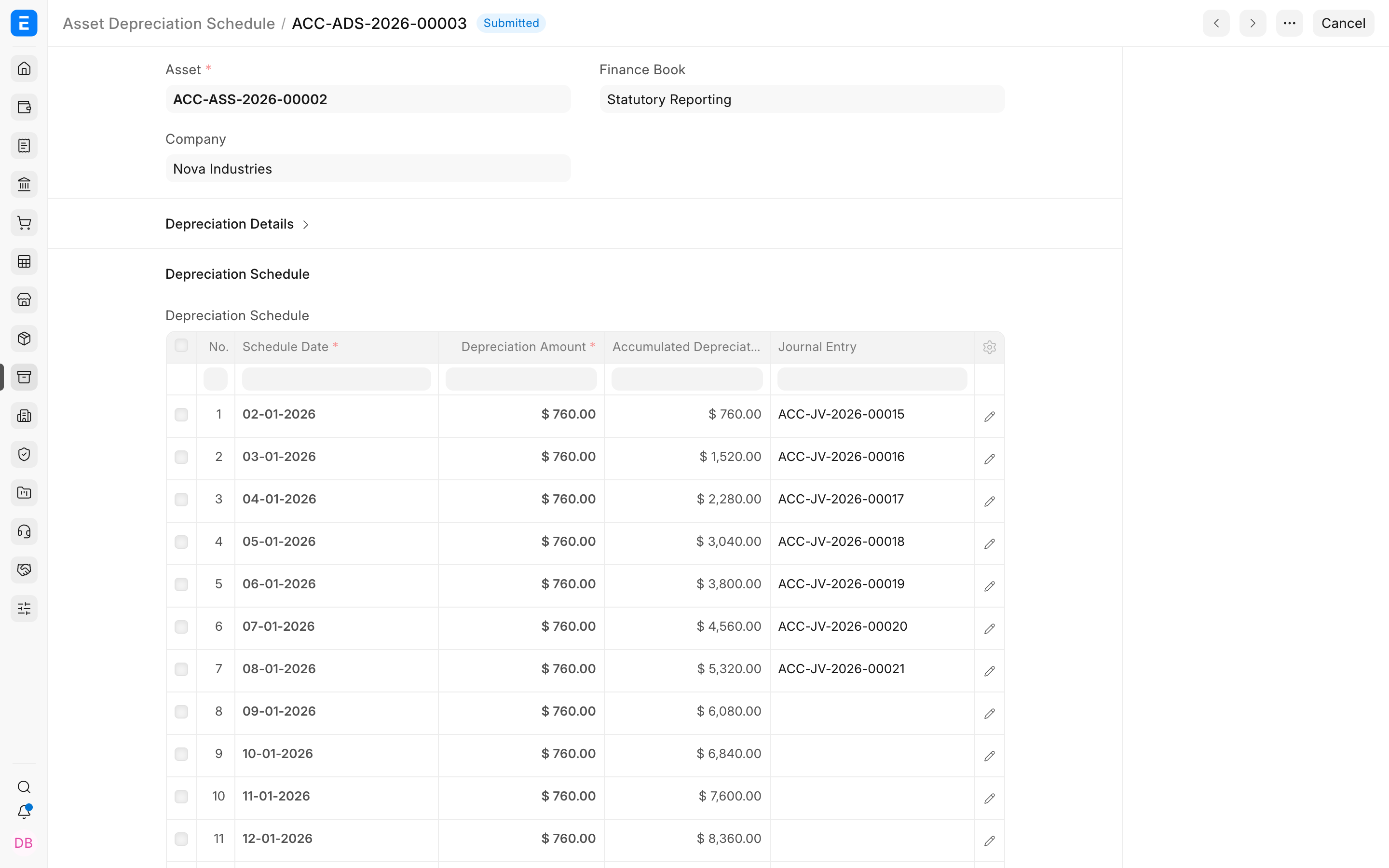
In the labeler's Statutory Reporting schedule, rows 1 to 7 cover February through August 2026 and link to Journal Entries ACC-JV-2026-00015 to ACC-JV-2026-00021. The accumulated column reaches $5,320 on row 7. At the end of August, row 8, dated September 1, 2026, has not fallen due yet, so it has no Journal Entry. The 60th and last row, dated January 1, 2031, brings the accumulated total to $45,600, so the labeler finishes at its $2,400 salvage value.
How depreciation is posted
A scheduled job runs every day and posts each active schedule row dated today or earlier that has no Journal Entry yet. It runs only while Book Asset Depreciation entry automatically is enabled in Accounts Settings, which is the default. If the job misses a few days, the next run catches up on every overdue row. To post a single due row yourself, open the schedule row and click Make Depreciation Entry.
Each posting is a Journal Entry of type Depreciation Entry, dated on the schedule row's date and tagged with the schedule's Finance Book. For the labeler's February row, it records:
| Account | Debit | Credit |
|---|---|---|
| Depreciation - NID | $760 | |
| Accumulated Depreciation - NID | $760 |
The debit adds $760 to February's expenses. The credit builds up Accumulated Depreciation, an account that sits against the labeler's $48,000 cost on the balance sheet, so the original cost stays visible while the book value falls. ERPNext takes both accounts from the asset category's row for the company and falls back to the company's default depreciation accounts when the category leaves them blank. Once the first entry posts, the asset's status changes to Partially Depreciated, and after the last one it becomes Fully Depreciated.
Verify the result
The Asset Depreciation Ledger lists every posted entry for the filters you choose. With the company Nova Industries, the dates January 1, 2026 to December 31, 2027, the asset ACC-ASS-2026-00002, and the Statutory Reporting finance book, it shows the labeler's seven entries.
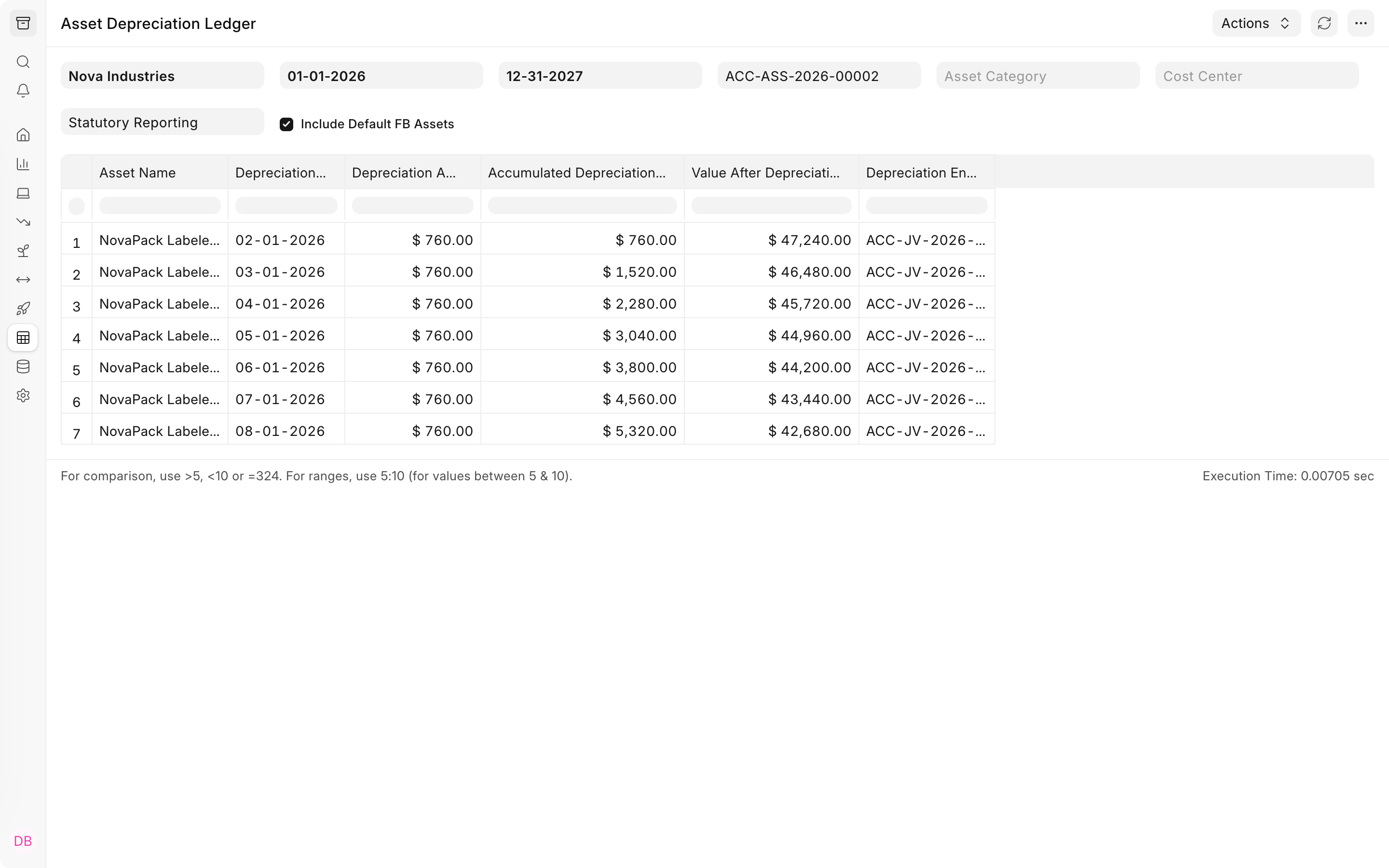
Each row shows the $760 posted for one month, the accumulated depreciation after it, and the value left after it. The last row, dated August 1, 2026, shows $5,320 accumulated and $42,680 remaining, which matches the schedule above. Asset Reports explains the other asset reports, including Asset Depreciations and Balances and the Fixed Asset Register, for checking many assets at once.
When an asset has more than one finance book
Nova Industries also tracks the labeler in a Management Reporting book that uses Double Declining Balance. Each row in the asset's Finance Books table gets its own schedule, and ERPNext posts a Journal Entry for every active schedule, tagged with that schedule's finance book. Filter reports by finance book to see one set of figures at a time; otherwise the depreciation expense from both books appears together. Using Finance Book for Asset Depreciation shows how to set up and report on separate books, and Finance Book explains the master itself.
When the schedule changes
Some later events change the remaining depreciation. Submitting an Asset Value Adjustment recalculates the schedule from the new value. Asset Shift Allocation changes the amounts based on how many shifts the machine runs. When an asset is scrapped or sold, ERPNext posts depreciation up to the disposal date before removing the asset from the books; see Scrapping an Asset and Selling an Asset.
Troubleshooting
No depreciation schedule was created
ERPNext builds a schedule only when Calculate Depreciation is enabled on the asset, and it creates one schedule for each complete row in the Finance Books table. Enable Calculate Depreciation, fill in the method, frequency, total number of depreciations, and posting date for at least one row, and save the asset again; the draft schedule appears and becomes active when you submit the asset.
Depreciation entries are not being posted
Open Accounts Settings and confirm that Book Asset Depreciation entry automatically is enabled, because the daily job does nothing without it. Then check the asset itself. The job only processes submitted assets with Calculate Depreciation enabled and a status of Submitted or Partially Depreciated, so an asset that is In Maintenance or Out of Order is skipped until its status changes. After fixing the cause, use Make Depreciation Entry on each overdue row, or wait for the next daily run, which posts every overdue row.
The asset shows "Failed to post depreciation entries"
This headline appears when the daily job tried to post a row for the asset and the Journal Entry failed validation. ERPNext records the error in the Error Log and emails it to users with the role set in Role to Notify on Depreciation Failure in Accounts Settings, or to Accounts Managers when that field is empty. Common causes are missing depreciation accounts on both the asset category and the company, and a mandatory accounting dimension without a valid value for the asset's company. Fix the cause shown in the Error Log, then click Make Depreciation Entry on the overdue row; a successful posting clears the failure status.
Frequently asked questions
Why is the first amount smaller than the others, and why is there an extra row?
ERPNext reduced the first amount because the asset was available for only part of the first period. It then added a final row so the total still reaches the full depreciable value. When the asset becomes available on the date of the first posting, as the labeler did, every row has the same amount.
How do I record an asset that is already partly depreciated?
Set the asset type to Existing Asset and enter the Opening Accumulated Depreciation and the Opening Number of Booked Depreciations. ERPNext then schedules only the remaining periods. Submitting an existing asset that has no purchase document does not post its cost or opening accumulated depreciation to the ledger, so include those amounts in your opening balances.
Can I change the useful life after the asset is submitted?
Changing the asset category does not affect an asset that has already been submitted. Use an Asset Value Adjustment to recalculate the remaining schedule, or an Asset Repair when the repair extends the asset's life.
Does depreciation change stock valuation?
Depreciation affects only fixed-asset accounting. It reduces the asset's book value through Accumulated Depreciation and does not change any stock item's valuation.