The Tree View is generated for all DocTypes that has Is Tree enabled.
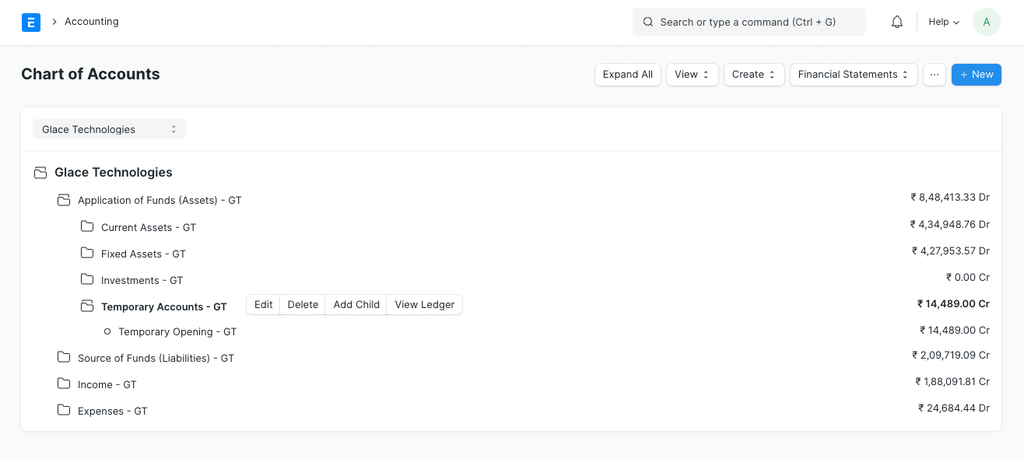 Tree View
Standard Tree JS
To customize the Tree View you must have a {doctype}_tree.js file in the doctype directory.
Below are all the options that can be customized.
For instance, if you want to configure the Account DocType, you'll have to create a file account_tree.js with the following contents.
frappe.treeview_settings['Account'] = {
 breadcrumb: 'Accounting',
 title: 'Chart of Accounts',
 filters: [
 {
 fieldname: 'company',
 fieldtype:'Select',
 options: 'Company 1
Company 2',
 label: 'Company',
 on_change: handle_company_change()
 }
 ],
 get_tree_nodes: 'path.to.whitelisted_method.get_children',
 add_tree_node: 'path.to.whitelisted_method.handle_add_account',
 // fields for a new node
 fields: [
 {
 fieldtype: 'Data', fieldname: 'account_name',
 label: 'New Account Name', reqd: true
 },
 {
 fieldtype: 'Link', fieldname: 'account_currency',
 label: 'Currency', options: 'Currency'
 },
 {
 fieldtype: 'Check', fieldname: 'is_group', label: 'Is Group'
 }
 ],
 // ignore fields even if mandatory
 ignore_fields: ['parent_account'],
 // to add custom buttons under 3-dot menu group
 menu_items: [
 {
 label: 'New Company',
 action: function() { frappe.new_doc('Company', true) },
 condition: 'frappe.boot.user.can_create.indexOf('Company') !== -1'
 }
 ],
 onload: function(treeview) {
 // triggered when tree view is instanciated
 },
 post_render: function(treeview) {
 // triggered when tree is instanciated
 },
 onrender: function(node) {
 // triggered when a node is instanciated
 },
 on_get_node: function(nodes) {
 // triggered when `get_tree_nodes` returns nodes
 }
 // enable custom buttons beside each node
 extend_toolbar: true,
 // custom buttons to be displayed beside each node
 toolbar: [
 {
 label: 'Add Child',
 condition: function(node) {},
 click: function() {},
 btnClass: 'hidden-xs'
 }
 ]
}
Last updated 4 months ago
Was this helpful?