


















Excel (XLSX) Export Styling
Introduced in Version 16
The get_xlsx_styles module method allows you to define custom Excel styling for report exports.
Note: This method is only called when exporting standard Script Reports or Query Reports to Excel format (not CSV).
Basic Usage
Define a get_xlsx_styles function in your report's Python file:
from frappe.utils.xlsxutils import XLSXMetadata, XLSXStyleBuilder

def get_xlsx_styles(metadata: XLSXMetadata) -> dict:
    builder = XLSXStyleBuilder(metadata)

    # Add your custom styles here...
    return builder.result
Note: Default styles (header, filters, fieldtype formats, currency) are applied automatically when
XLSXStyleBuilderis initialized.
To disable this, pass
default_styling=False:builder = XLSXStyleBuilder(metadata, default_styling=False)
XLSXMetadata
The metadata object provides access to report data and helper methods.
Attributes
| Attribute | Type | Description |
|---|---|---|
report_name |
str |
Name of the report |
filters |
dict |
Raw filter values |
column_map |
dict[int, dict] |
Column index → column definition |
row_map |
dict[int, dict \| list] |
Row index → row data |
applied_filters_map |
dict[int, list] |
Filter row index → [label, value] |
has_total_row |
bool |
Whether last row is a total row |
has_indentation |
bool |
Whether indentation styling applies |
Note: All indexes must be 0-based respecting XlsxWriter's indexing.
XLSXStyleBuilder
The builder provides methods to register and apply styles.
Registering Styles
# Register a style and get its ID
style_id = builder.register_style({"bold": True, "bg_color": "#FFFF00"})
Applying Styles
# Style an entire column
builder.style_column(col_idx, style_id)

# Style an entire row
builder.style_row(row_idx, style_id)

# Style a specific cell
builder.style_cell(row_idx, col_idx, style_id)
Style Properties
Font Styles
builder.register_style({
    "bold": True,
    "italic": True,
    "underline": True,
    "font_size": 12,
    "font_color": "#FF0000",
    "font_name": "Arial",
})
Background Colors
builder.register_style({
    "bg_color": "#FFFF00",
})
Borders
# Border thickness: 1 = thin, 2 = medium, 3 = thick
builder.register_style({
    "border": 1,
    "border_color": "#000000",
})

# Individual borders
builder.register_style({
    "left": 2,
    "right": 2,
    "top": 1,
    "bottom": 3,
})
Alignment
builder.register_style({
    "align": "center",           # left, center, right
    "valign": "vcenter",         # top, vcenter, bottom
    "text_wrap": True,
    "indent": 2,

})
Number Formats
builder.register_style({
    "num_format": "#,##0.00",    # Custom number format

})
Complete Example
from frappe.utils.xlsxutils import XLSXMetadata, XLSXStyleBuilder

def get_xlsx_styles(metadata: XLSXMetadata) -> dict:
    builder = XLSXStyleBuilder(metadata)

    # --- Register Styles (do this once, reuse style_id) --- #
    success_style = builder.register_style({"font_color": "#006100", "bg_color": "#C6EFCE"})
    warning_style = builder.register_style({"font_color": "#9C5700", "bg_color": "#FFEB9C"})
    error_style = builder.register_style({"font_color": "#9C0006", "bg_color": "#FFC7CE"})
    highlight_style = builder.register_style({"bold": True, "bg_color": "#DDEBF7"})
    total_row_border = builder.register_style({"border": 3, "border_color": "#15137e"})
    right_align = builder.register_style({"align": "right"})

    # --- Style entire column --- #
    amount_col_idx = builder.field_index_map.get("net_amount")

    if amount_col_idx is not None:
        builder.style_column(amount_col_idx, right_align)

    # --- Style total row with border --- #
    if metadata.has_total_row:
        builder.style_row(metadata.get_last_row_index(), total_row_border)

    # --- Conditional Cell Styling --- #
    status_col_idx = builder.field_index_map.get("status")

    for row_idx, row_data in metadata.row_map.items():
        if not isinstance(row_data, dict):
            continue

        # Status-based styling
        if status_col_idx is not None:
            status = row_data.get("status")

            if status == "Completed":
                builder.style_cell(row_idx, status_col_idx, success_style)

            elif status == "Pending":
                builder.style_cell(row_idx, status_col_idx, warning_style)

            elif status == "Cancelled":
                builder.style_cell(row_idx, status_col_idx, error_style)

        # High value highlighting
        if amount_col_idx is not None:
            amount = row_data.get("net_amount")

            if amount and amount > 10000:
                builder.style_cell(row_idx, amount_col_idx, highlight_style)

    return builder.result
Example Output
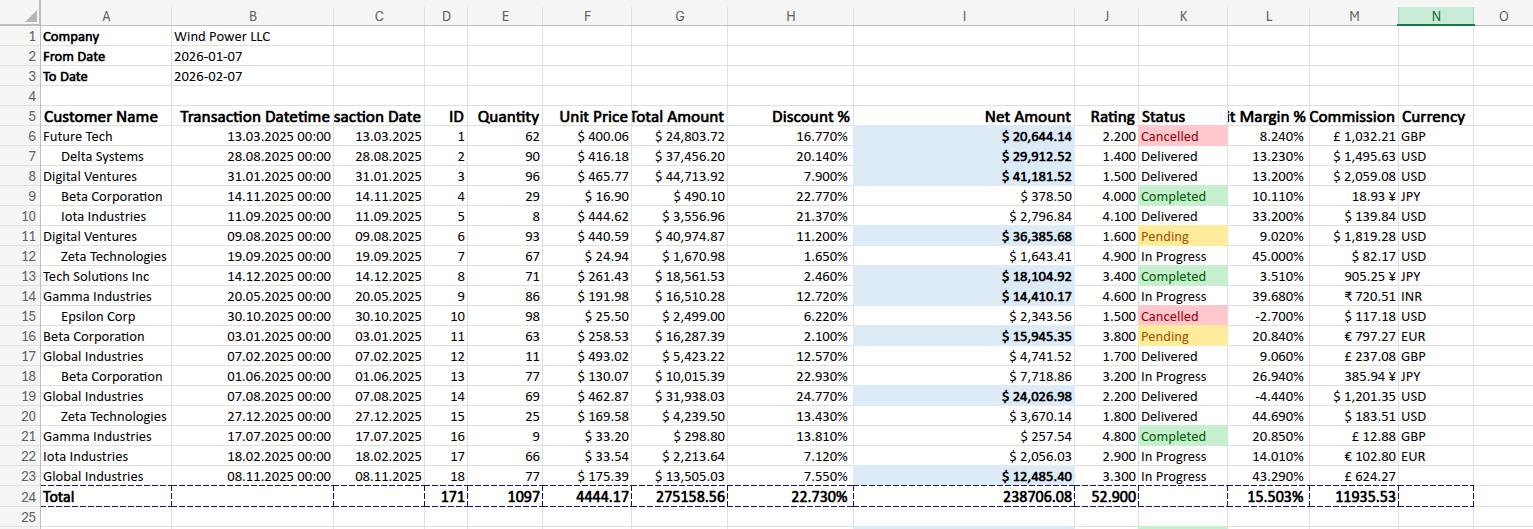 Example Export with Styles
Recommendations
- Register styles once and reuse — Avoid creating duplicate styles by registering them at the start and using the returned
style_idthroughout.
Reference
- For all available style properties, visit the xlsxwriter format documentation.