

















Available from version-16 onwards
For migrating existing loans or closed loans from another system into Frappe Lending, the standard Data Import can be used. A dedicated Loan Import template is available to structure historical loan data correctly. The import process functions like any other document import in the system.
1. Prerequisites
Before starting the import, ensure the following records already exist in the system for all loans to be imported:
- Loan Product (ensure it is fully configured, including accounting accounts like Loan, Payment, Interest Income, etc.)
- Company
- Applicant (Customer or Employee)
2. Preparing Data for Import
To import historical loans, the Loan Import template must be populated and then uploaded via Data Import.
- Download the Template: Go to the Data Import, select Loan as the Document Type, and download the template. It will include all standard Loan fields as well as fields specific to migration (prefixed with "Loan Import Details").
- Key Fields to Fill:
- Migration Date (Mandatory): This field is required for migrated loans, regardless of its current
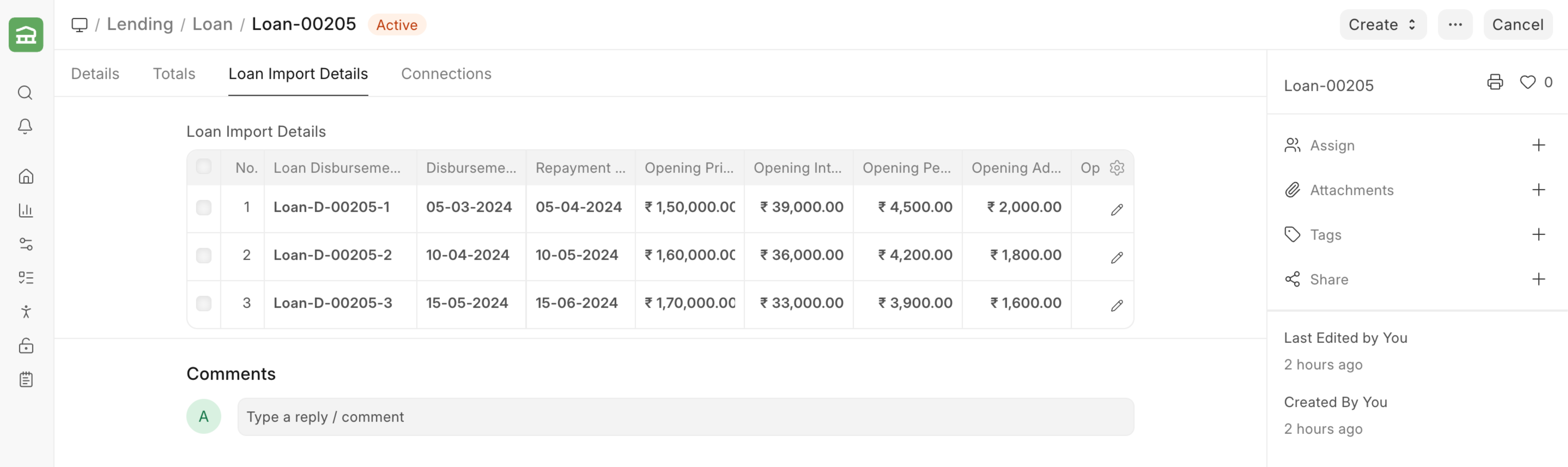
Status(for example, "Disbursed" or "Closed"). This date acts as the cut-off point for historical data. - Loan Import Details Table: For loans with multiple historical disbursements, one row per disbursement must be added in the CSV, using the columns prefixed with
(Loan Import Details). The most critical columns are the opening outstanding amounts (Principal, Interest, Penalty, Charges, etc.) as of theMigration Date.
- Migration Date (Mandatory): This field is required for migrated loans, regardless of its current
- Upload and Import: Once the file is ready, upload it in Data Import. The "Submit After Import" option should be enabled so that all created Loan documents are automatically submitted.
3. What the System Does
After the import is complete, the system processes the data differently based on the loan's status:
- If the loan's Status is "Closed": The system creates a simple Loan record with the provided
Migration Date. No other transactions (like repayment schedules, demands, or interest accruals) are generated for this loan. - If the loan's Status is "Disbursed" or "Active" and Loan Import Details have been provided: The system builds a complete loan history. For each disbursement row, it automatically creates:
- Opening Loan Balance: The loan's outstanding balance as of the migration date.
- Loan Disbursement: A record of the historical disbursement.
- Loan Repayment Schedule: The future repayment schedule based on the loan terms.
- Loan Demands: Demands for the outstanding principal, interest, penalties, and charges as of the migration date.
- Loan Interest Accruals: Accrual entries for the outstanding interest amounts.
4. Importing Repayments for Migrated Loans
After migrated loans have been successfully imported, their historical repayment transactions can also be imported. To do this, use the standard Data Import for the Loan Repayment doctype. This allows the complete payment history for each migrated loan to be brought into the system.