Company Level Setup
Company Level Setup in Frappe Lending defines default policy controls used across loan products, repayment behavior, classification logic, and accrual processing.
To access Company Level Setup, go to:
Home > Accounting > Company > (Open Company) > Lending tab
Prerequisites
Before configuring the Company Level Setup, it is advised to have the following ready:
- Company master
- Loan Classification master records
- Loan Demand Offset Order records
How to configure Company Level Setup
- Open the Company record.
- Go to the Lending tab.
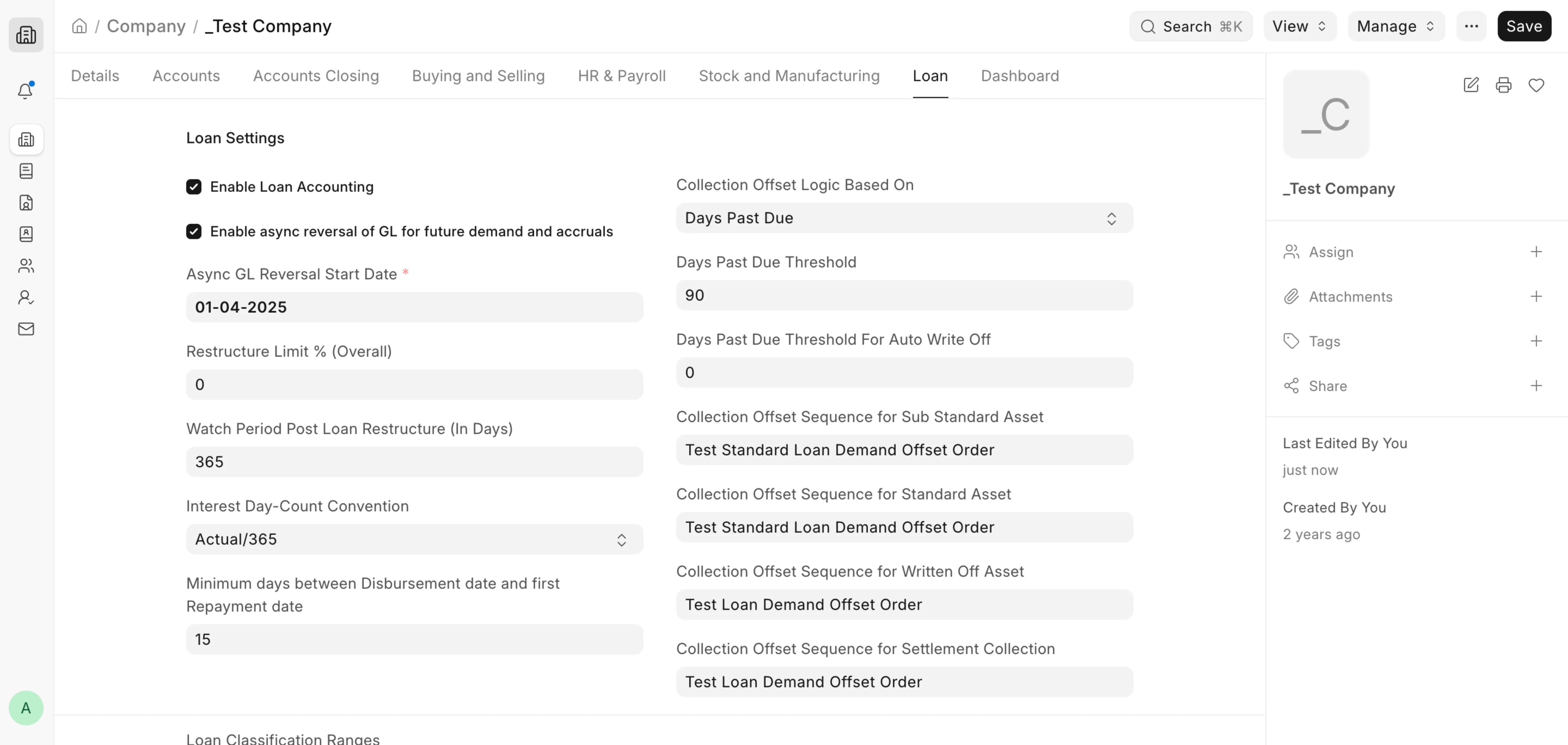
- Enter policy values in Loan Settings and collection configuration fields.
- Configure Loan Classification Ranges
- Save.
Additional Information
Enable Loan Accounting
When enabled, lending transactions follow accounting-enforced flows and related entries become part of accounting-ledger-driven processing. In day-to-day operations, this setting is used to determine whether loan accounting rules should be applied for lending transactions under that company.
Restructure Limit % (Overall)
Defines the overall restructuring cap as a percentage. This value is used in restructure limit processing to calculate permissible restructuring exposure against outstanding position when branch-level limits are not set.
Enable async reversal of GL for future demand and accruals
When enabled, the reverse GL Entries created on cancellation of Loan Demands and Loan Interest Accruals are not posted immediately. Instead, the reversal is deferred to background scheduler jobs. This keeps cancellations of future demands and accruals fast by moving their GL reversal off the main transaction. It applies only to Loan Demand and Loan Interest Accrual cancellations.
Async GL Reversal Start Date
Defines the date from which async GL reversal takes effect. Records cancelled on or after this date use the deferred (background) reversal; records cancelled before it use immediate GL reversal. This field is mandatory when async reversal is enabled.
Watch Period Post Loan Restructure (In Days)
Defines the post-restructure watch-period length. This watch period is used during NPA and classification handling after approved normal restructures, and it controls when certain status transitions can happen.
Interest Day-Count Convention
Controls how per-day interest is computed for accrual calculations. Depending on selected convention (for example Actual/365, 30/360, Actual/Actual), the system changes the year divisor and day treatment used in interest amount calculation.
Minimum days between Disbursement date and first Repayment date
Provides a company-level default minimum gap between disbursement date and first repayment date. This value is inherited by Loan Product when not explicitly set there, and is used in cycle-date schedule logic to avoid too-early first installments.
Collection Offset Logic Based On
Defines the intended policy basis for collection offset strategy (NPA Flag or Days Past Due). In current code paths, actual demand allocation routing is driven by loan state (standard/sub-standard/written-off/settlement) and configured offset sequences; keep this field aligned with policy governance.
Days Past Due Threshold
Represents company-level DPD threshold used for collection policy configuration. In current implementation, NPA thresholding is primarily product-driven, so this field should be maintained as a policy-level control value and for future-ready setup consistency.
Days Past Due Threshold For Auto Write Off
Defines the DPD level beyond which loan write-off processing can be triggered by the automated classification flow. This is used during daily DPD evaluation and write-off initiation checks.
Collection Offset Sequence for Standard Asset
Default demand-allocation order for collections on standard assets. Used as fallback when Loan Product-level sequence is not set.
Collection Offset Sequence for Sub Standard Asset
Default demand-allocation order for sub-standard/NPA collections. Used as fallback when Loan Product-level sequence is not set.
Collection Offset Sequence for Written Off Asset
Default allocation order for recovery collections after write-off. Used as fallback when Loan Product-level sequence is not set.
Collection Offset Sequence for Settlement Collection
Default allocation order used during settlement-oriented collections (for example full/partial settlement flows). Used as fallback when Loan Product-level sequence is not set.
 Company Level Loan Setup
Loan Accrual Frequency
Defines the accrual cycle at the company level (Daily, Weekly, or Monthly). Scheduler and accrual processing use this value to determine whether a date is an accrual day and how accrual breaks are generated.
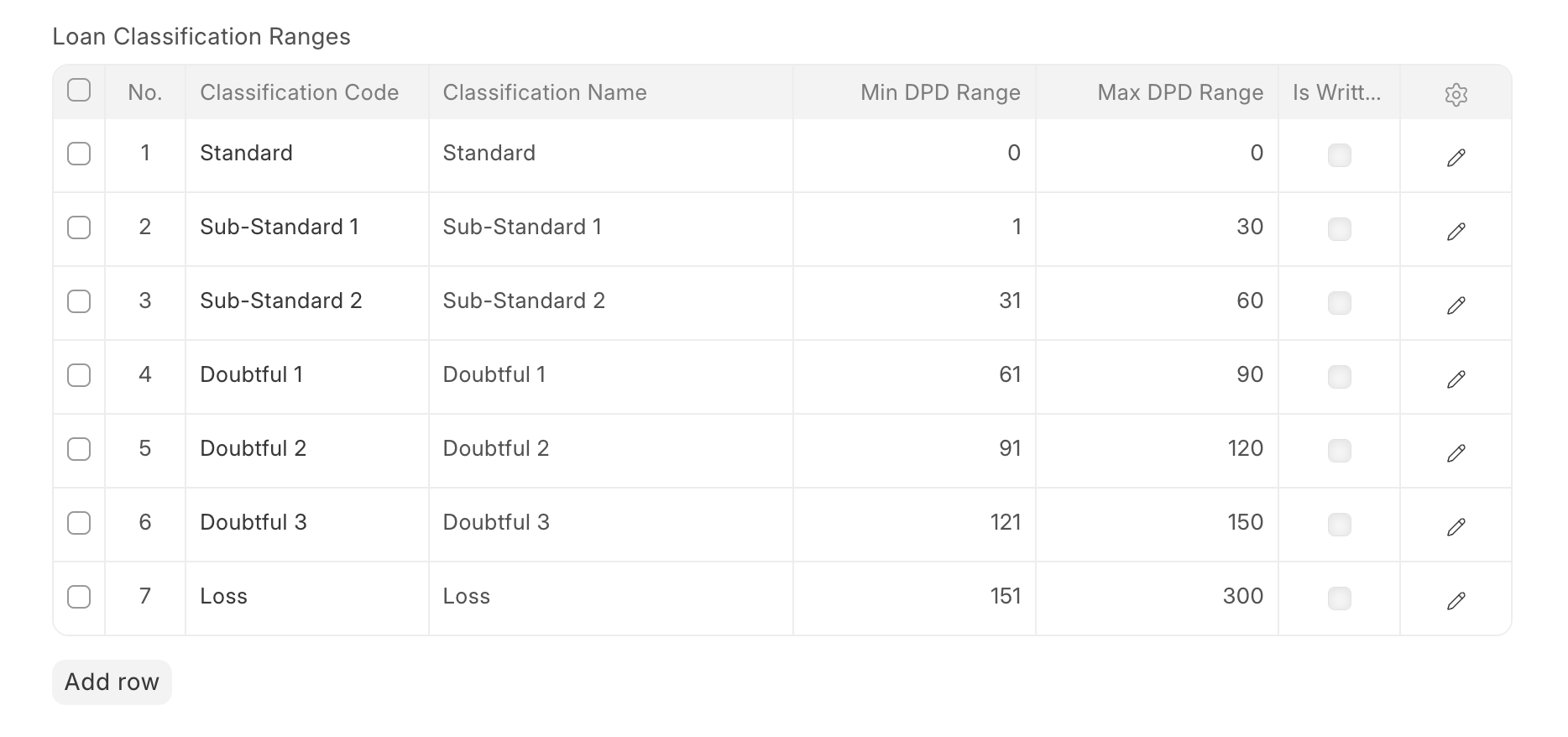
Configuring Loan Classification Ranges
Different regulatory bodies (like RBI in India) require banks or NBFCs to classify the overdue loans as per some standard nomenclature
These ranges can be configured in the company as shown in the example below. Once these ranges are configured, the loan classification process, along with DPD, also updates the classification code and classification in the loan account as per the current DPD value