


















The Workflow (BRE) feature in Lending is used to apply business rules during document transitions.
In Lending implementations, this is commonly used for journey steps such as screening, underwriting, approval, rejection, eKYC trigger, or eSign trigger.
This page focuses only on Lending-specific usage. For full setup and general concepts, refer to the references at the end.
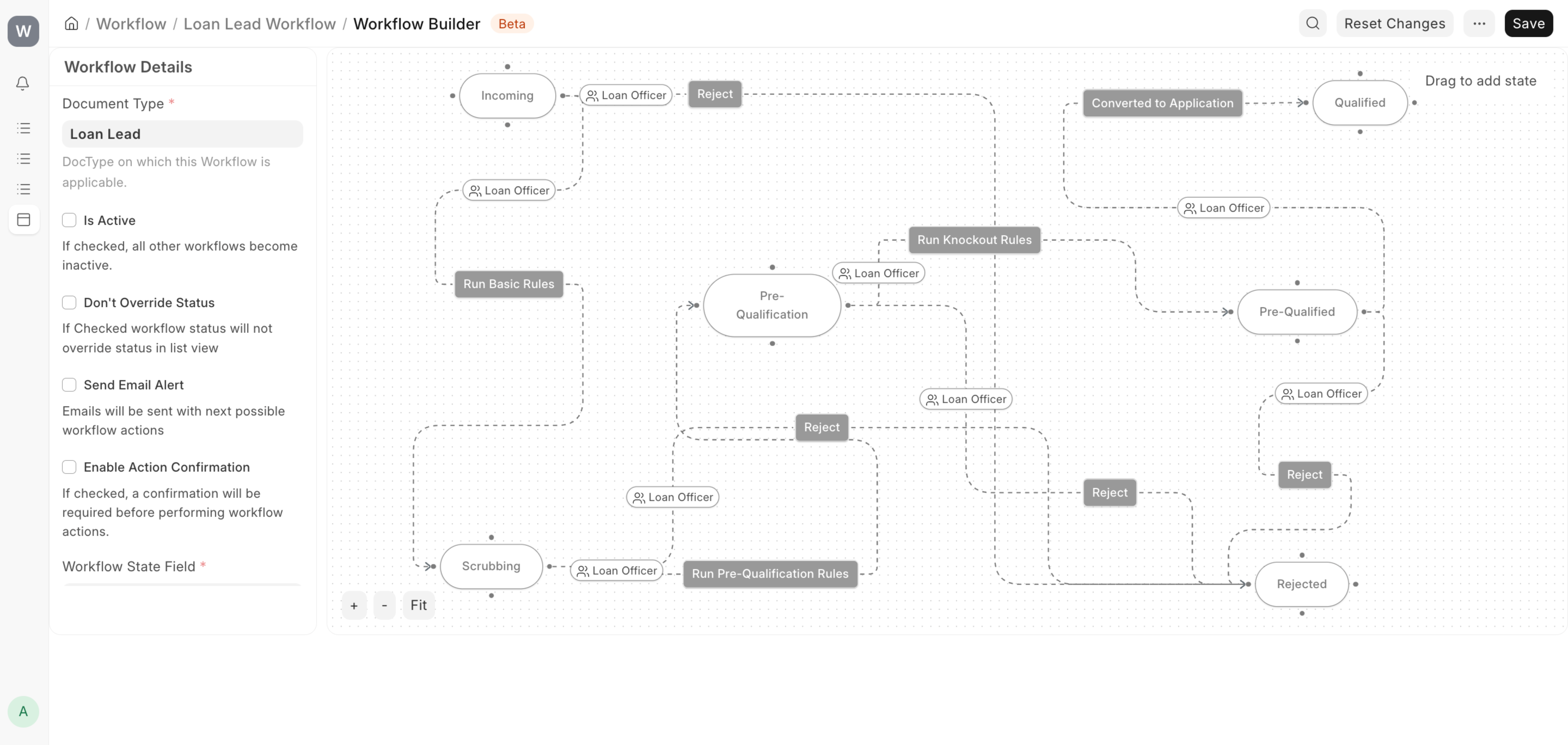
Below is the default workflow on the Loan Lead document.
Transition Tasks in Lending
Transition tasks are linked from the Transition Tasks field in each Workflow transition.
Task source options include:
- Webhook
- Server Script
- Custom methods defined in hooks.py using
workflow_methods
Example hooks entry:
workflow_methods = [
    {
        "name": "Your Task",
        "method": "my_app.workflow_tasks.your_task_method"
    }
]
Once configured, the named method appears in Workflow Transition Tasks and can be selected like other task types.
Actual Example: Loan Lead Workflow
The current Loan Lead workflow in Lending uses these states:
- Incoming
- Scrubbing
- Pre-Qualification
- Pre-Qualified
- Qualified
- Rejected
Typical transitions:
- Incoming -> Scrubbing using action Run Basic Rules
- Scrubbing -> Pre-Qualification using action Run Pre-Qualification Rules
- Pre-Qualification -> Pre-Qualified using action Run Knockout Rules
- Pre-Qualified -> Qualified using action Converted to Application
What Is Scrubbing Stage?
Scrubbing is the data-readiness stage before eligibility checks.
At this stage, the Loan Officer verifies that lead information is clean and complete, for example:
- Applicant name, mobile, loan product, and loan amount are present
- Date of Birth is available for Individual applicants
- Contact details are valid and usable
This ensures that Run Pre-Qualification Rules runs on reliable data.
Flow Example: Scrubbing -> Pre-Qualification
Action: Run Pre-Qualification Rules
At this transition, a Server Script can validate first-level eligibility checks such as:
- Age range (example: 21 to 65 for Individual applicants)
- Mandatory field completeness
Example Server Script (Workflow Task):
errors = []

if doc.doctype != "Loan Lead":
    frappe.throw("This task is only valid for Loan Lead")

required_fields = {
    "applicant_name": "Applicant Name",
    "mobile_number": "Mobile Number",
    "loan_product": "Loan Product",
    "loan_amount": "Loan Amount",
}

for fieldname, label in required_fields.items():
    if not doc.get(fieldname):
        errors.append(f"{label} is required")

if doc.get("applicant_type") == "Individual":
    if not doc.get("date_of_birth"):
        errors.append("Date of Birth is required for Individual applicant")
    else:
        today = frappe.utils.getdate()
        dob = frappe.utils.getdate(doc.get("date_of_birth"))
        age = today.year - dob.year
        doc.age = age
        if age < 21 or age > 65:
            errors.append("Applicant age must be between 21 and 65")

if errors:
    frappe.throw("<br>".join(errors))
Workflow Transition Tasks Mapping
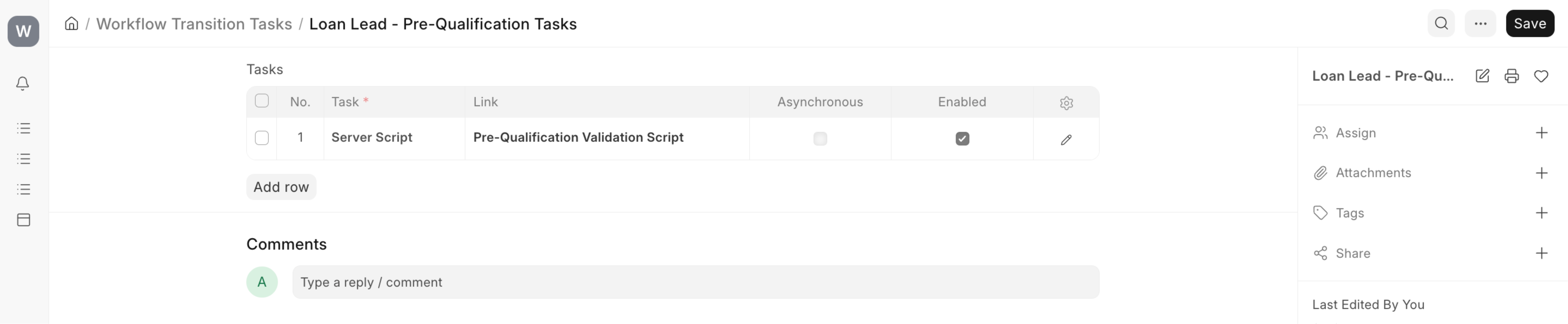
Configure task in Workflow Transition Tasks:
Loan Lead - Pre-Qualification Tasks
- Task: Server Script
- Link: Pre-Qualification Validation Script
- Enabled: Yes
- Asynchronous: No
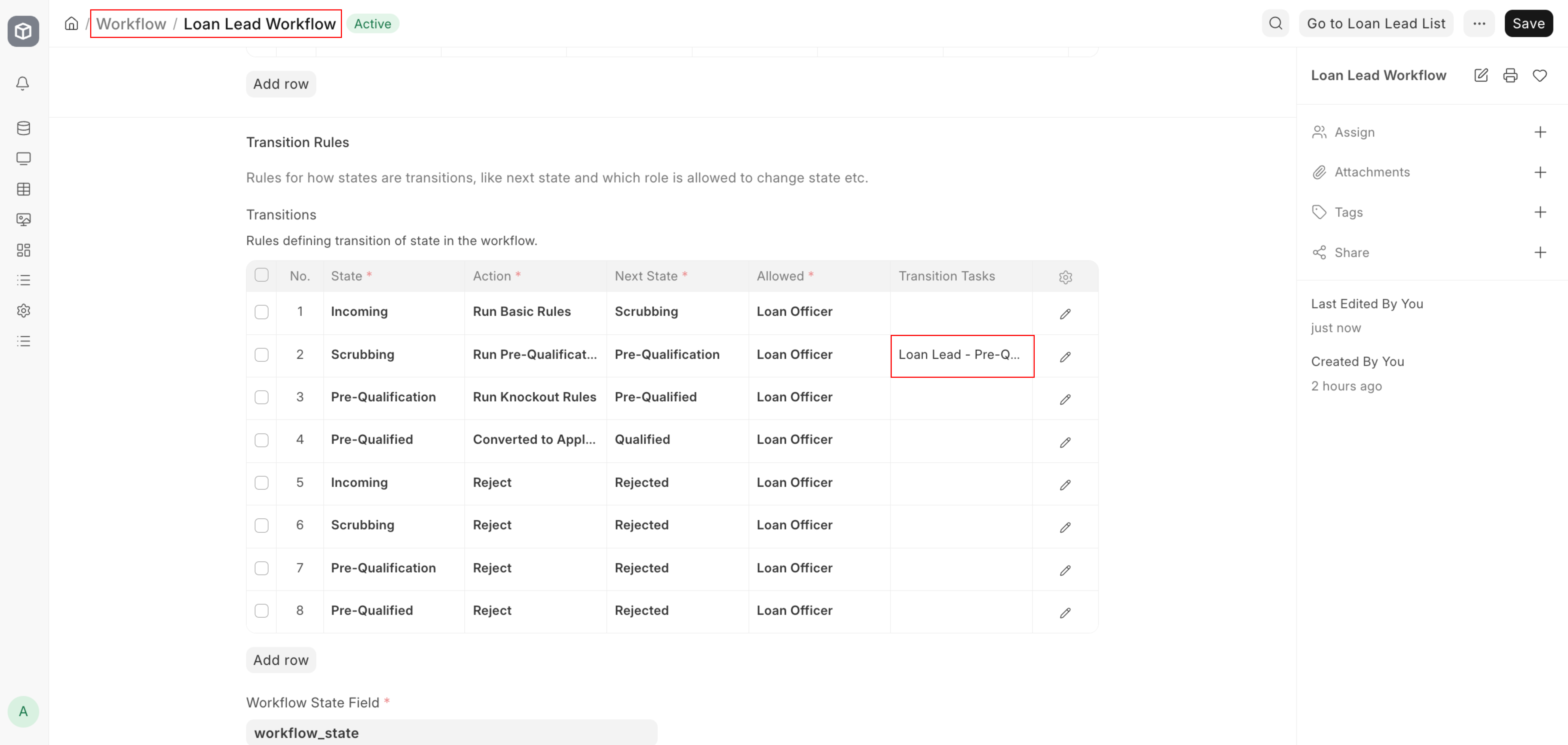
Then map in Workflow transitions:
- Scrubbing -> Pre-Qualification -> Transition Tasks = Loan Lead - Pre-Qualification Tasks
References
- Workflow: https://docs.frappe.io/erpnext/workflows
- Workflow Transition Tasks: https://docs.frappe.io/erpnext/workflow-transition-tasks