


















Collection Case
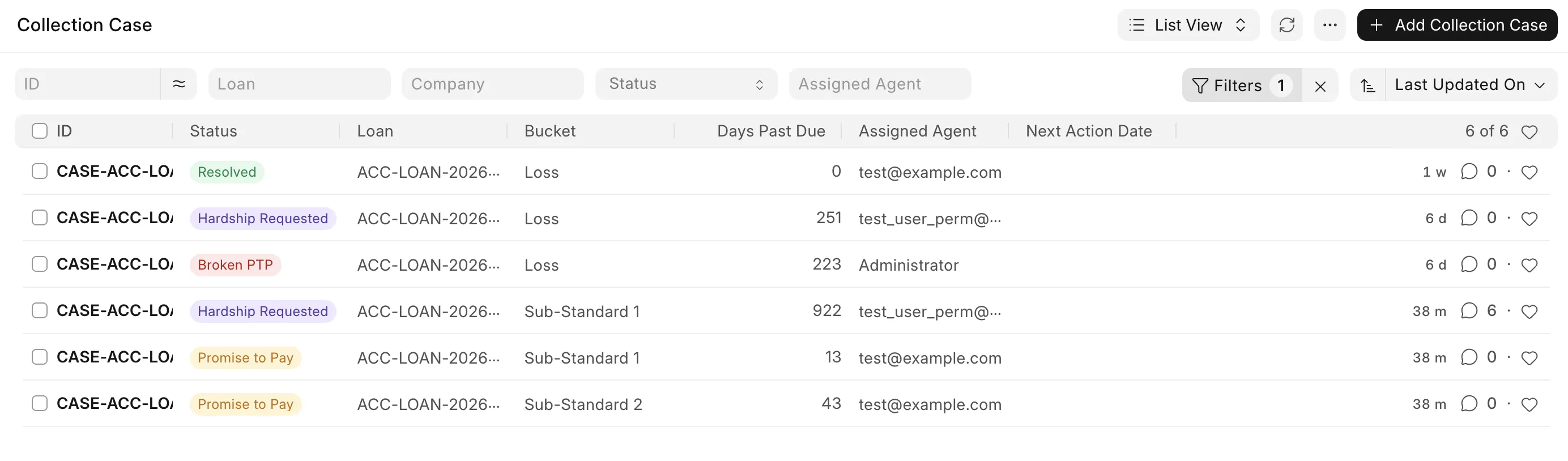
A Collection Case is the record your collection team works on for one overdue loan. It is opened when the loan's Days Past Due (DPD) moves it into a delinquency bucket, it is updated as the loan moves between buckets, and it is resolved when DPD comes back to 0. Agents use the case to add calls, visits and promises to pay, and can start a restructure from it if the borrower needs relief. A loan can have only one open case at a time.
To access it, go to:
Home > Lending > Collections > Collection Case
Prerequisites
See Collections Management Overview for the setup needed before cases can be opened.
How a case is opened
Every time a loan's Days Past Due Log is created or updated (usually by the daily Process Loan Classification), the system compares the loan's current bucket with its last bucket:
- Loan moves to a higher bucket (for example Standard → Sub-Standard 1):
- If there is no open case, a new Collection Case is created with status Open and an agent is assigned. A Case Opened entry is added in the Collection Case Log.
- If a case is already open, its bucket, DPD and outstanding amount are updated. A Bucket Escalated entry is added.
- Loan moves to a lower bucket but is still overdue (for example after a part payment, Sub-Standard 2 → Sub-Standard 1): the open case's bucket, DPD and outstanding amount are updated. A Bucket De-escalated entry is added.
- Loan stays in the same bucket: no entry is added, but the open case's DPD and outstanding amount are updated.
- DPD comes back to 0 (the loan is fully paid up): the case status is set to Resolved, Closed On is set to today, Resolution Reason is set to "Days past due returned to 0", and a Resolved entry is added.
If the loan becomes overdue again after the case is resolved, a new case is opened.
For Line of Credit loans, the highest DPD among all disbursements of the loan is used. For Written Off loans, the written-off classification ranges are used.
Agent assignment
When a case is opened, an agent is assigned automatically:
- The case can go to any enabled user with the Loan Officer role.
- The agent with the fewest open cases gets the case.
- If two agents have the same number of open cases, the agent who has worked on cases from the same branch before gets it. Branch is set only when the applicant is an Employee.
You can change the Assigned Agent at any time. If there is no Loan Officer, the case is created without an agent.
Fields
- Bucket / Classification Code: the current DPD bucket from Loan Classification Ranges.
- Days Past Due: current DPD of the loan.
- Outstanding Amount: remaining loan balance (pending principal + interest), not only the overdue amount.
- Status: see Case statuses below.
- Assigned Agent: the Loan Officer working on the case.
- Next Action Date: the date of the agent's next follow-up. Entered manually.
- Opened On / Closed On: when the case was opened and resolved.
- Resolution Reason: why the case was closed.
- Linked Restructure: the Loan Restructure created from this case, if any.
- Promise to Pay tab: promises given by the borrower.
- Activities tab: calls, messages, visits and reminders on the case.
Case statuses
- Open: the case is newly created.
- In Progress: set manually by the agent after follow-up starts.
- Promise to Pay: the case has at least one Open promise. Set automatically on save.
- Broken PTP: a promised date has passed and no payment was entered for it. Set automatically on save.
- Hardship Requested: a restructure has been started from the case.
- Resolved: DPD came back to 0. Set automatically.
- Closed: set manually, for example when the case is sent to legal.
Promise to Pay
When the borrower agrees to pay an amount by a date, add a row in the Promise to Pay tab:
- Promised Date and Promised Amount: the date and amount the borrower agreed to. Required.
- Status: Open, Kept, Broken or Partial. Default is Open.
- Actual Paid Amount: the amount the borrower actually paid for this promise.
- Captured By: the agent who added the promise.
When the case is saved:
- If the date of an Open promise has passed and Actual Paid Amount is empty, the promise is set to Broken and the case status changes to Broken PTP.
- If any promise is still Open, the case status changes to Promise to Pay.
This check does not run for Resolved, Closed and Hardship Requested cases. The agent sets Kept and Partial manually.
Activities
Add every follow-up with the borrower in the Activities tab:
- Activity Type: Call, SMS, Email, WhatsApp, Field Visit, Legal Notice or System Dunning. Required.
- Channel: Email, SMS, WhatsApp, Phone or In Person.
- Activity Date: date and time of the activity. Required.
- Agent: who did the follow-up.
- Outcome: Answered, No Response, Promise to Pay, Dispute Raised, Paid, Refused or Number Unreachable.
- Template Used: the Email Template used, if any.
A System Dunning row is added automatically every time a reminder is sent. See Dunning Rule.
Hardship / Restructure
If the borrower cannot pay the current EMIs, you can start a restructure from the case:
- Open the Collection Case and click Create > Hardship / Restructure.
- Select the Restructure Type: Normal Restructure, Pre Payment or Advance Payment.
- Click Create.
The system then:
- creates a draft Loan Restructure for the loan with today's date. For loans with "Repay Fixed Amount per Period", the current repayment method and EMI are copied to it.
- links it in Linked Restructure.
- changes the case status to Hardship Requested.
- adds a Hardship Requested entry in the Collection Case Log.
Complete and submit the Loan Restructure as usual. See Loan Restructure.
Only users who can create a Loan Restructure (Loan Manager / System Manager) can see this button. It is not shown when the case is Resolved or Closed, or when a restructure is already linked.