
Badges allow you to visually highlight important Ticket information directly on the page — such as VIP customers, escalations, SLA breaches, or special statuses.
Creating Custom Badges:
- Navigate to Desk: Switch to Desk and navigate to HD Form Script.
- Select Doctype: Choose the Doctype (e.g., HD Ticket) where you want to add the custom action. You'll be presented with a boilerplate code.
- Apply To: Choose "Form".
- Define Your Badge: Here's how to define different types of actions:
function setupForm({doc, updateField, call, router, toast, $dialog, createToast ,applyFilters}) {
    return {
        badges:[{"theme":"green","size":"lg","variant":"subtle","label":"Hello World"}]
    }
}
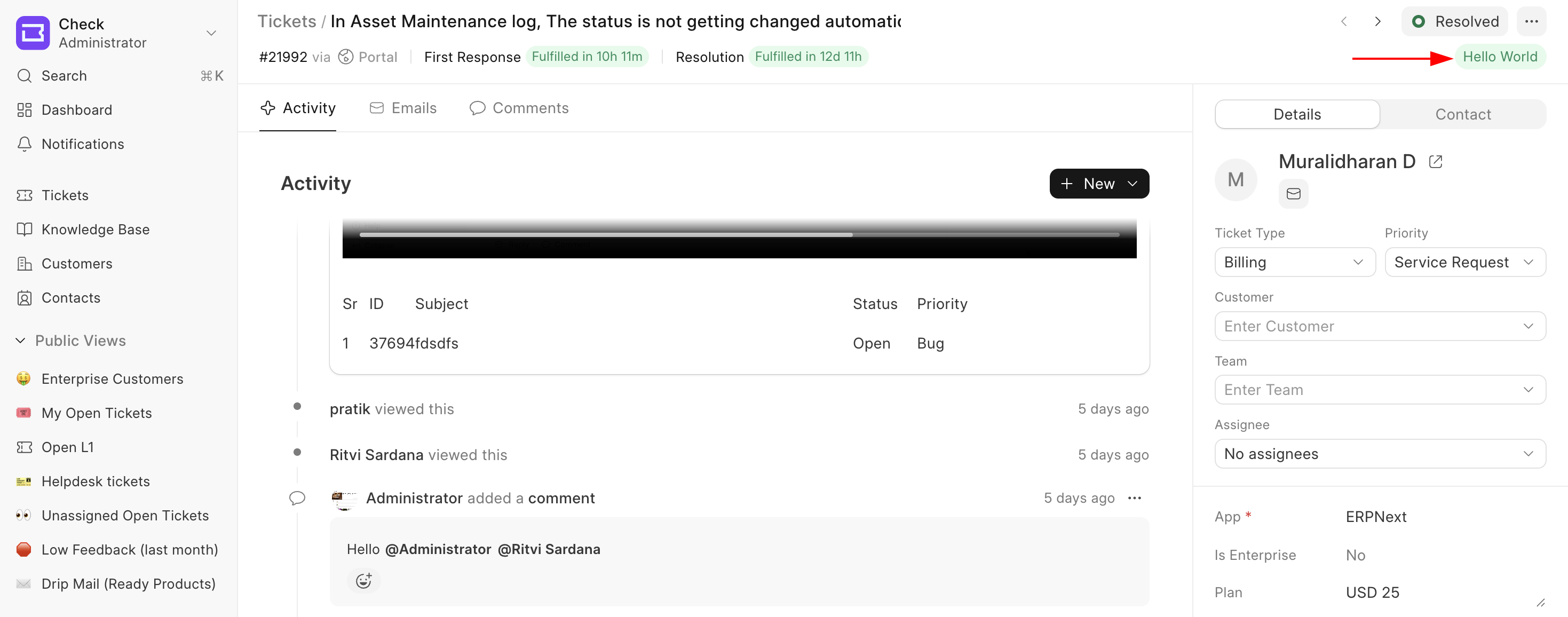 Custom Badge
Badge Properties
| Property | Available Values | Description |
|---|---|---|
label |
Any short text (e.g., "VIP", "Escalated") |
Text displayed inside the badge. This value is mandatory. |
theme |
gray, blue, green, orange, red |
Controls the badge color |
variant |
solid, subtle, outline, ghost |
Controls visual style |
size |
sm, md, lg |
Controls badge size |
Here are some real world use cases for adding Badges
function setupForm({ doc }) {
  const badges = [];

  // VIP Customer Badge
  if (doc.customer_tier === "VIP") {
    badges.push({
      label: "VIP",
      theme: "orange",
      variant: "solid",
    });
  }

  // Escalated Ticket Badge
  if (doc.is_escalated) {
    badges.push({
      label: "Escalated",
      theme: "red",
      variant: "solid",
    });
  }

  return {
    badges,
  };
}
Best Practices
- Keep badge labels short (1–2 words).
- Use
redonly for critical states. - Prefer
subtleoroutlinefor secondary information. - Avoid adding too many badges (3–5 recommended).
Last updated 6 hours ago
Was this helpful?