

















Navigating the Learning Portal
Frappe Learning operates across two distinct interfaces to separate student-facing content from administrative backend tasks.
- The Learning Portal: The primary student and instructor-facing website where learning and content creation happen.
- The Desk: The administrative backend.
Interface Access & Switching
You can jump between these two environments at any time:
- To Portal: Click the
Learningicon on your Desk Dashboard, or navigate to your base URL (default is/lms). - To Desk: Click on your
User Profile Icon>Apps>Desk. Alternatively, go to/deskURL.
Navigating Learning Portal
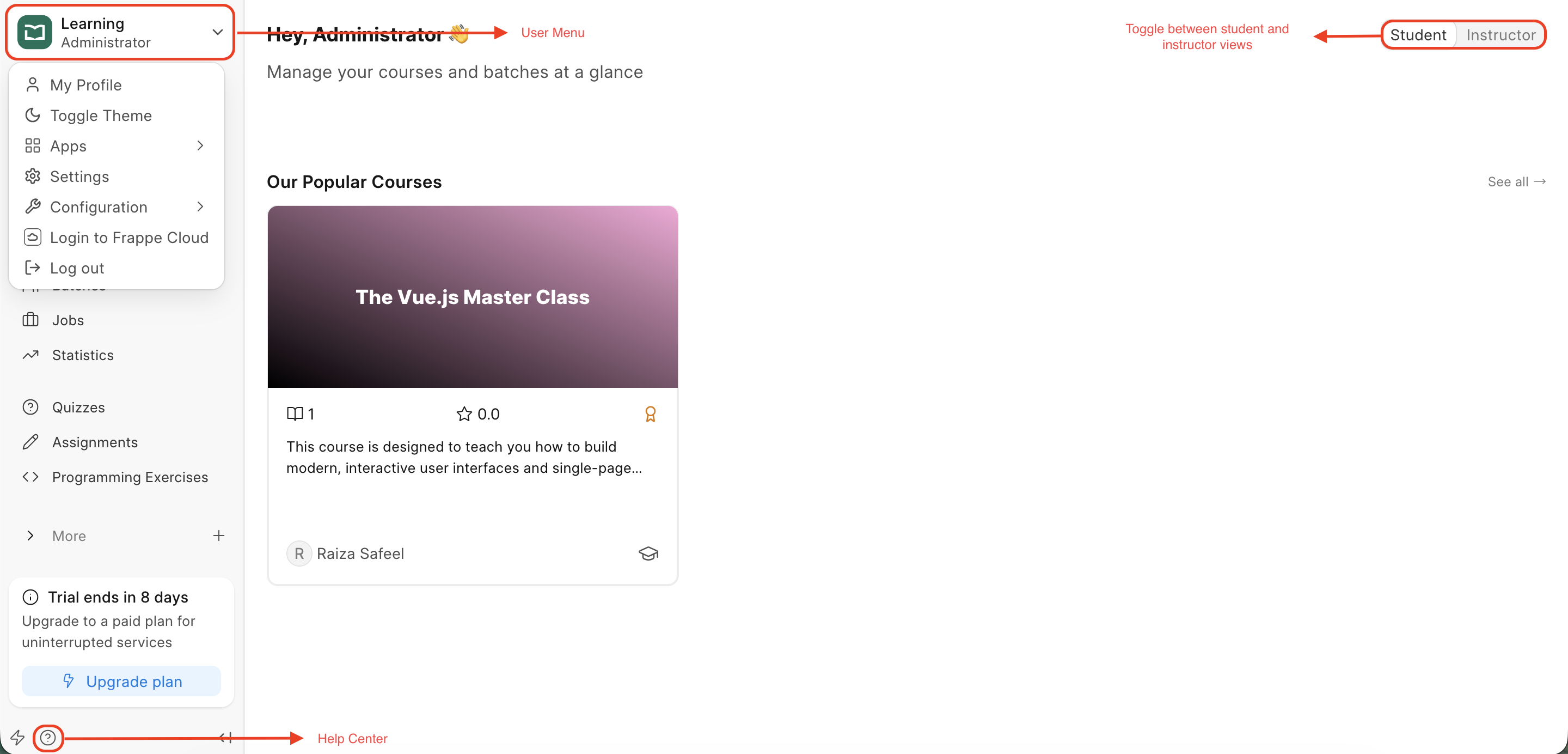
- The Sidebar: Located on the left, this contains quick links to Courses, Programs, and Batches.
- Instructor/Student Toggle: Located at the top of the homepage. This allows creators to preview exactly how content appears to a learner.
- User Menu: Click your avatar to access Theme Settings (Light/Dark mode), Account Settings, etc.
- Help Center: Click on the help icon on bottom center of your sidebar. This will take you to
Getting Startedwizard if it is incomplete or toHelp Centerif that is done.
Last updated 5 months ago
Was this helpful?