


















Ticket Field Visibility
To make Frappe Helpdesk more secure and easier to use, ticket fields are now protected by permission levels. This release also gives the HD Ticket Template a bigger role. It now controls which fields appear on the ticket form, who can see them, and whether customers can edit them after the ticket is raised.
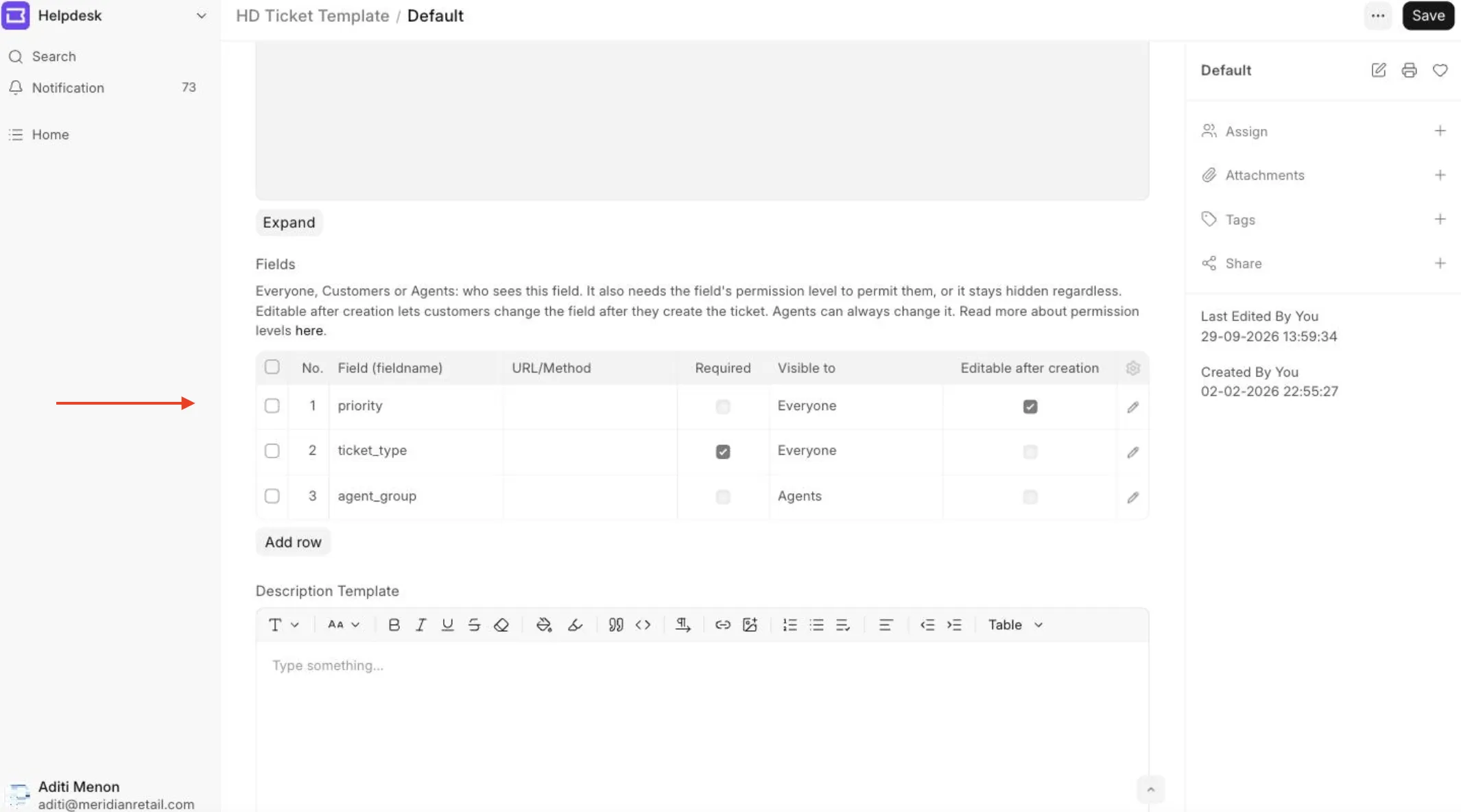
Ticket fields now use Frappe's permission levels, so each site controls what customers can see and fill in.
To hide a field from the ticket form, set its row in the ticket template to Visible to: Agents. This hides the field in the helpdesk UI, and only agents can fill it. For further hardening, raise the field's permission level in Customize Form, so the API stops returning it too.
There are two layers, and they do different jobs.
- Permission levels decide which roles can read and write a field. A higher level makes sure that the field never reaches a role that must not read it.
- Visible to decides where a field shows on the helpdesk pages. The ticket page and the new ticket form drop the fields that are hidden from you. On the new ticket form, you get only the fields that you can fill.
Set a permission level when a field must never reach a customer. Combine it with Visible to, so that the field never shows in the ticket form.
Permission levels
Every field has a permission level. Helpdesk ships three levels by default and leaves room for your own.
| Level | Who can read it | Fields at this level |
|---|---|---|
| 0 | Everyone | Subject, description, status, feedback |
| 7 | Customers and agents | Priority, ticket type, team, customer, SLA response and resolution times |
| 8 | Agents only | Resolution details, agreement status, merge history, the feedback key |
Levels 7 and 8 are deliberately high. Levels 1 to 6 are free for a scheme of your own.
To change the level of a field:
- Go to Customize Form and select HD Ticket.
- Click the field that you want to change.
- Set Permission Level to 8 to make the field agent-only, or to 7 to let customers read it.
- Click Update.
A permission level is the only thing that hides a field from the API. If a field must be internal, set its level. Read more about permission levels in the Frappe Framework here.
Custom created roles
The update gives level 7 read access to every role that can already read tickets. This includes customer roles that you created yourself. These roles can then see priority, team, and SLA times on the tickets they can open. Level 7 does not let a role open more tickets.
Level 8 is never given to your own roles. If you created your own role for agents, add level 8 to it in Role Permission Manager. Otherwise its users see agent-only fields as empty. See What do I do about my custom roles?.
Visible to
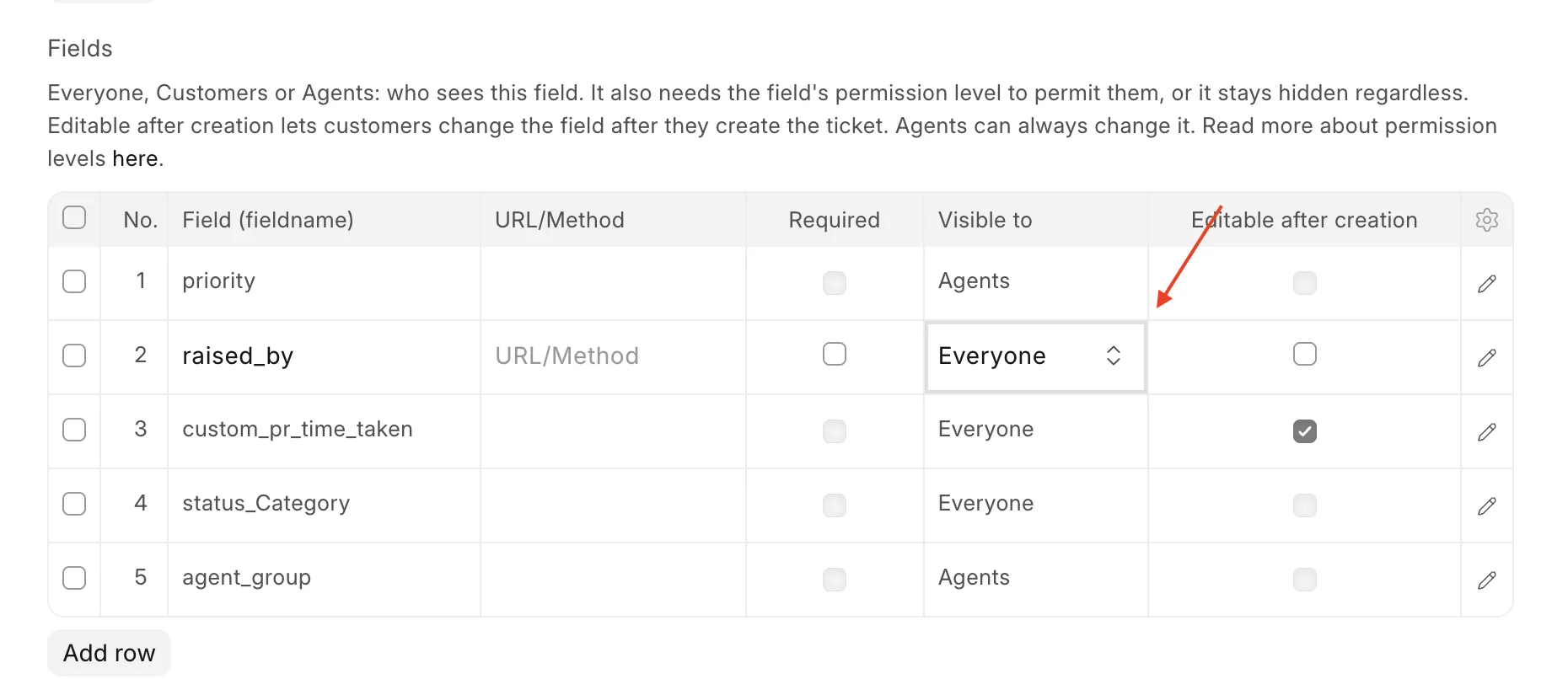
Every row on a ticket template has a Visible to setting. Open the template at HD Ticket Template > Default in the desk.
- Everyone shows the field to customers and agents. This is the default.
- Agents shows the field on the agent form and hides it from the portal ticket page and the new ticket form.
Visible to replaces the old Hide from customer checkbox. The update carries over your existing settings.
What to do when a field is hidden but the API still returns it?
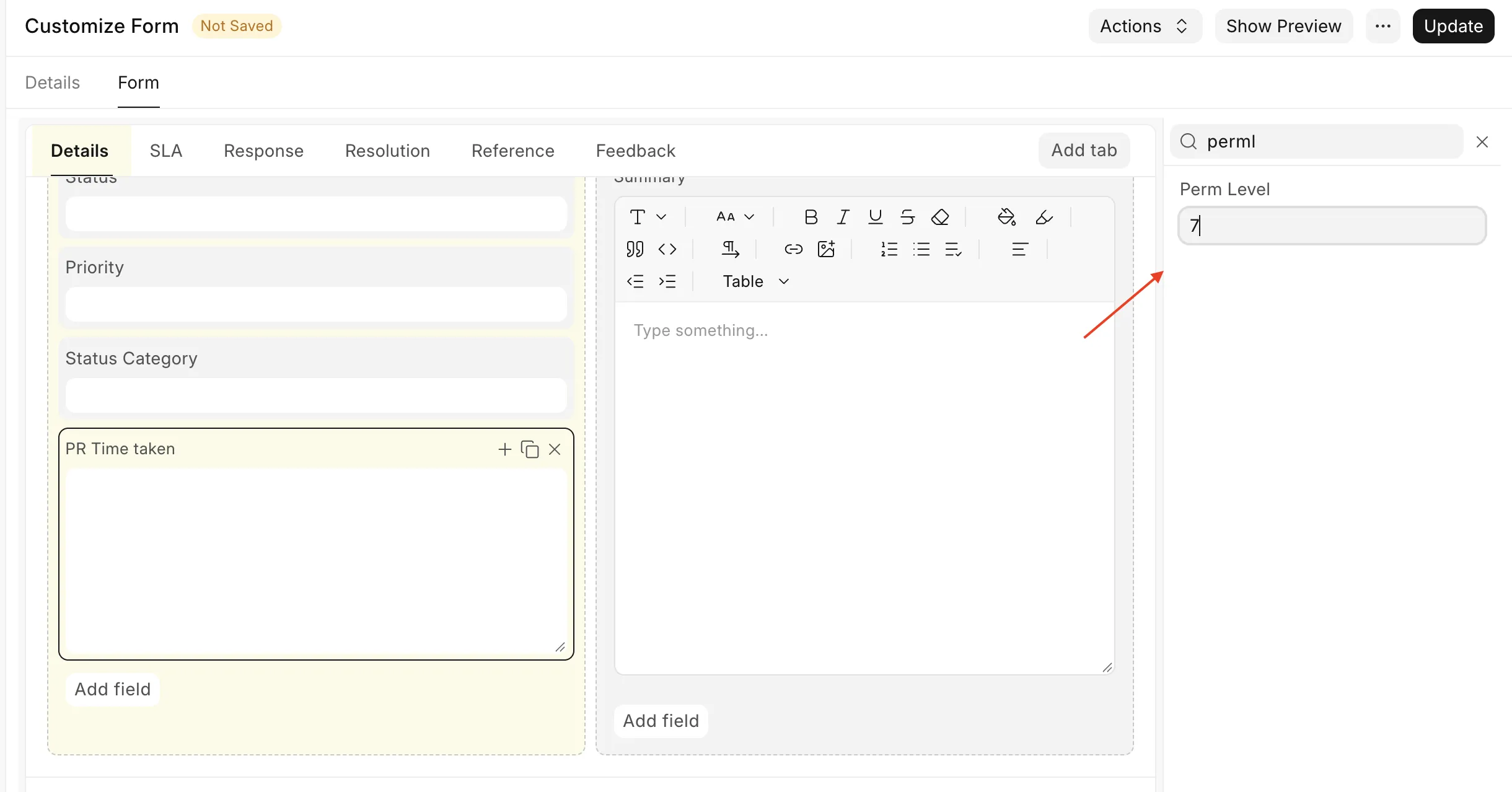
If you set a field to Agents while its permission level still lets customers read it, helpdesk shows a message when you save the template:
Ticket form successfully updated
Ticket Type is successfully hidden from customers in the ticket form. Raise its permission level in Customize Form to hide it from the API layer. Read more about permission levels here.
The field is now hidden on the portal, which is often all you need. If the field is sensitive, follow the link and raise its permission level to 8. The message stops after you do this.
Editable after creation
Every row on the Default ticket template also has an Editable after creation checkbox. When it is ticked, customers can change that field after they raise the ticket.
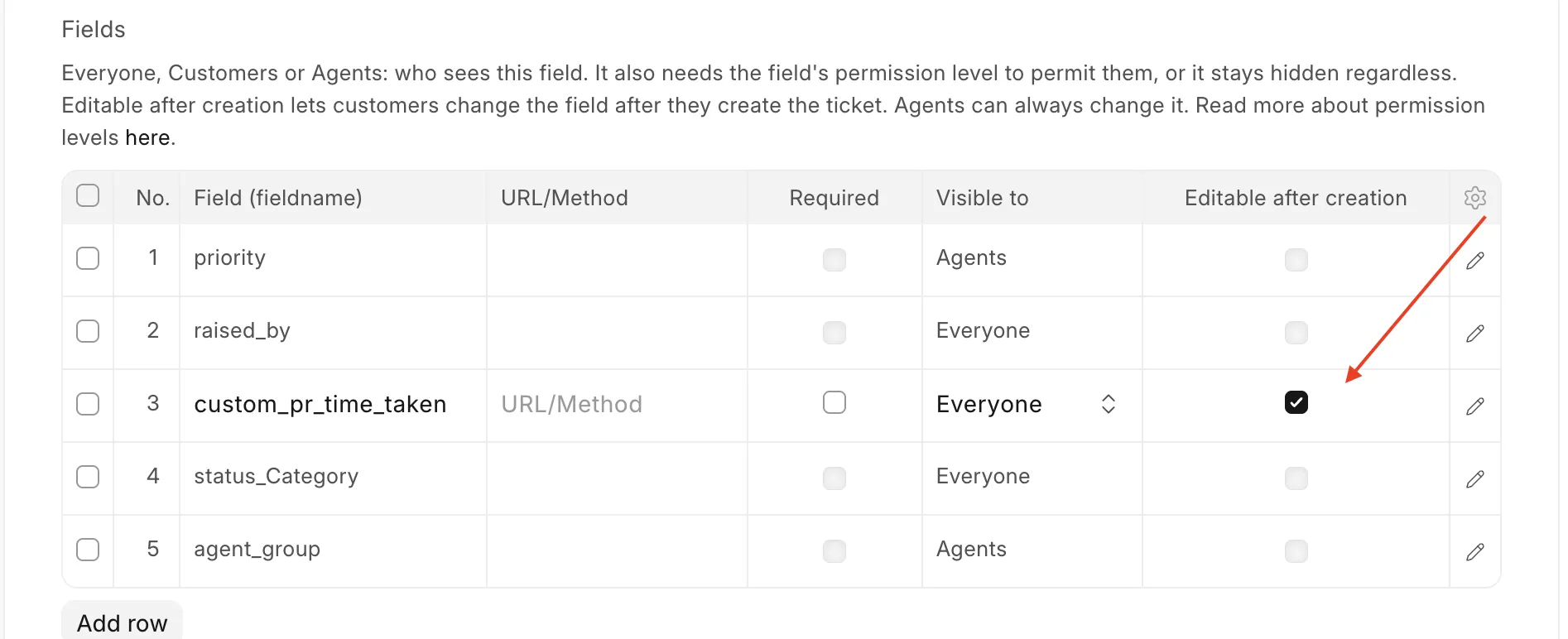
The change can come from the portal, a form script, or the API. Editable after creation only works on a field that the customer can already see:
- The row must have Visible to set to Everyone. The checkbox does not show on a row set to Agents.
- The field must be at a level that customers can read (0 or 7).
- Fields that the server sets, such as
slaorresponse_by, stay locked.
The checkbox is on by default, including on the rows that your template already has. To lock a field after the ticket is raised, untick it.
Form scripts
A form script runs in the browser as the user who has the page open, so it cannot do more than that user can do.
- Apply on new page decides whether the script runs on the new ticket form or on an existing ticket.
- Apply to customer portal decides whether a script for an existing ticket runs on the portal or on the agent page. On the new ticket form, it has no effect. Scripts with Apply on new page run there for customers and agents alike.
What a script can change depends on who has the page open:
- For an agent, a form script can change every field.
- For a customer on the new ticket form, a form script can fill only the fields that the Default template shows them. Helpdesk drops any other value when it creates the ticket.
- For a customer on an existing ticket, a form script can only close the ticket, leave feedback, or change a field with Editable after creation ticked. Any other change shows one of the errors above.
Breaking changes
These things change when you update.
- Customers can edit only the fields that you allow after creation: Before this release, a customer could change any field on their own ticket through the API. Now a customer can only reply, close, leave feedback, and change fields with Editable after creation ticked. Helpdesk refuses any other change with an error. Your template rows keep Editable after creation ticked after the update, so customers can still change those fields. To lock a field, untick it.
- Custom roles may not have the necessary read or write permissions. Please follow the steps below in the FAQ section for custom roles and add the necessary permissions for them according to the use case.
- Hide from customer is replaced by Visible to: The update carries existing values across, so hidden fields stay hidden. Anything that you built to read the old
hide_from_customerfield must now readvisible_to. - The description is set once: Agents can no longer change the description of an existing ticket.
- Customers cannot resolve a ticket: A customer can close their own ticket, but only an agent can mark it Resolved.
- Form scripts follow the customer's permissions: A portal form script can no longer change a ticket after creation, unless the field has Editable after creation ticked. On the new ticket form, a customer's script can fill only the fields that the Default template shows to customers.
FAQ
What do I do about my custom roles?
It depends on who uses the role, if it is assigned to a customer profile or agent profile.
A role for customers needs nothing. The update gives level 7 read access to every role that can already read tickets. Open Role Permission Manager, select HD Ticket, and filter by your role. You see a level 0 row and a level 7 row with Read ticked.
A role for agents needs level 8. The update never gives level 8 to a role that you created, because level 8 holds agent-only data. To add it:
- Go to Role Permission Manager and select HD Ticket.
- Click Add A New Rule.
- Select your role and set Permission Level to 8.
- Click Add. The new rule has Read ticked. Tick Write if the role must edit these fields.
- Do the same for level 7 if the role must edit priority, team, or ticket type.
A role that you create after the update gets nothing automatically. Add its level 7 row, and its level 8 row for an agent role, in the same way.
Users with your own agent role also need an HD Agent record. Helpdesk treats a user without an agent record or the Agent role as a customer, even if they are a System Manager.
What a customer can change?
A customer fills in the fields that your template shows them when they raise a ticket. After that, a customer can only:
- reply to the ticket,
- close it,
- leave feedback and a comment,
- change a field whose template row has Editable after creation ticked.
A customer can close a ticket but cannot mark it Resolved. Resolved is the agent's decision.
Helpdesk refuses every other change and shows an error. The field keeps its value. The error gives the reason:
| The customer tries to change | Error |
|---|---|
| A field that they could fill when they raised the ticket, such as the subject | You cannot change Subject after the ticket is raised |
| A field at a level that they cannot write, such as priority | You do not have permission to change Priority |
With Editable after creation unticked, a customer cannot set their own priority. A customer can never move a ticket to Replied, reassign a team, or change who raised the ticket.
This applies to every route into the ticket, not only the portal. Calling the API directly makes no difference.
What happens to my existing template fields?
Nothing is deleted, and no ticket values change.
- Rows with Hide from customer ticked become Visible to: Agents. All other rows become Visible to: Everyone.
- Rows for fields that customers must never see become Visible to: Agents, whatever they were before. These are agent-only fields, fields that the server sets, and secret fields.
- Every row gets Editable after creation ticked. Customers can change these fields after they raise a ticket until you untick the box.
Review the Default template after the update. Untick Editable after creation on every field that customers must not change later.
What happens to my existing tickets?
The values on your tickets do not change. Only who can read and change them changes. A customer who opens an old ticket sees only the fields at level 0 and 7, and fields that the template hides from them are not shown.
I use updateField in an HD Form Script. What changes?
It depends on where the script runs.
- On the agent pages (Apply to customer portal off), nothing changes. Agents can change every field.
- On the portal, on an existing ticket,
updateFieldsaves the change as the customer. Helpdesk refuses it unless the field has Editable after creation ticked. The customer sees an error toast, such as You do not have permission to change Priority, and the value stays the same. - On the new ticket form, a script can set only the fields that the Default template shows to customers. Helpdesk drops other values when it creates the ticket.
If your portal script updates a field after the ticket is raised, choose one:
- Tick Editable after creation on that field's row in the Default template, if customers may change it.
- Move the logic to an agent script. Untick Apply to customer portal, so that the script runs for agents.
- Show the field on the new ticket form, so that customers fill it when they raise the ticket.
Why do customers see priority, team, or SLA times as empty?
Their role cannot read level 7. This happens when the role was created after the update. Add a level 7 rule with Read for the role in Role Permission Manager. See What do I do about my custom roles?.
Why do some of my agents see fields as empty?
Their role cannot read level 8. Add a level 8 rule for the role. Also make sure that each of these users has an HD Agent record.
A custom field shows empty for customers and does not save. Why?
The field is at a permission level from 1 to 6. Customers cannot read these levels. In Customize Form, move the field to level 0 or 7 if customers must see it, or to 8 if it is for agents only.
I set a field to Agents, but the API still returns it. Why?
Visible to only hides a field on the helpdesk pages. To hide it from the API too, raise its permission level to 8 in Customize Form.
The template does not save and says that a field cannot be shown to customers. What do I do?
The field is agent-only, set by the server, or secret. Customers can never see it. Set its row to Visible to: Agents. If the field must be customer-facing, lower its permission level in Customize Form first.
Can a customer still close their ticket?
Yes. A customer can close their own ticket and leave feedback.
Can I use permission levels 1 to 6?
Yes. Helpdesk does not use them. Remember that a role can read a field only if it has a rule at that field's level.