


















Loyalty Program
A loyalty program gives points to customers when they buy from you. Customers can then use the points to pay for part of a later purchase.
Turn On Loyalty Programs
- Click Setup > Settings in the sidebar.
- In the General tab, turn on Enable Loyalty Program.
- Click Save, and then click Yes to reload Frappe Books.
Loyalty Program now shows in the Sales group of the sidebar. You cannot turn off loyalty programs after you save the setting. Only a Books Manager or a System Manager can make loyalty programs.
Create a Loyalty Program
- Click Sales > Loyalty Program in the sidebar.
- Click New.
- Enter a unique Name.
- Set From Date and To Date. Customers earn and redeem points only between these dates.
- In Collection Rules, add one row for each tier, such as
SilverandGold. - Enter the Conversion Factor and select the Expense Account.
- Optional: Enter an Expiry Duration and a Maximum Use.
- Click Save.
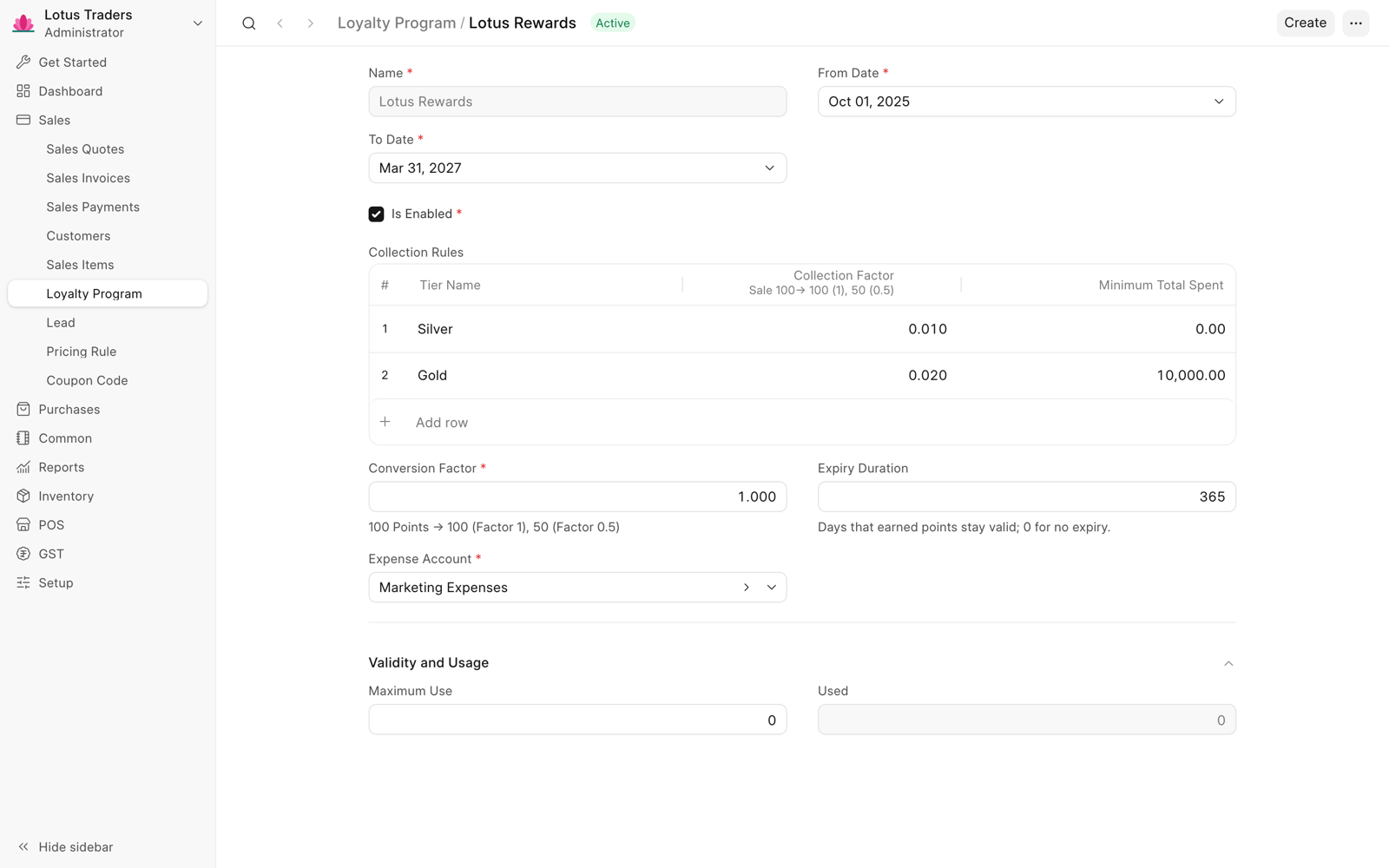
| Field | Description |
|---|---|
| Collection Factor | In a tier. The points for each unit of the invoice total. |
| Minimum Total Spent | In a tier. The smallest invoice total for this tier. Each tier must have a different minimum. |
| Conversion Factor | The value of one point. With factor 0.5, 100 points take 50 off the invoice. |
| Expiry Duration | The number of days that earned points stay available after the invoice date. 0 means that the points do not expire. |
| Expense Account | The account that records the value of the redeemed points. |
| Maximum Use | The number of invoices that can redeem points. 0 means no limit. |
To give a program to a customer, select it in the Loyalty Program field of the customer. Loyalty Points in the customer shows the points that the customer can use now.
Earn Points
When you submit a sales invoice, the customer earns points if the program is enabled and the invoice date is in its dates. An invoice that redeems points does not earn points.
Frappe Books uses the tier with the highest Minimum Total Spent that the grand total reaches. The points are the grand total multiplied by the Collection Factor of that tier, rounded to a whole number. For example, with a Silver tier (factor 0.01, minimum 0) and a Gold tier (factor 0.02, minimum 2,000), an invoice of 3,000 earns 3,000 × 0.02 = 60 points.
Redeem Points
- Make a sales invoice for the customer.
- In the Loyalty Points Redemption section, select Redeem Loyalty Points. This field shows only when the customer has points.
- In Loyalty Points, enter the number of points to use.
- Save and submit the invoice.
The grand total goes down by the points multiplied by the Conversion Factor. Frappe Books debits this value to the Expense Account of the program. The value of the points cannot be more than the invoice total.
Cancel or Return an Invoice
When you cancel an invoice, the customer gets back the points that it redeemed, and loses the points that it earned. If the customer already used the points that the invoice earned, you cannot cancel the invoice. A return takes back or gives back points in proportion to the returned amount.
Loyalty Point Entries
Each time a customer earns or redeems points, Frappe Books makes a read-only loyalty point entry. To see the entries of an invoice or a customer, click the … menu in its page header, and then click Linked entries. On a phone, tap the … button, and then tap Linked entries. To see all entries, search for Loyalty Point Entry in Quick Search.
Loyalty Points in POS
A POS sale earns points in the same way as a sales invoice. To redeem points:
- Select a customer that has a loyalty program, and add the items.
- Click Loyalty above the totals of the cart.
- In Loyalty Points, enter the points to use.
- Click Redeem.
On a phone, turn on Redeem loyalty points on the payment screen, enter the points, and tap Redeem. See Point of Sale (POS).