


















Master Data
Master data is the set of records that your transactions use, such as customers, items, and tax templates. A master does not make ledger entries. When you select a master in an invoice, Frappe Books copies its values to the invoice.
Masters in the Sidebar
| Master | Sidebar |
|---|---|
| Customers | Sales > Customers |
| Suppliers | Purchases > Suppliers |
| All customers and suppliers | Common > Party |
| Items that you sell | Sales > Sales Items |
| Items that you buy | Purchases > Purchase Items |
| Items that you buy and sell | Common > Items |
| Tax templates | Setup > Tax Templates |
| Accounts | Setup > Chart of Accounts (not on a phone) |
| Number series | Setup > Number Series |
The sidebar shows only the lists that you can read. See Roles and Permissions.
Masters of Optional Features
These masters show in the sidebar only after you turn on their switch in the settings:
| Master | Sidebar | Switch |
|---|---|---|
| Price lists | Common > Price List | Enable Price List |
| Loyalty programs | Sales > Loyalty Program | Enable Loyalty Program |
| Leads | Sales > Lead | Enable Lead |
| Pricing rules | Sales > Pricing Rule | Enable Pricing Rule |
| Coupon codes | Sales > Coupon Code | Enable Coupon Code |
Masters Without a Sidebar Entry
Some masters do not have a sidebar entry, such as addresses, item groups, and units. You make them from the field that links to them, such as the Address field of a party. To open their list, search for the name in Quick Search and open the List result.
Create a Master
Open the list in the sidebar, click New, fill in the fields, and click Save. The list fills some values for you. For example, a new entry in Customers gets the role Customer, and a new entry in Sales Items gets the purpose Sales.
Create a Master From a Field
You can make a master while you fill in a different form, such as a customer while you make a sales invoice.
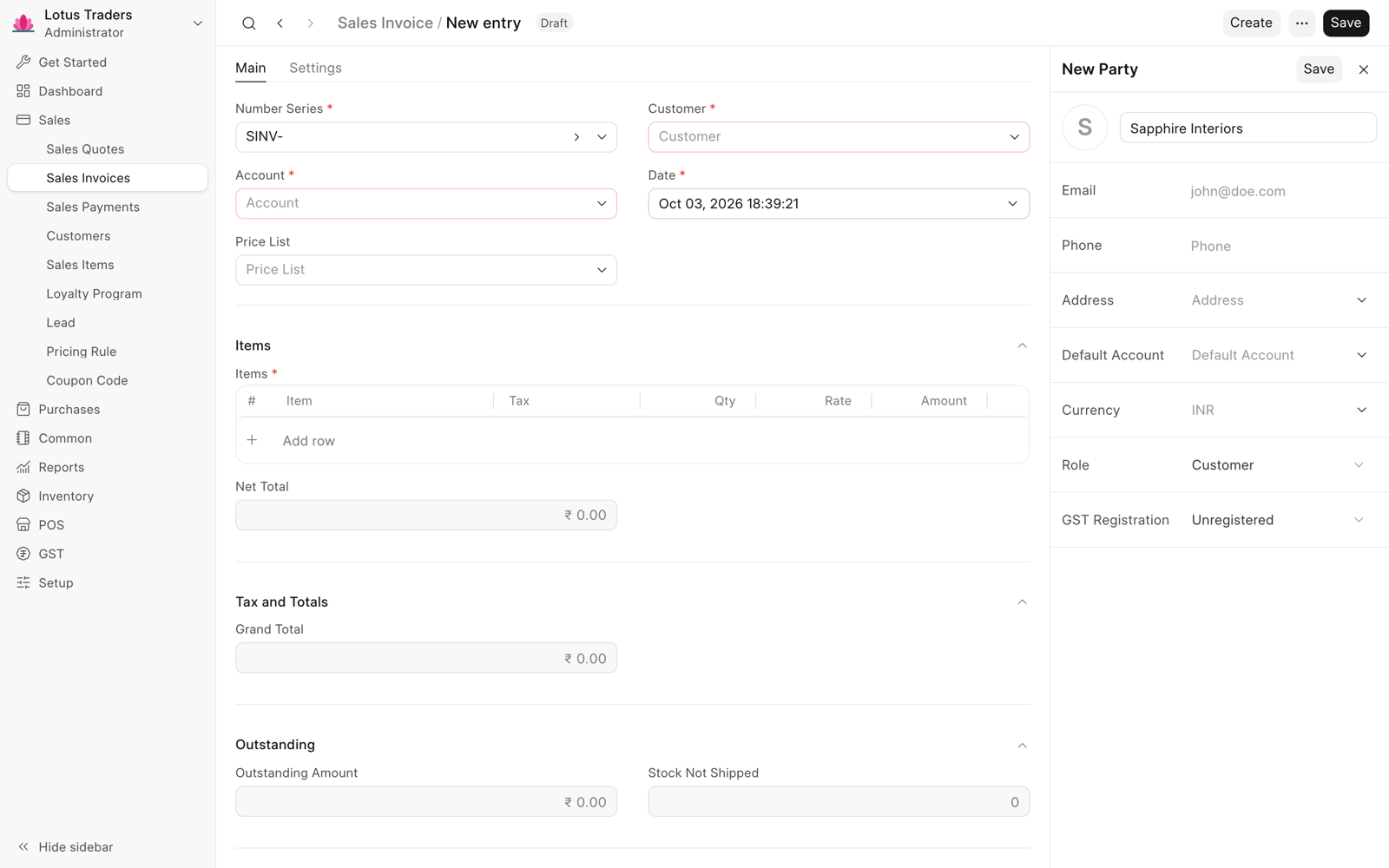
- Click the field, such as Customer.
- Type the name of the new entry.
- Click Create. The quick edit panel opens next to the form.
- Fill in the fields and click Save.
Frappe Books selects the new entry in the field. The panel shows only the main fields. On a phone, the new entry opens in a sheet. Create shows only when you can create that type of entry.
Duplicate or Delete a Master
To copy an entry, click Create > Duplicate in the page header. The name of the copy ends with CPY. To delete an entry, click … > Delete. On a phone, both actions are in the … menu in the header.
You cannot delete a master that a document uses. Frappe Books shows an error with the name of the document. Only a Books Manager or a System Manager can change tax templates, accounts, and price lists.
Import Masters
To add many masters at one time, use the Import Wizard. It can import parties, items, tax templates, accounts, addresses, and number series.