


















Trial Balance
A Trial Balance lists the balances of all your accounts for a period. It shows both ledger accounts and group accounts.
A company makes a trial balance at the end of each reporting period. It helps to make sure that the entries in your books are mathematically correct. The total of the debits must be equal to the total of the credits.
Click Reports > Trial Balance in the sidebar. On a phone, tap Reports in the bottom tabs, tap the report title, and then tap Trial Balance. For the controls that all reports share, such as export and print, see Reports.
Filters
| Filter | Description |
|---|---|
| From Date and To Date | The period of the report. Both dates are necessary. The default period is the current fiscal year. |
| Hide Group Amounts | Shows only the amounts of the ledger accounts. The group accounts stay in the report without amounts. The Total row keeps its amounts. |
Columns
| Column | Description |
|---|---|
| Opening (Dr) and Opening (Cr) | The balance of the account before From Date. |
| Debit and Credit | The totals of the debits and the credits from From Date to To Date. |
| Closing (Dr) and Closing (Cr) | The balance of the account at the end of To Date. |
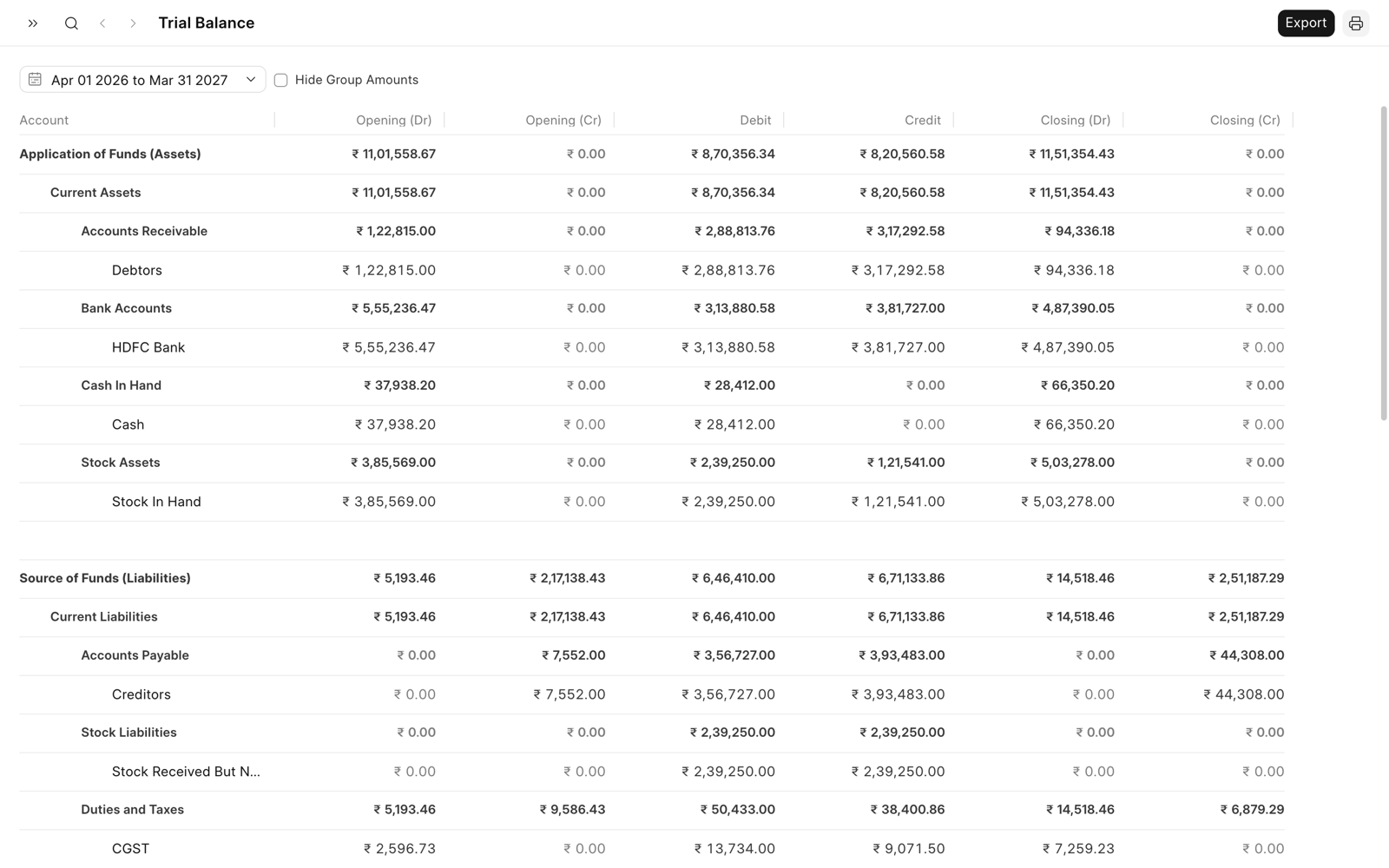
A ledger account shows each balance on one side only. If its debits are more than its credits, the balance is in the (Dr) column. If not, the balance is in the (Cr) column. A group account shows the totals of the accounts below it. So it can have amounts in both columns.
Read the Report
The report shows the accounts in five sections: assets, liabilities, income, expenses, and equity. It shows only the accounts that have ledger entries on or before To Date, and the group accounts above them. The entries of cancelled documents are not included.
The Total row at the end shows the total of each column. In each pair of columns, the total of the debit column is equal to the total of the credit column.
To hide the accounts below a group account, click the row of the group. Click it again to show them. On a phone, tap the group.
On a Phone
The report shows the Account, Closing (Dr), and Closing (Cr) columns. To see all the columns of a ledger account, tap its row.
The buttons below the header show From Date and To Date. To change the filters, see Change the Filters.