


















Employee CTC Break-Up
The Employee CTC Break-up report presents an employee's Cost to Company broken down by salary component. For each component it shows the per-cycle amount, the annual amount, and the share of CTC that the component represents.
The report is generated for a single Salary Structure Assignment, so it always reflects the structure and CTC assigned to that employee.
To access the Employee CTC Break-up report, go to:
Home > Payroll > Employee CTC Break-up
1. Prerequisites
Before viewing the report, the following must exist:
- Employee
- Salary Structure
- Salary Structure Assignment with a CTC set
2. How to view the report
There are two ways to open the report:
- From a Salary Structure Assignment, click Actions > See CTC Break-up. The Employee and Salary Structure Assignment are selected automatically.
- Go to Employee CTC Break-up and select the Company, Employee, and Salary Structure Assignment.
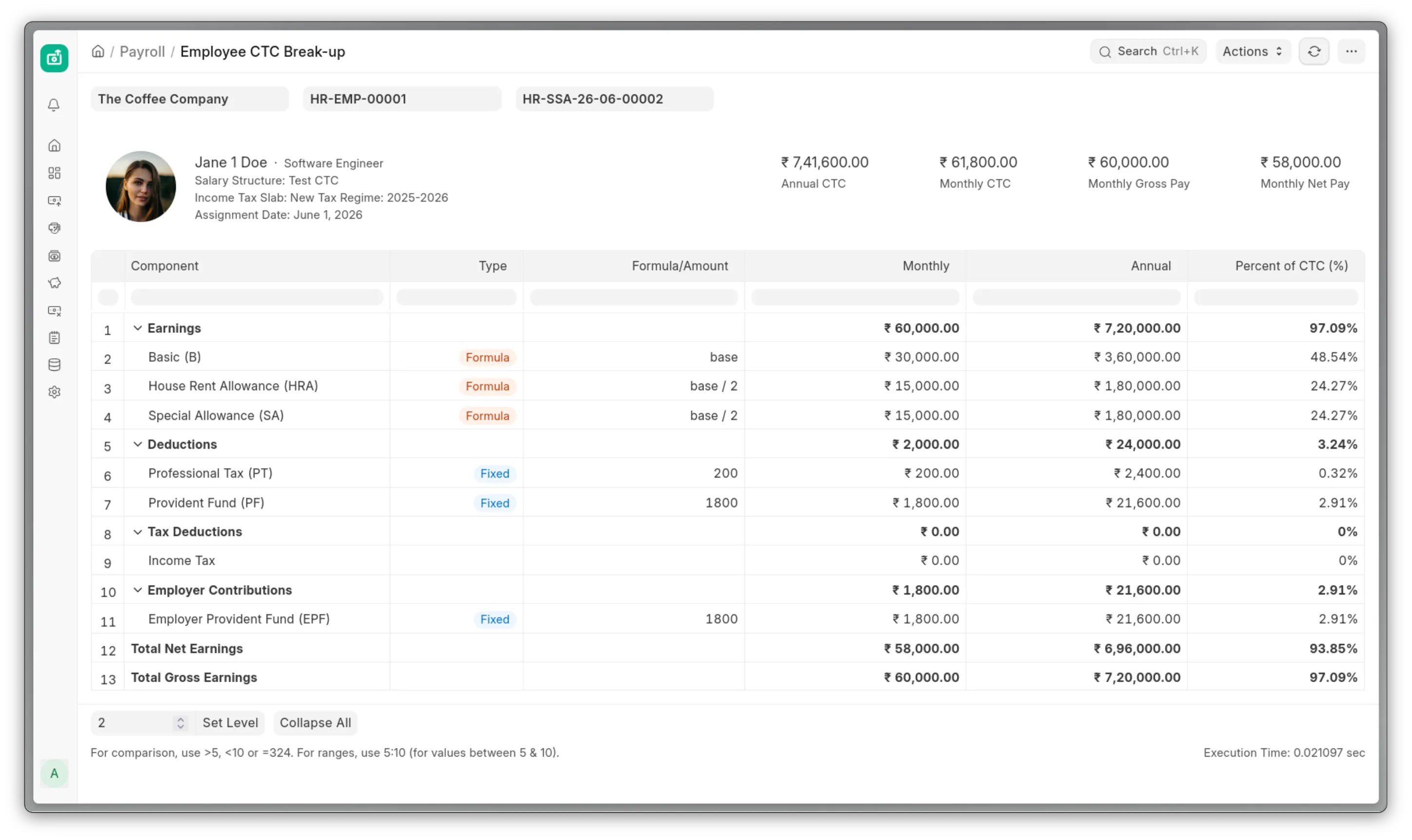
3. Report columns
| Column | Description |
|---|---|
| Component | The salary component, shown with its abbreviation. |
| Type | Fixed for a flat amount, or Formula for a derived one. |
| Formula/Amount | The formula text, or the fixed amount. |
| Monthly / Fortnightly / ... | The per-cycle amount. The column title follows the payroll frequency. |
| Annual | The per-cycle amount multiplied by the number of cycles per year. |
| Percent of CTC (%) | The component's share of total CTC. |
4. Sections
The components are grouped into sections. Each section opens with a bold totals row that sums the components below it. The sections appear in this order:
- Earnings
- Deductions
- Tax Deductions
- Employer Contributions
- Total Net Earnings
- Total Gross Earnings
Employer contributions appear after the Tax Deductions section and before the net and gross totals. A section with no components still shows its totals row at zero, so the layout is consistent across employees.
5. Understanding the totals
- Gross is the sum of payable earnings.
- Net is gross minus deductions and tax.
- CTC is gross plus employer contributions and any non-payout earnings, annualised.
Because employer contributions are part of CTC but not of net pay, two assignments with the same CTC can result in different take-home pay, depending on how much of the CTC is made up of employer contributions. The report makes this split visible.
For how employer-contribution components are configured, see Salary Component.