


















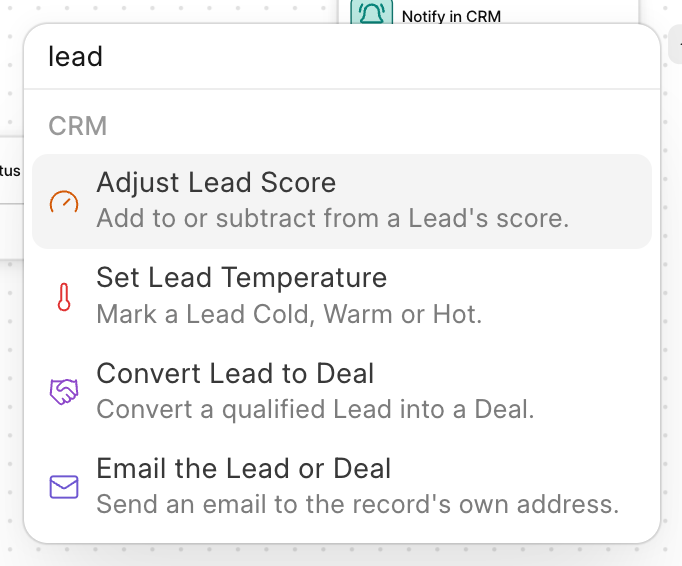
Actions are the steps that do the work: send an email, change a field, assign someone, convert a lead, and so on. Click + on the canvas to add one. Actions are grouped by the app that provides them: CRM actions and Core actions.
Only actions that make sense for the automation's document type are offered. For example, Adjust Lead Score is only offered on CRM Lead. Type in Search blocks to find one quickly.
Most text settings accept templates such as {{ doc.lead_name }}. See Getting started.
CRM actions
| Action | Works on | What it does |
|---|---|---|
| Email the Lead or Deal | Lead, Deal | Sends an email to the record's own email address. |
| Notify in CRM | Lead, Deal | Sends a notification to the CRM notification bell. |
| Adjust Lead Score | Lead | Adds to or subtracts from a lead's score. |
| Set Lead Temperature | Lead | Marks a lead Cold, Warm or Hot. |
| Convert Lead to Deal | Lead | Converts a lead into a deal. |
Email the Lead or Deal
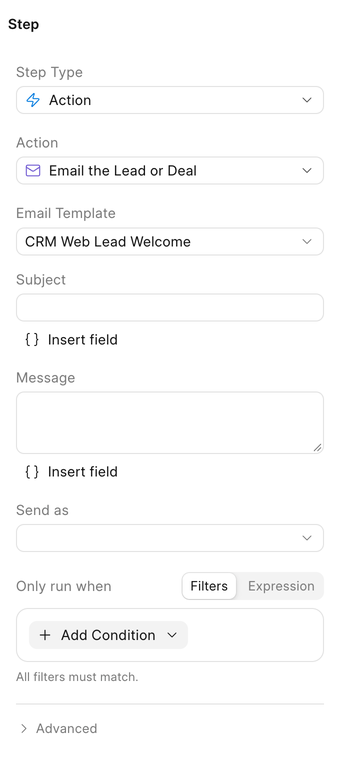
Sends an email to the address on the lead or deal. The email is logged in the record's activity, the same as one you send by hand.
| Setting | What it means |
|---|---|
| Email Template | An Email Template to use for the subject and body. Templates read fields the usual way, for example {{ doc.first_name }}. |
| Subject | Used when no template is picked. |
| Message | Used when no template is picked. |
| Send as | The user to send from. Leave empty to send from the default outgoing email account. |
You must pick a template or write a subject. The step fails if the record has no email address.
Notify in CRM
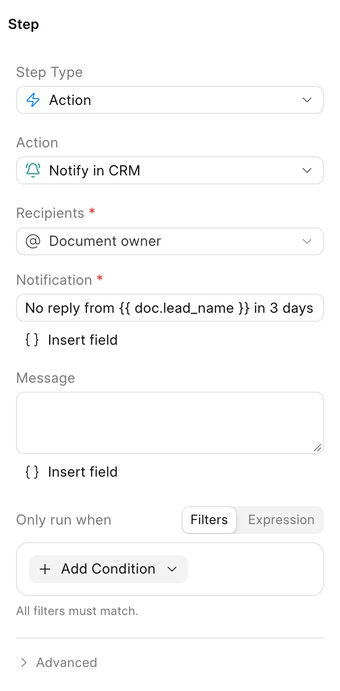
Adds a notification to the CRM notification bell for the users you pick. Clicking it opens the lead or deal.
| Setting | What it means |
|---|---|
| Recipients | Users to notify. Also offers Document owner and Assignees, which are worked out from the record when the step runs. |
| Notification | The line shown in the notification list. |
| Message | Optional longer text. |
The user the automation runs as is notified too, if they are among the recipients.
Adjust Lead Score
Adds a number to the lead's score, or subtracts it if the number is negative.
| Setting | What it means |
|---|---|
| Amount | The points to add, such as 10, or to subtract, such as -5. |
| Reason | Optional. Recorded with the change. |
| Minimum Score / Maximum Score | Optional limits. The score never goes below or above them. |
Set Lead Temperature
Sets the lead's Temperature to Cold, Warm or Hot.
Convert Lead to Deal
Converts the lead into a deal, creating the contact and organization as needed, the same as clicking Convert to Deal on a lead.
| Setting | What it means |
|---|---|
| If Already Converted | Return Existing (default) reuses the lead's existing deal. Fail stops the step. |
| Existing Contact | Optional. Link the deal to this contact instead of creating one. |
| Existing Organization | Optional. Link the deal to this organization instead of creating one. |
| Deal Field Overrides | Optional. Values to set on the new deal, as JSON. For example {"deal_owner": "{{ doc.lead_owner }}", "probability": 20}. |
Give the step a result name under Advanced, such as deal, to let later steps act on the new deal. For example, add Assign to User after it and set its Record to deal.
Core actions
These come with the Frappe framework and work on any document type.
| Action | What it does |
|---|---|
| Set Field Value | Sets one or more fields on the record. |
| Increment Field Value | Adds a number to a numeric field. |
| Create Document | Creates a new record of any type. |
| Assign to User | Assigns the record to one or more users. |
| Send Notification | Sends an email or a desk notification. |
| Call Webhook | Sends an HTTP request to another system. |
| Run Script | Runs an API Server Script. |
Set Field Value
Pick a Field and a Value, or set several fields at once with Field Values as JSON, for example {"status": "Contacted", "priority": "High"}. The record is saved afterwards, so its normal validations apply.
Increment Field Value
Pick a numeric Field and an Amount. Use a negative amount to subtract. Safe when several runs update the same record at once.
Create Document
Pick the Document Type and set its Field Values as JSON. For example, create a follow-up task when a deal is won:
{
  "title": "Kick-off call with {{ doc.organization }}",
  "reference_doctype": "CRM Deal",
  "reference_docname": "{{ doc.name }}",
  "assigned_to": "{{ doc.deal_owner }}"
}
Name the result under Advanced to let later steps act on the new record.
Assign to User
Pick the users in Assign To and optionally write a Description for the assignment.
Send Notification
| Setting | What it means |
|---|---|
| Channel | Email sends an email. System adds a notification in the desk. |
| Recipients | Users, Document owner or Assignees. |
| Email Template | Optional, email only. |
| Subject / Message | Used when no template is picked. |
To notify people inside the CRM, use Notify in CRM instead.
Call Webhook
Sends a request to another system, for example to push a won deal to your billing tool.
| Setting | What it means |
|---|---|
| URL | Where to send the request. Can include templates. |
| Method | GET, POST (default), PUT, PATCH or DELETE. |
| Headers | Optional JSON, such as an authorization header. |
| Payload | Optional JSON body. Can include templates. |
| Timeout (seconds) | Up to 120. Defaults to 30. |
A response with status 400 or above fails the step. A test run does not send the request; it reports what it would have sent.
A webhook cannot be undone. If a later step fails, the request has already been sent.
Run Script
Runs a Server Script of type API for anything the built-in actions cannot do. Write and review the script in the desk first, then pick it here. Server scripts must be enabled on the site.
Results of earlier steps
Some actions produce values that later steps can read under context["steps"], using the step's name:
| Action | Produces |
|---|---|
| Adjust Lead Score | old_value, new_value, delta |
| Set Lead Temperature | old_value, new_value |
| Increment Field Value | old_value, new_value, delta |
| Convert Lead to Deal | The new deal, contact, organization |
| Create Document | The new record |
| Email the Lead or Deal | communication |
| Call Webhook | status_code, response |
For example, if an Adjust Lead Score step is named score_reply, a later Notify in CRM step can say:
{{ doc.lead_name }} is now at {{ context.steps.score_reply.new_value }} points