


















The event, or trigger, decides when an automation starts. Each automation has exactly one trigger. To choose it, click the trigger at the top of the canvas.
Triggers are grouped into three sets: Records, Activity and Others.
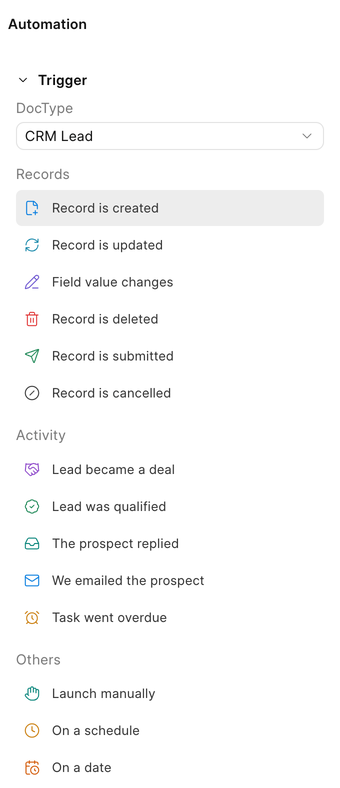
Records
These start a run when something happens to a record of the automation's document type.
| Trigger | Starts a run when |
|---|---|
| Record is created | A new record is saved for the first time. |
| Record is updated | An existing record is saved. |
| Field value changes | One field you pick moves to a new value. |
| Record is deleted | A record is deleted. |
| Record is submitted | A submittable record is submitted. |
| Record is cancelled | A submitted record is cancelled. |
Field value changes
Pick the Trigger Field to watch. You can also narrow it down:
- From Value: only run when the field changes from this value. Leave empty for any value.
- To Value: only run when the field changes to this value. Leave empty for any value.
For example, watch Status on CRM Deal with To Value set to Negotiation to act whenever a deal enters negotiation.
Record is updated runs on every save. If you only care about one field, use Field value changes instead so the automation does not run more often than it needs to.
Activity
Activity triggers are CRM events that describe something meaningful happening to a lead or deal. They are offered only on the document types they apply to.
| Trigger | Available on | Starts a run when |
|---|---|---|
| We emailed the prospect | Lead, Deal | An email or WhatsApp message is sent to the lead or deal. |
| The prospect replied | Lead, Deal | An email or WhatsApp message is received from the lead or deal. |
| Lead was qualified | Lead | A lead's status changes to Qualified. |
| Lead became a deal | Lead | A lead is converted into a deal. |
| Deal changed stage | Deal | A deal's status changes. |
| Deal was won | Deal | A deal moves to a status of type Won. |
| Deal was lost | Deal | A deal moves to a status of type Lost. |
| Task went overdue | Lead, Deal | A task linked to the lead or deal passes its due date without being marked Done or Canceled. |
Overdue tasks are checked once an hour, so a Task went overdue run can start up to an hour after the due time.
Values an activity event carries
Each activity event carries a few values, called its payload, that you can use in step text as {{ payload.<key> }}.
| Event | Payload keys |
|---|---|
| We emailed the prospect / The prospect replied | reference_doctype, reference_name, communication, channel (Email or WhatsApp), thread |
| Lead was qualified | lead, status |
| Lead became a deal | lead, deal, contact, organization |
| Deal changed stage | deal, status, previous_status |
| Deal was won | deal, status |
| Deal was lost | deal, status, lost_reason |
| Task went overdue | task, reference_doctype, reference_name, due_date |
For example, a Deal changed stage automation can notify the team with:
{{ doc.name }} moved from {{ payload.previous_status }} to {{ payload.status }}
Others
| Trigger | Starts a run |
|---|---|
| Launch manually | Only when started on demand for a record. |
| On a schedule | On a repeating schedule you define with a cron expression. |
| On a date | A number of days before or after a date stored on the record. |
| Custom event | When an app raises a named event you pick. |
On a schedule
Enter a standard 5-field Cron Expression:
| Cron | Runs |
|---|---|
0 9 * * 1 |
Every Monday at 09:00 |
0 18 * * * |
Every day at 18:00 |
0 8 1 * * |
On the 1st of every month at 08:00 |
On a date
Pick the Date Field on the record, the Date Offset in days, and the Date Direction (Before or After). For example, Expected closure date, 3 days, Before runs three days before a deal is expected to close.
Custom event
A developer can raise their own events from a custom app with frappe.automation_engine.emit(). Pick the event by name and the automation starts whenever it is raised. Events must be registered by an app through the automation_events hook.
Waiting for an event in the middle of a run
Activity events can also be used inside a flow, not only to start it. The Wait for event block pauses a run until an event such as The prospect replied happens for the same lead, deal or email thread. See Blocks.