


















Multi-Company Settings
Payroll Settings is a single, site-wide document, so by default, one India Payroll configuration applies to every company on the site. That works for a single legal entity, but a group running two or more entities has only one place to record an ESIC employer code or an EPF establishment code, and each registered entity has its own.
Multi-company payroll lifts that limit. It adds a table where you record statutory registration details per company, and it scopes statutory deductions to the companies you list.
It is off by default. Existing sites are unaffected until you turn it on.
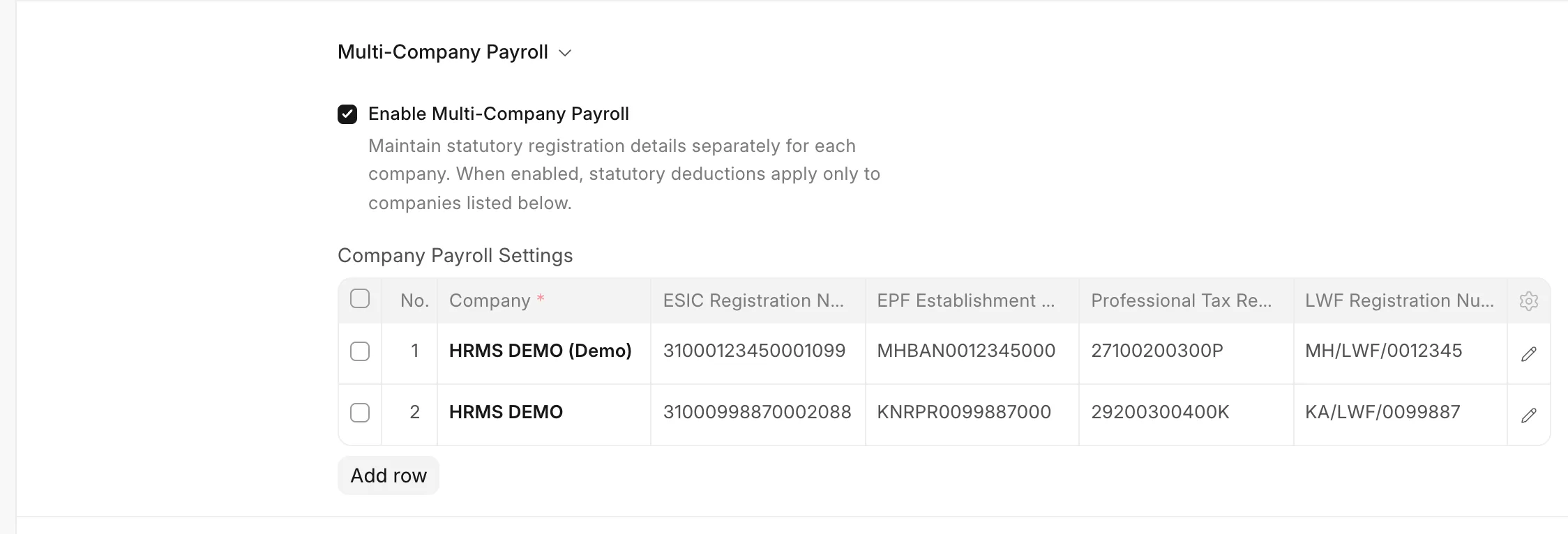 Multi-Company Settinga
When you need it
Turn it on when either is true:
- You run payroll for more than one company on this site, and they have different statutory registration numbers.
- Some companies on this site are registered under a scheme (EPF, ESIC, LWF, Professional Tax), and others are not. For example, a newly incorporated entity still below the headcount threshold.
You do not need it when every company on the site shares one registration, or when only one company runs payroll.
Enabling it
- Go to Payroll Settings > India Payroll.
- Under Multi-Company Payroll, tick Enable Multi-Company Payroll.
- In the Company Payroll Settings table that appears, add a row for each company that participates in statutory payroll.
- Save.
Each row holds:
| Field | Description |
|---|---|
| Company | The company this row configures. Required, and each company may appear only once. |
| ESIC Registration Number | 17-digit ESIC employer code for this company. |
| EPF Establishment Code | EPFO Establishment Code used in this company's ECR file header. |
| Professional Tax Registration Number | State Professional Tax enrolment / registration number. |
| LWF Registration Number | State Labour Welfare Fund establishment registration number. |
Only Company is mandatory. Leave a registration number blank if the company is not registered under that scheme, or if you have not received the number yet.
While multi-company payroll is on, the site-wide ESIC Registration Number and EPF Establishment Code fields are hidden, so there is never any question about which value applies to a given company.
How it changes payroll
The per-scheme checkboxes (Enable Professional Tax Deduction, Enable ESIC Deduction, Enable LWF Deduction, Enable EPF Deduction) remain the master switches. Multi-company payroll narrows their reach; it does not override them.
A statutory deduction is applied to a salary slip only when both are true:
- The scheme is enabled in Payroll Settings, and
- The slip's company appears in the Company Payroll Settings table.
A company with no row is treated as not configured and gets no statutory deduction:
| Multi-company | Scheme enabled | Company listed | Deduction applied |
|---|---|---|---|
| Off | No | n/a | No |
| Off | Yes | n/a | Yes |
| On | No | Any | No |
| On | Yes | Yes | Yes |
| On | Yes | No | No |
This applies to all four schemes and takes effect the next time a salary slip is created or saved. Salary slips already submitted are not altered. See Removing a company below.
One related behaviour: the Salary Structure Assignment warning about a missing Employment State is also scoped this way. Assignments for a company outside Professional Tax scope will not raise it.
How it changes reports
The statutory registers (Employee Provident Fund Register, ESIC Register and LWF Register) follow the same scope, with one deliberate exception that protects filed records.
A salary slip appears in a register when either:
- its company is currently in scope for that scheme, or
- the slip actually recorded that deduction.
The second rule matters. A register is a record of liabilities that were incurred, not a projection of current configuration. If a company deducted ESI in June and you remove it from the table in September, the June contributions were still deducted from employees and remitted to ESIC, so they must remain reportable, and the June ECR file must still regenerate identically. The registers therefore never erase history when scope changes.
The practical effect of the two rules together:
- Slips from before a company was removed keep their deductions and stay reported.
- Slips created after removal carry no statutory deductions, so they drop out.
The Bank Mandate Report is not scoped, by design: it lists salary payment instructions, not statutory liabilities.
ECR export
An ECR file is filed against a single EPF establishment code. Once codes are recorded per company, a file spanning several companies cannot be filed.
So while multi-company payroll is on, Generate ECR File requires a Company filter, and will show "Select a Company before generating the ECR file" if one is not set. In single-company mode, the filter stays optional, as before.
Validation
Saving Payroll Settings enforces three rules:
- A company may appear only once. A duplicate is rejected, naming both row numbers.
- Registration numbers are trimmed of leading and trailing whitespace.
- The table cannot be empty while multi-company payroll is on. Without this, ticking the box would silently switch off every statutory deduction across the site.
Removing a company
Removing a company's row stops it accruing new statutory deductions from the next salary slip onward. Its history is preserved: past slips keep the deductions they recorded, and those amounts continue to appear in the registers and the ECR export.
To also strip deductions from slips that are already draft, re-save them after removing the row. Submitted slips are unchanged. Amending a submitted slip to remove a statutory deduction is a payroll correction and should be done deliberately, not as a side effect of a settings change.
Turning it off
Unticking Enable Multi-Company Payroll returns the site to a single shared configuration:
- The site-wide ESIC and EPF registration fields reappear, holding whatever they held before.
- Every company is back in scope for whichever schemes are enabled.
- The Company Payroll Settings rows are retained, so re-enabling restores your per-company details.
Check the site-wide registration numbers after switching back, since they are not populated from the table.
Developer reference
india_payroll/india_payroll/company_settings.py is the single place that resolves statutory configuration. Use it rather than reading Payroll Settings fields directly, so behaviour stays consistent across schemes.
from india_payroll.india_payroll.company_settings import (
    is_statutory_enabled,
    get_applicable_companies,
    get_registration_number,
)
is_statutory_enabled(statute, company) → bool
Whether a scheme applies to a company right now. This is the salary-slip gate. statute is one of "professional_tax", "esic", "lwf", "epf".
get_applicable_companies(statute) → list[str] | None
The company scope for a register. Three-valued, and the distinction matters:
| Return | Meaning |
|---|---|
None |
No restriction. Multi-company payroll is off, so reports behave exactly as they did before the feature existed. |
[] |
Multi-company payroll is on but the scheme is globally disabled, so no company is currently in scope. |
[names] |
Only these companies are currently in scope. |
None is not the same as an empty list, and a caller that treats them alike will silently change single-company behaviour.
Because this returns current scope, never apply it as a bare filter to historical records. Combine it with evidence from the slip, as the registers do:
applicable = get_applicable_companies("esic")
if applicable is not None:
    with_esi = get_slips_with_deduction([r.slip for r in rows], [ESI_EMPLOYEE_COMPONENT])
    rows = [r for r in rows if r.company in applicable or r.slip in with_esi]
get_slips_with_deduction lives in india_payroll/india_payroll/utils.py. It returns the subset of slips carrying a given deduction with a positive amount. Statutory deduction rows are only ever written when the amount is above zero, so a row's presence is the slip's own record that the liability was incurred, independent of how Payroll Settings is configured today.
get_registration_number(statute, company) → str | None
The registration identifier for a scheme. Reads the company's row when multi-company payroll is on, and falls back to the site-wide field otherwise.
Current limitations
- Registration numbers are stored but not yet consumed. No report or export currently prints them: the ECR file format carries no header, and the ESIC Register has no registration column. The fields are in place so entities can be recorded correctly now, and so the values are available when those outputs are added.
- No site-wide fallback for Professional Tax and LWF. Those two registration numbers exist only on the per-company table. In single-company mode
get_registration_numberreturnsNonefor them. - Registers ignore the master switches in single-company mode. With multi-company payroll off, the registers report computed liabilities regardless of whether the scheme's checkbox is ticked. This predates multi-company payroll and is unchanged by it.
- TDS is configured separately. Deductor details for Form 24Q (TAN, deductor type, responsible person) live on the Company record itself and were already per-company. They are not affected by this setting.