


















Income Tax Deductions
The Income Tax Deductions report lists the income tax deducted from each employee's salary slip in a month, along with the gross pay of that slip.
It is useful for reconciling monthly TDS on salary and for preparing tax deposit challans.
To access the Income Tax Deductions report, go to:
Home > Tax & Benefits > Reports > Income Tax Deductions
The report is also listed under Home > Payroll > Reports.
1. Prerequisites
Before viewing the report, the following must exist:
- A Salary Component of type Deduction with Is Income Tax Component checked
- Submitted Salary Slips that include that component in their deductions
If no salary component is marked as an income tax component, the report is empty.
2. How to view the report
- Go to Income Tax Deductions.
- Select the Company, Month and Year.
- Optionally select a Department or Branch.
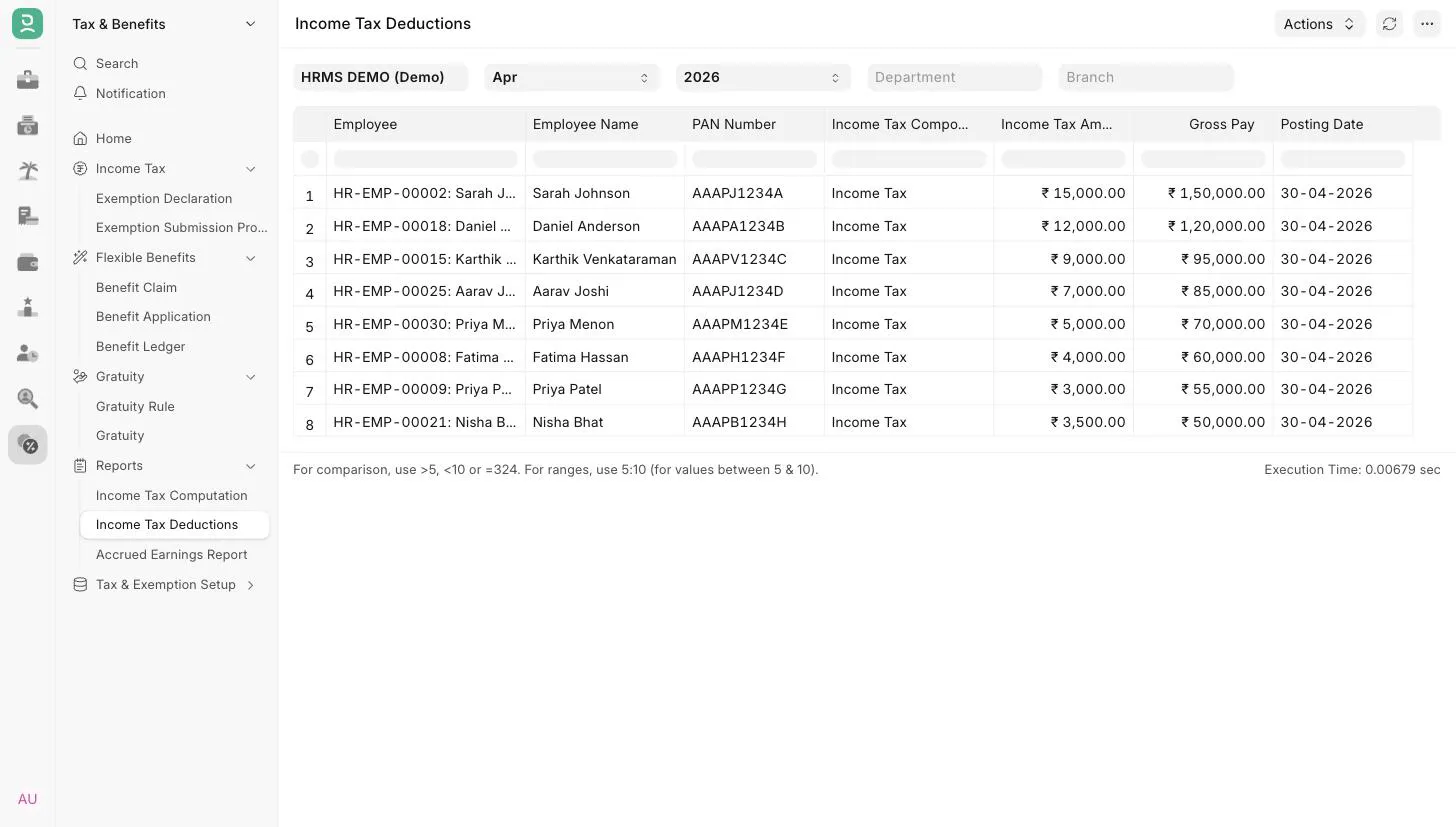 Income Tax Deduction Report
3. Filters
| Filter | Description |
|---|---|
| Company | Mandatory. Defaults to the user's default company. |
| Month | Mandatory. Defaults to the current month. Matched against the salary slip Start Date. |
| Year | Mandatory. The list shows only years that have salary slips, latest first. Matched against the salary slip Start Date. |
| Department | Show slips of one department. |
| Branch | Show slips of one branch. |
4. Report columns
| Column | Description |
|---|---|
| Employee | The employee on the salary slip. |
| Employee Name | Name of the employee. |
| PAN Number | The employee's PAN. Shown only when the selected company's country is India. |
| Income Tax Component | The income tax salary component deducted. |
| Income Tax Amount | Amount of that component on the salary slip. |
| Gross Pay | Gross pay of the salary slip. |
| Posting Date | Posting date of the salary slip. |
Each row is one income tax deduction line on a submitted salary slip. If a slip has more than one income tax component, it appears once per component.
5. Related
Last updated 3 weeks ago
Was this helpful?