


















Salary Payments via ECS
The Salary Payments via ECS report lists each employee's gross and net pay for a month along with their bank details. It can be used to prepare the payment file for salaries paid through ECS (Electronic Clearing Service) or bank transfer.
The report is not linked from a workspace. To access it, search for Salary Payments via ECS in the awesome bar, or open:
/app/query-report/Salary Payments via ECS
1. Prerequisites
Before viewing the report, the following must exist:
- Submitted Salary Slips for the month
- On the Employee, Salary Mode set, and for employees paid through the bank, the Bank Name and Bank A/C No. (and IFSC Code and MICR Code for Indian companies)
2. How to view the report
- Go to Salary Payments via ECS.
- Select the Company, Month and Year.
- Optionally select a Department or Branch.
- Set Type to Bank to list only employees paid through the bank.
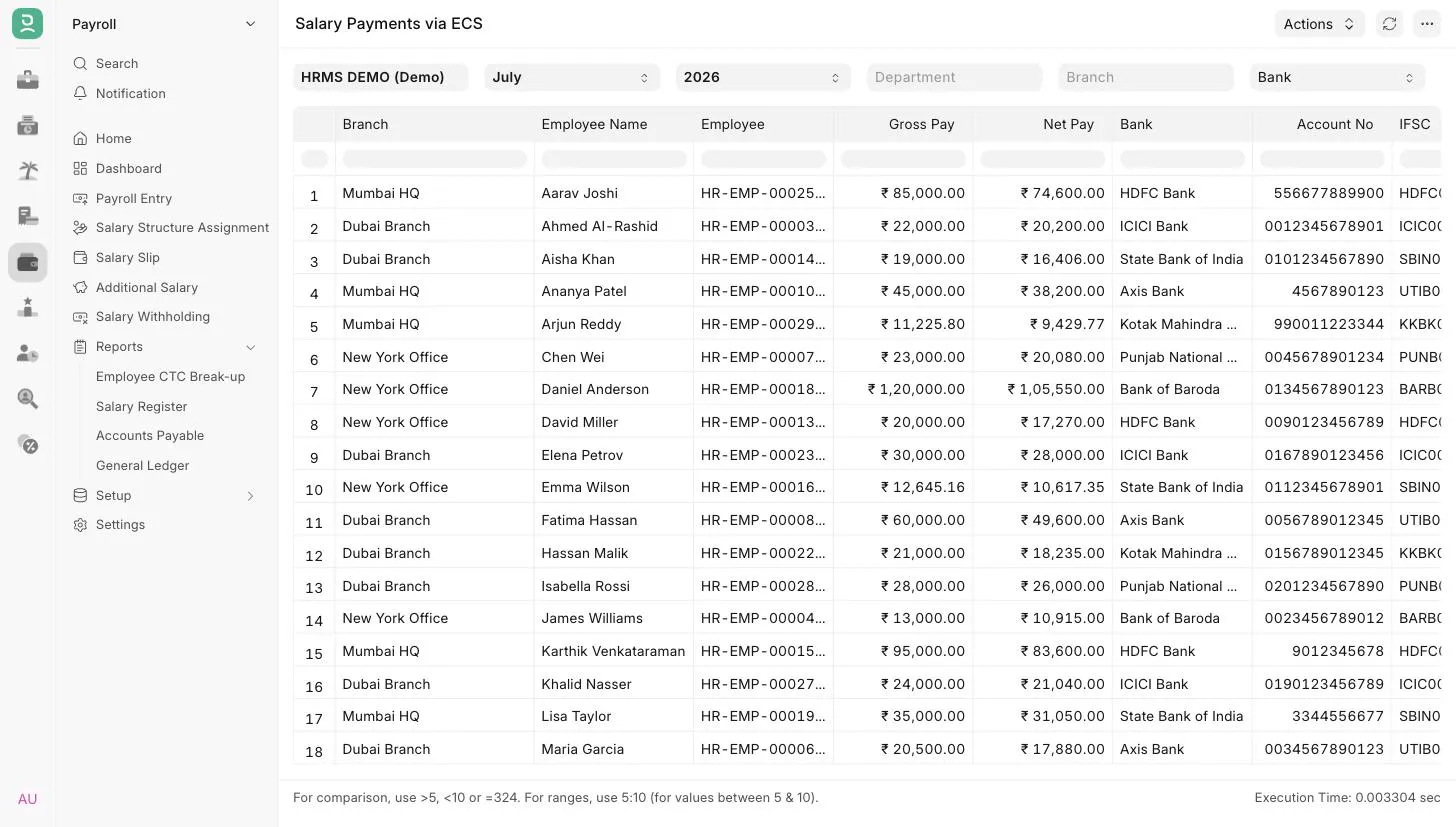
3. Filters
| Filter | Description |
|---|---|
| Company | Mandatory. Defaults to the user's default company. |
| Month | Mandatory. Defaults to the current month. Matched against the salary slip Start Date. |
| Year | Mandatory. The list shows only years that have salary slips, latest first. Matched against the salary slip Start Date. |
| Department | Show slips of one department. |
| Branch | Show slips of one branch. |
| Type | Bank, Cash or Cheque. Matches the Salary Mode on the Employee. Leave empty to show all employees. |
4. Report columns
| Column | Description |
|---|---|
| Branch | The employee's current branch. |
| Employee Name | Name of the employee. |
| Employee | Employee ID. |
| Gross Pay | Gross pay on the salary slip. |
| Net Pay | Net pay on the salary slip. |
| Bank | Bank Name from the Employee. Filled only when Salary Mode is Bank. |
| Account No | Bank A/C No. from the Employee when Salary Mode is Bank. Otherwise shows the Salary Mode, such as Cash or Cheque. |
| IFSC | IFSC Code from the Employee. Shown only when the default company's country is India. |
| MICR | MICR Code from the Employee. Shown only when the default company's country is India. |
Bank details and branch come from the Employee record at the time the report is run, not from the salary slip. If an employee's bank details changed after the slip was created, the report shows the new details.
5. Access
The report is available to users with the HR User or HR Manager role.
6. Related
Last updated 3 weeks ago
Was this helpful?