


















Recruitment Analytics
The Recruitment Analytics report tracks hiring against your staffing plans. For each active Staffing Plan it lists the linked Job Openings, the Job Applicants for each opening, and the Job Offer made to each applicant.
To access the Recruitment Analytics report, go to:
Home > Recruitment > Reports > Recruitment Analytics
1. Prerequisites
Before viewing the report, the following must exist:
- Staffing Plan whose To Date is after the selected On Date
- Job Opening linked to that Staffing Plan
- Job Applicant for that Job Opening (optional)
- Job Offer for the applicant (optional)
Job Openings that are not linked to a Staffing Plan do not appear in this report.
2. How to view the report
- Go to Recruitment Analytics.
- Select the Company.
- Set the On Date. Staffing plans that end on or before this date are left out.
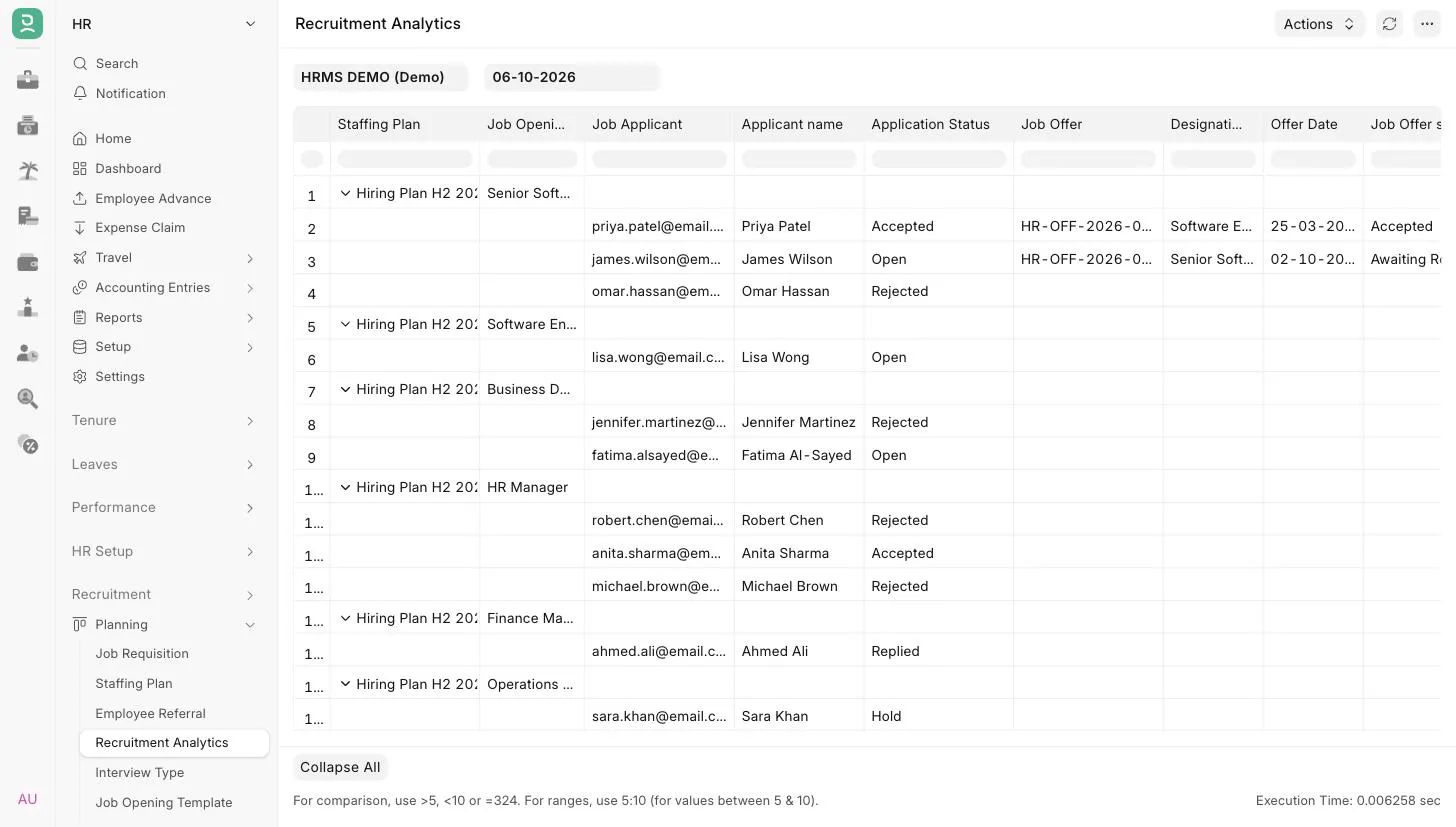 Recruitment Analytics
3. Filters
| Filter | Description |
|---|---|
| Company | Mandatory. Defaults to the user's default company. |
| On Date | Mandatory. Defaults to today. Only staffing plans with a To Date after this date are shown. |
4. Report layout
The report is a tree with two levels:
- A row for each Job Opening, showing the Staffing Plan and the Job Opening.
- Indented below it, a row for each Job Applicant who applied for that opening, with the offer details if a Job Offer exists.
5. Report columns
| Column | Description |
|---|---|
| Staffing Plan | The staffing plan the job opening belongs to. |
| Job Opening | The job opening created for the plan. |
| Job Applicant | An applicant for the job opening. |
| Applicant Name | Name of the applicant. |
| Application Status | Status of the Job Applicant, such as Open, Replied, Hold, Accepted or Rejected. |
| Job Offer | The Job Offer made to the applicant, if any. If there are several, the first one found is shown. |
| Designation | Designation on the Job Offer. |
| Offer Date | Offer date of the Job Offer. |
| Job Offer Status | Status of the Job Offer, such as Awaiting Response, Accepted or Rejected. |
6. Access
The report is available to users with the HR User or HR Manager role.
7. Related
Last updated 3 weeks ago
Was this helpful?