


















Can I run more than one salary slip or payroll entry in a month?
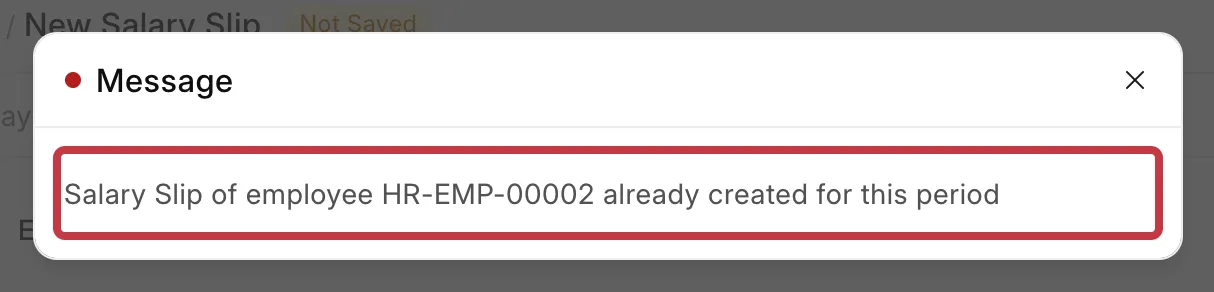
Yes, but only for different dates. Frappe HR stops a second Salary Slip or Payroll Entry for the same employee with the same Start Date and End Date, with the error Salary Slip of employee HR-EMP-00002 already created for this period. Each slip also pays the full salary structure amount for its own dates, so two slips in one month can pay the employee twice.
This page is for HR and payroll users who want to pay an incentive separately, pay a mid-month salary revision, run payroll again to correct it, or pay employees more than once a month.
The error
When you save a Salary Slip with the same dates as an earlier slip, you see:
Salary Slip of employee HR-EMP-00002 already created for this period
When you submit a Payroll Entry for dates that are already paid, you see a Duplicate Entry message:
Salary Slip already exists for HR-EMP-00002 for the given dates
How it works
Frappe HR checks three things before it creates a salary slip:
- Salary Slip. It blocks a slip when the same employee has a draft or submitted slip with exactly the same Start Date and End Date. A cancelled slip does not count. A slip with other dates, even inside the same month, is allowed.
- Payroll Entry → Get Employees. It leaves out employees who already have a submitted slip with the same Start Date and End Date. If an employee you expect is missing from the list, check their salary slips first.
- Payroll Entry → Submit. It shows the Duplicate Entry message if any employee in the table has a draft or submitted slip with the same dates.
However, different dates do not mean a smaller amount. A salary slip calculates the salary structure for its own date range. Payment Days and Working Days are counted only inside that range. So a slip for 16 to 31 October, on a Monthly salary structure, pays a full month and not half a month.
For example, Bluepeak Technologies revises the salary of Arjun Reddy from 1,20,000 to 1,40,000 from 16 October 2026. HR makes one slip for 1 to 15 October and one for 16 to 31 October. Each slip pays the full monthly amount, and Arjun gets 2,60,000 for October.

What you can do
Pick the case that matches what you want to do.
Pay employees more than once a month, every month
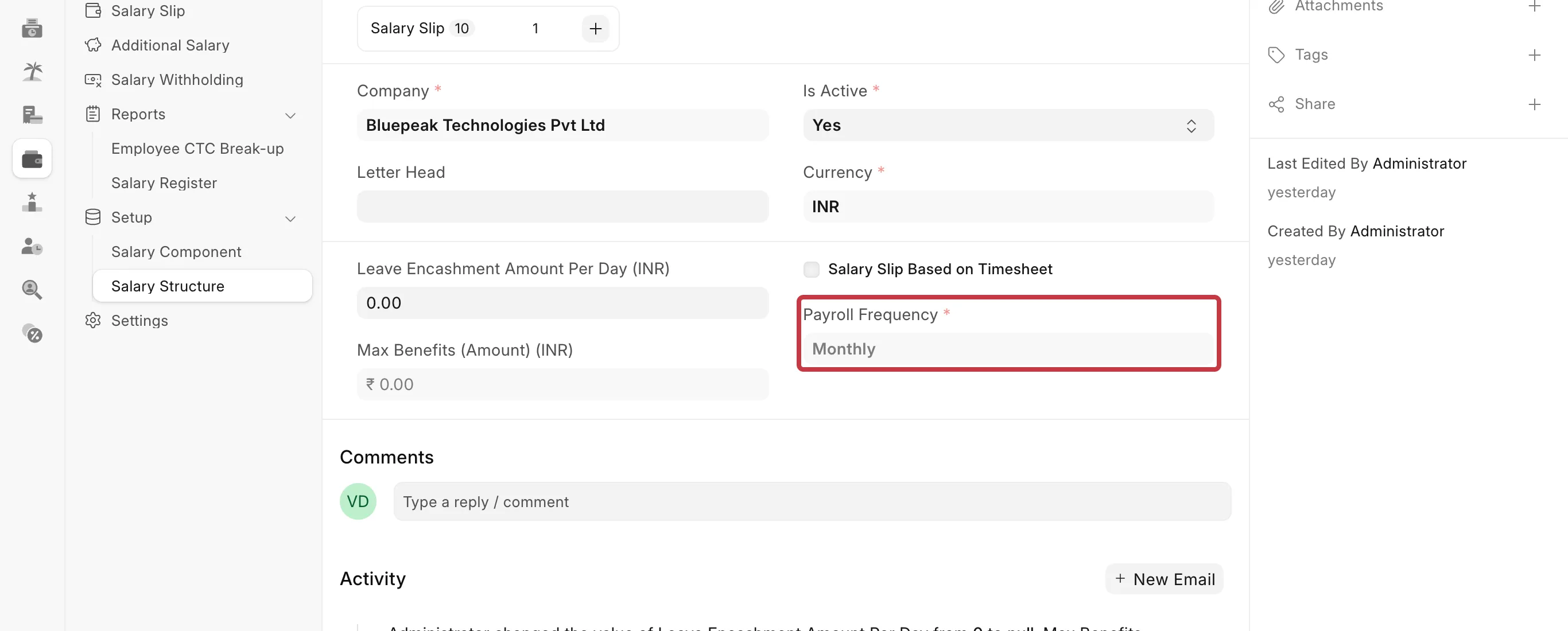
Use a salary structure with a shorter pay period. Then each Payroll Entry covers one period, and the amounts in the structure are per period.
- Go to Payroll → Salary Structure and create a new structure.
- In Payroll Frequency, select Weekly or Fortnightly.
- Set the earnings and deductions as amounts for one pay period.
- Assign the structure to the employees with a Salary Structure Assignment.
- Create one Payroll Entry for each period, with the same Payroll Frequency.
Run the payroll for a month again
You do not need a second Payroll Entry. Cancel the first one and run it again.
- Open the Payroll Entry for the month.
- Click Cancel. Frappe HR cancels and deletes the salary slips of this Payroll Entry, and cancels its journal entries.
- Fix the data that was wrong (attendance, Additional Salary, Salary Structure Assignment).
- Click Amend, or create a new Payroll Entry with the same dates.
- Click Get Employees, then Create Salary Slips.
To correct only one employee, cancel that employee's Salary Slip and create it again for the same dates.
Pay an incentive, bonus or other one-time amount
A one-time amount cannot get its own salary slip for dates that are already paid. Add it to a slip instead.
- Go to Payroll → Additional Salary and click Add Additional Salary.
- Select the Employee and the Salary Component, for example an incentive or bonus component.
- Enter the Amount.
- Set the Payroll Date to a date inside the pay period of the slip that must pay it. If the current month is already paid, use a date in the next month.
- Click Save, then Submit.
The amount shows on the next salary slip whose dates include the Payroll Date. For incentives, you can also use Employee Incentive, which creates the Additional Salary for you.
Pay a salary revision that starts in the middle of the month
A salary slip uses one Salary Structure Assignment: the latest one with a From Date on or before the slip's Start Date. It does not split one month between two bases. Keep one slip for the month and pay the difference as Additional Salary.
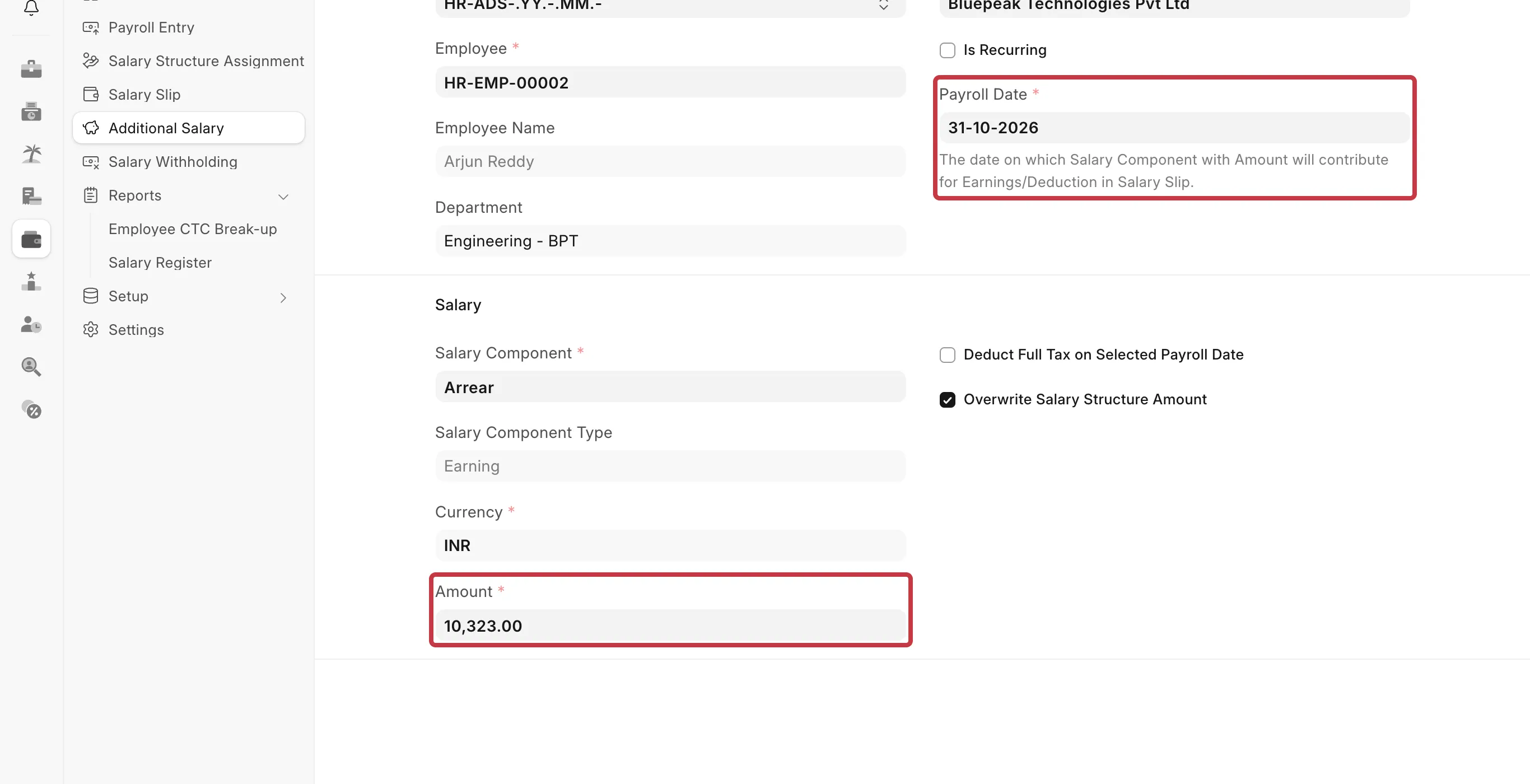
- Create the new Salary Structure Assignment with the revision date as the From Date. In the example, 16-10-2026 with Base 1,40,000.
- Calculate the difference for the revised days. In the example: (1,40,000 − 1,20,000) × 16 ÷ 31 = 10,323.
- Create an Additional Salary for the employee with this Amount and a Payroll Date in the month. In the example, 31-10-2026.
- Create the October salary slip for 1 to 31 October as usual. It uses the old base and adds the difference.
From November, the slips use the new base.
If the revision is for months that you already paid, use Arrears instead (Frappe HR v16 and later).
How to prevent it
- Do not split a month into two salary slips on a Monthly salary structure. Each slip pays a full month.
- Before you run a second Payroll Entry in a month, check Payroll → Salary Slip for slips of the same employees and dates.
- If an employee is missing after Get Employees, they already have a submitted slip for those dates.