


















Employee Hours Utilization Based On Timesheet
The Employee Hours Utilization report compares the hours employees logged in Timesheets with the hours they were expected to work in a date range. It splits logged time into billed and non-billed hours and shows the untracked balance, so you can see how much of each employee's time is accounted for.
To access the report, go to:
Home > Shift & Attendance > Reports > Employee Hours Utilization
1. Prerequisites
Before viewing the report, the following must exist:
- Standard Working Hours set in HR Settings. The report shows an error if it is not set.
- Timesheets with an Employee set, and time logs with hours
2. How to view the report
- Go to Employee Hours Utilization Based On Timesheet.
- Select the Company. From Date defaults to one month ago and To Date to today.
- Optionally filter by Employee, Department or Project.
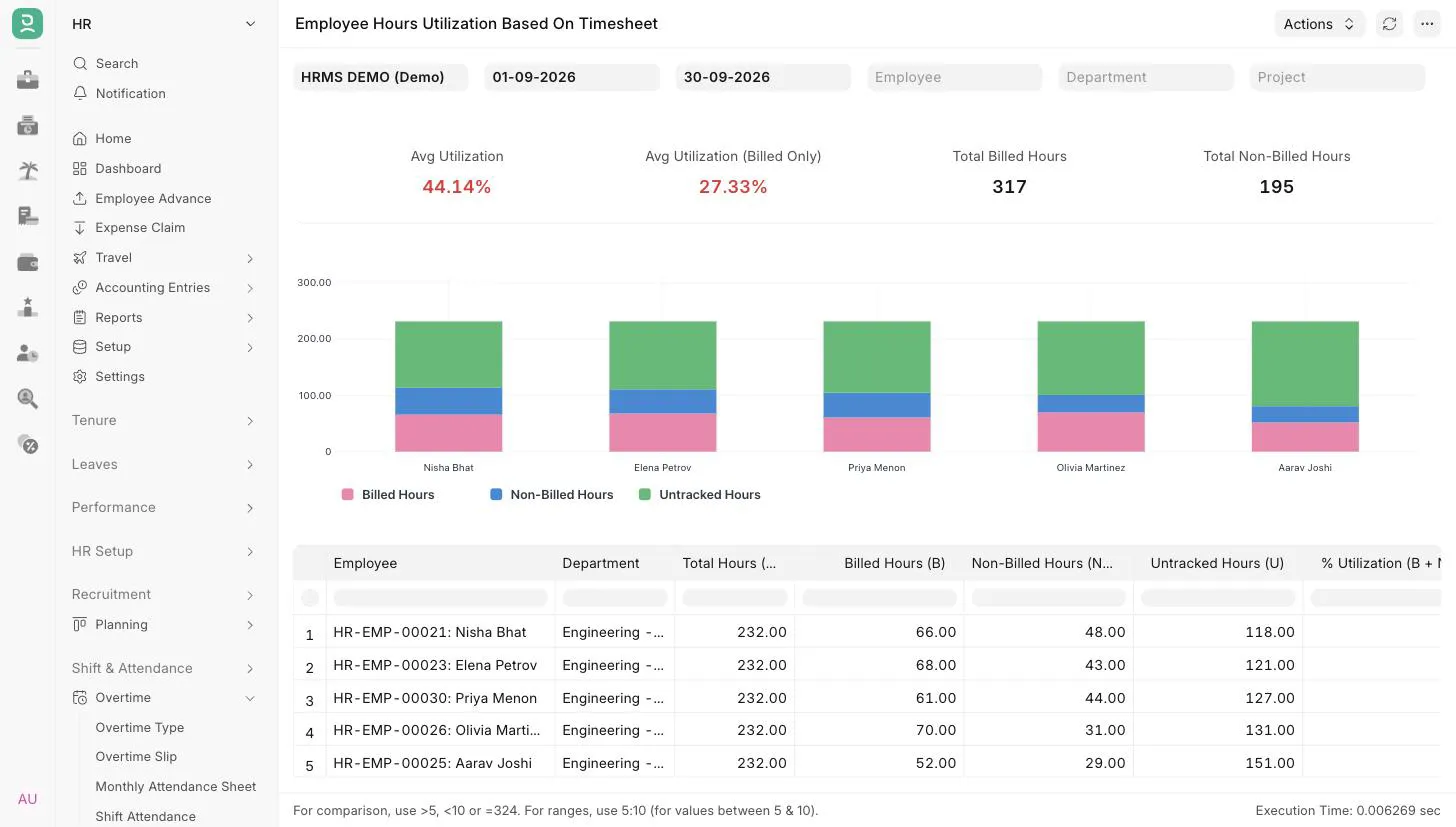
3. Filters
| Filter | Description |
|---|---|
| Company | Mandatory. Defaults to the user's default company. |
| From Date | Mandatory. Must be before To Date. |
| To Date | Mandatory. |
| Employee | Show one employee of the selected company. |
| Department | Show employees of one department. |
| Project | Count only time logs booked against this project. |
A timesheet is counted only if both its start date and end date fall within the selected range.
4. Report columns
| Column | Description |
|---|---|
| Employee | The employee on the timesheet. |
| Department | The employee's department. |
| Total Hours (T) | Expected working hours for the period. |
| Billed Hours (B) | Hours from time logs marked Is Billable. |
| Non-Billed Hours (NB) | Hours from time logs not marked Is Billable. |
| Untracked Hours (U) | Total Hours minus billed and non-billed hours. Shown as zero if the employee logged more than Total Hours. |
| % Utilization (B + NB) / T | Share of Total Hours that was logged. |
| % Utilization (B / T) | Share of Total Hours that was billed. |
Rows are sorted by % Utilization (B + NB) / T, highest first. Only employees with at least one timesheet in the range are listed.
5. How Total Hours is calculated
Total Hours = Standard Working Hours × number of days between From Date and To Date.
The number of days is To Date minus From Date, so 1 Sept to 30 Sept counts as 29 days. All calendar days are counted, including weekends and holidays. The same Total Hours applies to every employee in the report.
6. Summary and chart
Above the table, the report shows:
- Avg Utilization: the average of % Utilization (B + NB) / T across the listed employees
- Avg Utilization (Billed Only): the average of % Utilization (B / T)
- Total Billed Hours
- Total Non-Billed Hours
The two averages are shown in red when below 70% and in green otherwise.
A stacked bar chart shows billed, non-billed and untracked hours for up to 30 employees, in the same order as the table.
7. Access
The report is available to users with the HR User or HR Manager role.