


















Salary Payments Based On Payment Mode
The Salary Payments Based On Payment Mode report shows the net salary paid in a month, broken down by branch and by mode of payment. It also shows the month's total gross pay, total deductions and total net pay.
It is useful for checking how much needs to be paid out through each mode (Bank, Cash or Cheque) at each branch.
The report is not linked from a workspace. To access it, search for Salary Payments Based On Payment Mode in the awesome bar, or open:
/app/query-report/Salary Payments Based On Payment Mode
1. Prerequisites
Before viewing the report, the following must exist:
- Submitted Salary Slips for the month
- Salary Mode (Bank, Cash or Cheque) set on each Employee. The salary slip copies it into its Mode of Payment field when the slip is created.
2. How to view the report
- Go to Salary Payments Based On Payment Mode.
- Select the Company, Month and Year.
- Optionally select a Department or Branch.
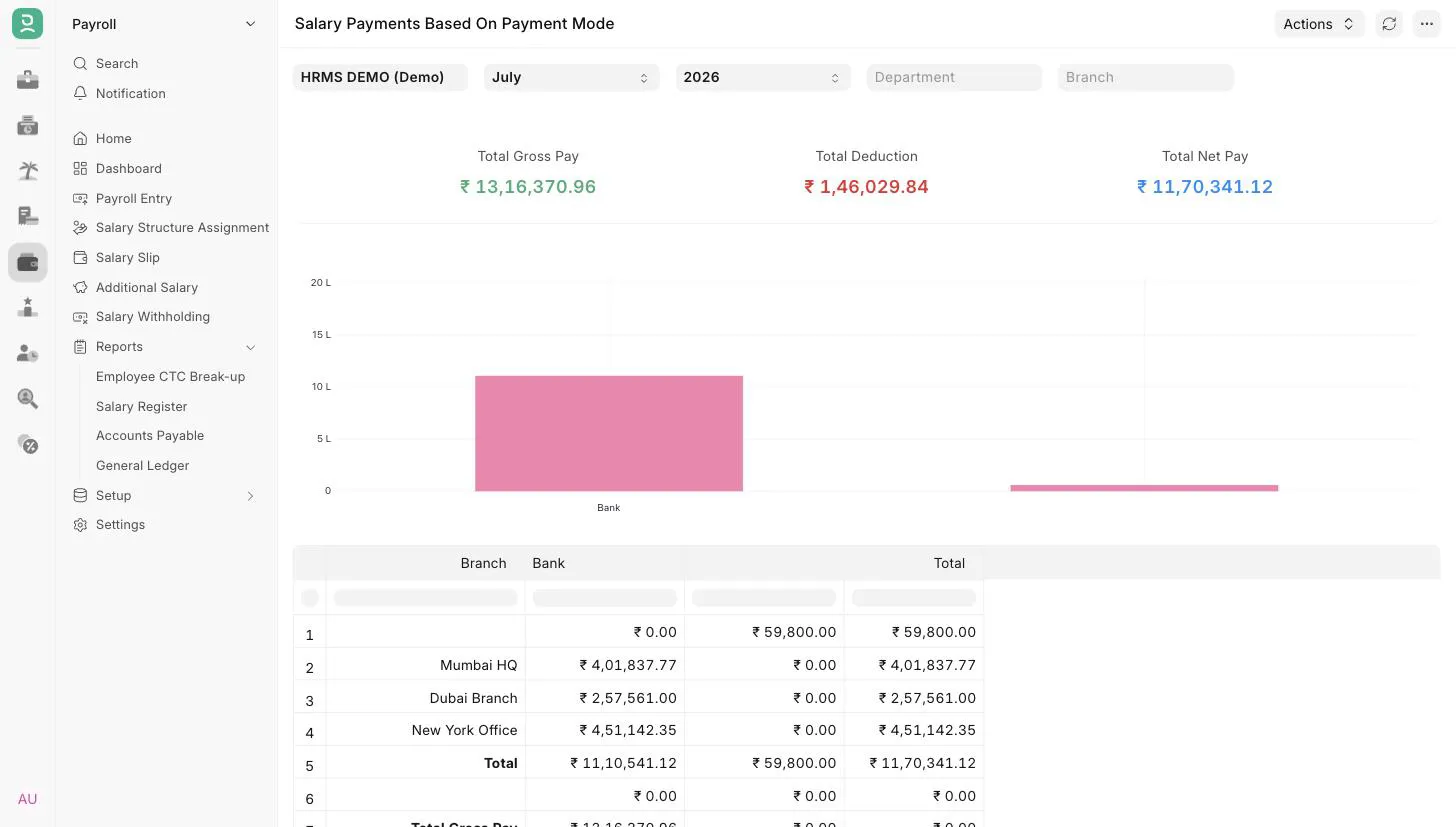
3. Filters
| Filter | Description |
|---|---|
| Company | Mandatory. Defaults to the user's default company. |
| Month | Mandatory. Defaults to the current month. Matched against the salary slip Start Date. |
| Year | Mandatory. The list shows only years that have salary slips, latest first. Matched against the salary slip Start Date. |
| Department | Show slips of one department. |
| Branch | Show slips of one branch. |
4. Report columns
| Column | Description |
|---|---|
| Branch | Branch on the salary slip. |
| One column per Mode of Payment | Total net pay of the slips at that branch paid through that mode. |
| Total | Total net pay at the branch across all modes. |
A column is added for every mode of payment used on any submitted salary slip, in any company or month. Slips of employees with no Salary Mode are shown in a column with a blank header.
5. Totals
Below the branch rows, the report adds:
- a Total row with the net pay per mode of payment across all branches
- Total Gross Pay: the sum of gross pay of all the slips
- Total Deductions: Total Gross Pay minus the total net pay
- Total Net Pay: the total net pay of all the slips
The same three totals are shown as summary cards above the table, and a bar chart shows the total net pay per mode of payment.
6. Access
The report is available to users with the HR User, HR Manager or Employee role.