


















Site Slow: 504 Gateway timeout
A 504 error means that the proxy waited too long for an answer from your site. All web workers were busy with earlier requests. A slow API causes this, most often a report that takes too long to run.
When the workers stay busy, the bench can go down and the site stops.
Note: A dead web worker gives a 502 error, not a 504. See 502 Bad Gateway.
Find the slow endpoint
- Open the Analytics tab of your site.
- Click the heading Advanced Analytics. The section is closed by default.
- Read the Slowest Requests chart. It groups the request time by path.
- Read the duration charts below it. They name the report, the method, or the doctype behind a slow path.
The list is sorted, so the first path is the slowest.
Common endpoints
| Endpoint | Meaning |
|---|---|
/api/method/frappe.desk.query_report.run |
A report from the Report doctype runs. |
/api/method/frappe.desk.reportview.get |
A list view or a report view loads. Many columns and many filters make this slow. Add indexes for the fields in the filters. |
/api/method/run_doc_method |
A whitelisted method of a document controller runs. |
/api/method/frappe.desk.form.save.savedocs |
A document is saved or submitted. A slow hook or a large child table makes this slow. |
Slow reports
If /api/method/frappe.desk.query_report.run is at the top of the list, your reports are slow. Convert them into Prepared Reports. A Prepared Report runs in the background, and the site stays free for other requests.
The Query Report Durations chart names the reports that take the most time.

What does "Other" mean in chart
The Other bucket holds all requests that are not in the top slowest paths.
When Other is the largest bar, one pattern of endpoint is usually slow. In this example, the /custom_app/view/ endpoint is slow, and the developer of that app must examine it.
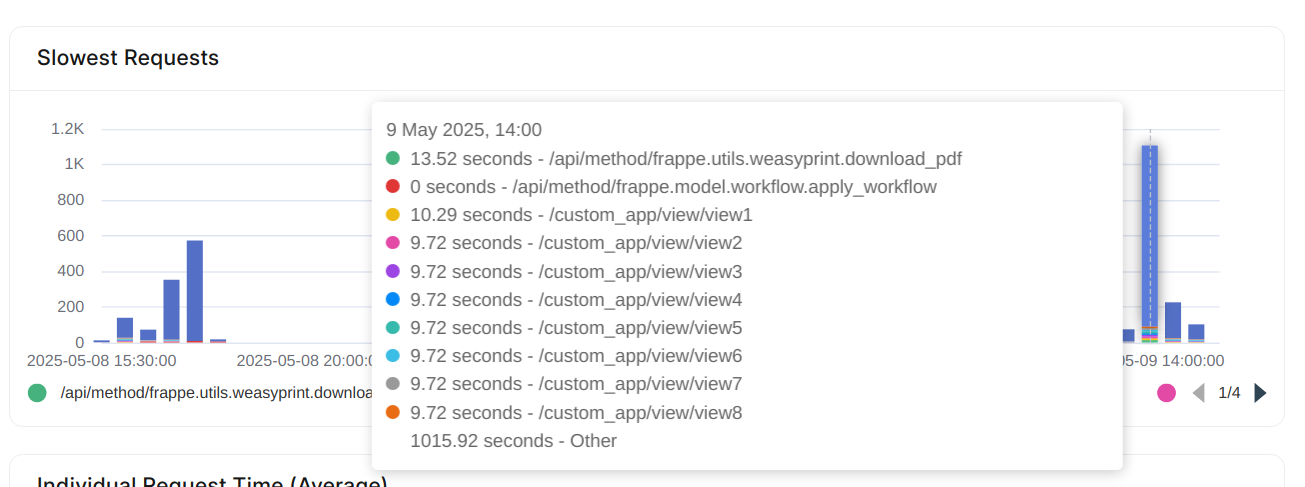
If you see no pattern and Other is still the largest bar, the server itself is slow.
Correct the cause
- Profile the slow endpoint with the Recorder of the framework. Turn the Recorder off when you finish, because it makes the site slower.
- If a slow query causes the delay, add an index. See MariaDB slow queries in your site.
- If you cannot make the endpoint faster, move the work into a background job.
- If you own a dedicated server, open the Analytics tab of the server. Read the CPU and Load Average charts of the application server and of the database server. See Guidelines for choosing a server plan.