


















Every email sent is different but certain emails can be standardized, usually known as Email Template or Standard Reply.
To access the Email Template list, go to:
Home > Settings > Email > Email Template
1. How to create an Email Template
- Go to the Email Template list, click on New.
- Enter a name for this Email Template.
- Enter a Subject for this Email Template.
- Response is the standard content of the email that will be a part of this template.
- Save.
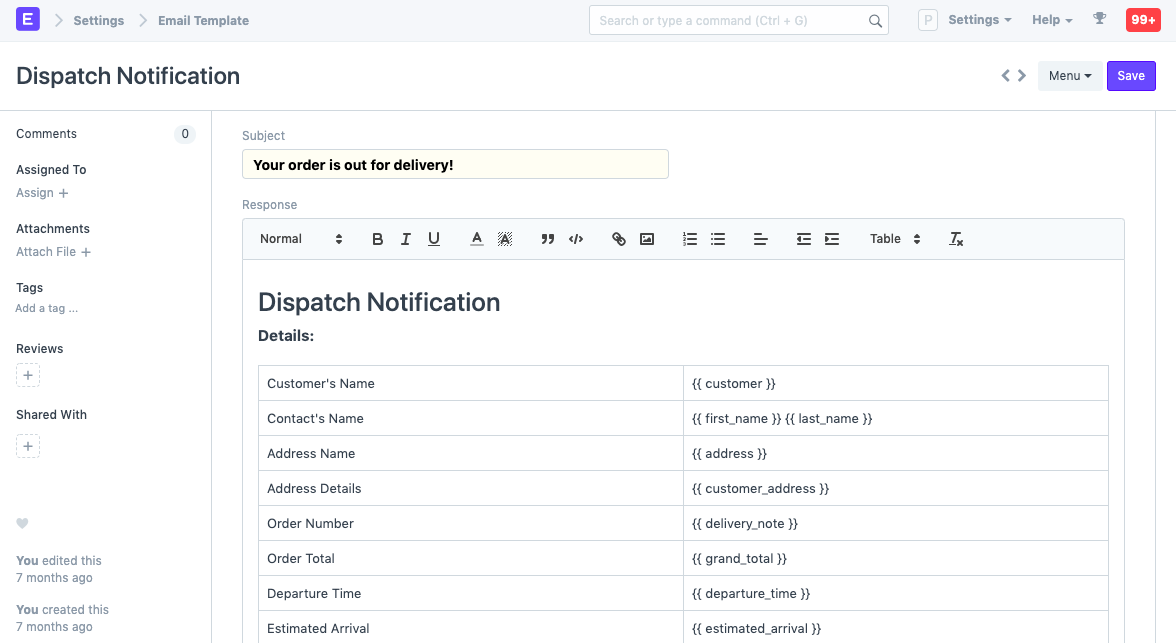
DocType Associated: (optional) The DocType associated with this template.
1.1 How to use Email Template
You can use this Email Template in the Emails that are sent from ERPNext in the "CC, BCC & Email Template" field of the email section of the document. ERPNext will fetch the subject and response as per the template selected.
You can set a Default Email Template for each document type via Customize Form.
1.2 How to get fieldnames
The fieldnames you can use in your email template are the fields in the document from which you are sending the email. You can find out the fields of any documents via Customize Form and selecting the document type (e.g. Sales Order)
1.3 Using HTML to build the template
There's a Use HTML check that you can toggle to switch from the text editor to a code editor. This allows finer control over the body of the email and makes it easier to use for features like loops in Jinja.
1.4 Templating
Templates are compiled using the Jinja. To learn more about Jinja, visit this page.