


















Quality Feedback
Quality Feedback is the information that a Customer expresses about the satisfaction or dissatisfaction about the products or services you offer.
Quality Feedback has different fields to rate different parameters. The Customer/User can easily give their feedback by selecting their template to rate on different parameters and also provide qualitative feedback on these parameters.
The parameters are fetched from a Quality Feedback Template. The templates store preset information for you to select in the Quality Feedback.
If the Feedback is not as per expectations, a Quality Action may be initialized on the basis of the seriousness of the Feedback.
To access Quality Feedback, go to:
Quality > Quality Feedback
1. How to create a Quality Feedback
- Go to the Quality Feedback list, click on Add Quality Feedback.
- Select the Quality Feedback Template. The parameters of the template are fetched automatically in the Parameters table.
- Select the Type, that is whether the Feedback is by a Customer or a User (ERPNext account User).
- Select the particular Customer or User in Feedback By.
- The Parameters table has the following columns:
- Parameter: Various Parameters that are pre-defined in the Quality Feedback Template you create.
- Rating: Rating for a parameter from 1 to 5.
- Feedback: Feedback based on the given Rating.
- Save.
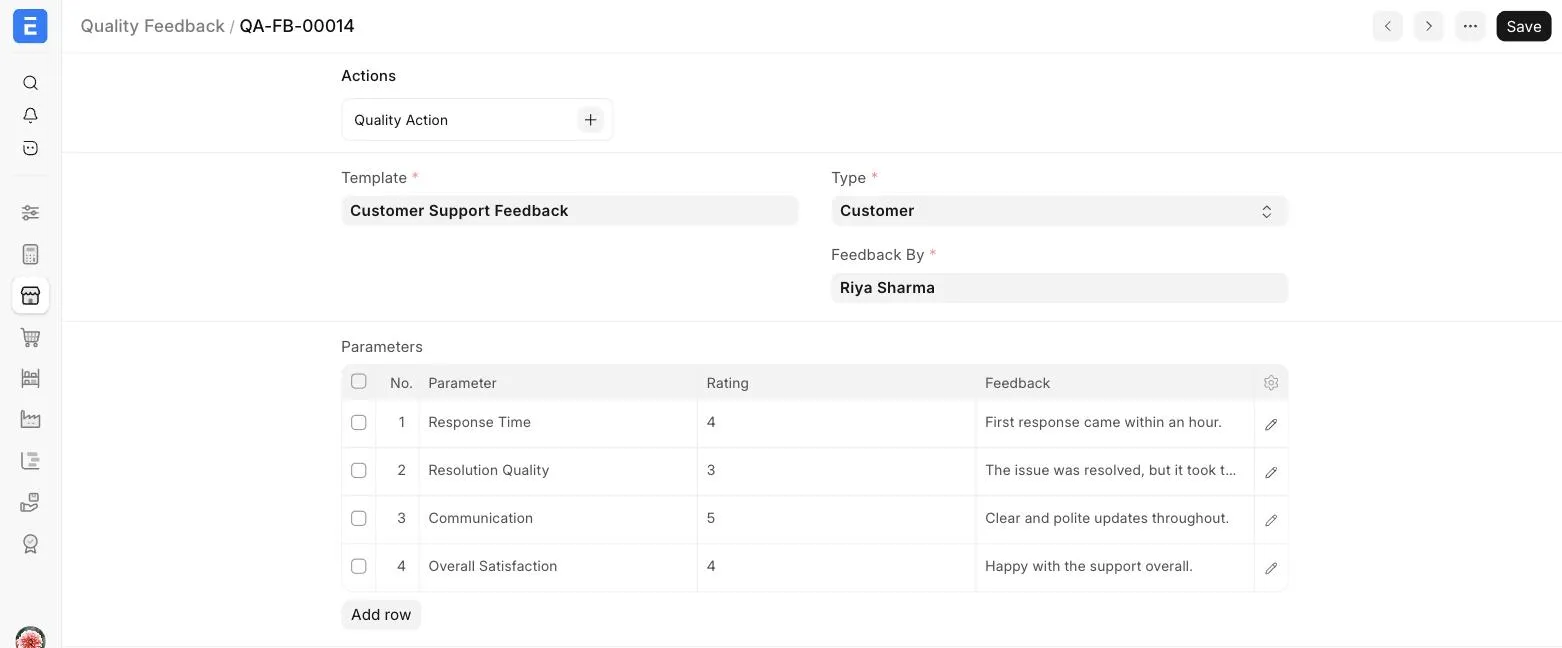
To take action on a Feedback, click on + next to Quality Action in the Actions section at the top of the Quality Feedback.