


















Validate and Correct the Migration
A successful import only proves that ERPNext accepted the rows. Validation proves that the new books represent the same financial position as the signed-off source system.
Nova Industries compares its Trial Balance, customer and supplier ageing, bank balances, stock value, fixed assets, taxes, and equity at the cut-off date. A difference is traced to the import file or mapping rule, corrected, and tested again before normal posting begins.
This page provides a practical reconciliation order, explains how to isolate differences, and distinguishes corrections to imported data from adjustments that require an approved accounting entry.
Reconcile in layers
Validate in this order:
- Master counts and mappings
- Imported document counts and totals
- Subledger schedules
- Control accounts
- Trial Balance
- Balance Sheet and Profit and Loss Statement
- Operational testing
An exact Trial Balance can still hide party, Warehouse, or Cost Center mapping errors, so subledger checks come first.
Master validation
Compare source and ERPNext counts for Customers, Suppliers, Items, Warehouses, accounts, Cost Centers, banks, and assets.
Review:
- duplicates;
- disabled records;
- missing parents;
- wrong companies;
- wrong currencies;
- missing tax IDs;
- incorrect defaults;
- unmapped legacy identifiers.
Receivables and payables
Run Accounts Receivable and Accounts Payable at cutover. Compare:
- party total;
- invoice count;
- invoice outstanding amount;
- due date;
- ageing bucket;
- currency;
- credit notes;
- unallocated payments and advances.
The receivable and payable control accounts in the Trial Balance must equal their subledger totals.
Bank and cash
Compare each General Ledger account with the reconciled legacy book balance. Recreate or document outstanding bank items. Confirm the statement balance plus reconciling items equals the ERPNext book balance.
Stock
Run Stock Balance by Item and Warehouse. Compare quantity and value separately. Investigate zero or negative valuation, wrong Warehouse, serial or batch differences, and rounding.
The stock ledger value must agree with the relevant General Ledger control accounts when perpetual inventory is used.
Fixed assets
Compare gross cost, accumulated depreciation, net book value, category, location, and next depreciation date with the source asset register.
Trial Balance and financial statements
Run Trial Balance at the cutover date and compare every mapped account.
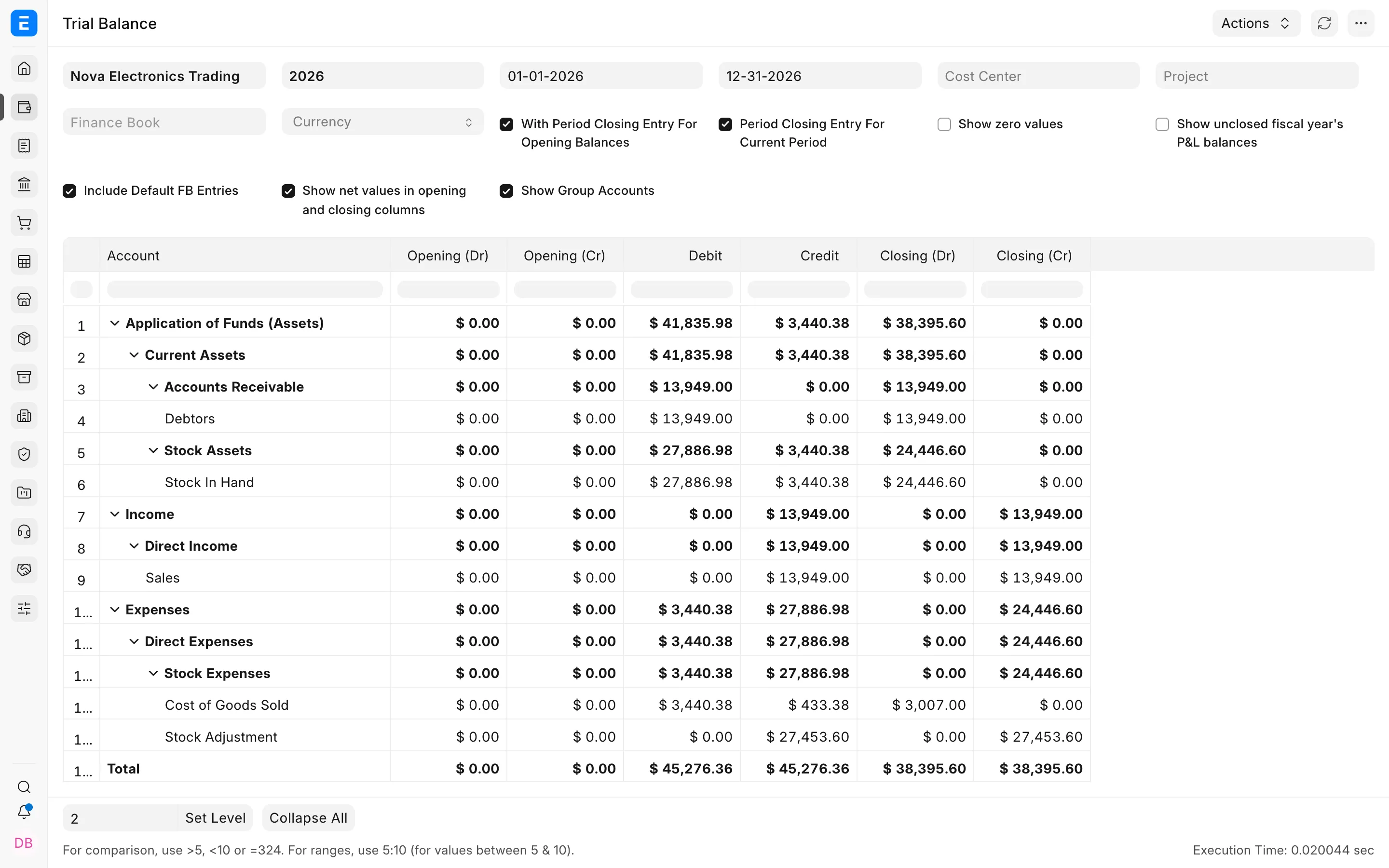
Classify each difference as:
- source adjustment posted after extraction;
- omitted import row;
- duplicate import;
- incorrect sign;
- wrong account mapping;
- exchange-rate difference;
- rounding;
- balance imported through two methods;
- date or company error.
Then compare Balance Sheet and Profit and Loss Statement. Review retained earnings and current-year result carefully.
Test real workflows
Create controlled transactions after opening:
- sell and receive payment;
- purchase and pay;
- allocate an imported advance;
- return an imported invoice where supported;
- reconcile a bank statement;
- issue stock from an opening quantity;
- post asset depreciation;
- run tax and financial reports.
Correcting errors
Correct the source document, not the ledger output.
| Error | Correction |
|---|---|
| Wrong master name or default | Rename, merge, or update the master using a supported method |
| Failed import row | Correct the approved file and import only the failed row |
| Wrong opening invoice | Cancel and recreate or amend before go-live |
| Wrong opening journal row | Cancel and amend the Journal Entry or post an approved correction |
| Duplicate balance | Cancel the duplicate opening document |
| Wrong stock opening | Correct through Stock Reconciliation |
| Wrong asset opening | Correct the Asset and depreciation opening data before later postings |
After every correction, rerun the affected subledger and the Trial Balance.
Sign-off
Record:
- report name and filters;
- source total;
- ERPNext total;
- difference;
- explanation;
- preparer;
- reviewer;
- approval date.
Freeze the cutover period only after all unexplained differences are zero and finance has signed off.