


















Types in Tax Template
The Type on a Sales or Purchase Taxes and Charges row tells ERPNext which amount to use as the calculation base. Choosing the correct Type matters as much as choosing the rate: the same 5 can mean 5%, a fixed $5, or $5 for every item unit. Start with the Taxes overview if the template, rule, and item-override roles are not yet clear.
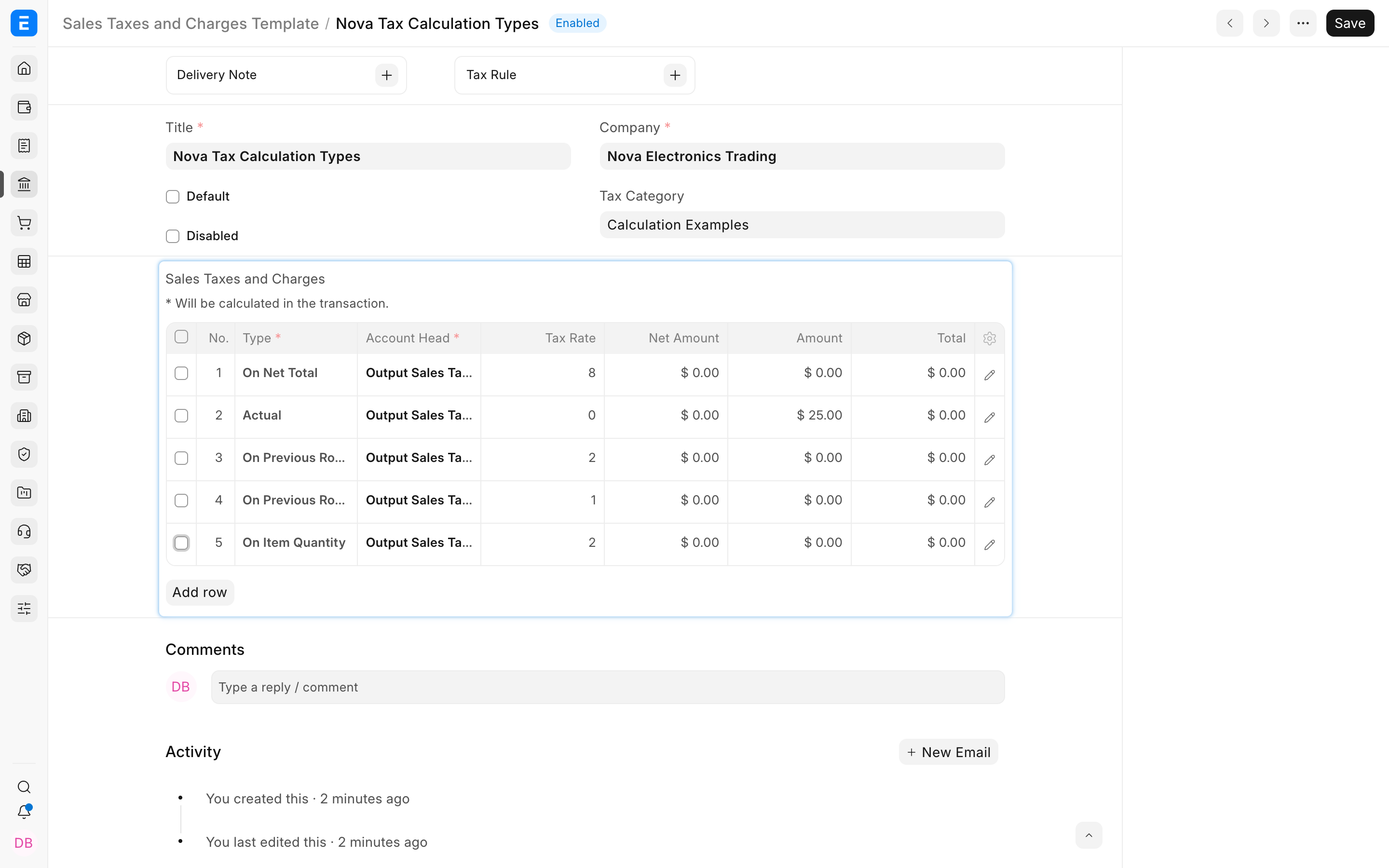
ERPNext provides five Types:
| Type | Formula |
|---|---|
| Actual | Entered Tax Amount |
| On Net Total | Net Total × Tax Rate ÷ 100 |
| On Previous Row Amount | Referenced row Amount × Tax Rate ÷ 100 |
| On Previous Row Total | Referenced row Total × Tax Rate ÷ 100 |
| On Item Quantity | Total item quantity × Tax Rate |
The same Types are available in Sales Taxes and Charges Template and Purchase Taxes and Charges Template.
Before you begin
Separate the business question into three parts:
- What is the base: net value, a fixed amount, another tax, a running total, or quantity?
- Is the entered value a percentage or an amount per unit?
- Should the row be added to or deducted from Total, Valuation, or both?
Write a small numerical example and calculate the expected result manually. Configure the rows in the same order as the calculation. For previous-row types, the referenced row must come earlier.
The examples below use a Net Total of $1,000 unless stated otherwise.
Actual
Use Actual when the charge is a fixed amount rather than a percentage.
For example, a fixed shipping charge of $25 produces:
| Value | Amount |
|---|---|
| Net Total | $1,000.00 |
| Actual shipping charge | $25.00 |
| Total after the row | $1,025.00 |
Enter the value in Tax Amount. The Tax Rate is not the calculation base for an Actual row.
Actual is suitable for a known shipping fee, documentation charge, insurance amount, or manual adjustment. If the amount varies by item value or quantity, choose a formula-based type instead.
On purchase documents, also decide whether the fixed amount affects supplier Total, stock Valuation, or both. See Include Tax or Charge in Valuation or Total?.
On Net Total
Use On Net Total for a percentage of the items' net value before taxes and charges.
With Net Total $1,000 and Tax Rate 8%:
$1,000 × 8 ÷ 100 = $80
The running Total after the row is $1,080 when the row is added to Total.
This is the usual choice for a standard tax applied uniformly to a Sales Invoice, purchase transaction, or order. If item rates differ, keep the transaction row for the tax account and use an Item Tax Template for those amounts.
On Previous Row Amount
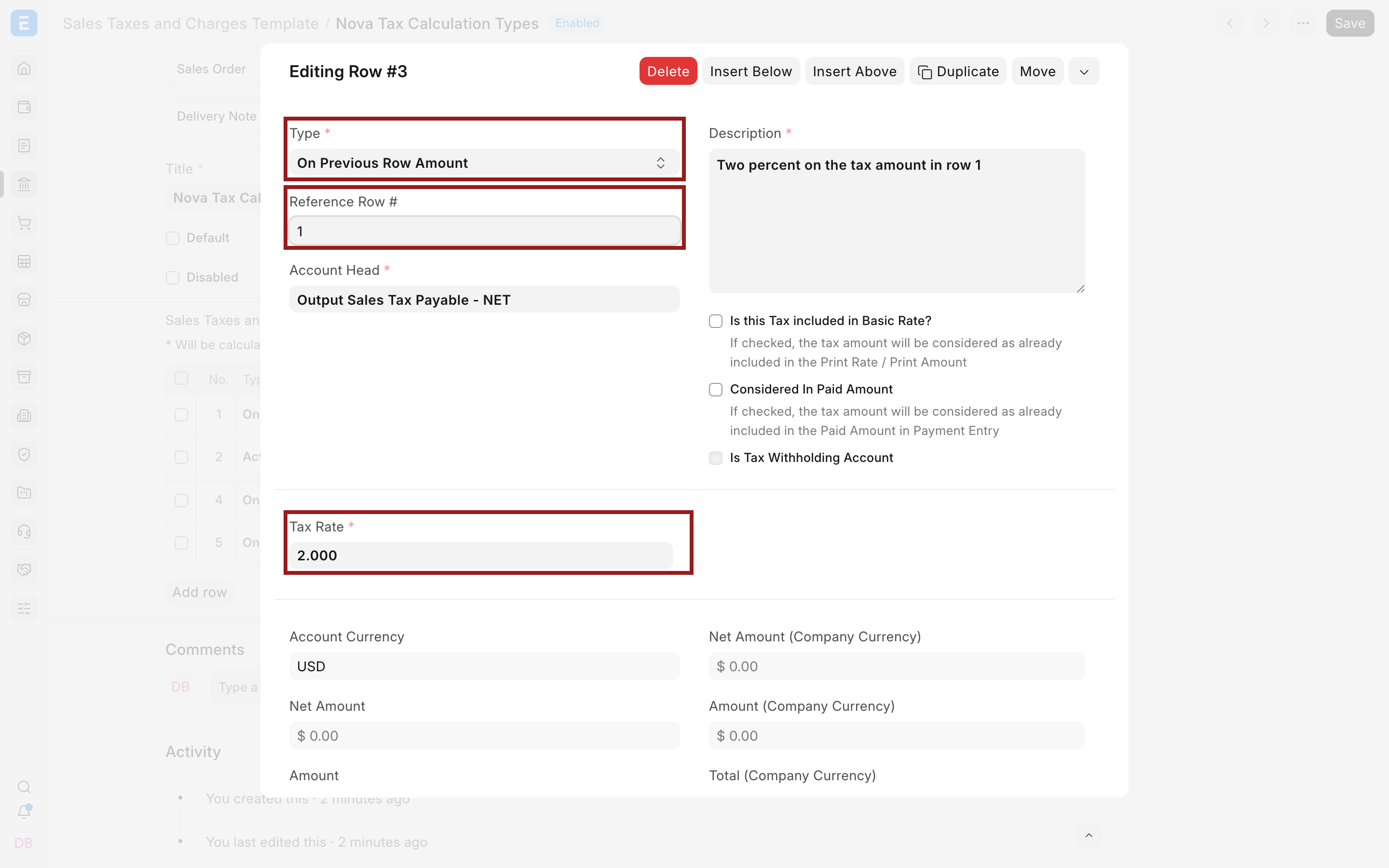
Use On Previous Row Amount when the current row is calculated only on the Amount produced by another row.
Suppose row 1 calculates 8% tax on $1,000:
| Row | Calculation | Amount | Running Total |
|---|---|---|---|
| 1 | 8% On Net Total | $80.00 | $1,080.00 |
| 2 | 2% On Previous Row Amount, Reference Row 1 | $1.60 | $1,081.60 |
Row 2 uses $80 × 2 ÷ 100, not the $1,080 running total.
Set Reference Row # to 1. This type is useful for a surcharge, cess, or levy calculated only on another tax or charge amount.
On Previous Row Total
Use On Previous Row Total when the current row is calculated on the running Total after an earlier row.
Using the same first row:
| Row | Calculation | Amount | Running Total |
|---|---|---|---|
| 1 | 8% On Net Total | $80.00 | $1,080.00 |
| 2 | 2% On Previous Row Total, Reference Row 1 | $21.60 | $1,101.60 |
Row 2 uses $1,080 × 2 ÷ 100. This is very different from the $1.60 result produced by On Previous Row Amount.
Use this type when the tax or charge is explicitly based on the subtotal that includes an earlier row. Confirm that this sequence is required by your pricing or tax rules.
On Item Quantity
Use On Item Quantity when the charge is a fixed amount for every unit, regardless of item price.
If the transaction has 5 total units and the Tax Rate is 2:
5 × $2 = $10
The field is named Tax Rate, but for this Type it represents an amount per unit, not a percentage. A value of 2 does not mean 2%.
This type is suitable for an environmental fee, packaging charge, excise amount, or another per-unit levy. Check the Unit of Measure, quantities, and conversion factors carefully.
Understand Amount and Total
Every tax row has two important calculated values:
| Column | Meaning |
|---|---|
| Amount | The tax or charge calculated by that row alone |
| Total | The running transaction total after ERPNext adds or deducts that row |
On Previous Row Amount uses the first value. On Previous Row Total uses the second. When debugging a compound tax, inspect both columns on the referenced row rather than looking only at Grand Total.
Use Reference Row # correctly
Reference Row # is valid only for On Previous Row Amount and On Previous Row Total.
The reference must point to an earlier row. If you insert, delete, duplicate, or move rows, check every dependent reference again. A formula that still points to row 1 may become wrong when a new row is inserted above the intended base.
Keep compound templates short. Use clear descriptions and test a known numerical example before making the template the default or selecting it through a Tax Rule.
Inclusive tax does not change the Type
Is this Tax included in Basic Rate? changes whether ERPNext adds tax on top of the entered price or back-calculates it from a price that already contains tax. It does not create another calculation Type.
For example, an 8% On Net Total row applied to a tax-exclusive net price of $100 adds $8. When the entered price of $108 is tax-inclusive, ERPNext derives the same $100 net and $8 tax from the entered amount.
See Tax Inclusive Accounting for the complete transaction effect.
Purchase valuation is a separate decision
On a purchase tax row, Consider Tax or Charge for determines whether the calculated Amount affects supplier Total, stock Valuation, or both. The Type determines how the Amount is calculated; the valuation field determines where its effect goes.
For example, an Actual freight amount of $25 can be:
- Total only, which increases the supplier amount without allocating it into stock value.
- Valuation only, which allocates it into stock value without increasing that document's payable.
- Valuation and Total, which does both.
Configure both fields intentionally.
Verify the calculation
Create a draft Sales Invoice or Purchase Invoice with small, easy-to-check values.
- Confirm the item Net Total and total quantity.
- Review each row in order.
- Compare Amount and Total with your manual calculation.
- Check Reference Row # on compound rows.
- Confirm Add or Deduct and valuation treatment on purchase rows.
- Review Total Taxes and Charges and Grand Total.
- Submit a controlled example and inspect the General Ledger.
Do not validate a complex template only with a large live invoice. A small example makes an incorrect base or row reference immediately visible. Confirm every Account Head in the Chart of Accounts.
Troubleshooting
ERPNext says a row can be referenced only for a previous-row Type
Either change Type to On Previous Row Amount or On Previous Row Total, or remove Reference Row #. A fixed or Net Total row must not carry a previous-row reference.
A compound tax is much larger than expected
You may have selected Previous Row Total when you intended Previous Row Amount. Compare the referenced row's Amount and Total, then recalculate the expected result manually.
On Item Quantity gives an unexpected value
Treat the entered rate as currency per unit, not a percentage. Check total quantity, stock UOM, transaction UOM, and conversion factor.
Changing row order changed the result
Previous-row calculations are sequence-dependent. Recheck every Reference Row # and the running Total after moving rows.
Frequently asked questions
Which Type should I use for a normal percentage tax?
Use On Net Total when the percentage applies to the transaction's item net value. Use Item Tax Templates when individual item rates differ.
Which Type should I use for a fixed shipping fee?
Use Actual and enter the amount in Tax Amount. On a purchase document, separately choose whether it affects Total, Valuation, or both.
What is the simplest difference between the two previous-row Types?
Previous Row Amount uses only the earlier row's charge. Previous Row Total uses the cumulative transaction total after that row.
Can a later row reference more than one earlier row?
The row stores one Reference Row #. If a calculation needs a combined base, design the preceding running total carefully or use separate supported rows and verify the result.
Does On Item Quantity apply a percentage to each item?
- It multiplies quantity by a fixed amount per unit. A rate of 2 and quantity of 5 produces 10.