


















Deferred Accounting
Deferred accounting separates the date you invoice from the period in which you earn revenue or consume an expense. In ERPNext, a qualifying invoice amount is first posted to a balance-sheet account. ERPNext then moves the appropriate portion to income or expense over the service period.
Use it for annual support contracts, warranties, hosting plans, insurance paid in advance, software subscriptions, rent paid ahead, or another service that covers more than one accounting period. Do not use it merely because an invoice will be paid later. Credit terms change when cash is due; deferred accounting changes when income or expense is recognized.
How deferred accounting works
The same pattern applies on both sides of the business:
| Flow | At invoice submission | During the service period |
|---|---|---|
| Deferred Revenue | Credit a deferred revenue liability instead of the Income Account | Debit deferred revenue and credit income |
| Deferred Expense | Debit a deferred expense asset instead of the Expense Head | Credit deferred expense and debit expense |
For example, Nova Electronics Trading invoices $1,200 for a 12-month extended warranty. The invoice creates the Customer receivable, but the $1,200 is initially credited to Customer Advances - NET, a liability used for the example. ERPNext then recognizes the amount against Service - NET over the warranty period.
On the purchase side, a $1,200 annual software subscription is first debited to Prepaid Expenses - NET. ERPNext then recognizes it against Software Subscription Expenses - NET as the subscription is consumed.
The exact accounts must match your Chart of Accounts and accounting policy. A deferred revenue account is normally a liability. A deferred expense account is normally an asset.
Before you begin
Prepare the following:
- A Company with the correct Chart of Accounts.
- A deferred revenue liability account and/or a deferred expense asset account.
- The final income or expense account that should receive each recognition entry.
- A non-stock Item representing the service, plan, warranty, or prepaid cost.
- A clear service start date and service end date.
- A decision on whether recognition should be calculated by days or by months.
Review the treatment with your accountant. Deferred accounting controls recognition timing, and the appropriate period may differ from the invoice, payment, contract, or delivery dates.
Configure deferred accounting
Open Accounts Settings and find Deferred Accounting Settings under Invoice and Billing.
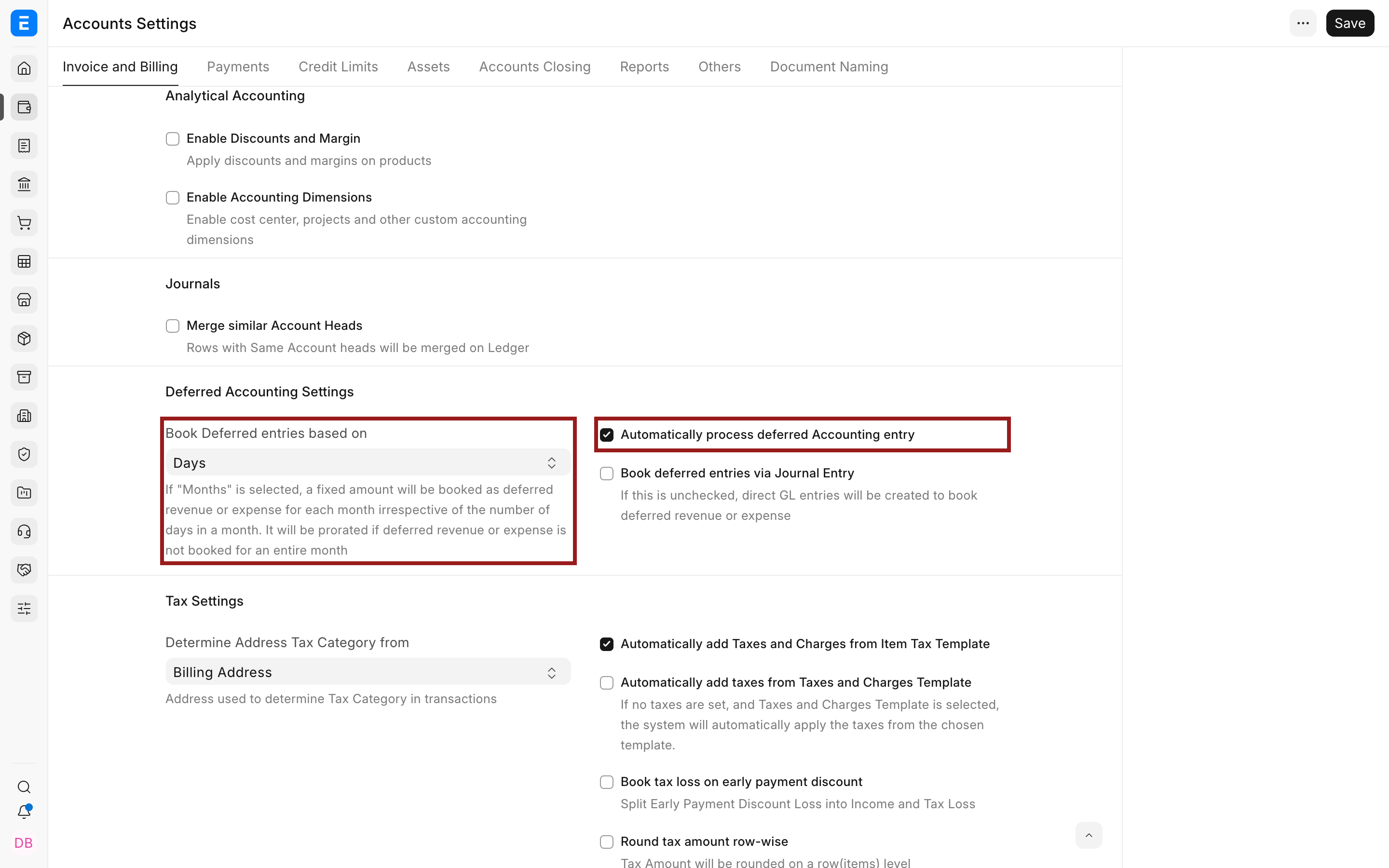
| Setting | What it controls |
|---|---|
| Book Deferred entries based on | Selects Days or Months as the recognition basis |
| Automatically process deferred Accounting entry | Allows the scheduled process to book eligible recognition entries |
| Book deferred entries via Journal Entry | Creates Journal Entry documents instead of posting the recognition directly to the General Ledger |
| Submit Journal entries | Automatically submits generated Journal Entries; if cleared, they remain Draft for review |
Days or months
With Days, ERPNext allocates the amount according to the number of service days falling in each period. This produces different amounts for months of different lengths.
The original example remains useful: if $12,000 covers 12 months, a 30-day month may recognize about $986.30 and a 31-day month about $1,019.17, depending on the exact service dates. The total across the complete period remains $12,000.
With Months, a complete 12-month term normally recognizes $1,000 per month. ERPNext still prorates a partial first or last month when the service does not cover the whole month.
Choose one policy and apply it consistently. Changing the setting affects how future processing calculates eligible schedules.
Direct ledger entries or Journal Entries
Direct posting creates the recognition entries without a separate Journal Entry document. This is simpler when your team trusts the automated calculation and reviews results through the General Ledger and deferred report.
Journal Entry posting gives each recognition batch a document that can be reviewed. When Submit Journal entries is not selected, generated Journal Entries remain Draft and do not affect the ledger until someone submits them. This adds control but also creates an operational review step.
Enable the Item
Open the service Item and select Enable Deferred Revenue, Enable Deferred Expense, or both when the same service can be sold and purchased. The optional month counts can supply a standard duration, but the invoice row's service dates determine the actual recognition period.
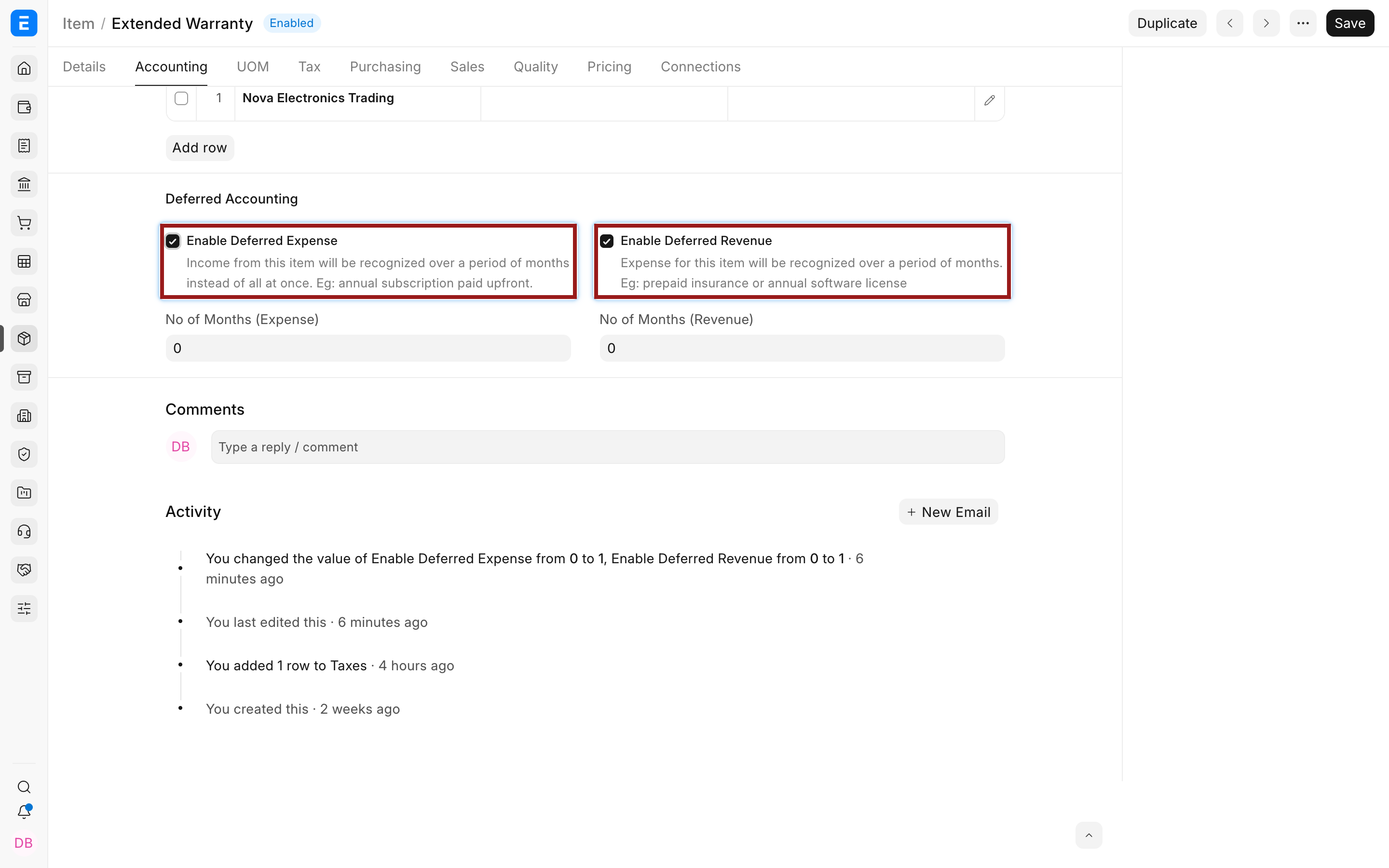
Enabling an Item does not post anything. The accounting effect begins when a submitted Sales Invoice or Purchase Invoice contains an enabled row with a valid deferred account and service period.
Complete the invoice row
In a Sales Invoice or Purchase Invoice, add the Item, then select the pencil icon on the Items row. Complete the deferred account and the Service Start Date and Service End Date in the row editor.
The service period belongs to each row. This allows one invoice to contain items with different recognition periods. Review every deferred row instead of assuming the dates apply to the whole invoice.
Process recognition entries
When automatic processing is enabled, ERPNext runs deferred accounting through a background process. You can also create and submit a Process Deferred Accounting document manually.
Select Income for deferred revenue or Expense for deferred expense. Set the posting date and the service date range that should be processed. Optionally select one deferred account to limit the run.
The process evaluates eligible submitted invoices and creates the recognition entries allowed by the selected settings. A Process Deferred Accounting record is also the processing log, so keep it available for audit and troubleshooting.
Verify the result
After processing, check all three layers:
- Open the invoice and confirm the deferred account and service dates on each affected row.
- Review the Deferred Revenue/Expense Report for invoiced, recognized, and pending amounts.
- Open the General Ledger for the deferred account and the final income or expense account.
The deferred balance should reduce as recognition is booked. The final income or expense should increase by the same amount. Across the full service term, the total recognized amount should equal the eligible invoice amount, subject to cancellations, returns, credits, and rounding.
Corrections and changes
Correct a Draft invoice before submission whenever possible. After submission, use the supported cancellation and amendment process rather than editing ledger entries directly. If the service stops early, use the row's Service Stop Date where the transaction and version support it, then process and verify the revised schedule.
Do not post a manual balancing Journal Entry merely to make the deferred report look correct. First find whether the cause is a missing account, wrong service date, unsubmitted generated Journal Entry, disabled automatic processing, an excluded processing range, or an amended invoice.
Troubleshooting
| Problem | What to check |
|---|---|
| No deferred fields appear on the invoice row | Confirm the Item has the applicable deferred option enabled and reopen the row editor |
| Full income or expense posts immediately | Check the row-level enable option, deferred account, and service dates before submission |
| No monthly entry appears | Check automatic processing, background jobs, the processing range, and Draft Journal Entries |
| Amounts differ by month | Confirm whether Days is selected; different month lengths produce different allocations |
| Deferred report and ledger differ | Check document status, filters, service dates, generated entries, cancellations, and posting dates |
FAQs
Is deferred accounting the same as an advance payment?
No, an advance payment records cash received or paid before it is allocated. Deferred accounting controls when invoice income or expense is recognized. A transaction can involve both concepts, but they solve different accounting problems.
Can I defer only one line on an invoice?
Yes, deferred controls and service dates are stored on each invoice Item row. Other rows can post normally.
Should I use days or months?
Use the basis required by your accounting policy. Days follows the exact service days in each period. Months produces equal complete-month allocations and prorates partial months.
Why are generated Journal Entries still Draft?
Book deferred entries via Journal Entry is enabled but Submit Journal entries is not. Review and submit the generated documents, or change the setting only after approving the control implications.
Can I change the account or service dates after submission?
Use the supported cancellation, amendment, or service-stop workflow. Directly changing posted accounting data can break the relationship between the invoice, deferred report, and General Ledger.