


















Accounting for Bad Debts
Record a bad debt when a customer receivable is no longer expected to be collected. The write-off should close or reduce the specific Sales Invoice, post the loss to an approved expense account, and preserve the Customer and invoice references for an auditable trail.
The example below writes off USD 500 from Northstar Retail. The demo company uses Write Off - NET as its approved expense account. Your organization may instead use an account named Bad Debt Expense.
Before you begin
Complete your collection and approval process first:
- Review the Customer's Accounts Receivable, Credit Notes, unallocated payments, disputes, and Dunning history.
- Confirm the approved write-off amount, accounting date, Customer, and Sales Invoice.
- Confirm which expense account your accountant wants to use. Create a non-group expense account such as Bad Debt Expense if one does not already exist.
- Keep the approval evidence ready to attach to the Journal Entry.
If the amount is being reduced because of a return, pricing dispute, or commercial concession, use a Credit Note instead. A Credit Note can correct revenue and taxes; a bad-debt Journal Entry records a collection loss.
Understand the accounting entry
The Journal Entry must balance:
| Row | Account | Debit | Credit | Result |
|---|---|---|---|---|
| 1 | Bad Debt Expense or Write Off | 500 | 0 | Records the loss in the Profit and Loss statement |
| 2 | Receivable account | 0 | 500 | Reduces the amount owed by the Customer |
The receivable row must also contain the Customer, Reference Type, and Reference Name. These fields tell ERPNext which customer's balance and which invoice outstanding amount should be reduced.
Create the Journal Entry
- Go to Accounting > General Ledger, Journals and Adjustments > Journal Entry.
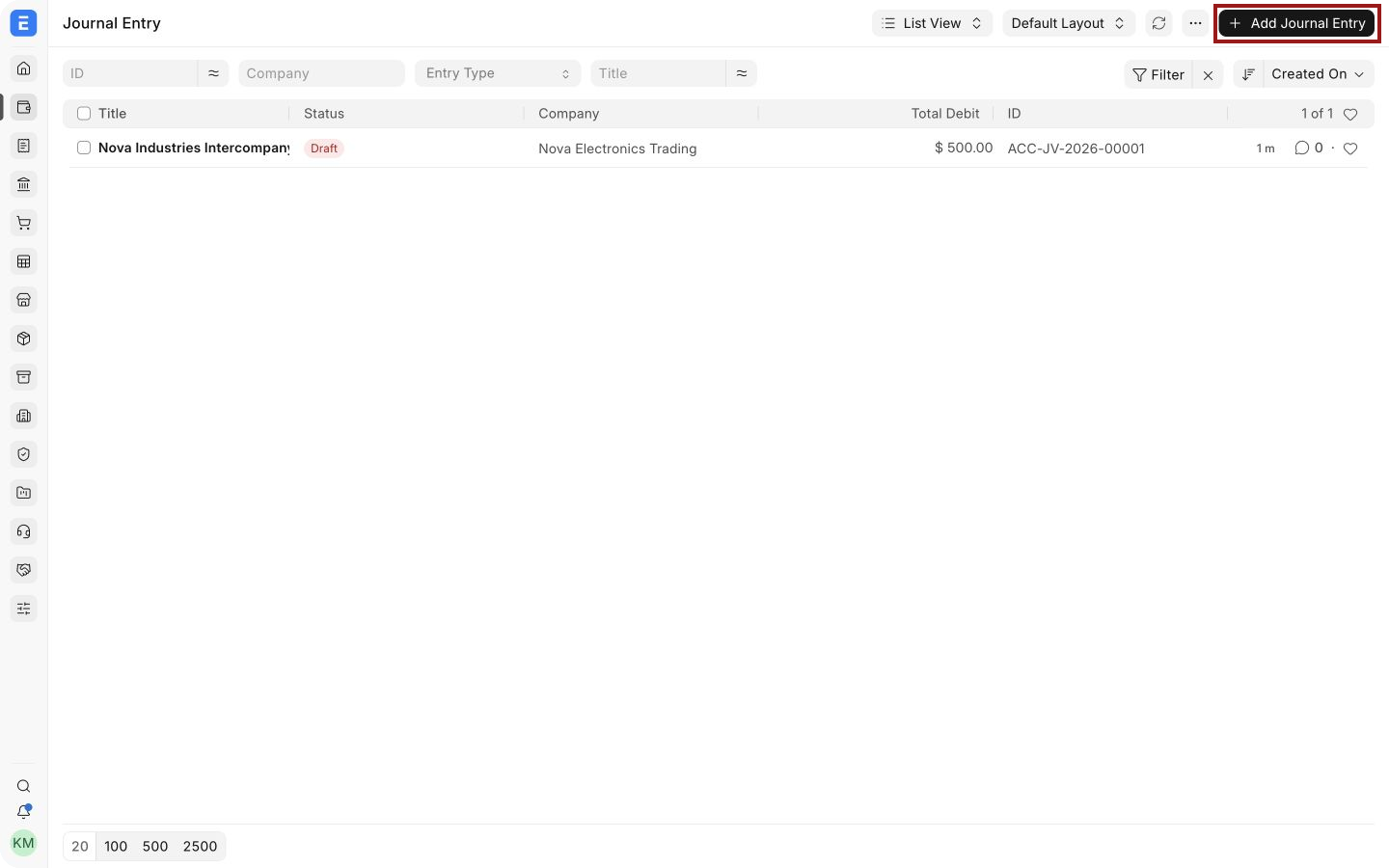
- Select Add Journal Entry, highlighted below.
- Select the Company and Posting Date. Keep Entry Type as Journal Entry unless your accounting policy requires a different type.
- In Accounting Entries, add the expense row. Select Bad Debt Expense or your approved write-off account and enter the approved amount in Debit.
- Add a second row. Select the Company's Receivable account and enter the same amount in Credit.
- Confirm that Total Debit equals Total Credit.
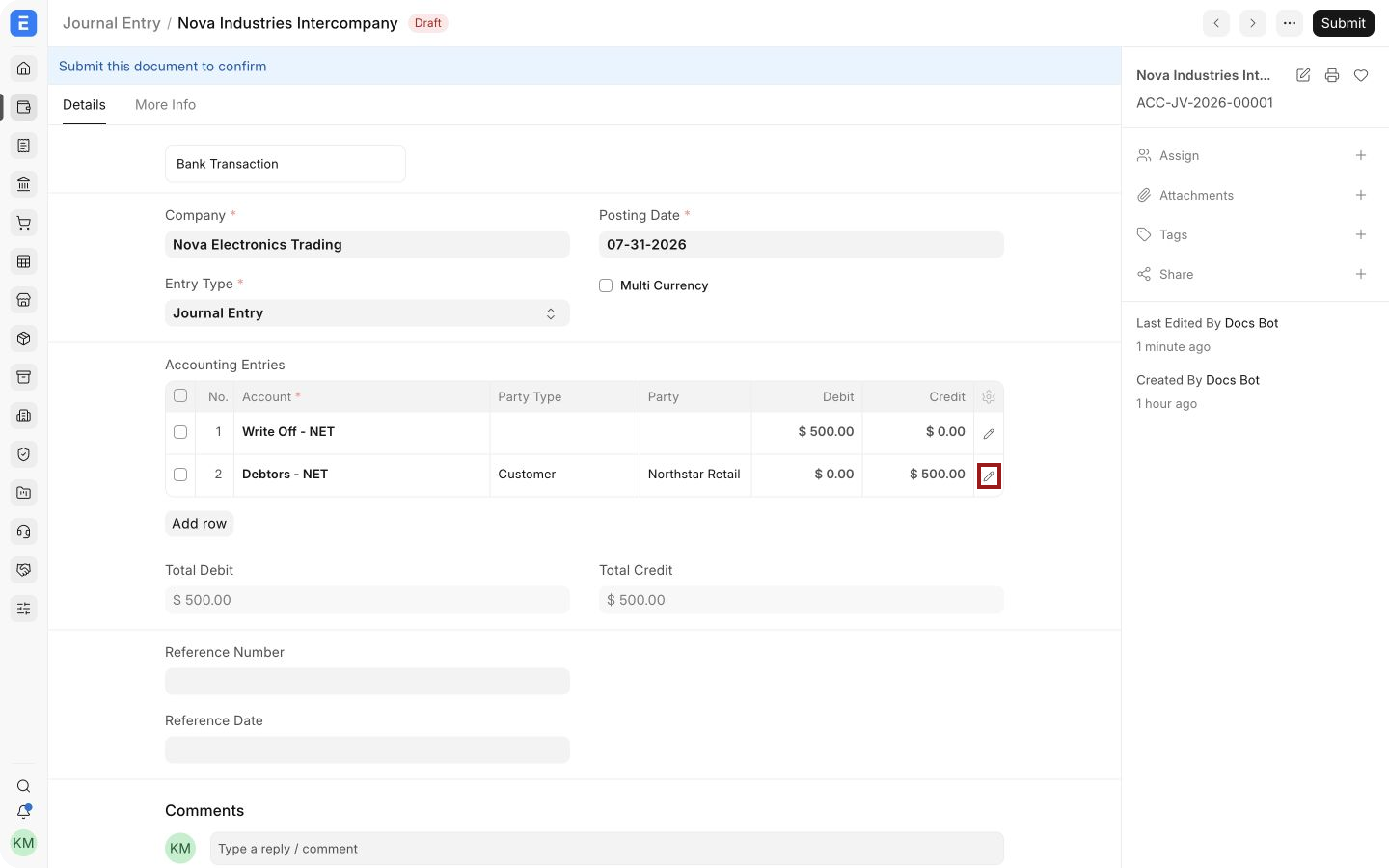
The example uses Write Off - NET for the debit and Debtors - NET for the credit. On the receivable row, select the highlighted pencil icon to open the full child-row editor. Fields for the Customer and invoice reference are available inside this editor.
Identify the Customer on the receivable row
In the child-row editor:
- Confirm that Account contains the Receivable account used by the Sales Invoice.
- Set Party Type to Customer.
- Select the Customer whose debt is being written off in Party.
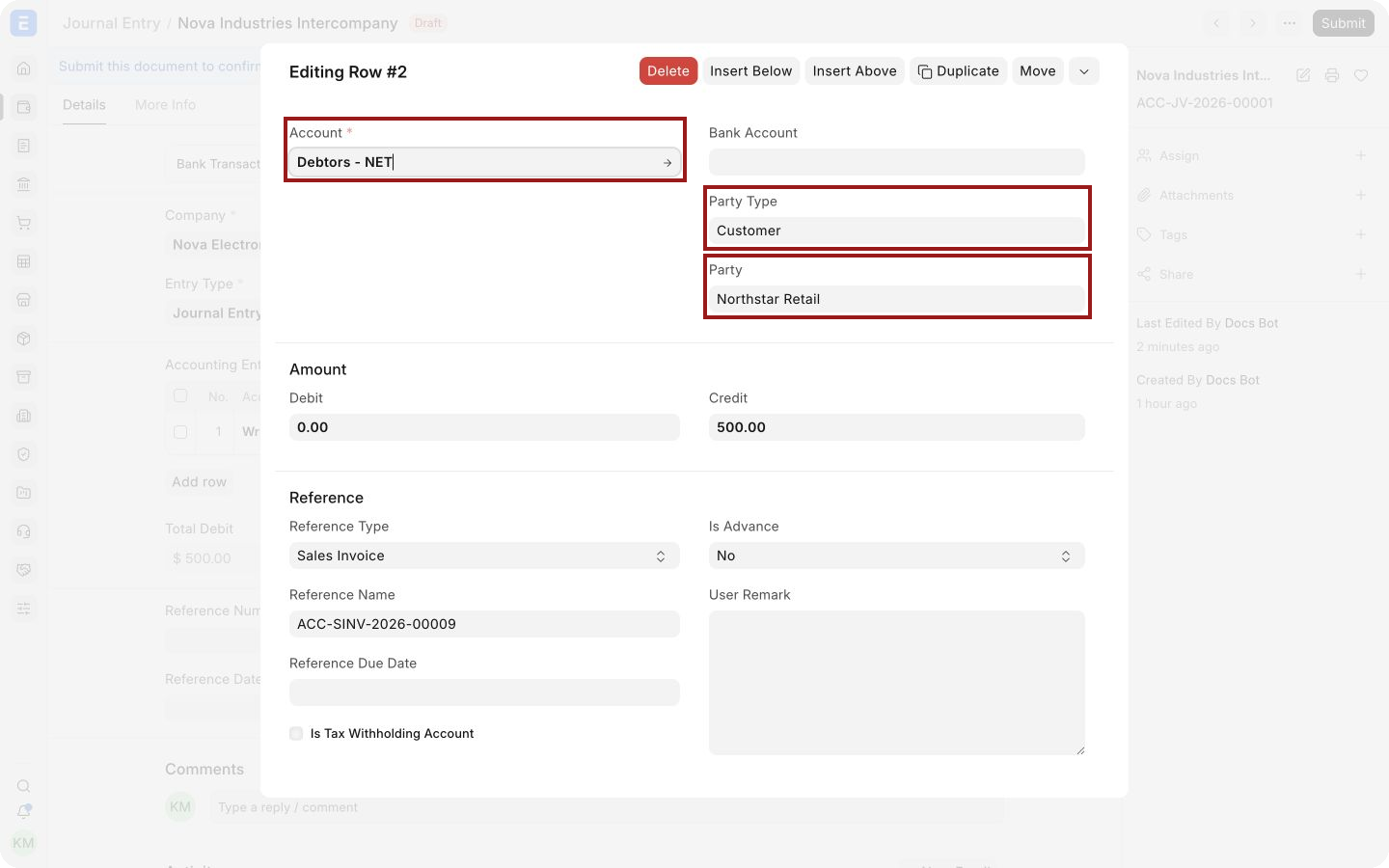
The highlighted fields identify Northstar Retail inside the shared receivable control account. Without the Party values, ERPNext cannot apply the write-off to the customer's outstanding balance correctly.
Link the write-off to the Sales Invoice
Continue in the same child-row editor:
- Confirm that the write-off amount is entered in Credit.
- Set Reference Type to Sales Invoice.
- Select the invoice being written off in Reference Name.
The highlighted reference fields link the USD 500 credit to Sales Invoice ACC-SINV-2026-00009.
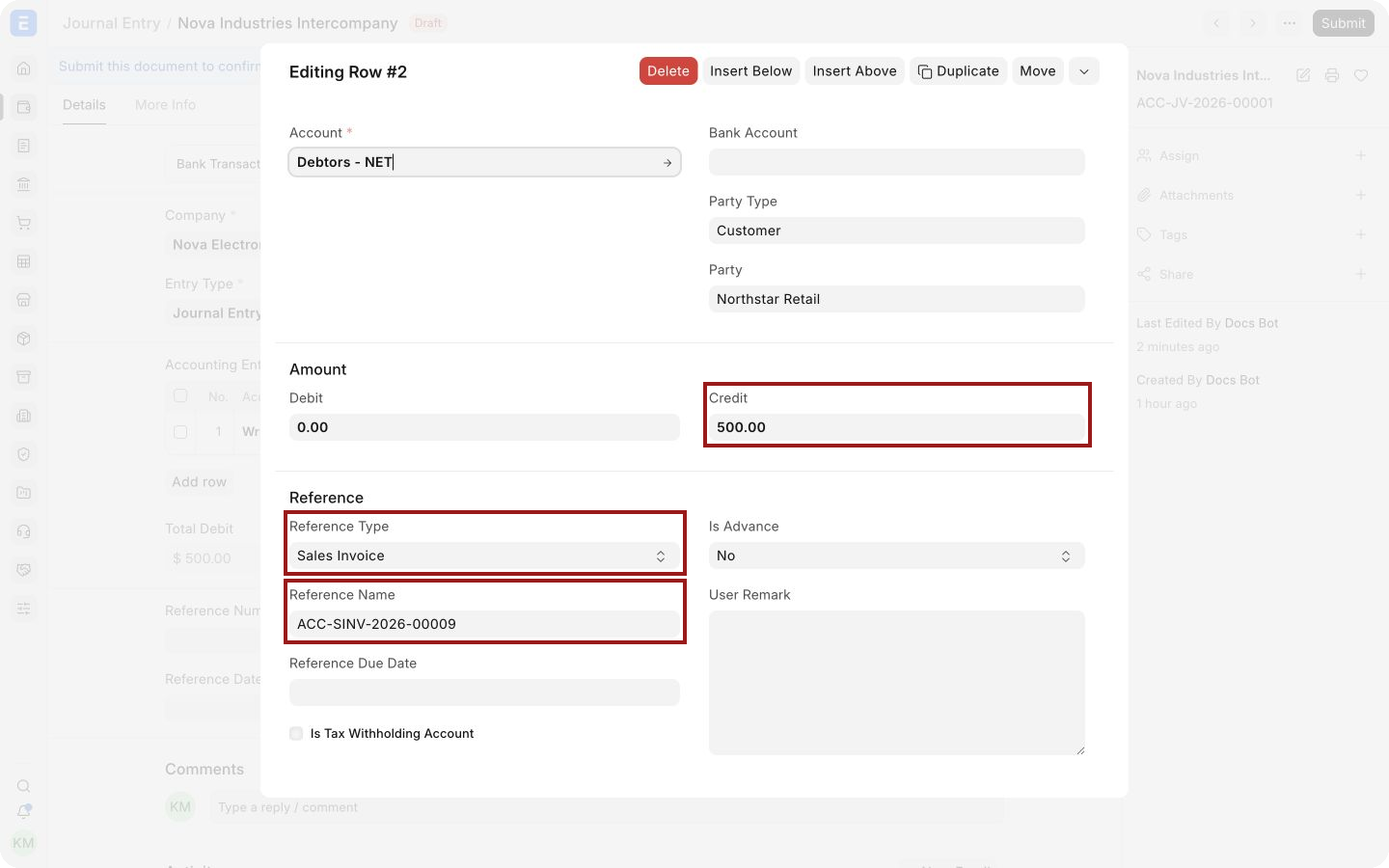
This reference is essential. A Journal Entry can balance the General Ledger without it, but the Sales Invoice may remain outstanding in the Accounts Receivable report.
Save and submit
- Close the child-row editor and recheck both account rows.
- Add a clear User Remark, such as
Approved partial bad debt write-off for ACC-SINV-2026-00009. - Attach the approval, collection history, or other supporting evidence.
- Save the Journal Entry.
- Review the accounts, Customer, invoice reference, and posting date, then select Submit.
Submitting creates General Ledger entries. It does not create stock movement and does not alter the original Sales Invoice's item, revenue, or tax values.
Partial write-off
For a partial bad debt, enter only the approved amount in both Journal Entry rows. The invoice remains outstanding for the balance.
For example, if an invoice has USD 1,200 outstanding and USD 500 is written off, its expected remaining outstanding amount is USD 700. Check the report after submission rather than assuming the reference was applied correctly.
If the customer pays later
Do not edit or cancel a valid submitted write-off merely because the Customer later pays. Record the recovery using a new entry and the recovery income or expense account required by your accounting policy. Preserve a clear reference to the Customer, original invoice, and bad-debt Journal Entry.
Consult your accountant when a recovery affects tax reporting or a closed accounting period.
Verify the result
After submission, check the General Ledger and Accounts Receivable report using the same Company, posting date, and currency.
Confirm that:
- the Sales Invoice outstanding amount is reduced by the write-off;
- the bad-debt or write-off expense account is debited;
- the Receivable account is credited;
- the ledger entries retain the Customer party;
- the receivable entry retains the Sales Invoice reference;
- no stock movement occurred.
Troubleshooting
The Sales Invoice still appears fully outstanding
Open the receivable row and confirm Party Type, Party, Reference Type, and Reference Name. Also check that the credit amount was entered on the receivable row rather than the expense row.
The Customer or invoice cannot be selected
Confirm that the Receivable account, Customer, Sales Invoice, and Journal Entry belong to the same Company. Check the invoice currency and whether the selected account permits the required currency.
Total Debit and Total Credit do not match
Enter the same approved write-off amount as a debit to the expense account and a credit to the Receivable account. Include any exchange difference required for a foreign-currency invoice according to your accounting policy.
Accounts Receivable does not match the Receivable control account
Look for Journal Entries posted to a Receivable account without a Party or invoice reference. Compare the same Company, date, currency, and account in both reports.
Frequently asked questions
Can I write off the full invoice?
Y
es. Credit the Receivable account for the full outstanding amount and link the row to that Sales Invoice. Verify that the invoice becomes fully settled after submission.
Can I write off several invoices in one Journal Entry?
Use a separate receivable row for each invoice reference. This keeps the allocation and audit trail clear.
Does a bad-debt Journal Entry correct tax or revenue?
It normally records a collection loss and reduces the receivable. Use a Credit Note when the underlying sale, price, return, or tax must be corrected.