


















Purchase Cycle Ledger Impact
The purchase cycle begins when you commit to buy from a supplier and ends when the supplier is paid. Not every document creates an accounting entry. A Purchase Order records the commitment, while the Purchase Receipt, Purchase Invoice, and Payment Entry record the inventory, liability, expense, and cash effects that follow.
The examples below use common account names and exclude taxes to keep the entries easy to follow. Your account names may differ. ERPNext uses the accounts configured for the Company, Item, Item Group, warehouse, and transaction.
Understand when the ledger changes
ERPNext creates General Ledger entries when an accounting or stock transaction is submitted. Saving a draft does not affect the ledger.
| Document | Typical ledger impact | What it represents |
|---|---|---|
| Purchase Order | No General Ledger entry | A commitment to buy goods or services at an agreed quantity, rate, and schedule. |
| Purchase Receipt for stock items | Debit Stock In Hand; credit Stock Received But Not Billed | Inventory has been received, but the supplier invoice may not have arrived. |
| Purchase Invoice against a Purchase Receipt | Debit Stock Received But Not Billed; credit Accounts Payable | The temporary receipt liability is cleared and the confirmed amount becomes payable to the supplier. |
| Purchase Invoice for a service | Debit the relevant Expense; credit Accounts Payable | The service cost is recognized and the supplier is owed the invoice amount. |
| Payment Entry, Pay | Debit Accounts Payable; credit Bank or Cash | The supplier liability is reduced and money leaves the company. |
The debit and credit are two sides of the same event. For example, paying a supplier reduces Accounts Payable, so Accounts Payable is debited. It also reduces Bank, so Bank is credited.
Example 1: Manufacturing company purchasing stock items
Assume a manufacturer purchases five stock-controlled electronic units from Apex Devices at $520 each, for a total of $2,600. The same accounting flow applies when the purchased stock consists of raw materials, components, consumables, or finished goods.
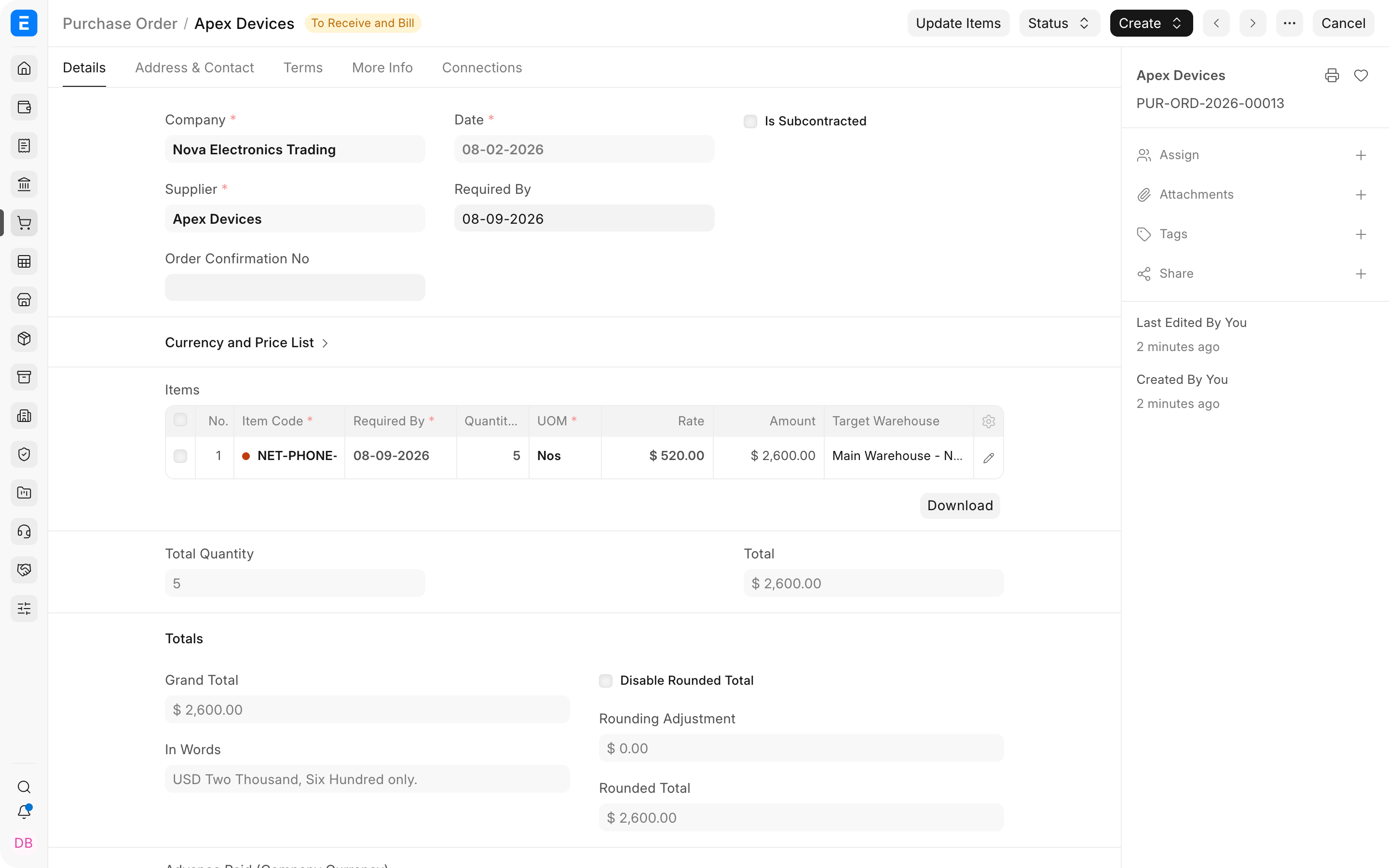
1. Submit the Purchase Order
The Purchase Order records what the company agreed to buy, the supplier, rate, warehouse, and expected receipt date. It does not increase inventory, create an expense, or create a supplier payable.
Ledger impact: None.
2. Submit the Purchase Receipt
The Purchase Receipt confirms that the stock has physically arrived. ERPNext increases the stock asset and records an equal temporary liability in Stock Received But Not Billed.
| Account | Debit | Credit | Explanation |
|---|---|---|---|
| Stock In Hand | $2,600.00 | Inventory controlled by the company increases. | |
| Stock Received But Not Billed | $2,600.00 | The goods have arrived, but the supplier invoice is not yet represented as a confirmed payable. |
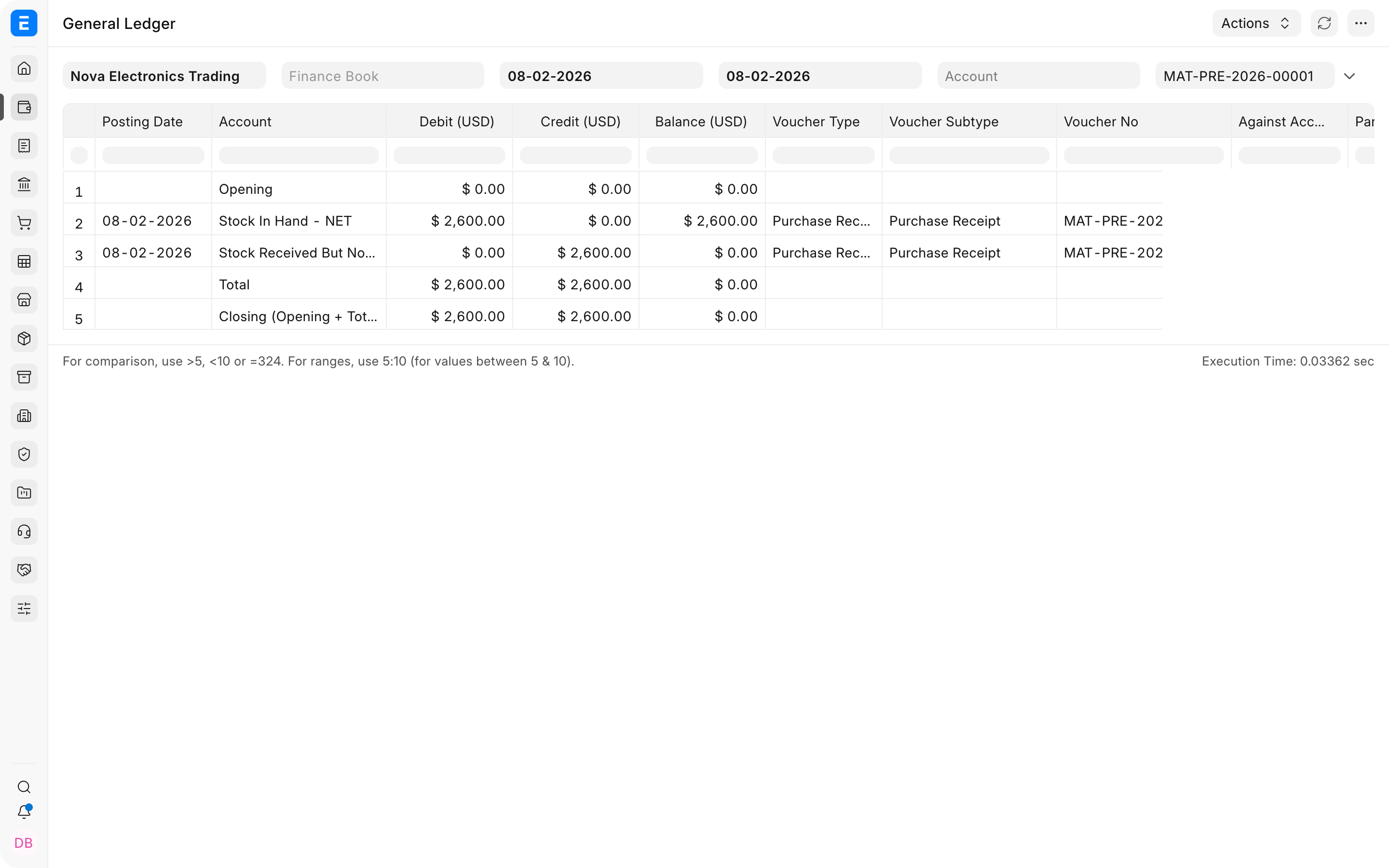
Stock Received But Not Billed is a clearing account. It allows the physical receipt and the supplier invoice to be recorded on different dates without losing the liability created by the receipt.
3. Submit the Purchase Invoice
When the supplier invoice is recorded against the Purchase Receipt, ERPNext moves the amount from the temporary receipt liability to the supplier's payable account.
| Account | Debit | Credit | Explanation |
|---|---|---|---|
| Stock Received But Not Billed | $2,600.00 | The temporary liability created by the Purchase Receipt is cleared. | |
| Accounts Payable (Creditors) | $2,600.00 | The confirmed amount is now owed to the supplier. |
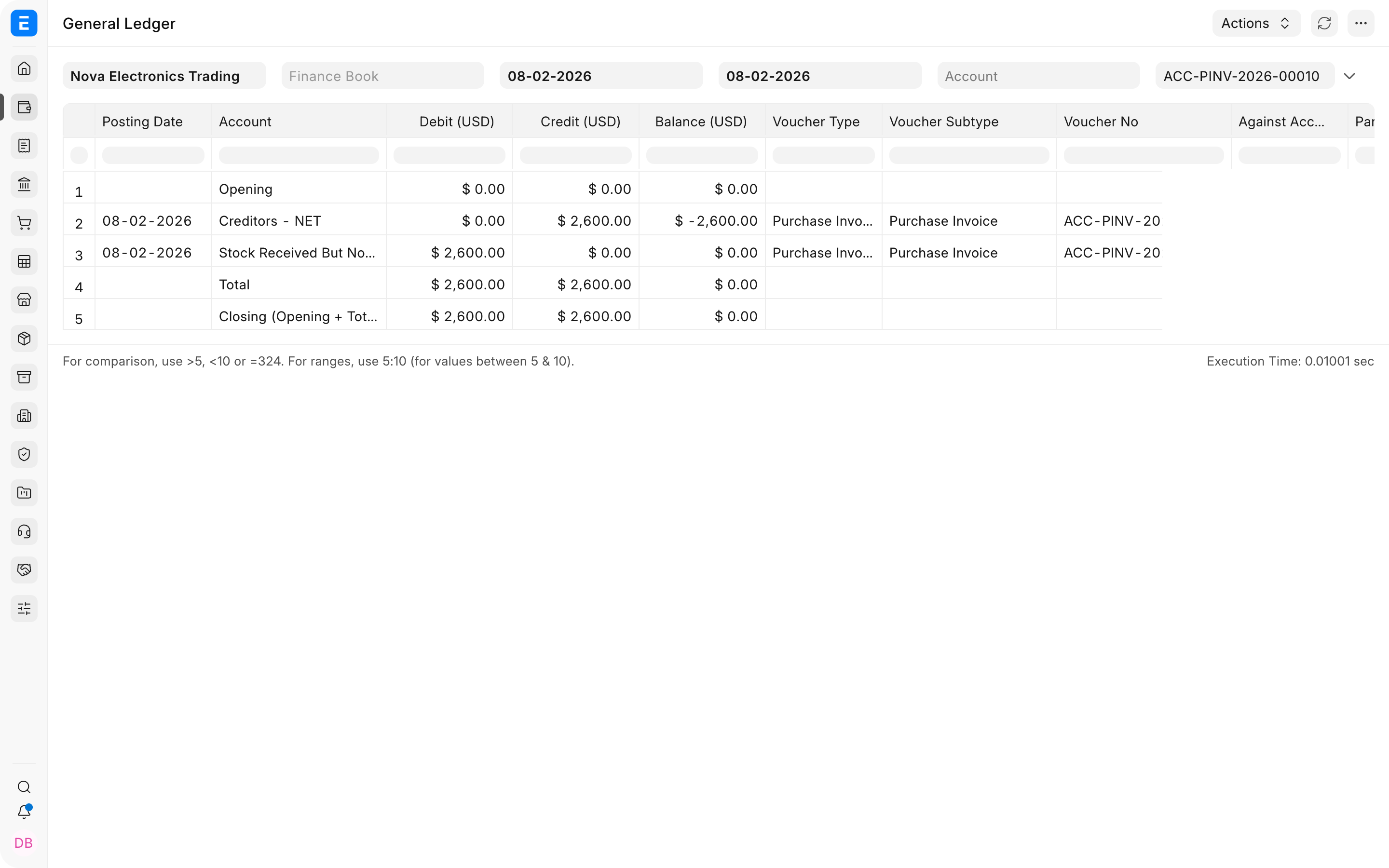
The Stock In Hand debit is not repeated on the invoice because the Purchase Receipt already increased inventory. Across the receipt and invoice together, Stock In Hand remains debited and Accounts Payable remains credited, while Stock Received But Not Billed returns to zero.
4. Pay the supplier
Submit a Pay-type Payment Entry and allocate it to the Purchase Invoice.
| Account | Debit | Credit | Explanation |
|---|---|---|---|
| Accounts Payable (Creditors) | $2,600.00 | The amount owed to the supplier is cleared. | |
| Bank | $2,600.00 | Money leaves the company's bank account. |
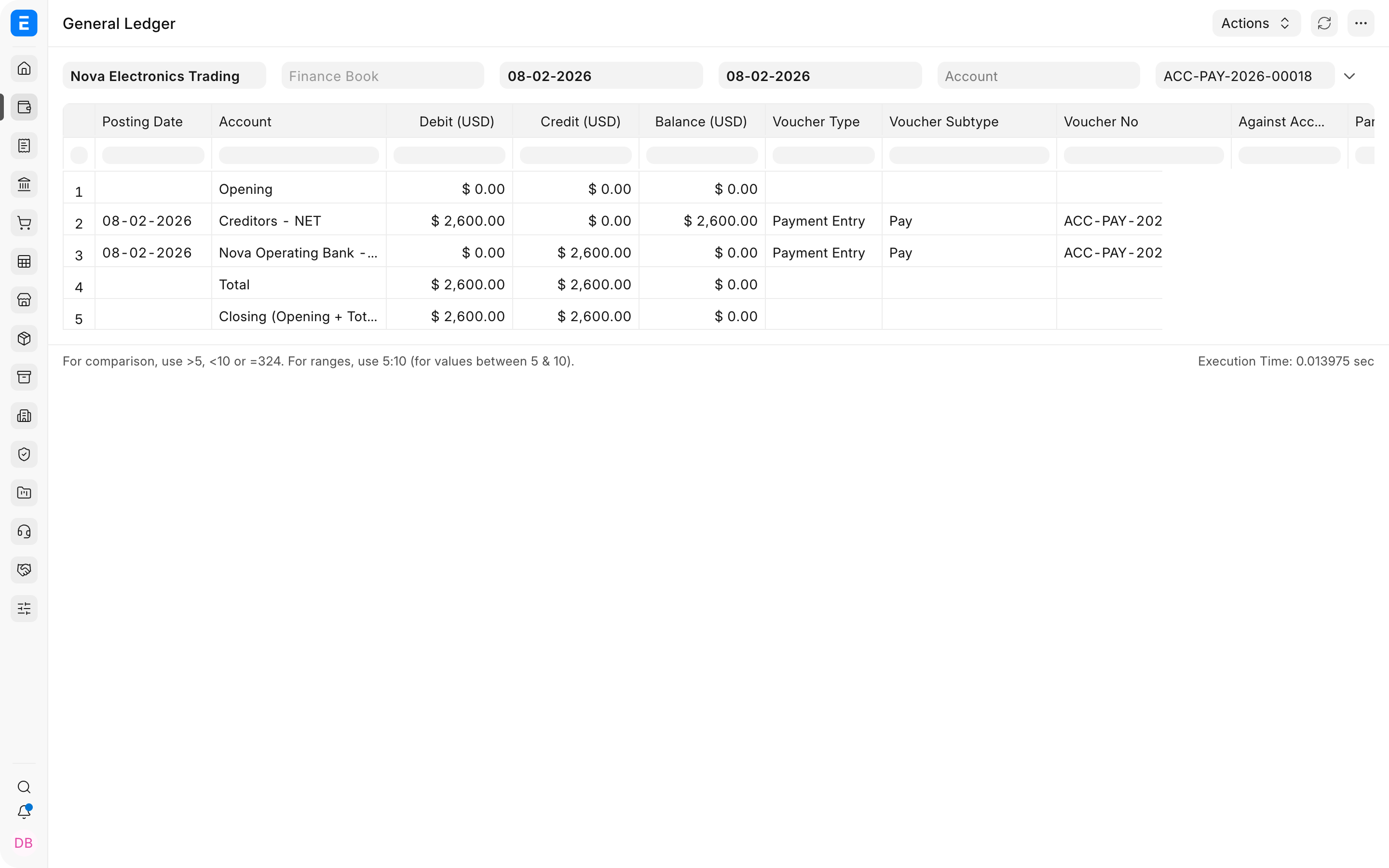
The Payment Entry does not increase inventory or recognize the purchase again. Those effects were already recorded by the Purchase Receipt and Purchase Invoice. The payment only settles the supplier liability.
Example 2: Services company purchasing a service
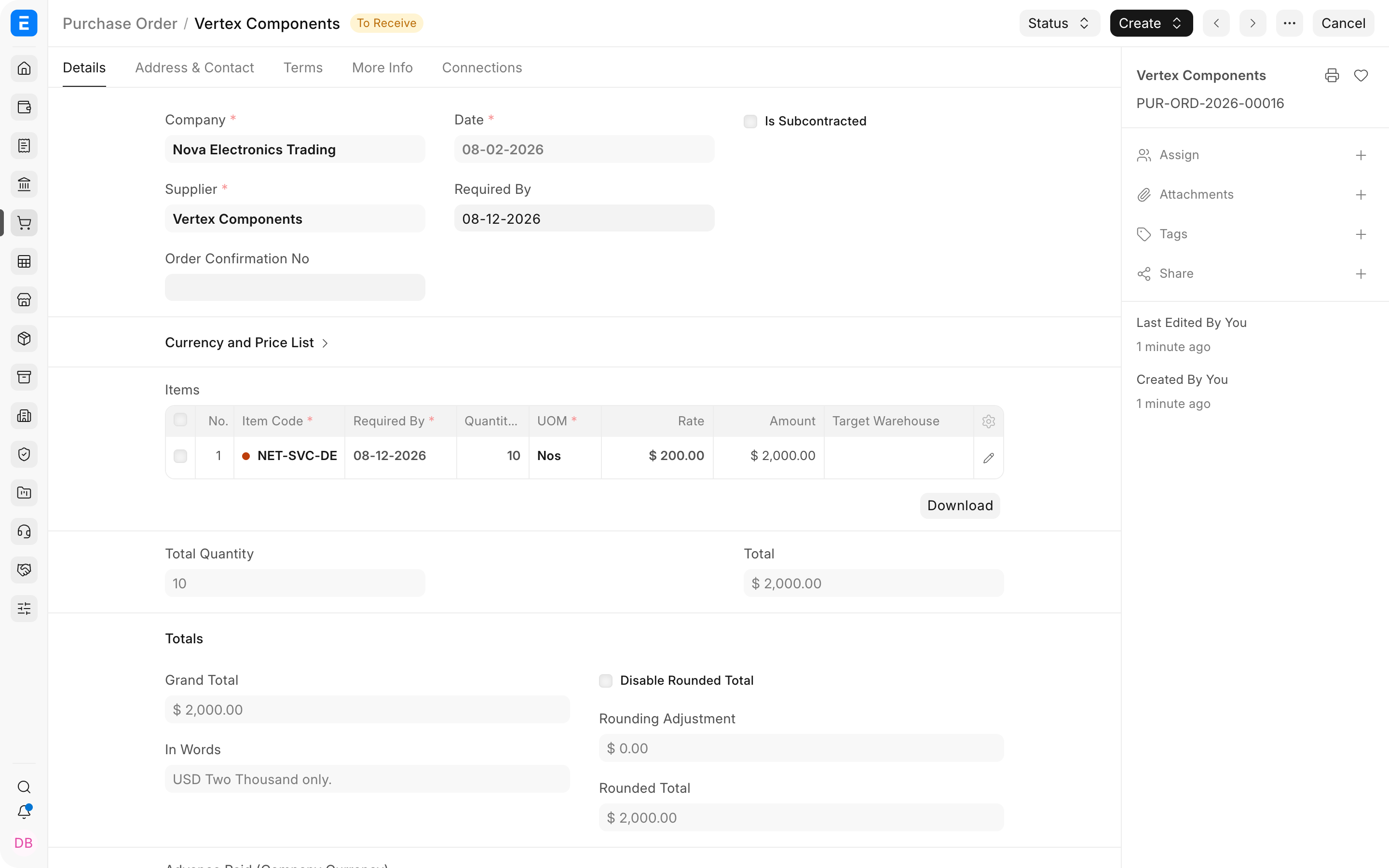
Assume a services company purchases ten device-setup support sessions from Vertex Components at $200 each. The total supplier charge is $2,000.
A non-stock service does not increase inventory, so a stock Purchase Receipt is normally unnecessary. The company can move from Purchase Order to Purchase Invoice and Payment Entry. Use a receipt or acceptance workflow only when the business needs a separate operational confirmation that the service was delivered.
1. Submit the Purchase Order
The Purchase Order records the scope, quantity, rate, supplier, and expected completion date. It does not create an expense or supplier payable.
Ledger impact: None.
2. Submit the Purchase Invoice
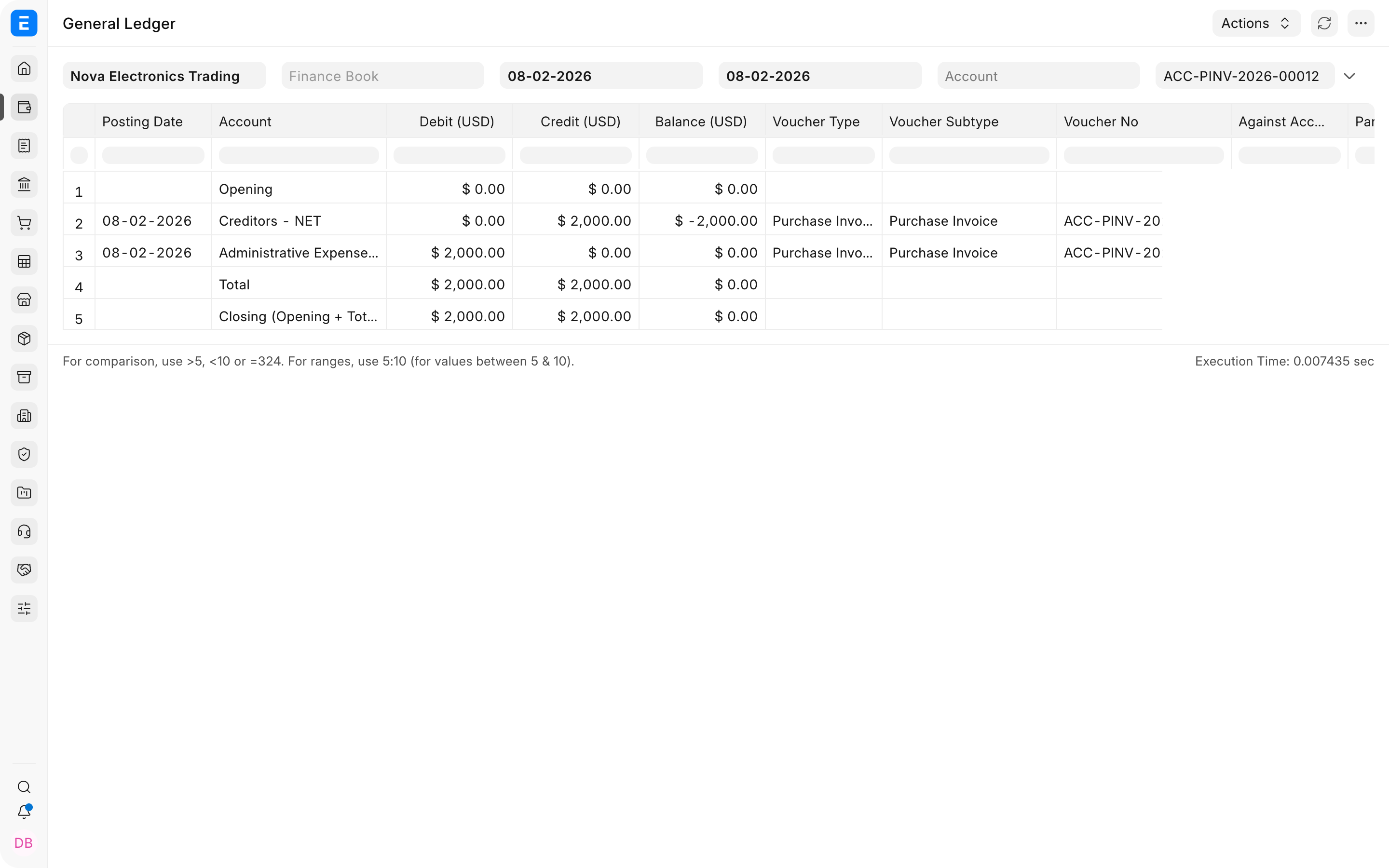
When the supplier invoice is accepted, ERPNext recognizes the service expense and creates the supplier liability.
| Account | Debit | Credit | Explanation |
|---|---|---|---|
| Administrative or Professional Services Expense | $2,000.00 | The service cost is recognized in the period. | |
| Accounts Payable (Creditors) | $2,000.00 | The company now owes the supplier. |
Choose the expense account that describes the service and supports useful reporting. For example, legal work may use Legal Expenses, rent may use Office Rent, and outsourced implementation may use Professional Services or an appropriate project expense account.
3. Pay the supplier
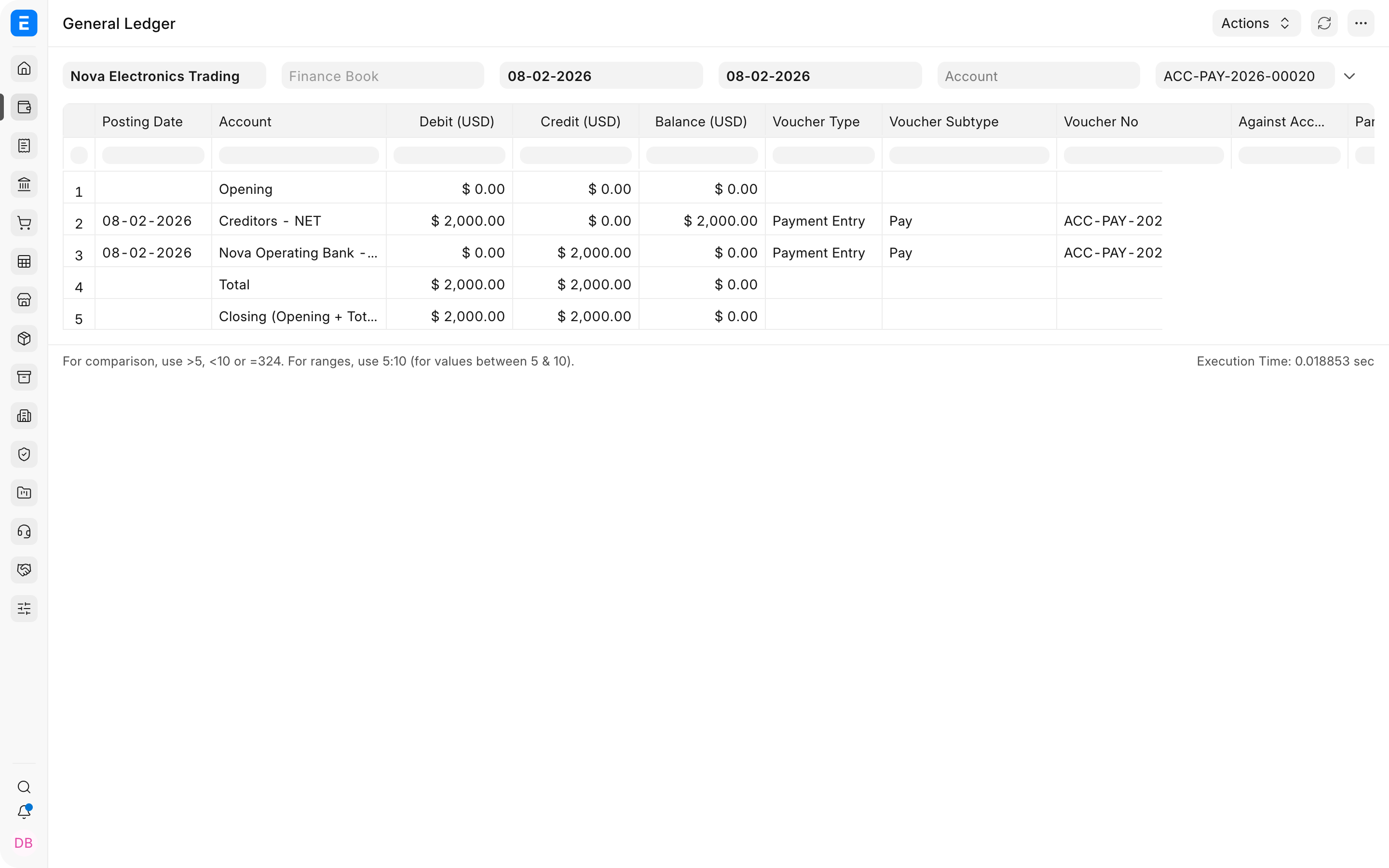
The supplier payment has the same basic effect as it does for a stock purchase.
| Account | Debit | Credit | Explanation |
|---|---|---|---|
| Accounts Payable (Creditors) | $2,000.00 | The supplier liability is cleared. | |
| Bank | $2,000.00 | The bank balance decreases. |
Compare the two workflows
| Stage | Manufacturing or stock purchase | Service purchase |
|---|---|---|
| Purchase Order | No ledger impact | No ledger impact |
| Receipt | Debits Stock In Hand and credits Stock Received But Not Billed | Usually no stock receipt or inventory posting |
| Invoice | Debits Stock Received But Not Billed and credits Accounts Payable | Debits the selected Expense and credits Accounts Payable |
| Payment | Debits Accounts Payable and credits Bank | Debits Accounts Payable and credits Bank |
If a stock-item Purchase Invoice is submitted with Update Stock enabled, ERPNext can combine the stock effect of a Purchase Receipt with the payable effect of the Purchase Invoice. The simplified posting is debit Stock In Hand and credit Accounts Payable. This is useful for direct purchases, but it removes the separate receipt document from the audit trail.
If a Purchase Invoice is created directly without a Purchase Order, it still creates its normal ledger entries. What is missing is the earlier procurement commitment, approval trail, expected delivery tracking, and comparison of ordered, received, and invoiced quantities.
Frequently asked questions
Does submitting a Purchase Order affect the General Ledger?
- A Purchase Order records a procurement commitment. It does not create inventory, expense, tax, payable, or bank entries.
Why is Stock Received But Not Billed used?
It bridges the timing difference between receiving stock and receiving the supplier invoice. The Purchase Receipt credits it, and the linked Purchase Invoice debits it. The account should clear when receipts and invoices match.
What changes when purchase tax is included?
Accounts Payable is credited for the full supplier invoice. The purchase or expense amount is debited to its normal account, and recoverable input tax is debited to the configured tax asset account. Non-recoverable tax may instead become part of the item cost or expense, depending on configuration and local rules.
Why does Stock Received But Not Billed have a remaining balance?
Check for Purchase Receipts that have not yet been invoiced, Purchase Invoices that do not reference the correct receipts, quantity or rate differences, returns, and backdated cancellations. Use the Purchase Receipt and Purchase Invoice references to reconcile the difference.