


















Import Advances, Unallocated Payments, Bank, Stock and Asset Balances
These balances need specialized opening documents. Import them before the residual opening Journal Entry so their control-account balances are not duplicated.
Customer and Supplier advances
Prepare one row per advance with:
- party;
- receipt or payment date;
- currency and exchange rate;
- amount;
- bank or cash account;
- party account;
- legacy reference;
- order reference, if the allocation must be retained.
Create opening Payment Entries or use the approved opening-journal method for your version and process. Mark entries as opening where supported. Leave genuinely unallocated amounts unallocated so they can be reconciled against future invoices.
After posting, compare party-wise advances with the source schedule and check the General Ledger.
Unallocated receipts and payments
Do not convert unallocated money into an invoice simply to make ageing agree. Import the payment against the correct party and leave the unallocated amount available.
Use the Payment Reconciliation Tool after the related opening invoices exist if legacy allocations must be recreated.
Bank and cash balances
Create the Bank, Bank Account, ledger account, and Mode of Payment before import.
The General Ledger bank balance at cutover should match the reconciled legacy book balance, not necessarily the statement closing balance. Carry unreconciled deposits, withdrawals, checks, and fees in the reconciliation schedule.
Import each cash account separately and obtain a signed cash count where applicable.
Stock quantities and values
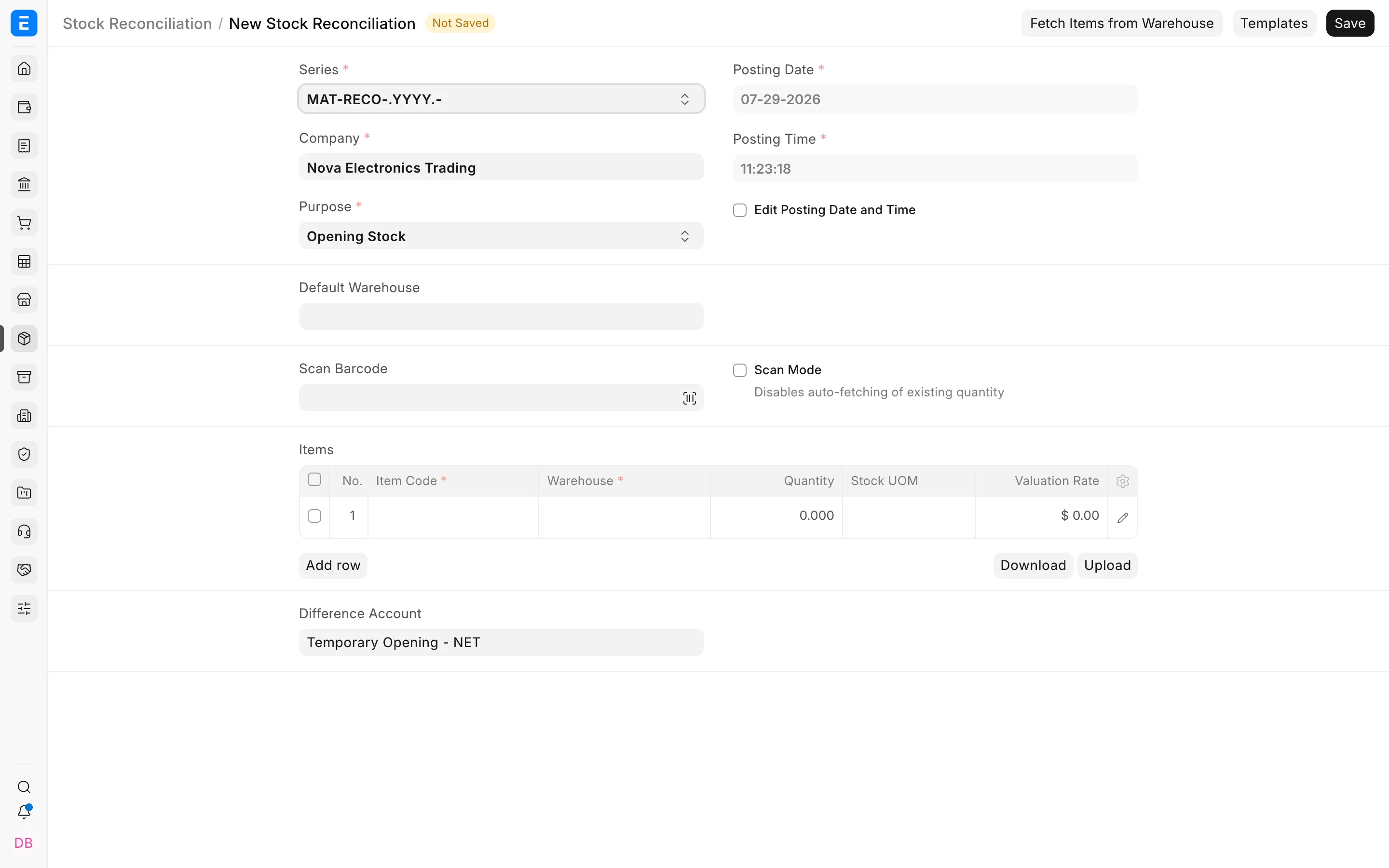
Use Stock Reconciliation with an opening purpose:
- Select the cutover date and Company.
- Add each Item and Warehouse.
- Enter opening quantity.
- Enter valuation rate.
- Verify the total stock value.
- Submit after quantity and value totals match the approved stock report.
Do not import stock value again through the opening Journal Entry when perpetual inventory creates the accounting balance.
Test serial numbers, batches, negative stock, alternative UOMs, and multiple Warehouses before the final import.
Fixed assets
Import each active asset with:
- Asset Category;
- Company;
- gross purchase amount;
- purchase and available-for-use dates;
- accumulated depreciation;
- opening number of booked depreciations;
- remaining useful life or depreciation periods;
- location and custodian;
- finance book;
- asset and accumulated depreciation accounts.
Verify:
Gross cost - accumulated depreciation = opening net book value
After import, inspect the depreciation schedule. The next depreciation date and remaining amount must agree with the source asset register.
Loans, deposits, accruals, and prepayments
Use the supported operational record when future schedules or allocations are required. Otherwise include the approved balance in the opening Journal Entry with the correct party, Cost Center, Project, and dimensions.
For deferred revenue and expense, decide whether to recreate the remaining schedule or bring only the cutover balance. Test automatic future recognition.
Foreign-currency balances
Retain foreign amount and company-currency amount. Use the approved cutover rate. Reconcile both values and keep exchange differences separate from operating balances.
Reconciliation
| Balance | ERPNext report |
|---|---|
| Advances and unallocated payments | Party ledger and Payment Reconciliation |
| Bank | Bank Reconciliation and General Ledger |
| Cash | General Ledger and cash count |
| Stock | Stock Balance and Stock Ledger |
| Assets | Fixed Asset Register and General Ledger |