


















Why do my P&L, Balance Sheet or Trial Balance show unexpected numbers?
The Profit and Loss Statement, Balance Sheet, Trial Balance and Cash Flow read the same General Ledger, but each report uses its own filters, periods and rules. Most "wrong" numbers come from a filter or a setting, not from wrong entries. Find your symptom below.
A balance is negative or different on the Balance Sheet
The Balance Sheet shows the position on a date, so it must include everything posted before that date.
- Keep Accumulated Values on (the default). With it off, each column shows only the change during that period, and an account can show a negative value.
- Check Finance Book and Include Default FB Entries. With a finance book selected and the checkbox off, entries without a finance book are left out.
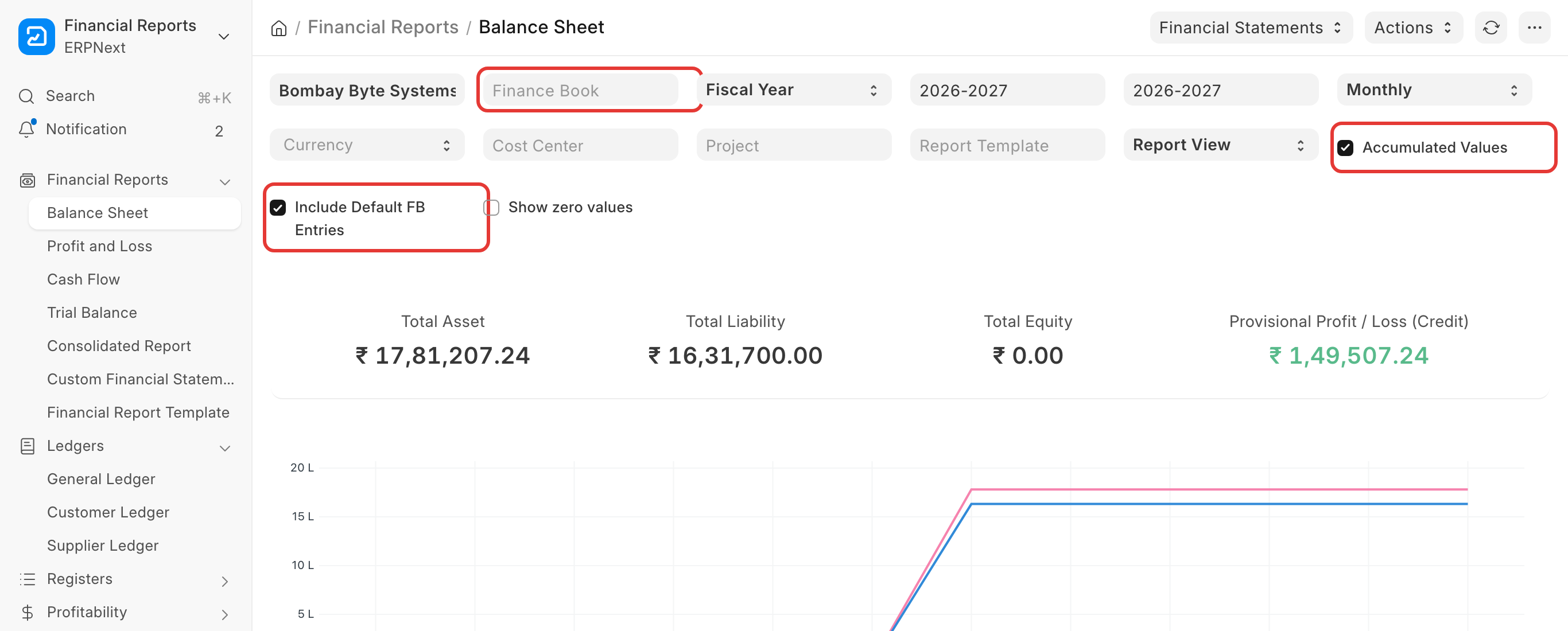
- Provisional Profit / Loss (Credit) is the profit of the open year. It is shown until you submit a Period Closing Voucher for the year.
An account is missing from the P&L or Balance Sheet
- Turn on Show zero values to see accounts without a balance.
- If the account is in the Trial Balance but not in the P&L or Balance Sheet, check its parent in the Chart of Accounts. An account under the wrong root type (for example an income account under an asset group) shows on the other report.
- If the tree looks right but the account is still missing, the tree's internal order may be broken after many deletions or renames. A System Manager can open Chart of Accounts and click ⋯ → Rebuild Tree.
Yearly periodicity splits my fiscal year
With Periodicity set to Yearly, the report makes columns of 12 months from the start date. If your fiscal year is longer than 12 months (for example a first year of 18 months), you get two columns for one year.
- Set Filter Based On to Date Range and give the fiscal year's start and end date, with Periodicity Yearly, to see one total; or
- Use Monthly or Quarterly and read the totals.
The Balance Sheet does not match the General Ledger
Compare the same thing in both reports:
| Check | Balance Sheet | General Ledger |
|---|---|---|
| Date | Balance on the end date, from the beginning | Opening on the From Date, plus the period |
| Finance book | Finance Book, Include Default FB Entries | Finance Book filter |
| Currency | Currency filter (company currency by default) | Currency filter, or account currency |
| Cancelled entries | never | only with Show Cancelled Entries |
If the totals still differ, open the General Ledger for the account with Categorize by set to Categorize by Voucher (Consolidated) and look for an entry dated outside the period, or posted to another company.
The Trial Balance changes after period closing
After a Period Closing Voucher, the income and expense accounts are closed into the closing account. In the Trial Balance:
- With Period Closing Entry For Opening Balances (on by default): the next year's opening includes the closing entry, so income and expense open at zero.
- Period Closing Entry For Current Period (on by default): the closing entry of the selected year is shown, so income and expense close at zero, and the closing account carries the profit.
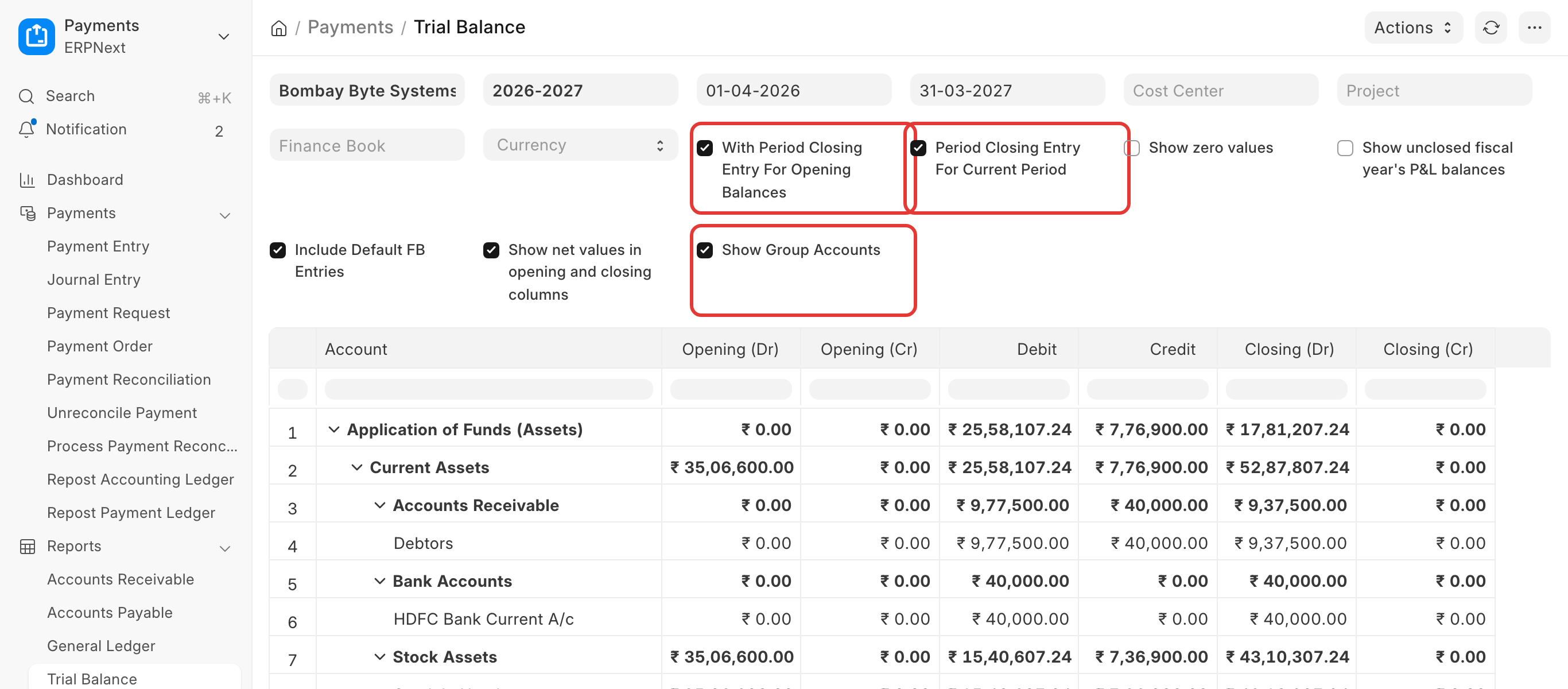
Turn the second filter off to see the year's income and expense balances before closing.
If the Balance Sheet shows a small Provisional Profit / Loss after closing, one voucher in that year has unequal debit and credit. Correct it with Repost Accounting Ledger, cancel the Period Closing Voucher, and submit it again.
Trial Balance totals or exports do not add up
- With Show Group Accounts on (the default), group accounts and their child accounts are both listed. The total row adds only the top accounts, so a sum of the whole column in a spreadsheet counts amounts twice. Turn Show Group Accounts off before you export, or sum only the leaf accounts.
- With Show net values in opening and closing columns on (the default), opening and closing show one net amount, in debit or credit. Turn it off to see both sides.
- The report runs within one fiscal year. A date outside it gives "From Date should be within the Fiscal Year. Assuming From Date = …" and the report uses the year's start instead.
The Trial Balance does not match Accounts Receivable or Payable
The Trial Balance reads every General Ledger entry of the Debtors or Creditors account. Accounts Receivable and Payable read only entries with a party. Common causes of a difference:
- A Journal Entry posted to Debtors or Creditors without a Party. Find it in the General Ledger for that account, and add the party (cancel and amend).
- The report date or Party Type: Accounts Receivable shows one party type at a time (Customer by default).
- A party in another currency: compare in the company currency.
See Why does my AR/AP report not match the Trial Balance.
Reports filtered by cost center do not balance
The Cost Center filter shows only entries with that cost center (and its child cost centers). Income and expense entries usually have one, but many Balance Sheet entries (bank, tax, party) take the company's default cost center, or none. So a Balance Sheet filtered by a cost center normally does not balance, and its provisional profit differs from the P&L for that cost center.
- For branch or division profit, use the Profit and Loss Statement with the Cost Center filter.
- To get balance sheet figures by branch, set the cost center on every transaction, or use an accounting dimension that is mandatory for Balance Sheet accounts too.
The Cash Flow Statement looks wrong
The Cash Flow Statement starts from the profit and adds the change in accounts of certain Account Types:
| Section | Account Type |
|---|---|
| Operations | Depreciation, Receivable, Payable, Stock |
| Investing | Fixed Asset |
| Financing | Equity |
An account without one of these types (for example a loan account with no type) is left out, so a row is empty or the net change in cash does not match the bank balance. Open the account in the Chart of Accounts and set its Account Type. For a custom layout, use a Financial Report Template (below).
Change the layout or the labels of the P&L or Balance Sheet
In version 16, use a Financial Report Template: your own rows, groups, order, labels and formulas. Select it in the report's Report Template filter. See Financial Report Template.
In version 15 the layout is fixed. Accounts are listed in alphabetical order within each group, so rename an account (for example with a number prefix) to change its place.
The report does not open: an SQL or server error
A Balance Sheet, P&L or General Ledger that gives an SQL syntax error or a server error for some users only was a bug in early version 16 releases. Update the site to the latest release. If the error stays, click Copy error to clipboard in the error dialog and raise a support ticket with it.