


















Multi-currency FAQs
This page answers frequent questions about transactions in a foreign currency: why a customer or supplier is limited to one currency, where exchange rates come from, why a rate does not change from order to invoice, and how revaluation and exchange gain or loss are posted.
A customer or supplier can use only one currency
After the first invoice, a party's receivable or payable account is in one currency. A new invoice in another currency gives "Party Account … currency (…), and document currency (…) should be the same".
- Recommended: make one customer or supplier per currency, each with its own receivable or payable account. The Accounts Receivable and Payable reports then stay correct.
- Or: turn on Allow multi-currency invoices against single party account in Accounts Settings.
Invoices in other currencies then post to the party's account in the company currency. Reports show these amounts in the company currency.
Where the exchange rate comes from?
- A Currency Exchange record for the currency pair and date, if one exists.
- Otherwise, the exchange rate service set in Currency Exchange Settings.
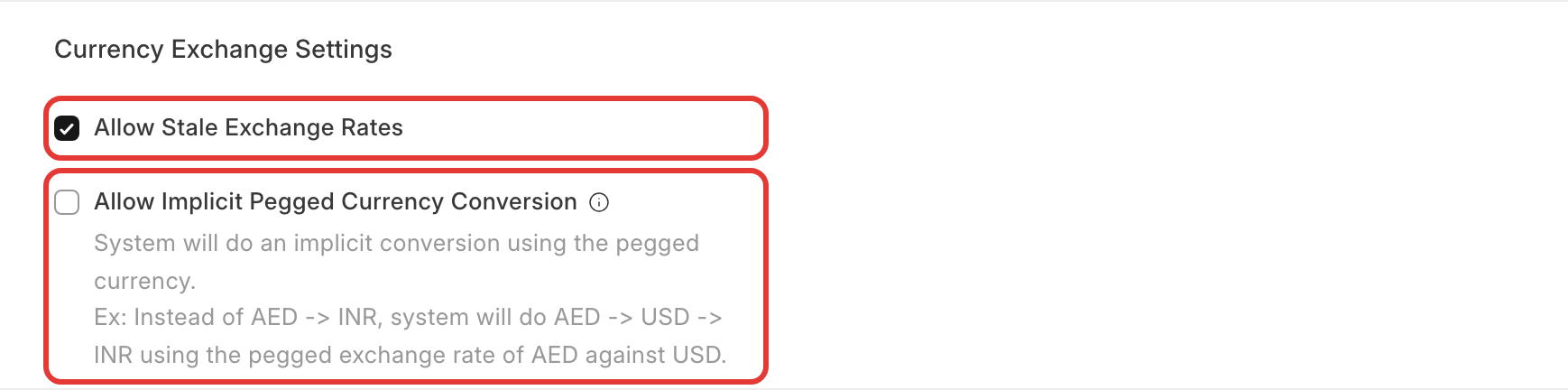
If the service is not reachable, there is no rate. Turn on Allow Stale Exchange Rates in Accounts Settings to use the last saved rate, or add a Currency Exchange record.
Pegged currencies
Some currencies, such as AED and SAR, are pegged at a fixed rate to another currency, usually the US dollar. To use these fixed rates, turn on Allow Implicit Pegged Currency Conversion in Accounts Settings, and check the rates in Pegged Currencies. ERPNext then converts through the anchor currency.
For example, AED → INR is calculated as AED → USD at the fixed rate, then USD → INR at the fetched rate. This gives consistent rates for pegged currencies everywhere ERPNext fetches rates automatically, including Opportunities and the Consolidated Financial Statement. A Currency Exchange record you enter for a date always takes priority, and the setting has no effect if automatic rates are disabled in Currency Exchange Settings.
The invoice does not take today's rate
A document made from another (Quotation → Sales Order → Delivery Note → Sales Invoice) keeps the exchange rate of the first document. This keeps the amounts consistent across the flow.
- For purchases, turn on Use Transaction Date Exchange Rate in Buying Settings to fetch the rate of the invoice's own date.
- On a sales document, change Exchange Rate on the invoice before you submit it.
- After submit, the rate cannot be changed. Cancel and amend the invoice. If amending keeps the wrong rate, make a new invoice instead.
A return made against an invoice must use the invoice's currency and rate.
Exchange gain or loss
When an invoice is paid at a different rate than it was posted, the difference is an exchange gain or loss. ERPNext posts it to the company's Exchange Gain/Loss Account as a separate Journal Entry, from the Payment Entry or from Payment Reconciliation.
- Which date? Posting Date inheritance for exchange gain/loss in Accounts Settings decides: the invoice's date, the payment's date, or the reconciliation date. With Invoice, a payment this year against last year's invoice posts the gain or loss in last year. Choose Payment or Reconciliation Date to keep it in the current year.
- Cost center: the Journal Entry needs one. Set a cost center in the allocation rows, or a default cost center on the company.
- See Payment Entry: wrong outstanding, "already fully paid", accounts and currency
differences for differences shown on the Payment Entry.
Exchange Rate Revaluation
Exchange Rate Revaluation revalues open foreign-currency balances at a date (for example the year end) and posts the unrealized gain or loss with a Journal Entry (Create → Journal Entry).
- The payment's gain or loss ignores the revaluation. When the invoice is paid later, the realized gain or loss is calculated from the invoice's original rate, not from the revalued rate. Reverse the revaluation Journal Entry at the start of the next period (as most accountants do), so the total is right.
- Revaluation entries show in Accounts Receivable or Payable. Tick Revaluation Journals in the report to include or check them. This is a known limitation.
Small rounding differences
Each line is converted and rounded separately, so totals can differ by a cent or a few units of a small currency. Write the difference off with a Deductions or Loss row on the Payment Entry.