


















Debit Note for Price Adjustment
Apex Components, a supplier to Nova Industries, invoiced 10 phones at $520 each. After the Purchase Invoice was submitted, both companies agreed that the correct price was $500 each. No phones are being returned, but Nova Industries should owe the supplier $200 less.
A Debit Note for price adjustment records only that value correction. It reduces the payable and adjusts the relevant expense or asset value without creating a stock return.
Use this workflow when a supplier reduces an agreed price after invoicing and the physical quantity remains unchanged.
Before you begin
Confirm the revised price with the Supplier and calculate the reduction per unit.
Example:
- original invoice: 10 phones at $520 each;
- revised price: $500 each;
- price reduction: $20 per phone;
- total Debit Note: $200.
The quantity of goods owned by the Company does not change. Therefore, do not select Update Stock for this adjustment.
Create a Debit Note for price adjustment
- Open the submitted Purchase Invoice.
- Select Create > Return / Debit Note.
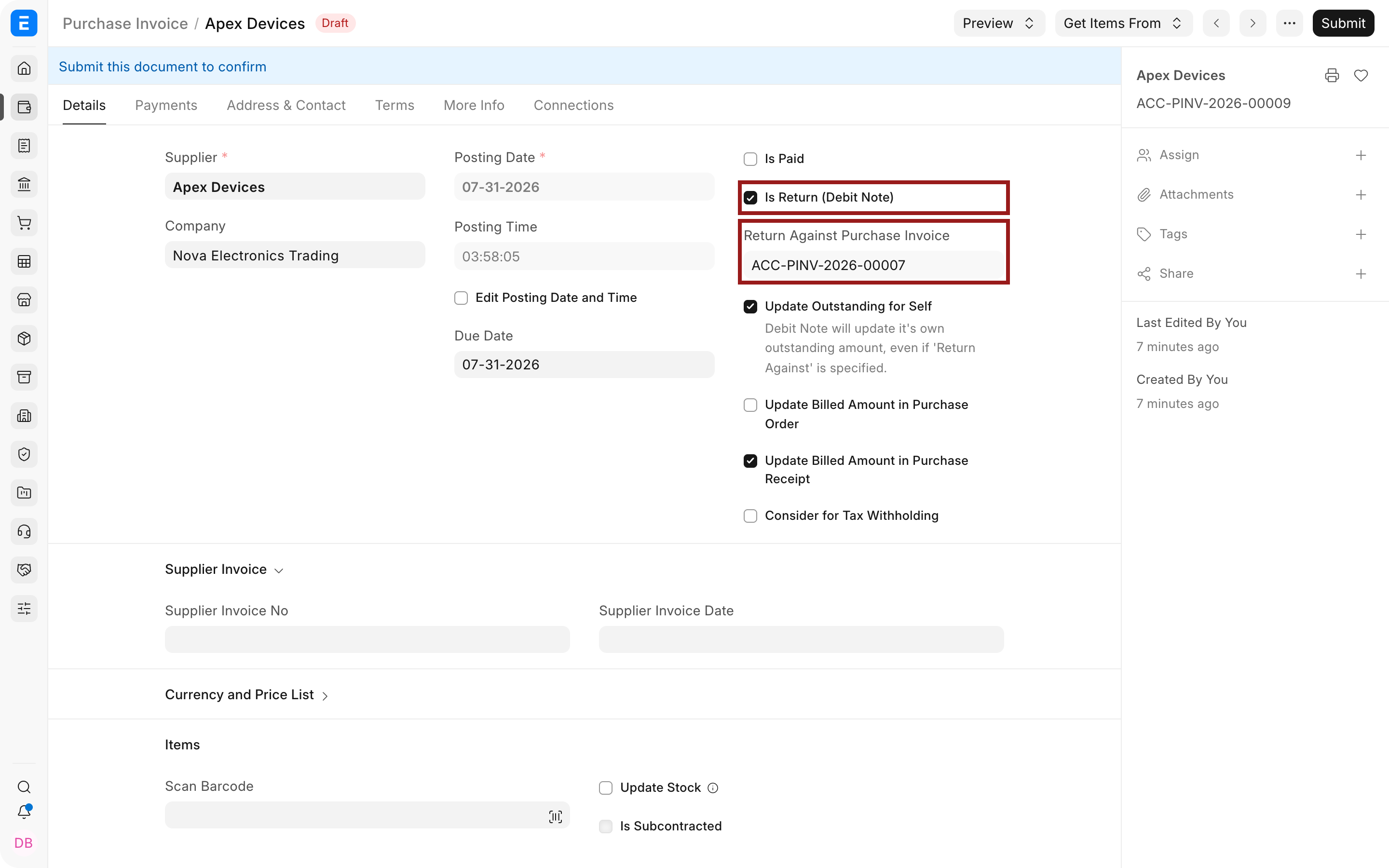
- Confirm that Is Return (Debit Note) is selected and Return Against Purchase Invoice references the original invoice.
- Remove Items that are not part of the price correction.
- Open the affected Item row using its pencil icon.
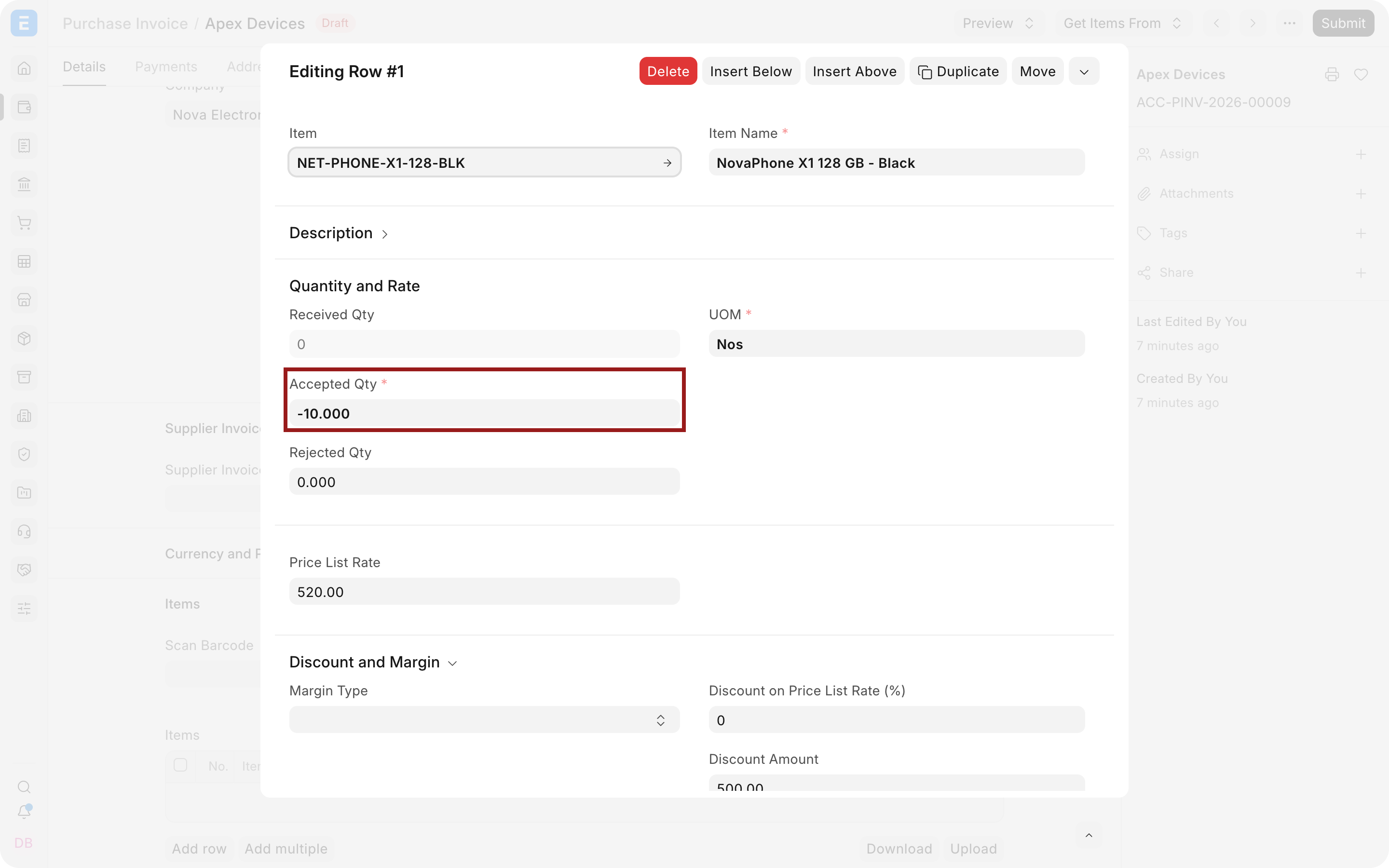
- Enter the full original billed quantity as a negative quantity. For the example, enter
-10.
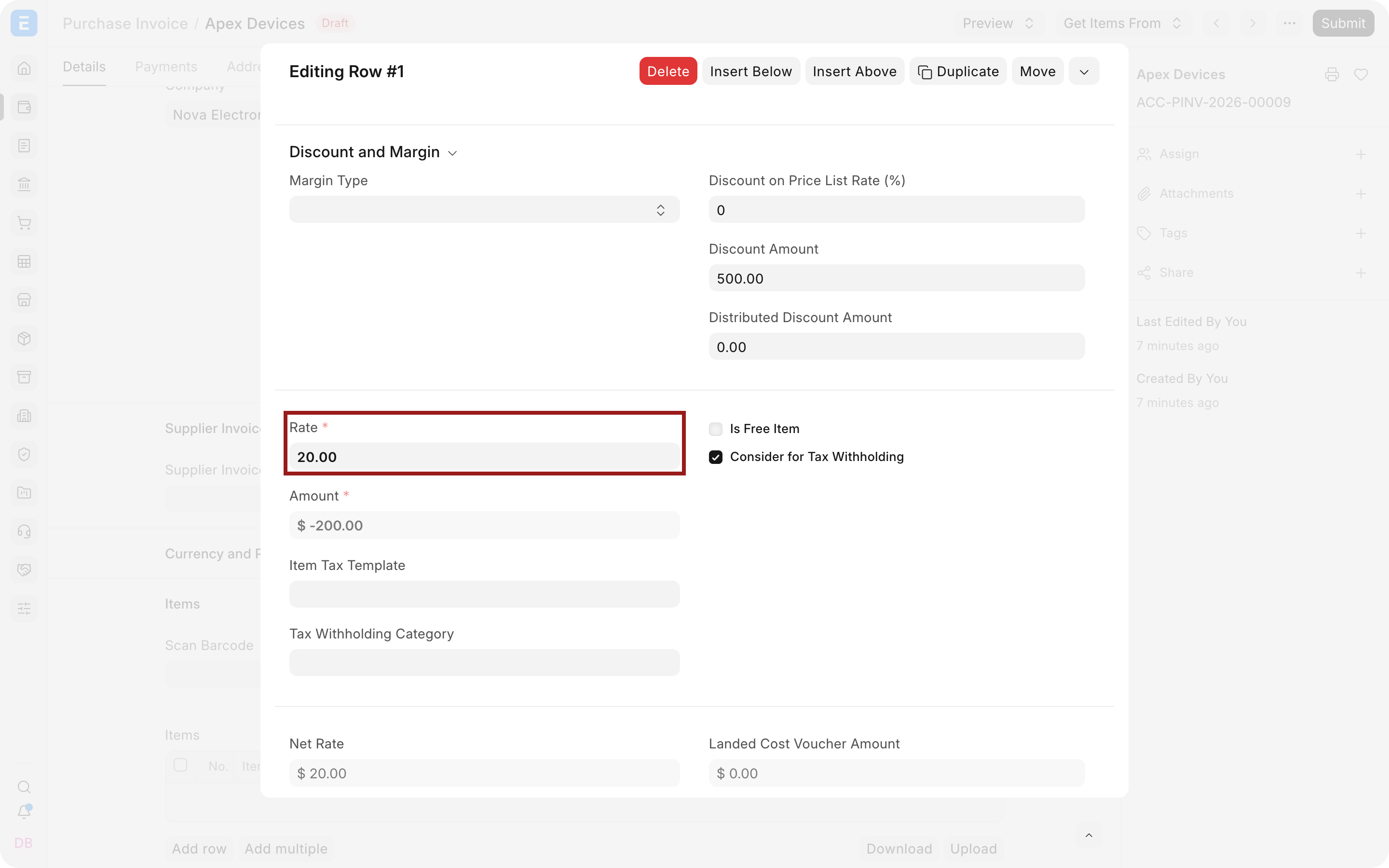
- Enter only the price reduction per unit in Rate, not the revised unit price. For the example, enter
$20, which produces an amount of-$200.
- Leave Update Stock clear because the goods are not being returned.
- Review taxes. Adjust them only when the Supplier's credit document and applicable tax rules require it.
- Save and submit the Debit Note.
Why the full quantity and difference rate are used
The Debit Note amount is calculated as quantity multiplied by rate. Using the full affected quantity and only the reduction per unit produces the exact credit:
10 units × $20 reduction = $200
Because the quantity is negative on a return Purchase Invoice, the document reduces the payable by $200. It does not mean that ten units were physically returned, provided Update Stock remains clear.
Do not enter the revised price of $500 as the Debit Note rate. That would reduce the invoice by $5,000 instead of the intended $200.
Important fields and what they mean
| Field | What it controls |
|---|---|
| Is Return (Debit Note) | Makes the Purchase Invoice a reducing document. |
| Return Against Purchase Invoice | Connects the adjustment to the original Supplier invoice. |
| Accepted Qty | Use the negative full quantity affected by the price change. |
| Rate | Enter the reduction per unit, not the original or revised unit price. |
| Amount | The total reduction. Verify it against the Supplier's credit document. |
| Update Stock | Keep this clear for a price-only adjustment. |
| Posting Date | Determines the accounting period in which the adjustment is recognized. |
| Taxes and Charges | Reverses applicable tax amounts when included in the adjustment. |
Submit and verify
After submission, check:
- the Debit Note total equals the Supplier's agreed credit;
- the original Purchase Invoice outstanding amount is reduced correctly;
- Item stock quantity is unchanged;
- the Supplier balance in Accounts Payable reflects the adjustment;
- the General Ledger shows the intended reduction in payable and expense, asset, or receipt-clearing value.
If the original invoice has already been paid, the Debit Note creates a Supplier credit. Allocate it to a future invoice through Payment Reconciliation, or record the Supplier refund using the correct payment workflow.
Troubleshooting
The Debit Note amount is too large
The revised price may have been entered instead of the price difference. Calculate original price - revised price and use that amount as the Rate.
Stock quantity changed
The Debit Note was submitted with Update Stock selected. Review whether cancellation and amendment are allowed in the posting period, then correct the document using your approved process.
The original invoice still shows the wrong outstanding amount
Verify the Return Against Purchase Invoice reference and review existing payments and reconciliations. Use the invoice and Debit Note Payment Ledger entries to trace the balance.
Only some units received the price reduction
Use the negative number of affected units, not the full invoice quantity. For example, if only four of ten units receive a $20 reduction, enter quantity -4 and rate $20.
Frequently asked questions
Is this the same as returning goods?
It is different. A price adjustment changes the payable but keeps stock unchanged. A physical return also reverses the relevant stock movement.
Can I cancel and amend the original Purchase Invoice instead?
Only when your permissions, posting period, audit policy, and linked documents allow it. A Debit Note usually provides the clearer audit trail after the original invoice has been accepted or posted.
What document should I request from the Supplier?
Retain the Supplier's credit note, revised invoice, or other approved evidence that explains the price reduction and tax treatment.