


















Opening and Closing Balances
Imagine that Nova Industries will stop using its old accounting system on 31 December and begin using ERPNext on 1 January. The old system must finish with a trusted set of closing balances. ERPNext must begin with the same amounts as its opening balances. If the two sides do not match, the first Trial Balance, customer ageing, stock value, and bank reconciliation in ERPNext will already be wrong.
Opening and closing are therefore two halves of one cutover. You close the legacy books, bring only the balances and open transactions that Nova still needs, validate the result, correct any differences, and then protect the accepted opening from accidental changes. This guide covers that sequence. For the broader migration strategy, begin with the Accounting Migration Overview.
Before you begin
Choose one cutover date and write down which system owns transactions before and after that date. A clean month-end or fiscal-year-end usually reduces reconciliation work, but a mid-year cutover is also possible.
Complete at least one test migration before the final cutover. Keep a backup of the legacy data, the original exports, the cleaned import files, and the control reports used for sign-off. Do not migrate years of detailed history merely because it exists. Keep the old system read-only for historical reporting and bring forward only the masters, open transactions, balances, and statutory details required to operate in ERPNext.
Assign an owner for receivables, payables, stock, banking, fixed assets, tax, and the final Trial Balance. Each owner should approve both the legacy closing total and the matching ERPNext opening total.
Understand the two sides of the cutover
| Activity | What it means | Result |
|---|---|---|
| Close the legacy system | Finish approved transactions, adjustments, and reconciliations through the cutover date. | A final Trial Balance and supporting schedules that will no longer change without approval. |
| Open ERPNext | Load the balances and open transactions needed from the next day onward. | A first ERPNext Trial Balance and subledgers that agree with the legacy closing reports. |
The cutover date must not belong to both systems. For example, if the legacy books close on 31 December, ERPNext opening balances are normally dated 1 January. Transactions dated 1 January onward belong in ERPNext.
Close the legacy system
Before taking the final export:
- Enter all approved sales, purchases, receipts, payments, payroll, and journals through the cutover date.
- Reconcile every bank and cash account.
- Complete the physical stock count and post valuation corrections.
- Post depreciation, accruals, prepayments, tax adjustments, payroll liabilities, and exchange differences.
- Reconcile customer and supplier balances with their ageing schedules.
- Reconcile fixed-asset cost and accumulated depreciation with the asset register.
- Run the final Trial Balance, receivable ageing, payable ageing, stock valuation, bank reconciliation, and asset schedules.
- Restrict posting in the legacy period after the finance owners approve these reports.
Keep a cutover log for late invoices, payments, or corrections discovered after the export. Record the item, owner, financial effect, and the system in which it will be posted. This prevents the same transaction from being entered in both systems or omitted from both.
Decide what ERPNext must open with
Use the tool that matches the information you need to carry forward. Do not force every balance through one Journal Entry.
| Data to bring forward | Recommended ERPNext method | What to verify |
|---|---|---|
| Customers, Suppliers, Items, warehouses, and other masters | Prepare clean templates and use Data Import. | Names, codes, tax details, currencies, and links are mapped consistently. |
| Chart of Accounts | Use the Chart of Accounts Importer before loading balances. | Root types, account types, currencies, and company defaults are correct. |
| Outstanding customer and supplier invoices | Use the Opening Invoice Creation Tool. | Party, invoice date, due date, currency, outstanding amount, and ageing total match the legacy schedule. |
| Customer or supplier advances, bank balances, stock, and asset balances | Follow Import Advances, Unallocated Payments, Bank, Stock, and Asset Balances. | Each supporting schedule agrees with its control account. |
| Opening stock quantity and value | Use Stock Reconciliation. | Quantity and stock value agree by Item and warehouse. |
| Fixed assets already in use | Create opening Asset records with purchase value and accumulated depreciation. | Net book value and remaining useful life agree with the legacy asset register. |
| Remaining ledger balances | Use the supported Opening Balance process and an opening Journal Entry where required. | Debit and credit totals balance, and no amount is duplicated by invoices, stock, or assets. |
The Opening Invoice Creation Tool is designed for outstanding receivables and payables. It does not recreate historical Item lines, stock movements, or sales analytics. Keep the legacy system available when users need that historical detail.
Load the opening data in sequence
Import in small, controlled stages so that a difference can be traced to the latest stage rather than the entire migration.
- Create the Company, fiscal year, currencies, and core settings.
- Import and review the Chart of Accounts.
- Import supporting masters such as Customers, Suppliers, Items, warehouses, cost centers, and accounting dimensions.
- Import outstanding sales and purchase invoices.
- Import advances and unallocated payments.
- Load stock quantities and values.
- Create opening Asset records and their accumulated depreciation.
- Post the remaining ledger balances without repeating amounts already represented by invoices, payments, stock, or assets.
If ERPNext begins at the start of a fiscal year, the legacy system will normally contain the year-end profit or loss transfer. If ERPNext begins during a fiscal year, finance must decide how year-to-date income and expense balances will be represented so that full-year statements remain meaningful. Document that choice before importing any opening Journal Entry.
Validate and correct the opening
Run the ERPNext Trial Balance after every major import stage. The final debit total must equal the final credit total, but a balanced report alone is not enough. Compare every control account with the schedule that explains it.
| ERPNext result | Compare it with |
|---|---|
| Accounts Receivable | Customer-wise outstanding invoice schedule |
| Accounts Payable | Supplier-wise outstanding invoice schedule |
| Bank and cash accounts | Reconciled bank statements and cash count |
| Stock accounts | Item-and-warehouse stock valuation report |
| Fixed Asset and accumulated depreciation accounts | Asset register and net book value schedule |
| Tax accounts | Filed returns and unpaid tax schedule |
| Equity and retained earnings | Approved legacy closing Trial Balance |
| Temporary Opening account | Zero after every opening component has been loaded correctly |
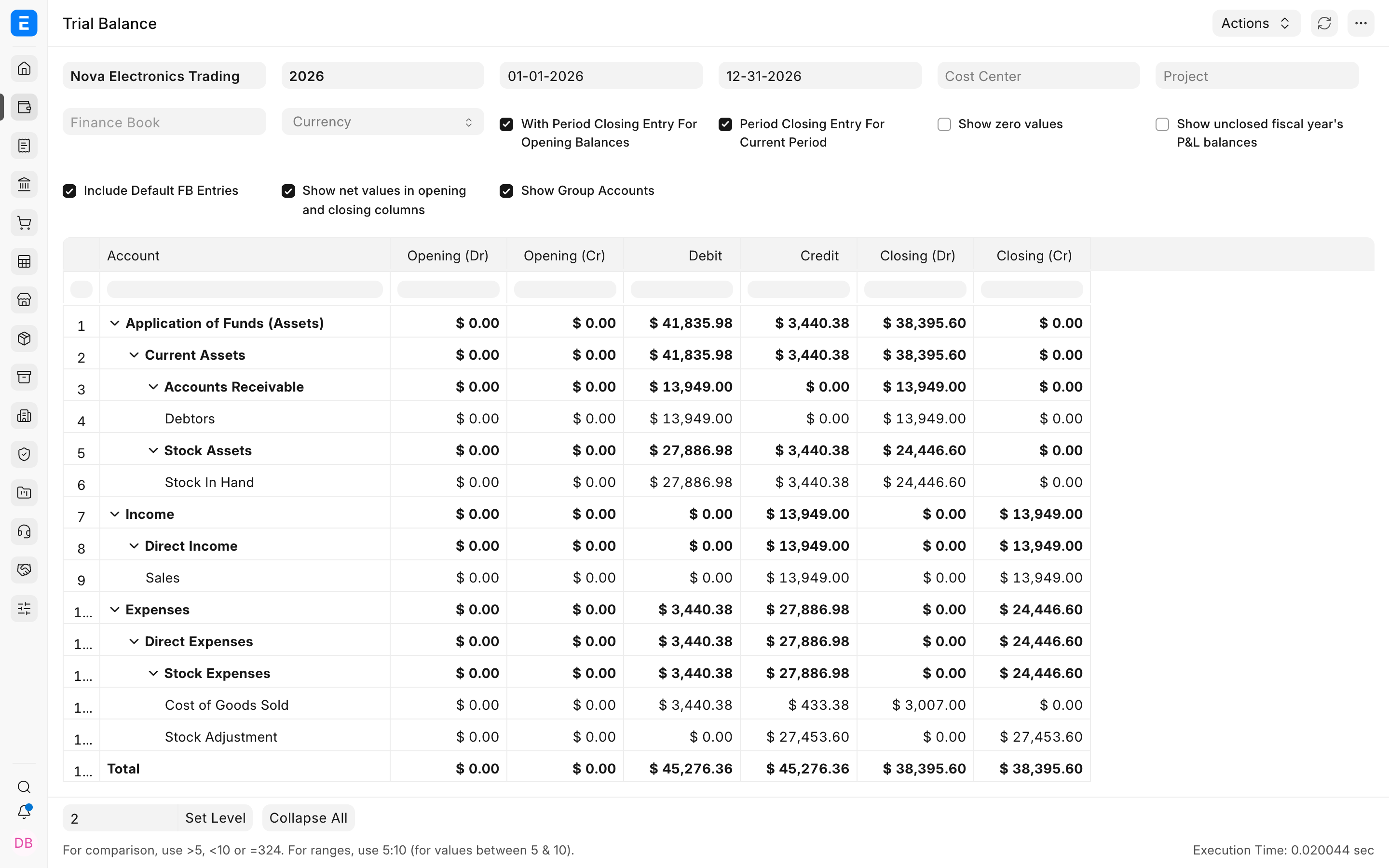
The Trial Balance must be fully loaded and reviewed at account level. Matching grand totals do not prove that individual control accounts are correct.
When a difference appears, stop and identify its source. Check whether a row was omitted, imported twice, mapped to the wrong account, assigned the wrong sign, or converted using the wrong exchange rate. Correct the source file or the supported ERPNext record, rerun the affected report, and preserve the correction in the cutover log. Never repair migration balances by changing database values directly.
Know when to use Period Closing Voucher
A Period Closing Voucher transfers the net balance of income and expense accounts to a closing account for an ERPNext accounting period. It is not an opening-balance import tool and it is not automatically required just because you are migrating.
Use it when the period being closed exists in ERPNext and the organization is ready to close that period. When the legacy system already closed the year and ERPNext starts in the new Fiscal Year, bring forward the approved closing balances instead of recreating the legacy year-end close in ERPNext.
Sign off and protect the accepted opening
Do not freeze the cutover period until every owner has approved the relevant schedule and the finance owner has approved the complete Trial Balance.
After sign-off, save the accepted reports and import files in a controlled location. Restrict the migration user, configure the freeze date through Accounts Settings, review how to Freeze an Account, and use an Accounting Period when selected transaction types must be blocked for a defined period.
If an accepted opening must be changed, record the error and its effect, obtain approval, temporarily grant only the required role, post a traceable correction, rerun every affected reconciliation, and restore the controls. Update the sign-off record so reviewers can see what changed and why.
Troubleshooting
The opening Trial Balance does not match the legacy closing Trial Balance
Compare one account group at a time. First confirm dates, company, currency, and filters. Then look for missing rows, duplicate imports, reversed debit and credit signs, and balances mapped to the wrong account. Reconcile control accounts to their supporting schedules before changing the opening Journal Entry.
Receivables or payables do not match their ledger control accounts
Check whether an outstanding invoice was also included in the remaining ledger balance. Opening invoices create party-level outstanding amounts, so importing the same amount again through a Journal Entry duplicates the control balance. Correct the duplicate source and rerun both the ageing report and Trial Balance.
A late invoice arrives after the legacy period was locked
Use the cutover log to decide which system owns it. If it belongs before the cutover, finance should approve a controlled legacy correction and refresh the affected opening value. If it belongs after the cutover, enter it in ERPNext with the correct transaction date and supporting evidence. Do not enter it in both systems.
Frequently asked questions
Must we migrate all historical transactions?
Most organizations do not need to migrate every historical transaction. Keep the old system read-only for past detail and move the masters, open transactions, balances, and compliance information required for ongoing work and reporting.
Can opening balances be corrected after go-live?
Corrections are possible, but they must remain traceable. Use the supported amendment or adjustment process, document the reason, obtain approval, rerun the affected reports, and restore the freeze after the correction is accepted.
Is Period Closing Voucher mandatory during migration?
The voucher is only needed when an accounting period in ERPNext must be closed. It is not required merely to import opening balances from a legacy system.