


















Adding reference to Journal Entry
A reference connects one accounting row in a Journal Entry to the ERPNext document that explains the amount. On a receivable or payable row, the reference can also allocate the debit or credit against a specific invoice and update its outstanding balance when the Journal Entry is submitted.
Add a reference only when the Journal Entry genuinely settles, adjusts, transfers, or reverses an amount related to that document. A reference is not a general-purpose note. Use User Remark and attachments for supporting context that should not affect invoice allocation.
Before you begin
Confirm the following:
- The referenced document belongs to the same company and is eligible for the intended adjustment.
- The account, party, debit or credit direction, and amount are correct.
- A dedicated document such as a Payment Entry, return, Credit Note, or Debit Note is not more appropriate.
- The invoice has enough outstanding amount for the allocation.
- You have accounting approval and supporting evidence for a write-off or manual adjustment.
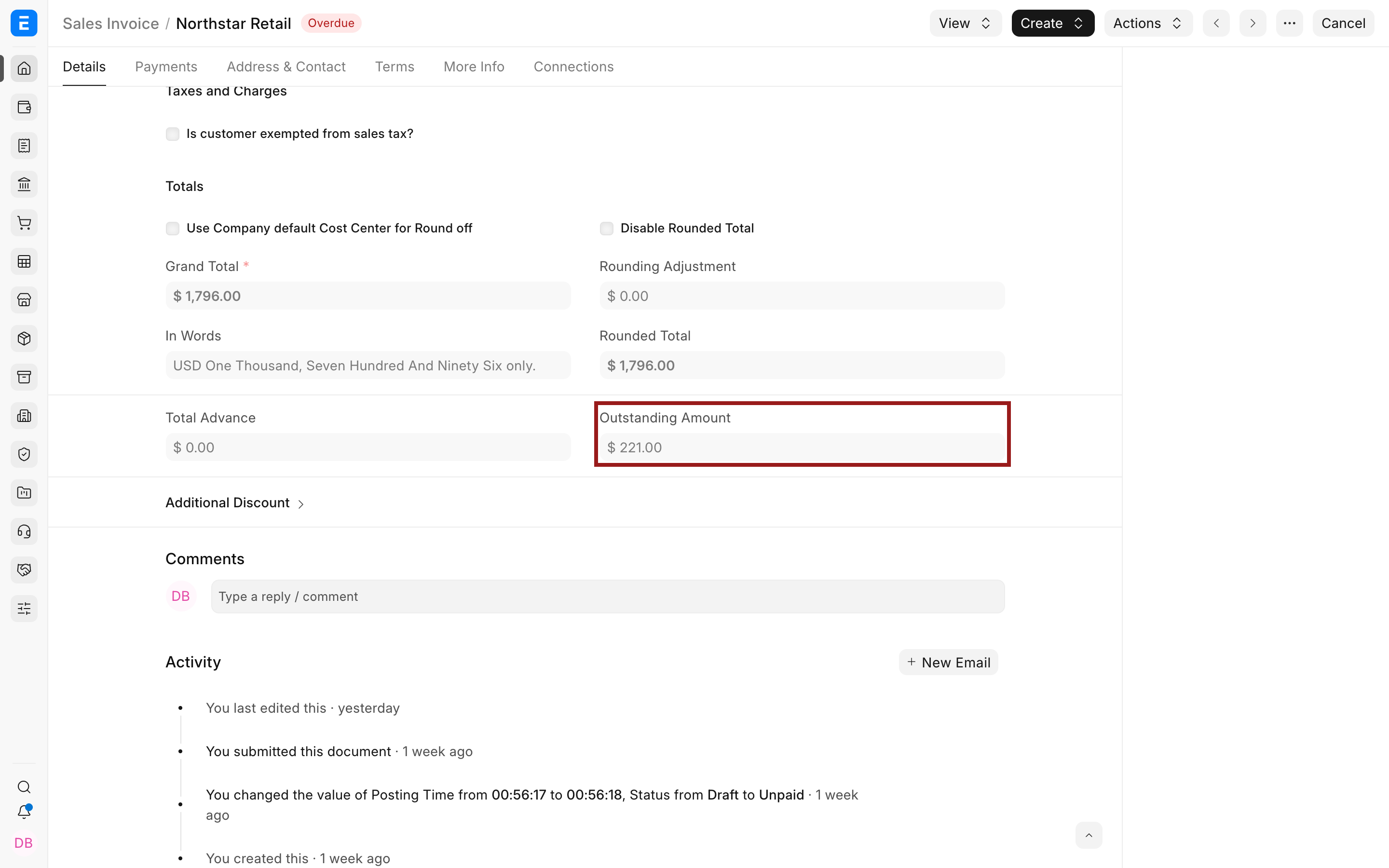
The example below writes off $221 from Northstar Retail's submitted Sales Invoice ACC-SINV-2026-00009 using a draft Journal Entry.
Add the reference
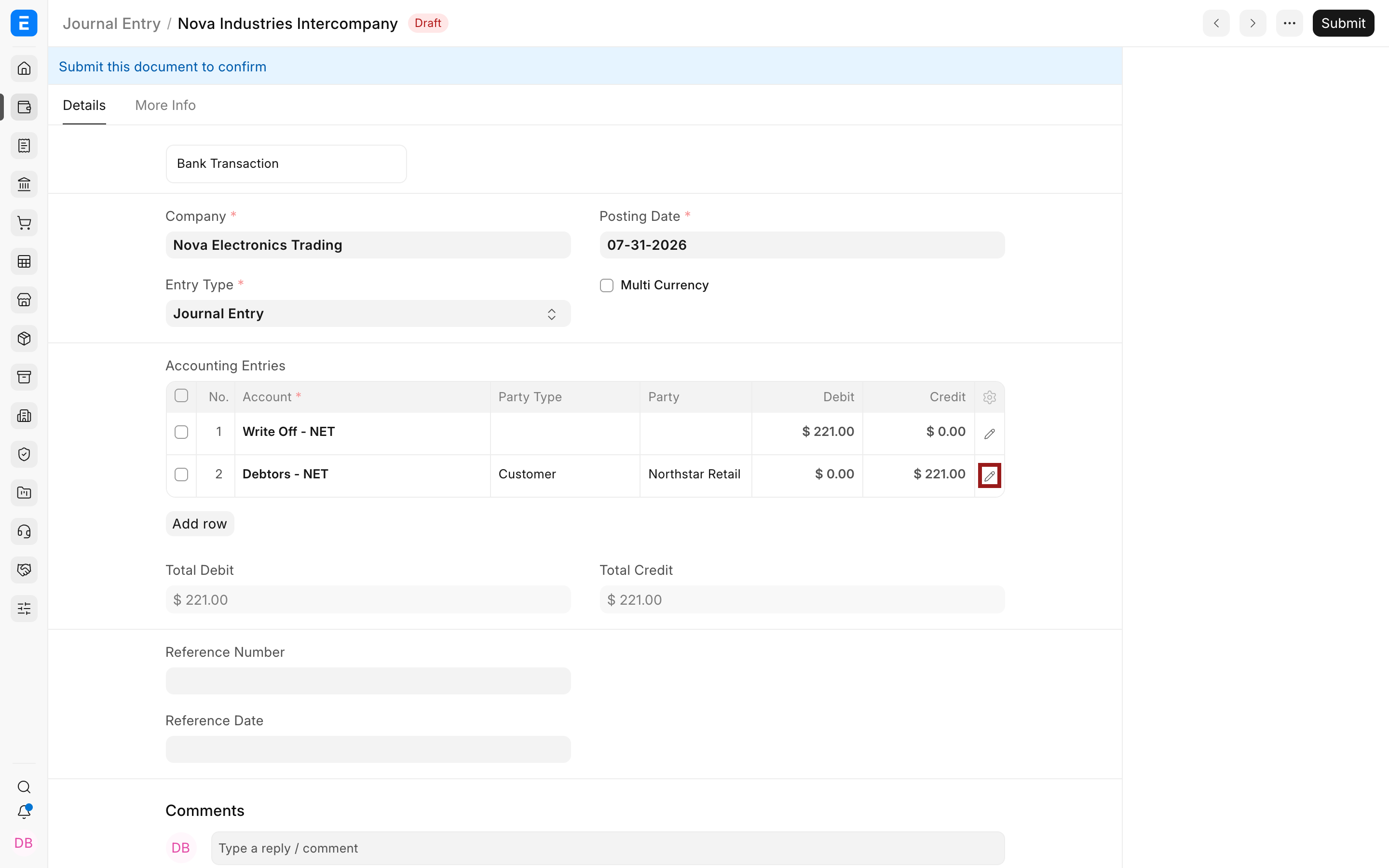
Create or open the Journal Entry. Add the balanced accounting rows and enter the approved debit or credit amounts.
For an invoice-related adjustment, use the receivable or payable account on the party row. Select the pencil icon to open the full child-row editor.
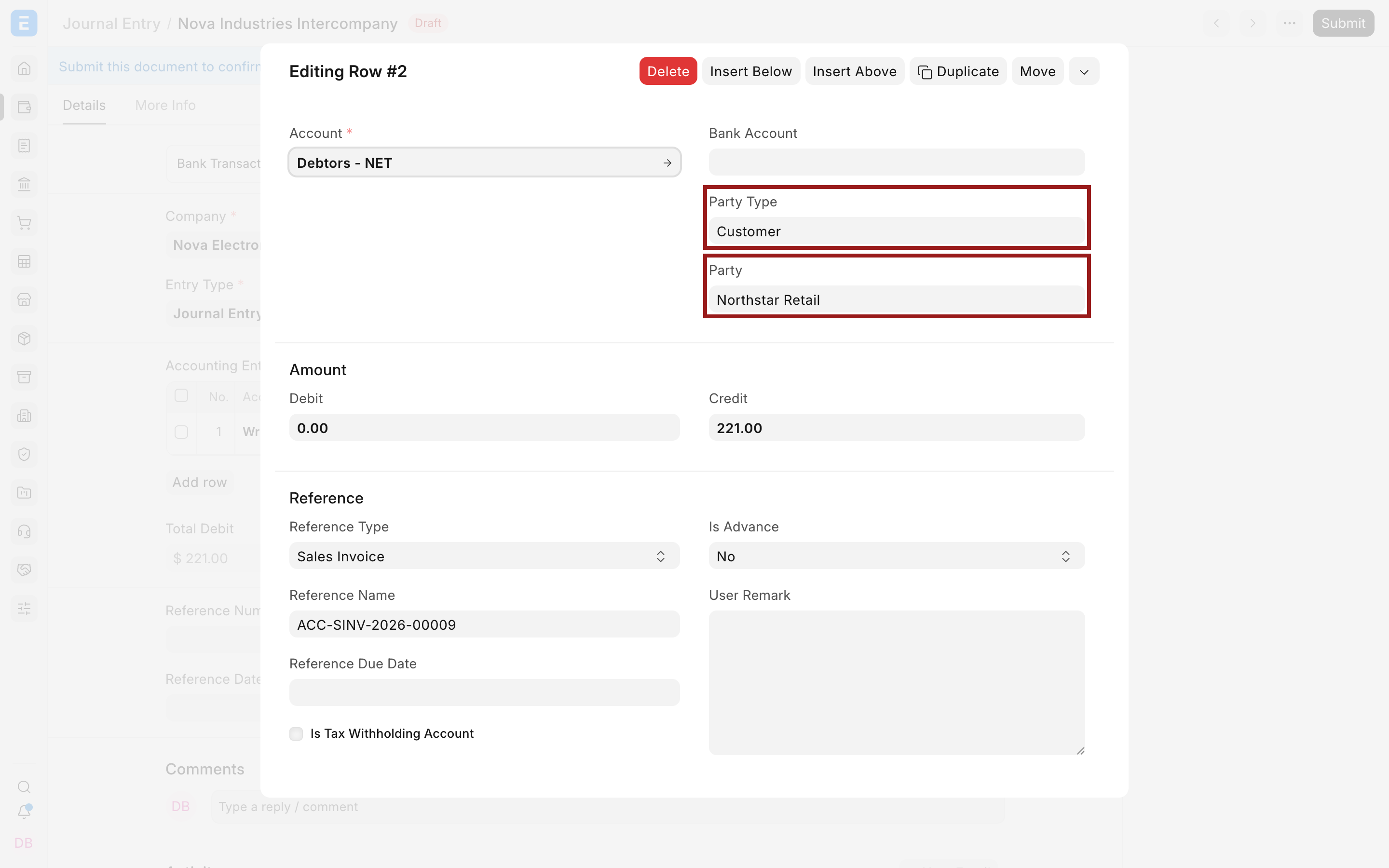
Set Party Type to Customer or Supplier, then select the corresponding party. ERPNext uses these fields with the receivable or payable account to update the correct party ledger.
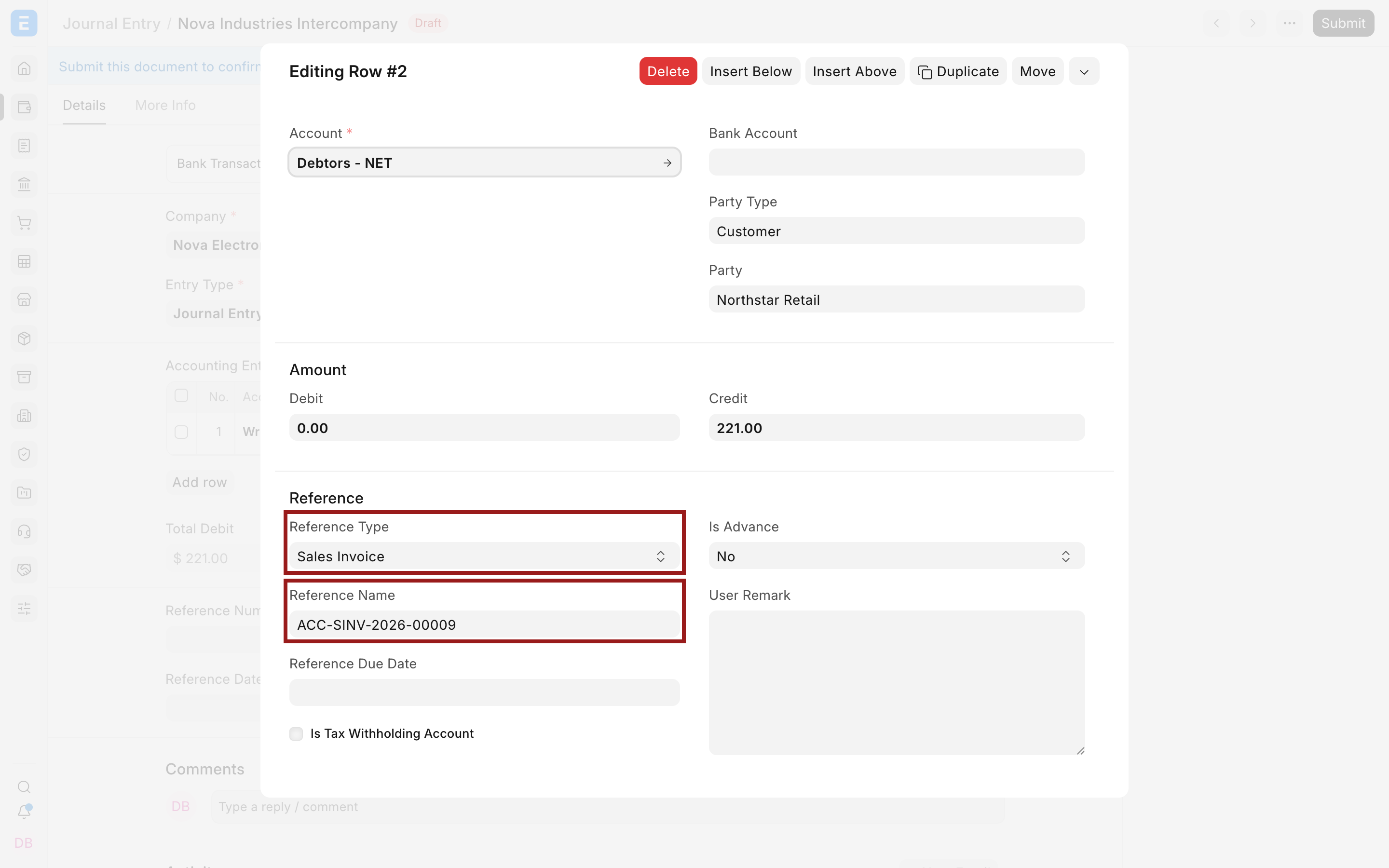
In the Reference section:
- Set Reference Type to the document type, such as Sales Invoice.
- Set Reference Name to the exact document, such as
ACC-SINV-2026-00009. - Review the reference due date when ERPNext fetches it.
- Confirm that the row amount is the amount you intend to allocate.
Collapse the row and verify that total debit equals total credit. Save the draft, review all accounts and references, then submit.
What the reference changes
The effect depends on the referenced document and the accounting row.
For a Sales Invoice write-off:
| Account | Debit | Credit | Reference effect |
|---|---|---|---|
| Approved write-off expense | $221 | Records the loss or adjustment. | |
| Accounts Receivable for Northstar Retail | $221 | Allocates $221 to the selected Sales Invoice and reduces its outstanding amount. |
For a supplier adjustment, the payable row and debit or credit direction depend on the business event. Do not reverse the signs merely to make the voucher submit. Confirm the intended ledger effect with your accountant.
After submission, open the referenced invoice and confirm its outstanding amount. You can also use View > Ledger, the General Ledger, and the Accounts Receivable or Payable report to verify the allocation.
Documents that can be referenced
Current ERPNext provides these Reference Type options on a Journal Entry accounting row:
| Group | Reference types |
|---|---|
| Sales and purchases | Sales Invoice, Purchase Invoice, Sales Order, Purchase Order |
| Accounting and payments | Journal Entry, Payment Entry, Bank Transaction, Exchange Rate Revaluation, Invoice Discounting |
| Expenses and payroll | Expense Claim, Payroll Entry, Employee Advance, Full and Final Statement |
| Assets, loans, and education | Asset, Loan, Fees |
The presence of an option does not mean every combination is valid. ERPNext filters Reference Name choices and validates the account, party, company, status, and amount according to the selected document.
Orders can be referenced for traceability, but they do not have an invoice outstanding balance to settle. Use an invoice reference when the Journal Entry must update receivables or payables.
Important fields and what they mean
| Field | Meaning | Guidance |
|---|---|---|
| Account | Ledger account affected by the row | Use the correct receivable or payable account for invoice allocation. |
| Party Type | Type of counterparty | Required for customer or supplier ledger allocation. |
| Party | Specific Customer, Supplier, Employee, or other supported party | Must match the referenced transaction where applicable. |
| Reference Type | DocType connected to the row | Select the business document that explains the adjustment. |
| Reference Name | Specific document connected to the row | Select the exact submitted transaction. |
| Reference Due Date | Due date fetched from the reference | Useful for receivable and payable ageing. |
| Debit or Credit | Amount posted and allocated by the row | Direction must match the intended accounting effect. |
Troubleshooting
Reference Name is empty
Set Reference Type first. Confirm that the source document is submitted, belongs to the same company, matches the selected party, and is available for that account and adjustment.
ERPNext says the reference has no outstanding amount
The invoice may already be fully paid, written off, returned, or allocated. Open the invoice and inspect its outstanding amount and payment references before adding another adjustment.
The Journal Entry submits but the invoice outstanding amount is unchanged
Confirm that the receivable or payable row contains the correct Party Type, Party, Reference Type, and Reference Name. A reference on an unrelated expense, income, bank, or cash row does not allocate the party invoice.
The allocated amount is more than the outstanding amount
Reduce the Journal Entry row to the intended outstanding amount or investigate prior allocations. Do not over-allocate merely to absorb a difference.
The wrong invoice was referenced
If the Journal Entry is still a draft, correct the row. If it is submitted, follow the controlled cancellation and amendment process, considering the immutable ledger and closed-period restrictions.
FAQs
Is a reference required on every Journal Entry row?
No, Use it when the row relates to a supported ERPNext document. Ordinary accruals, transfers, and opening adjustments may not require a document reference.
Should I use a Journal Entry to record normal customer payments?
Prefer Payment Entry. It is designed for bank or cash movement, invoice allocation, advances, currencies, and reconciliation. Use a Journal Entry for an approved accounting adjustment that is not better handled by a dedicated transaction.
Can one Journal Entry reference several invoices?
Yes, Add separate accounting rows with the appropriate party, invoice reference, and allocation amount. Keep the voucher balanced and verify every invoice afterward.
Can I reference a Sales Order or Purchase Order?
Yes, for traceability where supported. Orders are commitments, so referencing one does not settle an invoice outstanding balance.
Does saving a draft change the invoice balance?
No, The allocation affects accounting and outstanding balances when the Journal Entry is submitted.