


















Selling Cycle Ledger Impact
The selling cycle begins with a commercial commitment and ends when the customer pays. Not every document creates an accounting entry.
A Sales Order records what you have agreed to sell, while Delivery Notes, Sales Invoices, and Payment Entries record the financial events that follow.
The examples below use common account names and exclude sales tax to keep the entries easy to follow. Your account names may differ. ERPNext posts to the accounts configured for your Company, Item, Item Group, warehouse, and transaction.
Understand when the ledger changes
ERPNext creates General Ledger entries when an accounting or stock transaction is submitted. Saving a draft does not affect the ledger.
| Document | Typical ledger impact | What it represents |
|---|---|---|
| Sales Order | No General Ledger entry | A commitment to supply goods or services at an agreed quantity and price. |
| Delivery Note for stock items | Debit Cost of Goods Sold; credit Stock In Hand | The inventory has left the company and its valuation becomes an expense. |
| Sales Invoice | Debit Accounts Receivable; credit Sales. Credit Tax Payable when tax applies. | Revenue is recognized and the customer now owes the invoiced amount. |
| Payment Entry, Receive | Debit Bank or Cash; credit Accounts Receivable | Money is received and the customer's outstanding balance is reduced. |
The debit and credit are two sides of the same event. For example, receiving a customer payment increases Bank, so Bank is debited. It also reduces the customer's receivable balance, so Accounts Receivable is credited.
Example 1: Manufacturing company selling finished goods
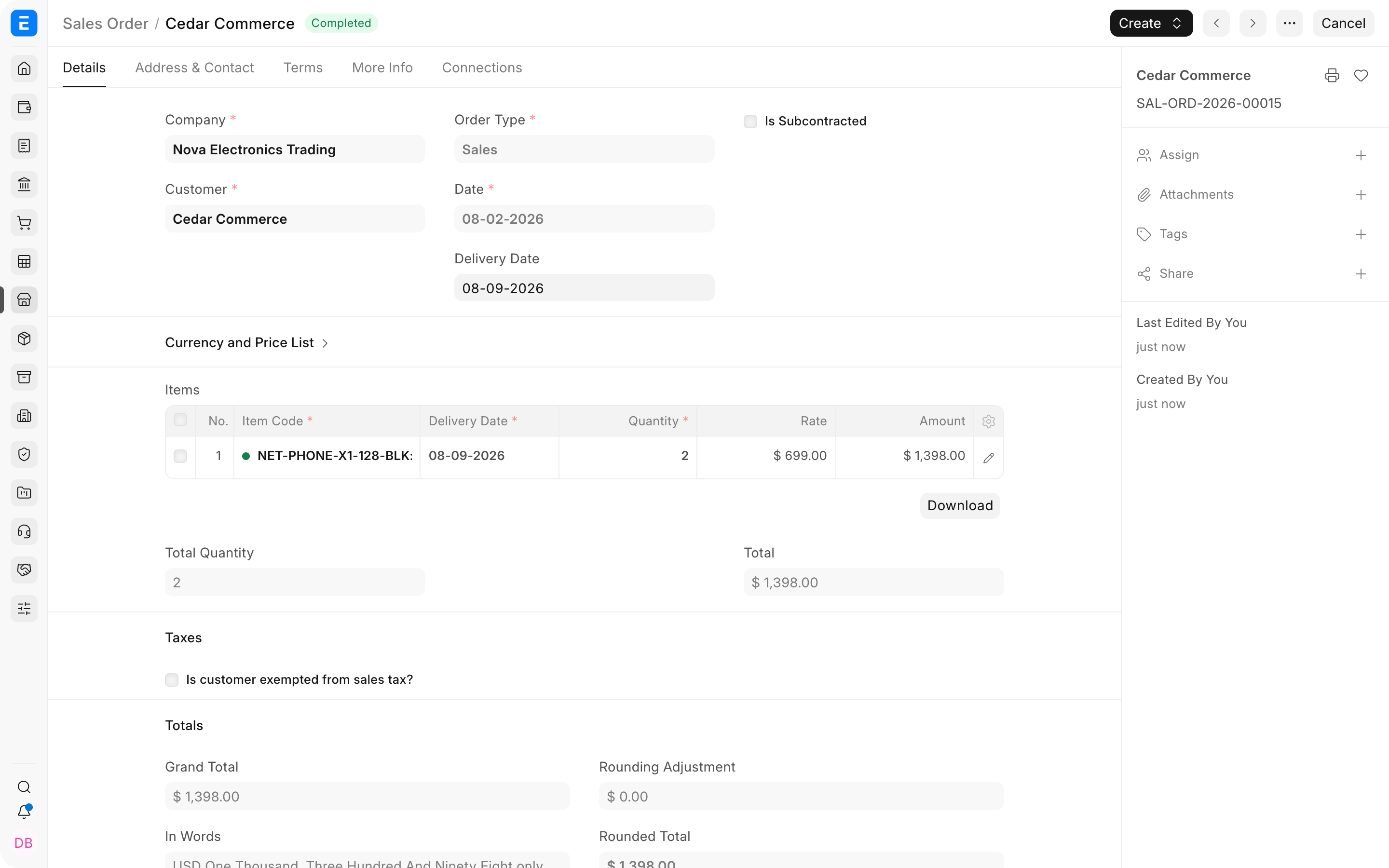
Assume a manufacturer sells two finished phones to Cedar Commerce for $699 each, for a total selling price of $1,398. ERPNext values the two finished units at $866.76. The manufacturing costs were accumulated into inventory before this selling cycle began.
1. Submit the Sales Order
The submitted Sales Order records the customer's order for two finished phones. It reserves the commercial commitment, but it does not recognize revenue, reduce inventory, or create a receivable.
Ledger impact: None.
2. Submit the Delivery Note
The Delivery Note confirms that the finished goods have left the warehouse. ERPNext removes their current valuation from the stock asset and recognizes that valuation as the cost of the sale.
| Account | Debit | Credit | Explanation |
|---|---|---|---|
| Cost of Goods Sold | $866.76 | The inventory cost becomes an expense. | |
| Stock In Hand | $866.76 | The value of inventory held by the company decreases. |
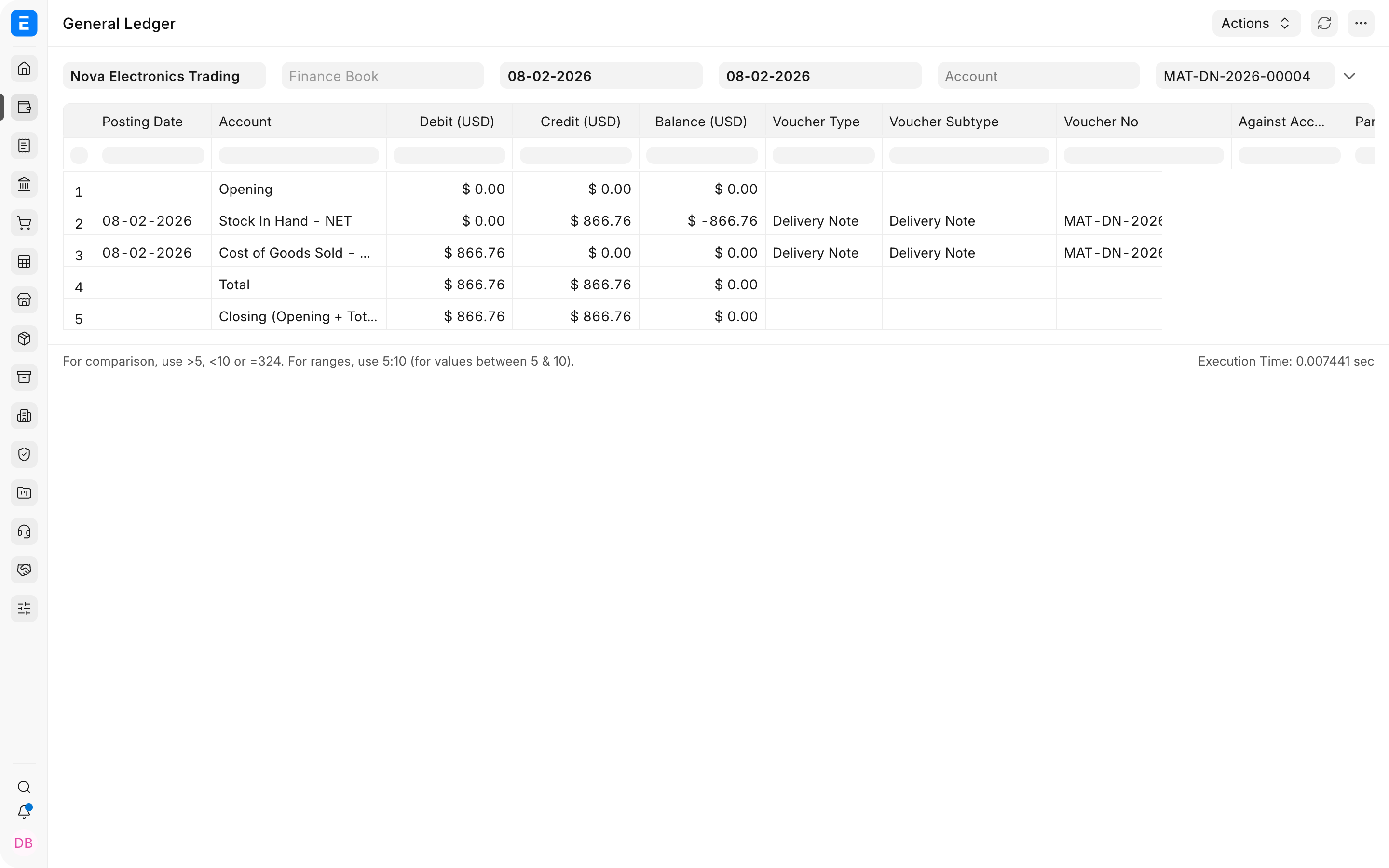
The debit is based on valuation, not the customer selling price. That is why the Delivery Note posts $866.76 even though the customer will be invoiced $1,398.
3. Submit the Sales Invoice
The Sales Invoice recognizes revenue and creates the amount due from the customer.
| Account | Debit | Credit | Explanation |
|---|---|---|---|
| Accounts Receivable (Debtors) | $1,398.00 | The customer now owes the company. | |
| Sales | $1,398.00 | Revenue from the sale is recognized. |
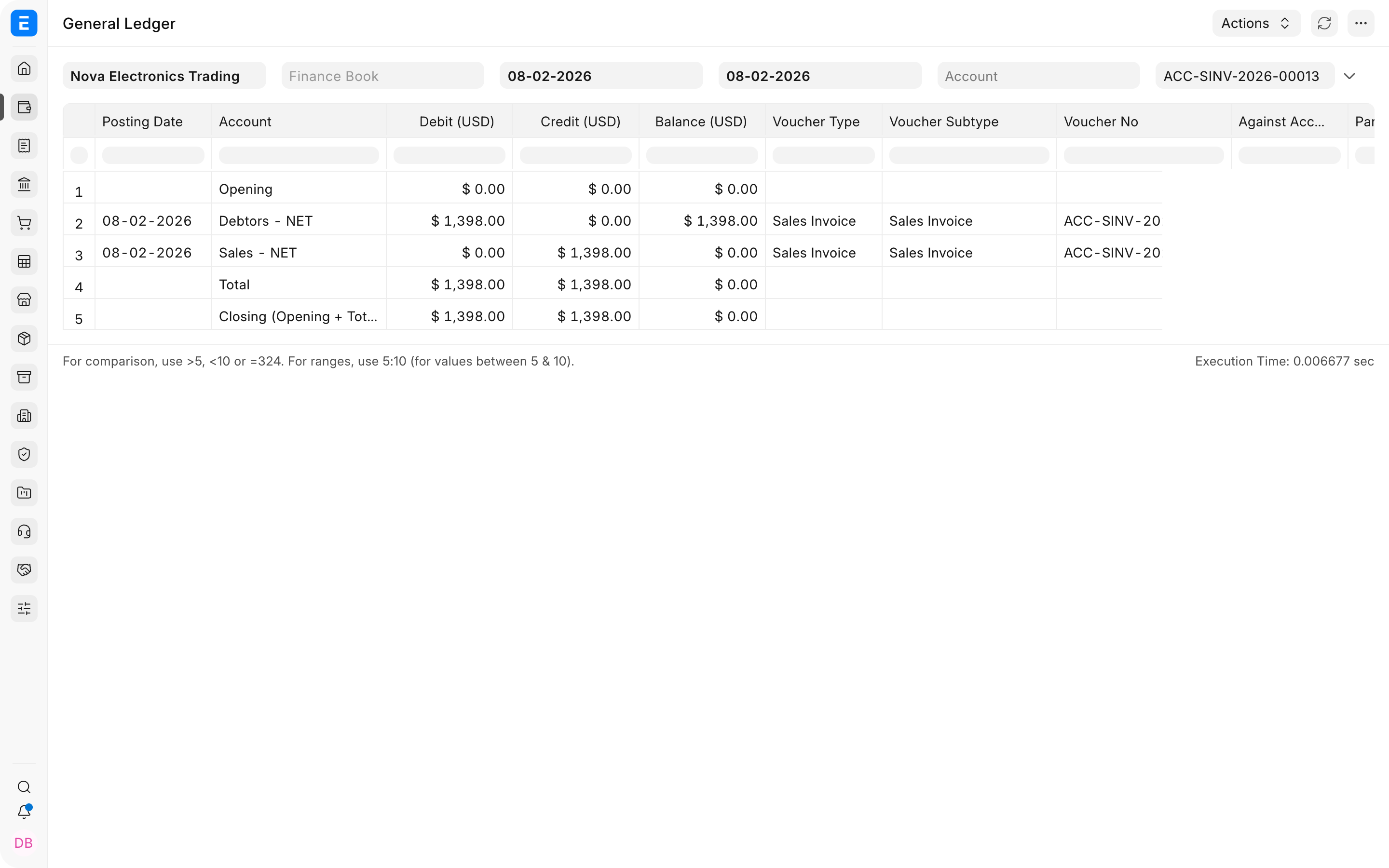
Ignoring tax and other costs, the gross profit visible from these two events is $531.24: sales of $1,398.00 less cost of goods sold of $866.76.
4. Receive the customer payment
When the customer pays the full invoice, submit a Receive-type Payment Entry and allocate it to the Sales Invoice.
| Account | Debit | Credit | Explanation |
|---|---|---|---|
| Bank | $1,398.00 | Money received increases the bank balance. | |
| Accounts Receivable (Debtors) | $1,398.00 | The amount owed by the customer is cleared. |
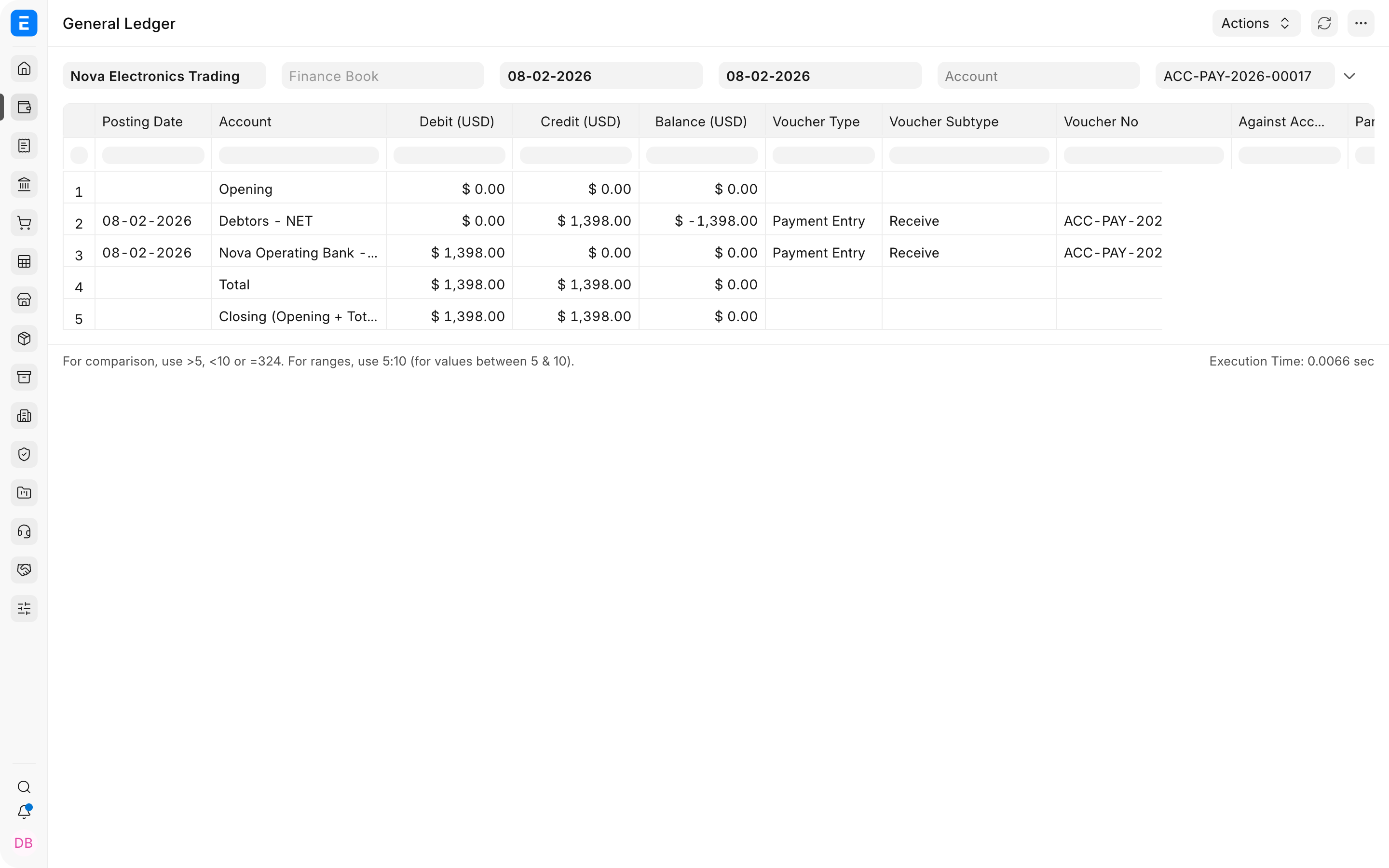
The Payment Entry does not recognize sales income again. The Sales Invoice already recorded the income. The payment only moves the balance from Accounts Receivable to Bank.
Example 2: Services company
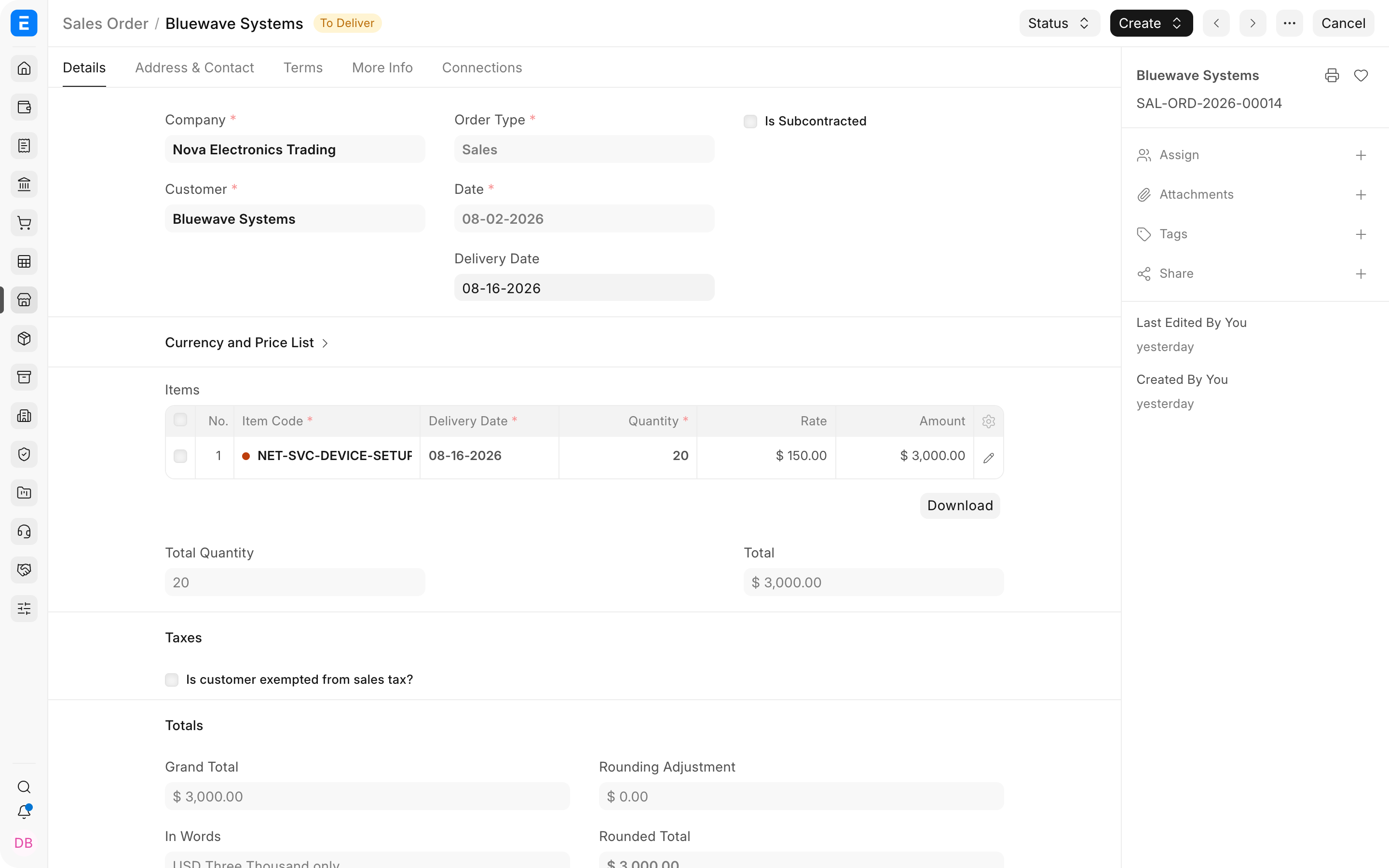
Assume a service company agrees to perform 20 device-setup sessions for Bluewave Systems at $150 each. The total contract value is $3,000.
Services do not normally move inventory, so this workflow can go directly from Sales Order to Sales Invoice and Payment Entry. A Delivery Note is unnecessary unless the company uses it as an operational confirmation of service delivery.
1. Submit the Sales Order
The Sales Order records the agreed scope, quantity, rate, and delivery date. It does not create revenue or a receivable.
Ledger impact: None.
2. Submit the Sales Invoice
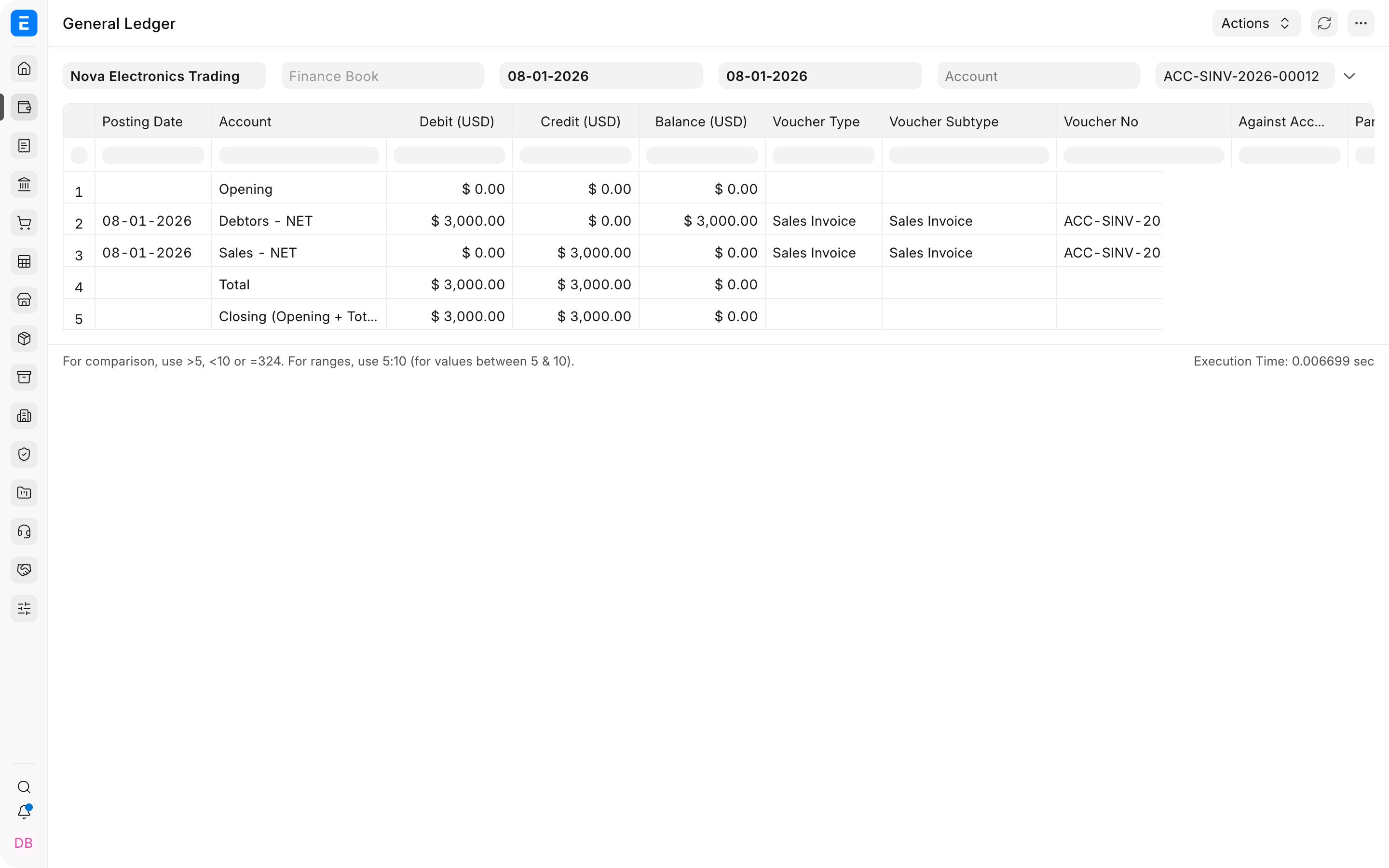
After completing the agreed work, submit the Sales Invoice. Because the Item is a non-stock service, no Stock In Hand or Cost of Goods Sold entry is created by this invoice.
| Account | Debit | Credit | Explanation |
|---|---|---|---|
| Accounts Receivable (Debtors) | $3,000.00 | The customer owes the invoiced service fee. | |
| Sales or Service Income | $3,000.00 | Service revenue is recognized. |
Employee costs, contractor charges, travel, and other delivery expenses are recorded through their own payroll, expense, purchase, or journal workflows. They are not automatically posted as Cost of Goods Sold merely because a service Sales Invoice is submitted.
3. Receive the customer payment
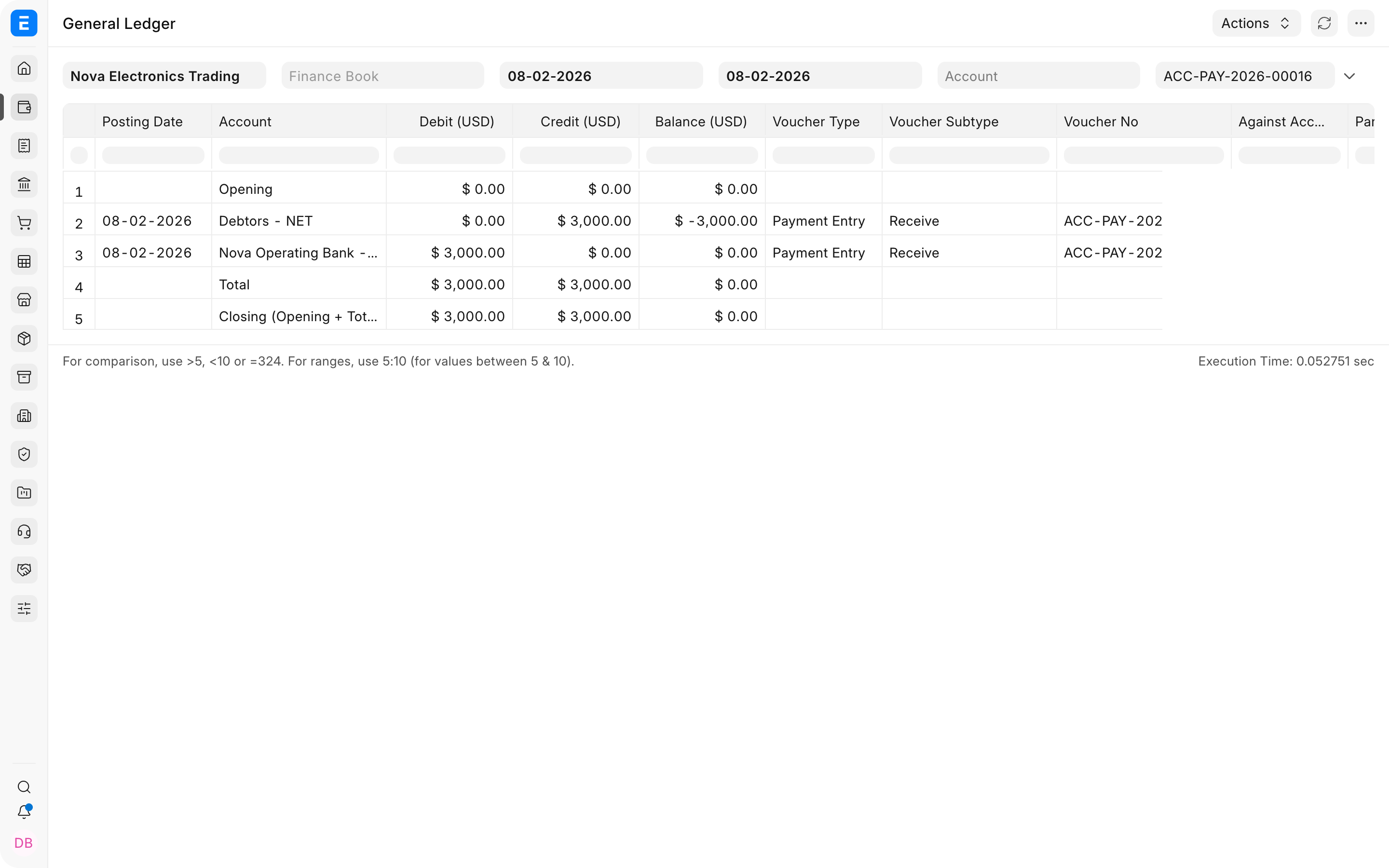
The Payment Entry has the same basic effect as it does for a goods sale.
| Account | Debit | Credit | Explanation |
|---|---|---|---|
| Bank | $3,000.00 | The company's bank balance increases. | |
| Accounts Receivable (Debtors) | $3,000.00 | The customer's outstanding balance is cleared. |
Compare the two workflows
| Stage | Manufacturing or stock goods | Services |
|---|---|---|
| Sales Order | No ledger impact | No ledger impact |
| Delivery | Delivery Note reduces Stock In Hand and debits Cost of Goods Sold | Usually no stock Delivery Note or stock posting |
| Invoice | Debits Accounts Receivable and credits Sales | Debits Accounts Receivable and credits Sales or Service Income |
| Payment | Debits Bank and credits Accounts Receivable | Debits Bank and credits Accounts Receivable |
If a stock-item Sales Invoice is submitted with Update Stock enabled, ERPNext combines the stock effect of the Delivery Note with the revenue and receivable effect of the Sales Invoice. The result is valid, but the company loses a separate delivery document in the audit trail.
If users create a Sales Invoice directly without a Sales Order, the Sales Invoice still creates the same ledger entries. What is missing is the earlier commercial commitment, order tracking, and link between ordered and billed quantities.
Frequently asked questions
Does submitting a Sales Order affect the General Ledger?
A Sales Order is a commercial commitment. It can influence order, delivery, reservation, and billing reports, but it does not create debit or credit entries.
Why is Cost of Goods Sold different from the selling price?
Cost of Goods Sold uses the item's stock valuation. Sales uses the price charged to the customer. The difference contributes to gross profit.
What changes when sales tax is included?
Accounts Receivable is debited for the full invoice total. Sales is credited for the net revenue, and the applicable tax liability account is credited for the tax collected from the customer.
Can a services company use a Delivery Note?
Yes, if it wants a separate operational record confirming service delivery. A non-stock service Delivery Note does not reduce Stock In Hand. Many service companies invoice directly from the Sales Order instead.