


















Nova Industries has finished its August review. The finance manager sees a $20,000 sale in the books and needs to confirm that the customer receivable, sales income, inventory value, and cost of goods sold were posted correctly. A financial statement shows the summarized result. The General Ledger shows the entries that created it.
The General Ledger is ERPNext's detailed accounting trail. It lists every debit and credit generated by submitted transactions and connects each row to its source voucher. Use it to explain an account balance, investigate an unexpected posting, or provide transaction-level evidence for an audit. It does not replace the Accounts Receivable and Accounts Payable reports when the question is which invoices remain outstanding.
Before you begin
Transactions must be submitted before they appear in the ledger. Confirm the correct Company, fiscal period, and reporting currency. If your organisation uses Finance Books, Cost Centers, Projects, or other Accounting Dimensions, use the same filters when comparing reports.
Run the General Ledger
- Open Accounting and select General Ledger.
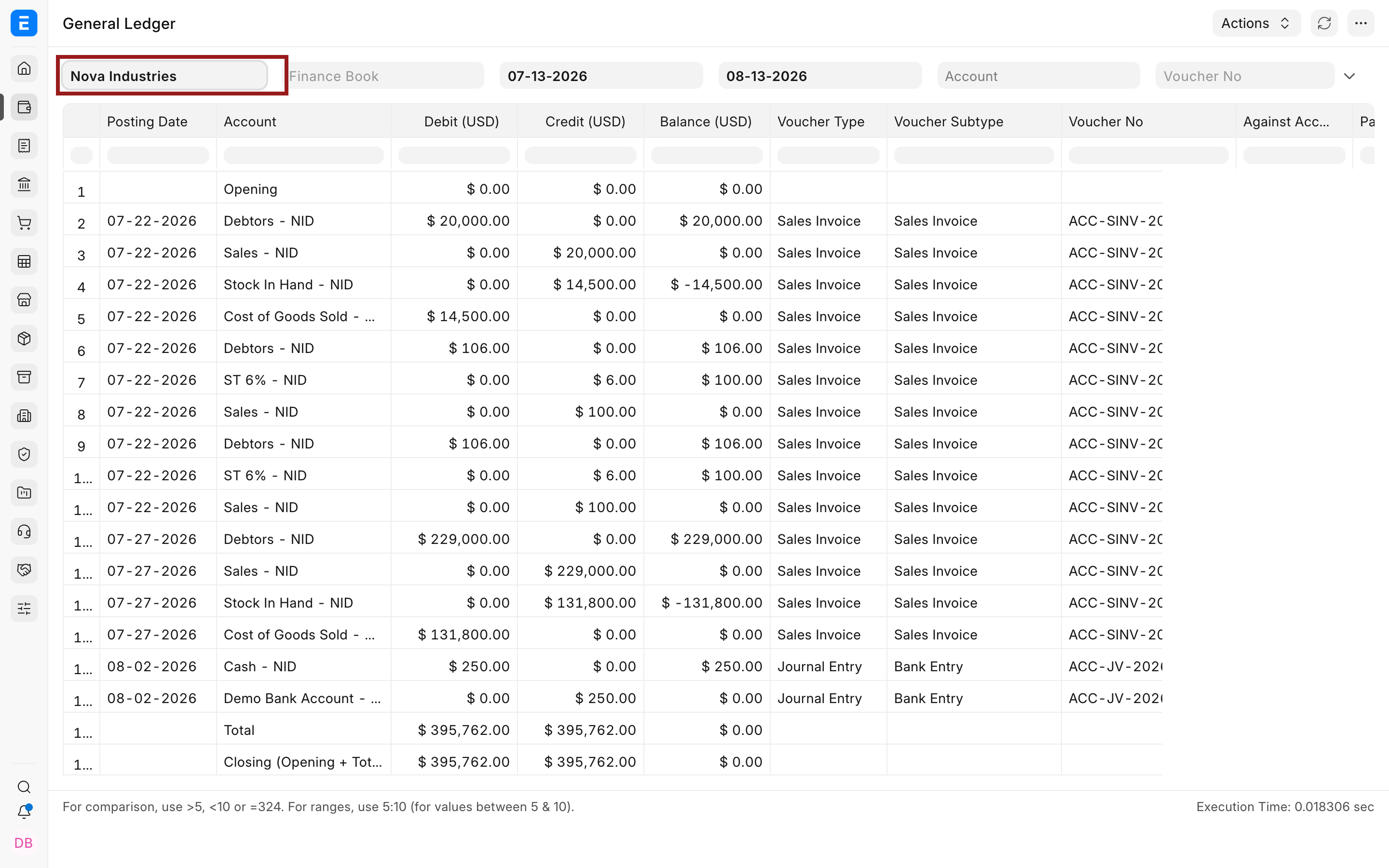
- Select Nova Industries and the required date range.
- Leave Account and Party blank to review all postings, or narrow the report to the balance you are investigating.
- Use Voucher No when you already know the source transaction. Select a categorization option when you want entries arranged by Account, Voucher, or Party.
- Refresh the report and confirm that the result has fully loaded before interpreting it.
Follow a Sales Invoice through the ledger
For the selected period, Nova Industries has $395,762 in total debits and $395,762 in total credits. Equal totals show that the selected entries are mathematically balanced. They do not prove that every transaction used the correct account, so the finance manager opens the rows behind the $20,000 sale.
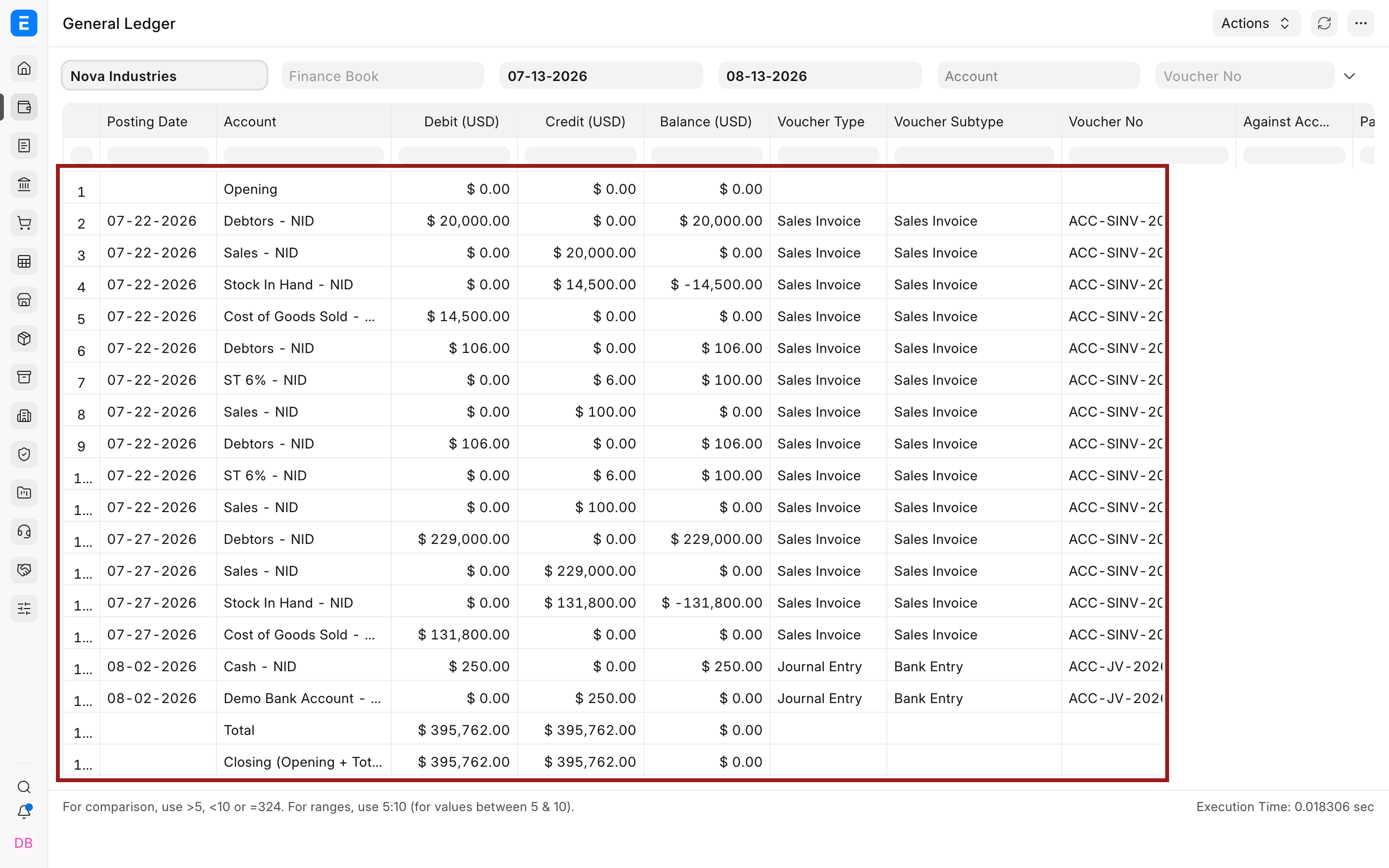
| Posting | Debit | Credit | What it means |
|---|---|---|---|
| Customer balance | Debtors $20,000 | The customer now owes Nova Industries. | |
| Sales income | Sales $20,000 | The sale increases income for the period. | |
| Inventory reduction | Stock In Hand $14,500 | The inventory asset decreases by the delivered stock value. | |
| Cost recognition | Cost of Goods Sold $14,500 | The cost of the sold goods becomes an expense. |
The receivable and income rows explain the commercial sale. The stock and cost rows explain the inventory leaving the business. This is why one Sales Invoice can produce more than two ledger rows when stock is updated.
Open the source voucher
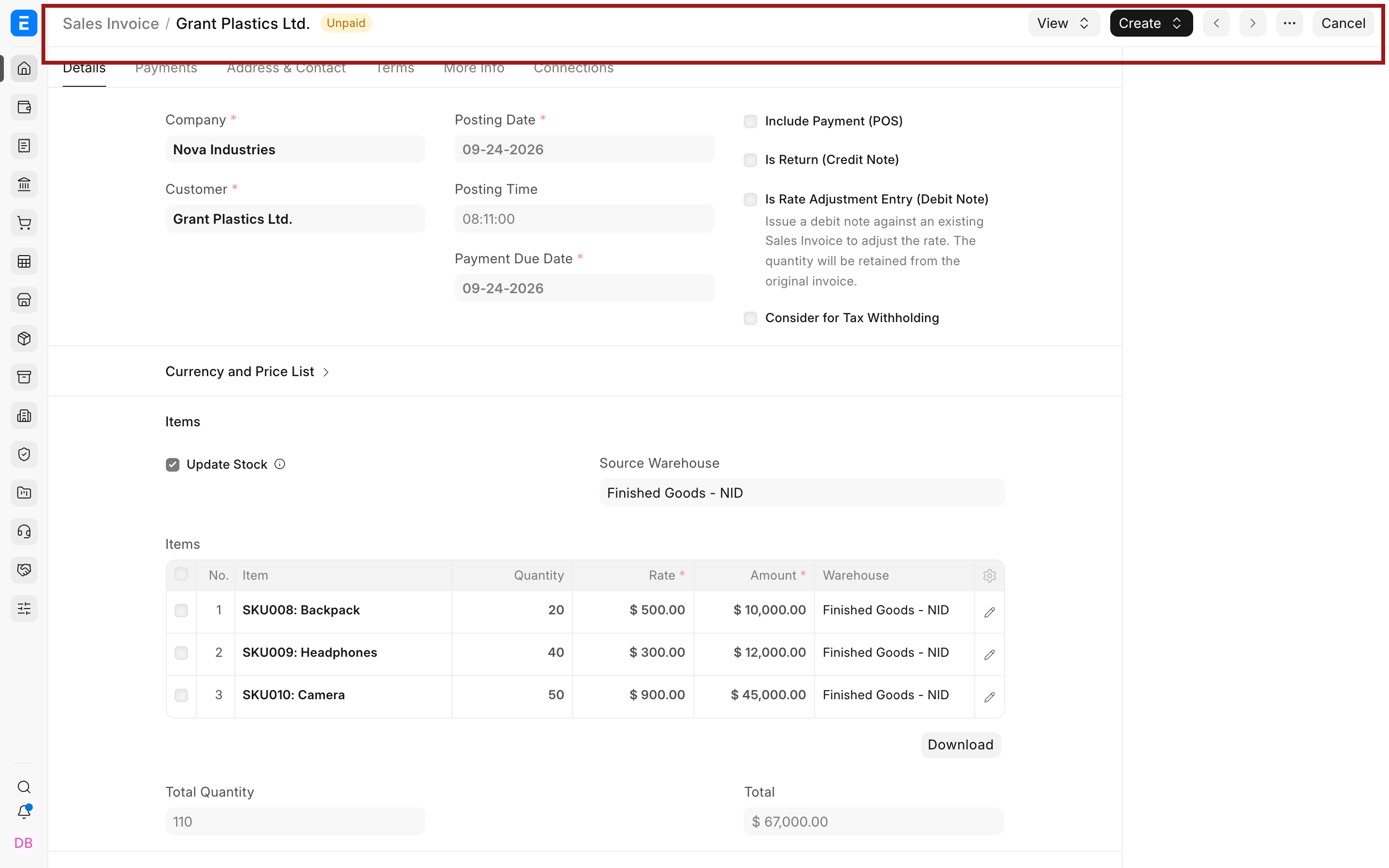
Select the Voucher No in the report to open the submitted transaction. Compare the customer, posting date, items, income account, taxes, stock settings, and totals with the ledger rows. The voucher explains the business event, while the General Ledger explains its accounting effect.
Ledger rows cannot be edited directly. If an account or dimension is wrong, correct the source through its supported cancellation and amendment process or post an approved Journal Entry. Review Immutable Ledger behavior before correcting backdated stock or accounting transactions.
Understand the important columns
| Column | How to read it |
|---|---|
| Posting Date | The accounting date used by the source voucher. It determines the reporting period. |
| Account | The ledger account affected by the row. |
| Debit and Credit | The two sides of the posting in the displayed currency. |
| Balance | The running debit less credit balance for the current report arrangement. |
| Voucher Type and Voucher No | The submitted source document that created the row. |
| Against Account | The counterpart account or accounts from the same voucher. |
| Party | The Customer, Supplier, Employee, Shareholder, or other party associated with a party ledger. |
| Cost Center, Project, and dimensions | The reporting segments copied from the transaction. |
Choose the right categorization
| View | Use it when |
|---|---|
| No categorization | You need each individual GL Entry in posting order. |
| Categorize by Account | You need opening, movement, and closing values account by account. |
| Categorize by Voucher | You want all rows created by each transaction together. ERPNext does not allow a Voucher No filter with this view. |
| Categorize by Voucher (Consolidated) | You want a compact voucher-level result instead of every underlying row. |
| Categorize by Party | You are reviewing ledger movement for customers or suppliers. |
General Ledger, Trial Balance, and Payment Ledger
| Report | Question it answers |
|---|---|
| General Ledger | Which debit and credit entries created this balance, and which vouchers produced them? |
| Trial Balance | What is the opening, period movement, and closing balance for every account? |
| Payment Ledger | How were invoices, payments, credit notes, and advances linked to calculate outstanding amounts? |
Use the General Ledger for accounting evidence. Use Trial Balance for account-level closing balances. Use Payment Ledger and Payment Reconciliation when an invoice remains outstanding because a payment or credit has not been allocated correctly.
Troubleshooting
A submitted voucher is missing
Check Company, posting dates, Account, Party, Finance Book, dimensions, and Voucher No. Draft documents have not posted ledger entries. Also confirm that the report is not excluding cancelled or period-closing entries needed for the investigation.
General Ledger and Trial Balance appear different
Run both reports with the same Company, dates, Finance Book, dimensions, presentation currency, and period-closing options. Trial Balance separates opening, movement, and closing values, while General Ledger lists the underlying postings.
The debit and credit totals do not match
Remove narrow Account and Party filters before concluding that the books are unbalanced. A filtered subset can display only one side of otherwise balanced vouchers. Compare the full company scope for the same period.
The opening balance is unexpected, or entries before the From Date appear
The opening value includes qualifying postings before the From Date. Extend the date range, inspect the account from the fiscal-year start, and verify opening entries and previous closing activity.
- The Opening row is calculated only when you filter by one Account or Party, or set Categorize by to Categorize by Account or Categorize by Party. Without these, the report shows only the entries in the date range.
- Entries marked Is Opening (for example an opening Journal Entry) are shown even when their posting date is before the From Date. This keeps opening balances in every period. To apply the date filter to them too, turn on Ignore Is Opening check for reporting in Accounts Settings.
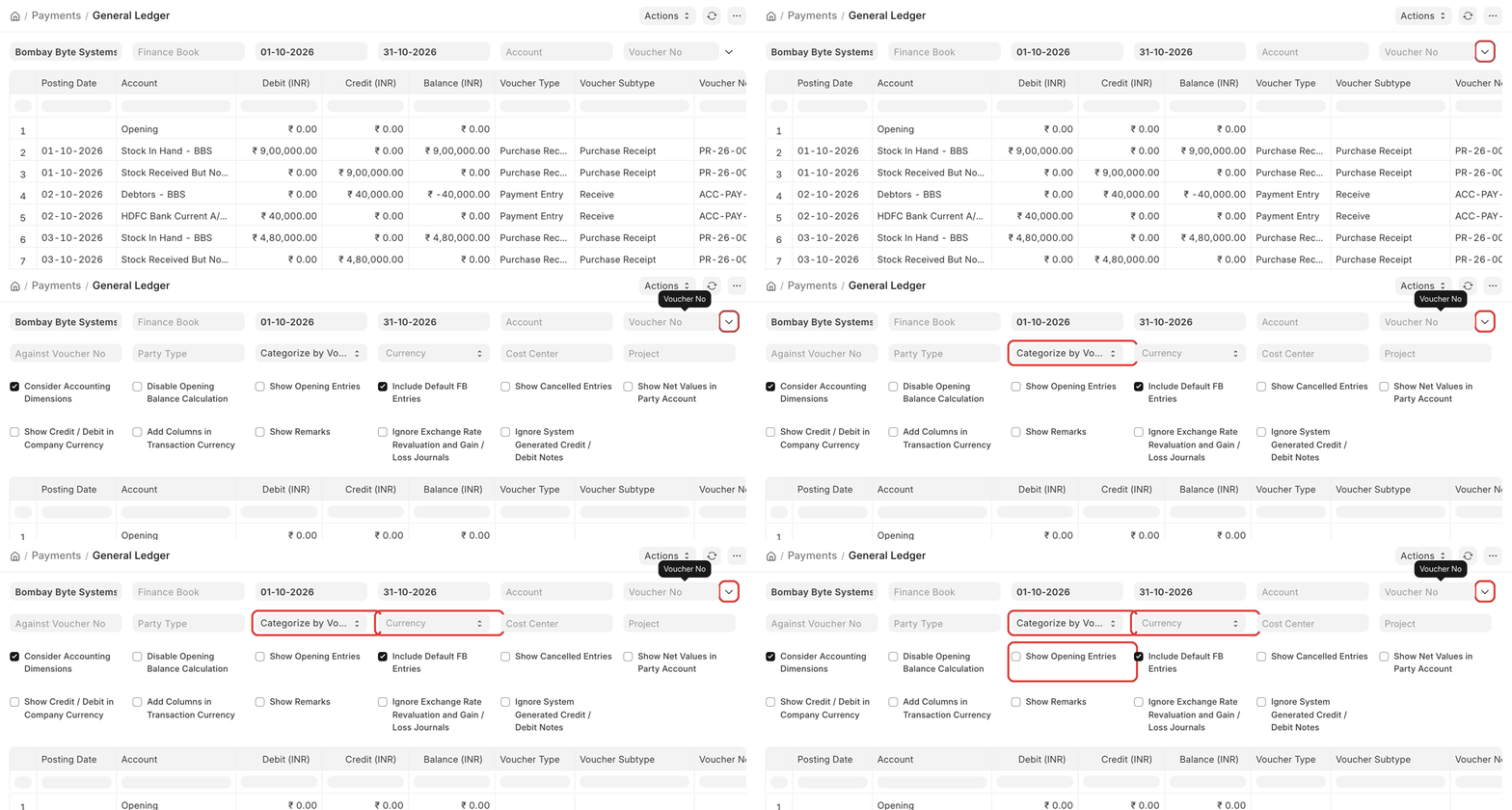
- Show Opening Entries adds those opening entries as rows. Disable Opening Balance Calculation skips the opening row, which makes a large report faster.
Amounts differ from the voucher
- Currency filter. When you choose a Currency other than the company currency, the report converts every amount at the exchange rate of the To Date. Amounts then differ from the voucher, which used the rate of its posting date. Leave Currency empty, or set it to the company currency, to see the posted amounts.
- Account currency. For a foreign-currency account, turn on Add Columns in Transaction Currency to see the amount in the voucher's currency next to the company currency.
- Show Credit / Debit in Company Currency is for exchange gain or loss entries and group accounts. It does not convert other rows.
Totals look wrong or are missing
The report has three total rows: Opening (before the From Date), Total (the selected dates) and Closing (Opening + Total). If you filter the report by Voucher No, there is no opening or closing. To total a filtered selection, export the report and add the total in the spreadsheet.
Remarks are cut off
The remarks are shortened to the length set in Accounts Settings → General Ledger remarks length. Set it to 0 to show the full remarks. Turn on Show Remarks in the report to show the column.
The Party Name column is missing
- Party Name shows only when customers or suppliers are named by a naming series (Customer Naming By in Selling Settings, Supplier Naming By in Buying Settings). When they are named by their name, the name is already in Party, so the column is left out.
- Party columns are filled only for receivable and payable accounts. For a bank or cash account, see the party in Against Account.
The cost center or dimension differs from the document header
The General Ledger takes the cost center and accounting dimensions from each item row, not from the document header. Selecting a cost center or project in the header copies it to the item rows, but a row that already has a value keeps it. Check the item rows of the voucher. To correct a submitted voucher, see Correct the account, cost center or date of a submitted voucher.
I need other columns, such as item code or project name
The General Ledger is a standard report and cannot be changed. Use Report Builder on GL Entry (go to the GL Entry list, then Report view) to choose your own columns, or ask a developer for a custom report based on the General Ledger.
FAQs:
Can a General Ledger row be edited?
ERPNext generates ledger rows from submitted source documents. Correct the voucher through its supported lifecycle or use an approved adjustment. Direct editing would break the audit trail.
Why does one voucher create several rows?
A transaction can affect receivable, income, tax, stock, cost, discount, and dimension accounts. Each accounting effect appears as a separate row.
Does cancelling a transaction remove its history?
ERPNext preserves the accounting history through reversal behavior where applicable. Review the original voucher, cancellation, and later amended voucher together.
Why is account currency different from company currency?
A foreign-currency account retains amounts in its account currency while ERPNext also records company-currency values. Confirm the selected presentation currency before comparing reports.