


















ERPNext for Service Organization
ERPNext for Service Organization
ERPNext supports service organizations such as software companies, certification providers, agencies, professional-services firms, and independent consultants. You can use it to manage sales, accounting, projects, support, assets, and—when Frappe HR is installed—HR operations without running a warehouse-based fulfillment process for every sale.
The main difference from a trading or manufacturing setup is that services are normally configured as non-stock Items. A service Sales Order can then be invoiced without a Delivery Note and marked Completed after it is fully billed.
The original overview of how the ERPNext team used ERPNext for its own service-business operations is retained below:
Before you begin
Set up the following records:
- a Company with its Chart of Accounts and default currency;
- a Customer for each organization you serve;
- one or more non-stock service Items;
- income accounts, taxes, payment terms, and Cost Centers required by your accounting process;
- Projects and Timesheets when you bill or measure work by project or time.
Decide whether you will bill a fixed fee, recurring amount, milestone, or time and expenses. That decision affects the Items, Sales Orders, Projects, and invoicing process you configure.
Create a service Item
Use a non-stock Item for consulting, implementation, support, subscriptions, or other work that does not move through a Warehouse.
- Open Item and select Add Item.
- Enter an Item Code and Item Name that describe the service.
- Disable Maintain Stock.
- Select an Item Group and the default unit of measure, such as Nos or Hour.
- Under accounting defaults, select the appropriate income account when your setup requires one.
- Save the Item.
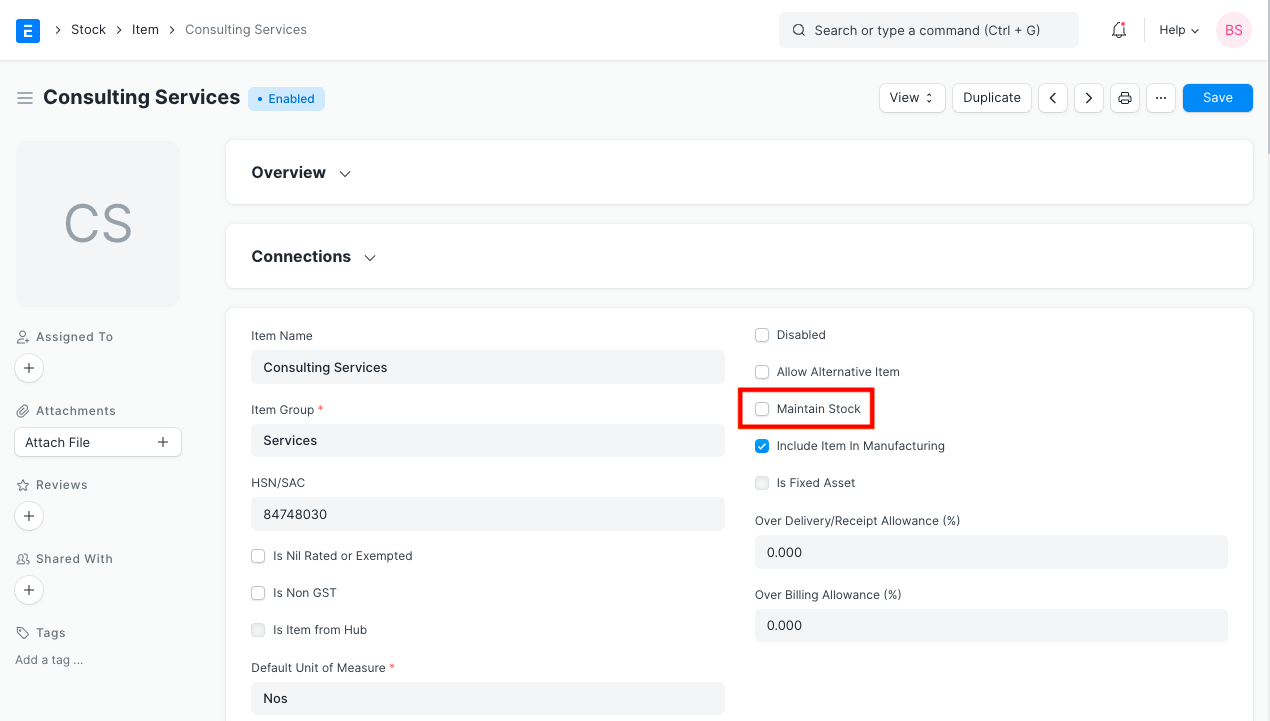
A non-stock service Item does not require a source Warehouse and does not create stock-ledger entries. You can still use quantities, rates, taxes, and accounting dimensions on sales transactions.
Sell and invoice a service
The recommended flow for an agreed service is:
Quotation → Sales Order → Sales Invoice → Payment Entry
A Quotation is optional when the Customer has already confirmed the work.
Complete a Sales Order without a Delivery Note
Use this flow when the service does not require a stock or delivery transaction:
- Create a Sales Order and select the Customer.
- Set Order Type to Maintenance.
- Enable Skip Delivery Note.
- Add the non-stock service Item, quantity, rate, taxes, payment terms, and commercial terms.
- Save and submit the Sales Order.
- From the submitted Sales Order, select Create > Sales Invoice.
- Review and submit the Sales Invoice.
When Skip Delivery Note is enabled, delivery is not required for the order. After the Sales Invoice bills the full ordered quantity, ERPNext sets the Sales Order to Completed. If you invoice only part of the order, it remains open until the remaining quantity is billed or the order is closed.
Use a normal Delivery Note flow when the order includes physical goods that must leave a Warehouse. For an order containing both services and stock Items, choose the workflow that preserves the required stock movement and audit trail.
Track delivery through Projects and Timesheets
Create a Project when the service has tasks, milestones, budgets, or a defined delivery period. Link the Sales Order and subsequent transactions to the Project so revenue and costs can be reviewed together.
Use Timesheets when employees record billable or non-billable hours. Depending on the commercial model, you can invoice time through the relevant project-and-timesheet billing workflow instead of using only a fixed-quantity service Item.
Service organizations can also use Issues for customer support, Service Level Agreements for response commitments, and Maintenance Visits or Schedules when work is performed at planned intervals.
Manage equipment and fixed assets
A service company may still purchase and track physical assets such as laptops, servers, furniture, or test equipment. Configure those purchases and Assets separately from the non-stock Items sold to Customers.
Use stock Items only when you genuinely need inventory quantities and Warehouse movements. An office asset does not need to become a sales Item merely because the company owns it.
Hide workspaces you do not use
Service organizations may not need Manufacturing, Stock, or other operational workspaces. Keep the interface focused by controlling workspace visibility and user roles:
- assign each user only the roles required for their work;
- remove Stock or Manufacturing roles from users who should not use those modules;
- configure workspace visibility or customize the workspace when your version supports it.
The older Setup > Permissions > Show/Hide Modules instruction may appear in legacy documentation. In current ERPNext versions, use role-based permissions and workspace configuration available on your site.
Configure permissions
ERPNext is role- and permission-controlled. A hidden workspace is not a substitute for access control: use Role Permissions Manager to define which documents a role can read, create, submit, amend, or cancel.
Test permissions using a non-administrator account that has the same roles as the intended user. Confirm both what the user can see and what the user can do.
The existing permissions walkthrough is retained below:
Troubleshooting
A Warehouse is required for a service Item
Open the Item and confirm that Maintain Stock is disabled. Also confirm that the Sales Order row contains the intended service Item rather than a stock Item with a similar name.
Skip Delivery Note is not visible
Set the Sales Order Order Type to Maintenance. The checkbox is conditional and does not appear for every order type.
The Sales Order is not Completed after invoicing
Confirm that Skip Delivery Note was enabled and that the Sales Invoice was submitted for the full ordered quantity. Review the Sales Order's billing percentage and linked invoices. A partial or draft invoice does not complete the order.
A user can still access an unwanted module
Review the user's assigned roles and Role Permission Manager settings. Workspace visibility affects navigation, while document permissions control access.
Frequently asked questions
Do service organizations need Warehouses?
Not for non-stock services. Warehouses are still useful when the company buys, stores, or sells physical Items.
Must every service sale use a Sales Order?
No. You can create a Sales Invoice directly when your process does not require a confirmed-order stage. Use a Sales Order when you need to record scope, value, terms, or progress before billing.
Should every service Sales Order use Maintenance order type?
Use Maintenance with Skip Delivery Note for the delivery-free completion flow described here. If the transaction includes physical fulfillment, use the order type and delivery process appropriate to that sale.