


















Profit and Loss Report
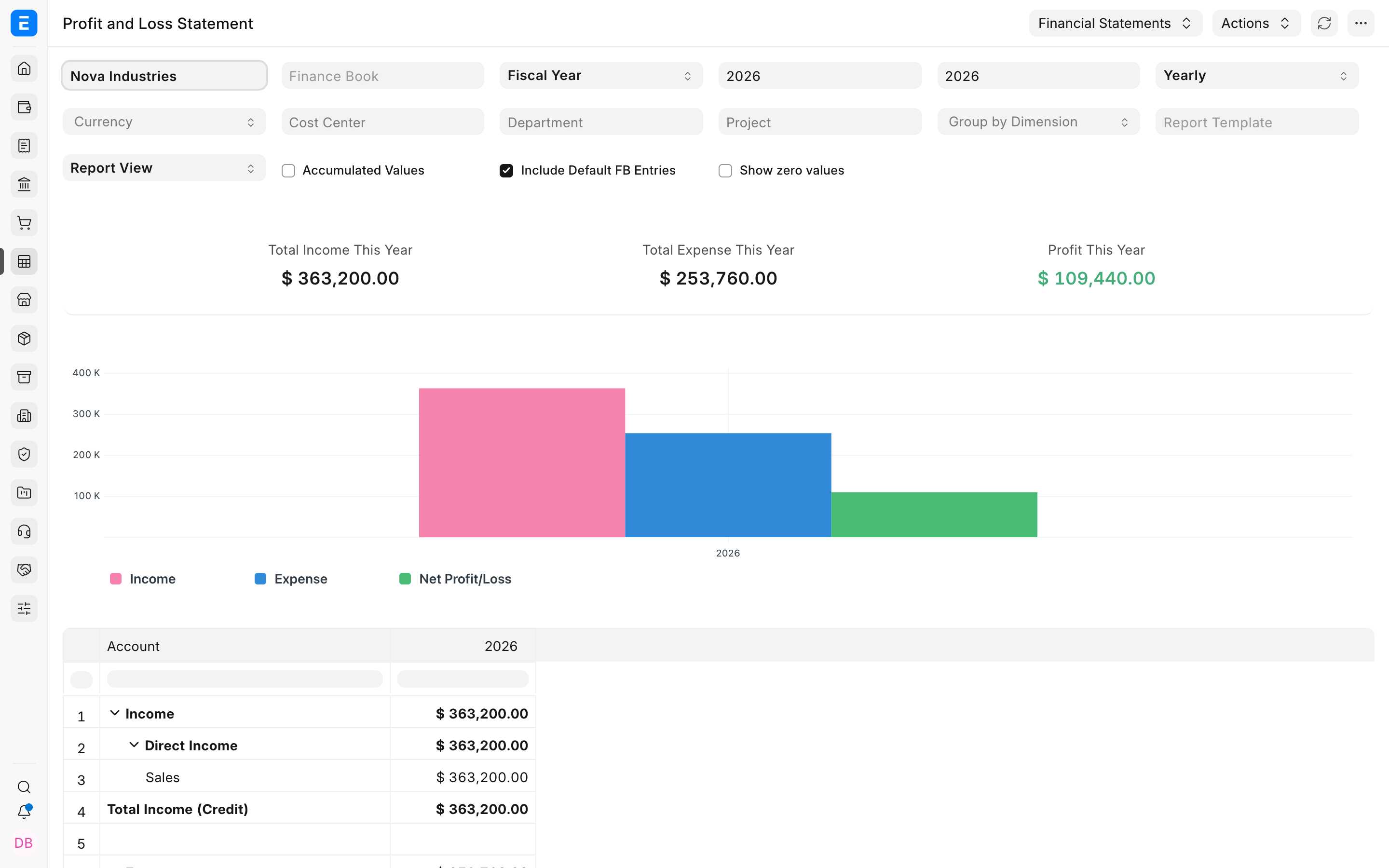
Nova Industries recorded $363,200 of income and $253,760 of expenses in 2026. The business earned $109,440, but the owner wants to know where that profit came from and whether a particular product line, department, or period performed better than another.
The Profit and Loss Statement summarizes income minus expenses over a period. It answers whether the company earned a profit, which accounts produced it, and how results compare across periods or reporting dimensions. It does not show what the company owns and owes at one date, which belongs in the Balance Sheet, or explain when cash moved, which belongs in Cash Flow.
Before you begin
Submit the relevant Sales Invoices, Purchase Invoices, stock transactions, payroll entries, depreciation, and approved Journal Entries. Confirm that Income and Expense accounts use the correct root and report type in the Chart of Accounts.
Run the report
- Open Accounting and select Profit and Loss Statement.
- Select Nova Industries.
- Choose Fiscal Year or Date Range and set the required period.
- Select Yearly, Half-Yearly, Quarterly, or Monthly periodicity.
- Apply Finance Book, Cost Center, Department, Project, or another Accounting Dimension only when the question requires that slice.
- Refresh and wait for the totals, chart, and account rows to load.
Interpret the Nova Industries result
| Result | Value | Interpretation |
|---|---|---|
| Total Income | $363,200 | Revenue and other income recognized during the selected period. |
| Total Expense | $253,760 | Cost of goods sold and other expenses recognized during the period. |
| Profit | $109,440 | Income exceeds expenses by this amount for the selected scope. |
The profit is approximately 30.1% of income. That ratio is useful only after confirming that all period expenses, stock costs, depreciation, accruals, and adjustments are posted. A positive profit also does not mean the same amount is available in the bank. Credit sales can increase profit before customers pay.
Read the account hierarchy
Expand Income and Expense groups to see the accounts behind each total. Direct Income and Direct Expense usually describe core trading or service activity. Indirect Income and Indirect Expense normally contain supporting or non-core items. The exact meaning depends on how your organisation designed its accounts.
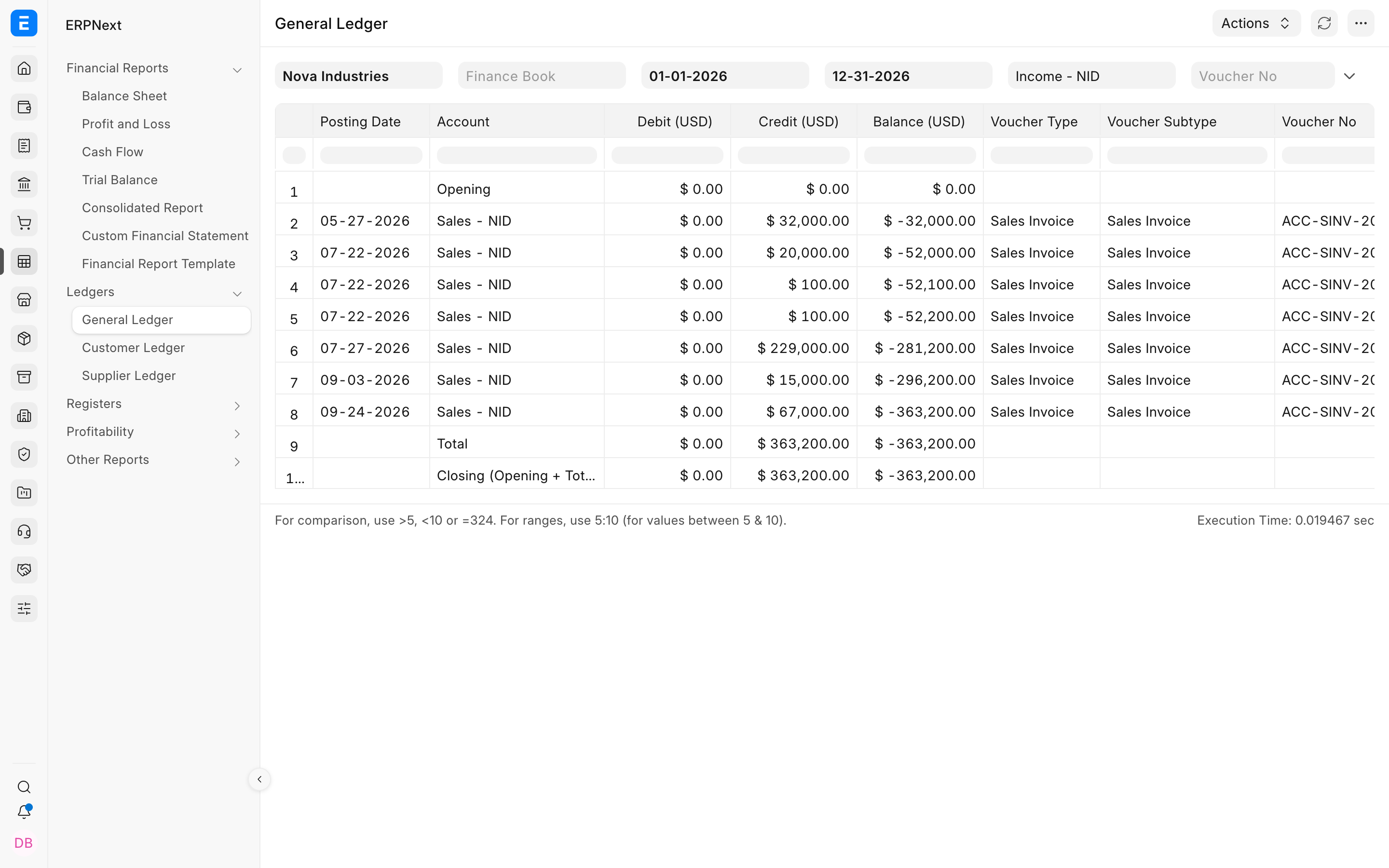
Select an account value to drill into the entries that produced it. The linked General Ledger should use the same Company, dates, Finance Book, and dimensions as the Profit and Loss Statement.
Understand the important filters
| Filter | Effect |
|---|---|
| Fiscal Year or Date Range | Defines which accounting period is included. |
| Periodicity | Splits results into yearly, half-yearly, quarterly, or monthly columns. |
| Accumulated Values | Shows cumulative balances through each displayed period instead of each period in isolation. |
| Finance Book | Restricts entries to the selected accounting book, subject to the default-book option. |
| Cost Center, Project, Department, and dimensions | Shows the profit result for a selected operational segment. |
| Currency | Changes presentation currency without changing the underlying ledger entries. |
| Report Template | Applies a configured Financial Report Template when available. |
Profit and cash are different
The Profit and Loss Statement recognizes income and expenses according to accounting dates. Accounts Receivable may show that customers still owe part of the reported income, while Accounts Payable may show unpaid supplier expenses. Use Cash Flow to explain how those outstanding balances affect actual cash movement.
Troubleshooting
The report is empty
Confirm that submitted transactions exist inside the selected period and Company. Remove Finance Book and dimension filters one at a time, then verify that the affected accounts use Income or Expense roots.
Profit and General Ledger do not agree
Match Company, dates, Finance Book, dimensions, currency, and period-closing options. A drill-down that loses a dimension filter can show a broader ledger scope than the original report.
A monthly result looks cumulative
Review the Accumulated Values setting. Enable it for year-to-date columns and disable it when each month should show only that month's activity.
Previous-year income or expense appears
Review fiscal-year dates and Period Closing Voucher status. Income and Expense accounts normally begin the new fiscal year without the previous year's operating balance.
Frequently asked questions
Can a profitable company have negative cash flow?
Credit sales can create income before customers pay, while inventory purchases and other cash outflows may occur earlier. Cash Flow explains the difference.
Does changing a report filter alter accounting entries?
Filters change which entries are selected and how they are presented. They do not repost submitted transactions.
Should tax appear as income or expense?
The answer depends on the tax type, recoverability, and account configuration. Review regional accounting rules and the accounts used by the source transactions.
Can the report compare departments or product lines?
Cost Centers, Projects, and custom Accounting Dimensions can segment the result when those values were recorded consistently on transactions.