


















Include Tax or Charge in Valuation or Total?
On a purchase transaction, a tax or charge can affect what you owe the supplier, the value assigned to received stock, or both. ERPNext separates these effects through Consider Tax or Charge for on each row of the Purchase Taxes and Charges Template.
This choice matters because supplier payable and inventory valuation answer different questions:
| Question | ERPNext value |
|---|---|
| How much must the company pay this supplier? | Total |
| How much did it cost to bring the item into stock? | Valuation |
The available choices are Total, Valuation, and Valuation and Total.
Before you begin
Confirm who is charging the amount and whether the cost should form part of inventory value. Ask your accountant how the cost must be treated under your accounting policy. Also confirm that the relevant tax, freight, or expense account exists in the Chart of Accounts.
Use Total or Valuation and Total only when the amount belongs in the payable created by this purchase document. Use Valuation when the amount should be allocated to stock but is not payable to this supplier on this document.
The examples below use:
| Component | Amount |
|---|---|
| Item net value | $800.00 |
| Recoverable tax at 4% | $32.00 |
| Freight | $100.00 |
The $32 tax is added to Total in every example. The difference is how the $100 freight row is treated.
Choose the correct treatment
| Setting | Supplier total | Stock valuation | Typical use |
|---|---|---|---|
| Total | Increases | Does not increase | A charge payable to the supplier that should not be capitalized into stock |
| Valuation | Does not increase | Increases | Freight paid separately but allocated through this receipt or invoice |
| Valuation and Total | Increases | Increases | The supplier charges freight and it forms part of landed inventory cost |
The Type determines how ERPNext calculates the row amount. Consider Tax or Charge for determines where that amount has an effect. These are separate decisions. See Types in Tax Template for the calculation options.
Add a Total-only charge
Select Total when the charge should increase the amount payable on the Purchase Invoice but should not be allocated into item valuation.
For the example:
$800 item value + $32 tax + $100 freight = $932 payable
The freight does not increase the item's valuation through this row. This treatment can be appropriate for a fee that is expensed directly instead of capitalized.
- Add or open a row in Purchase Taxes and Charges.
- Select the required Account Head.
- Set the calculation Type, such as Actual for a fixed $100 charge.
- Set Consider Tax or Charge for to Total.
- Review the row Amount and the document Grand Total.
Do not use Total merely because money was paid. The accounting treatment depends on whether the cost belongs in inventory value.
Add a Valuation-only charge
Select Valuation when the cost should increase inventory value but should not increase the payable on this document. A common example is freight paid to a separate carrier while the purchase invoice being processed belongs to the item supplier.
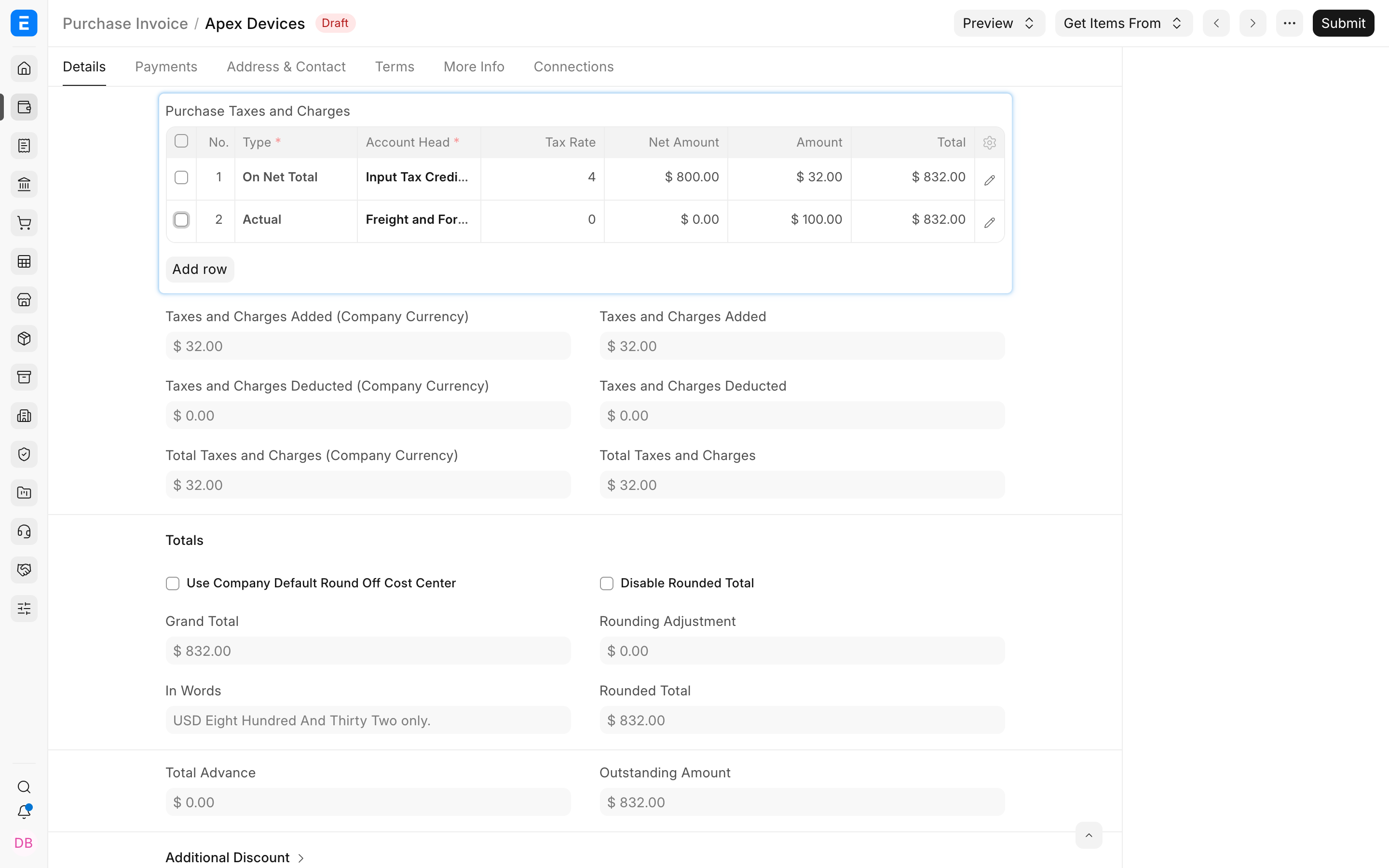
Open the freight row using its pencil icon. Set the row to Valuation, then enter the amount and the correct expense or clearing account.
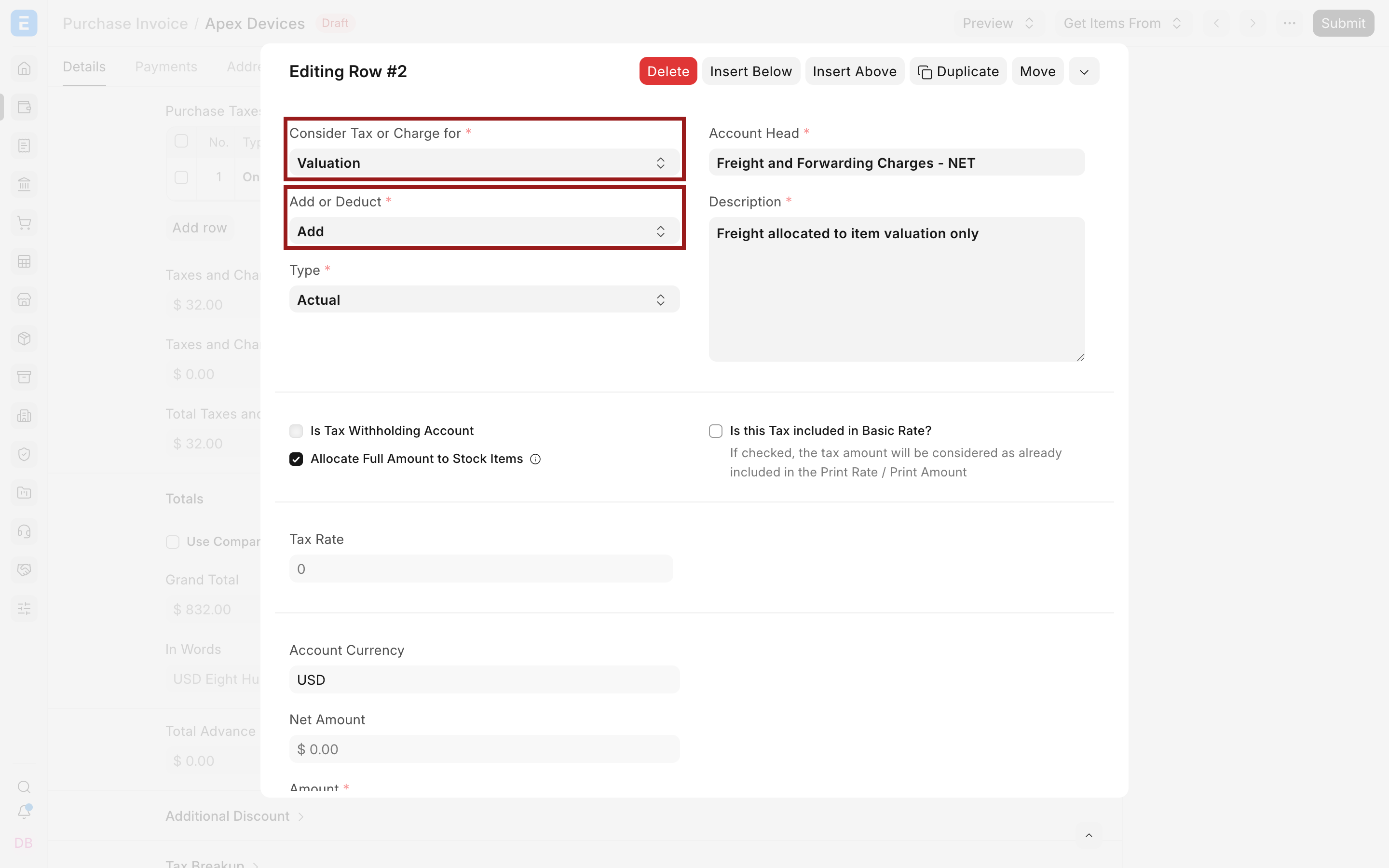
In this example, the supplier payable remains:
$800 item value + $32 tax = $832 payable
The $100 freight is allocated into valuation but is excluded from the supplier total.
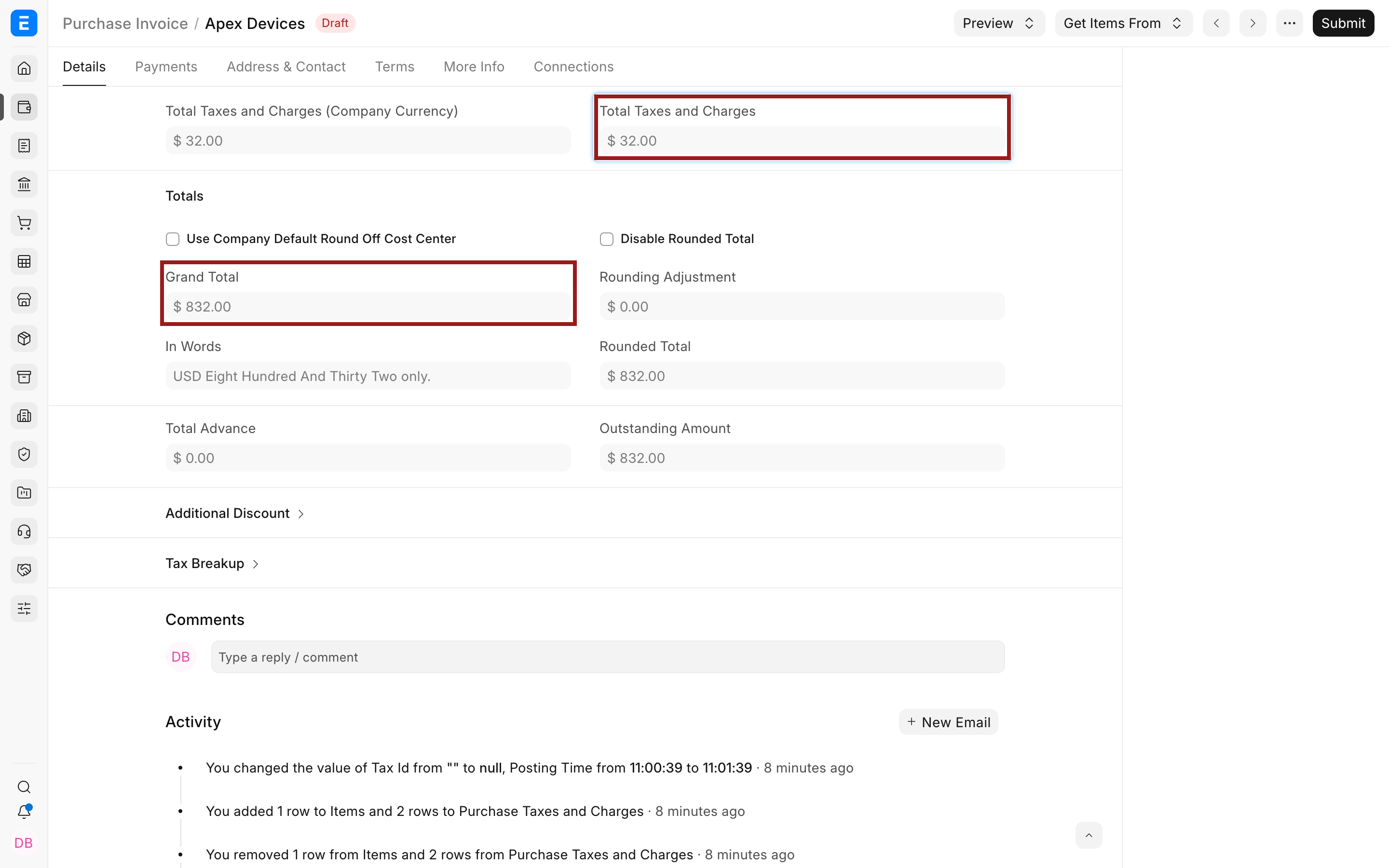
Use a suitable clearing or expense account for the valuation row. The source of the separately paid freight must still be recorded correctly, such as through another supplier invoice or a Landed Cost Voucher, depending on the workflow.
Add a charge to Valuation and Total
Select Valuation and Total when the same amount must increase both the supplier payable and the item's valuation. This is common when the item supplier arranges freight, includes it on the invoice, and the freight forms part of landed cost.
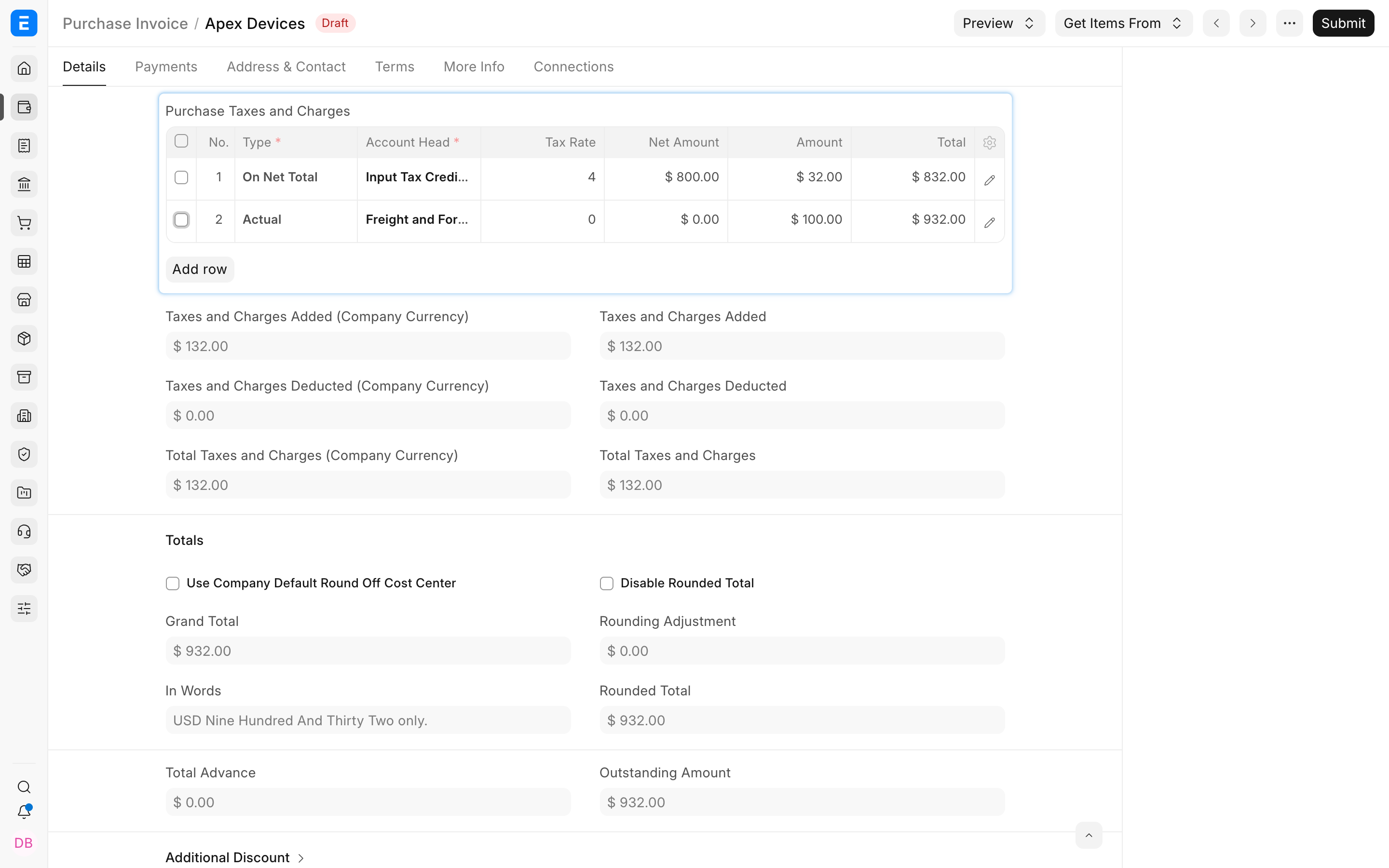
Open the freight row and select Valuation and Total. Confirm the Account Head, Type, description, and amount before closing the row editor.
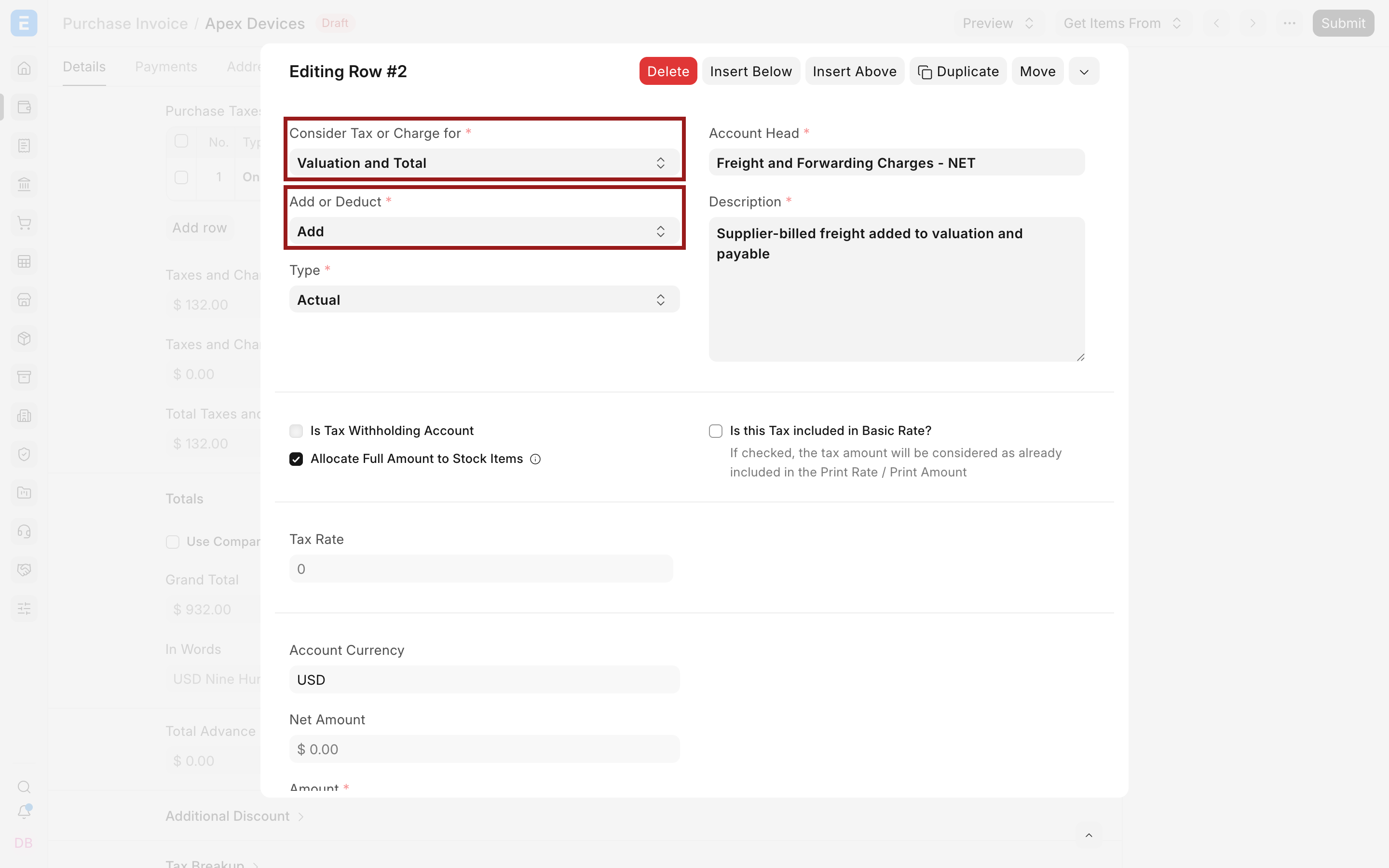
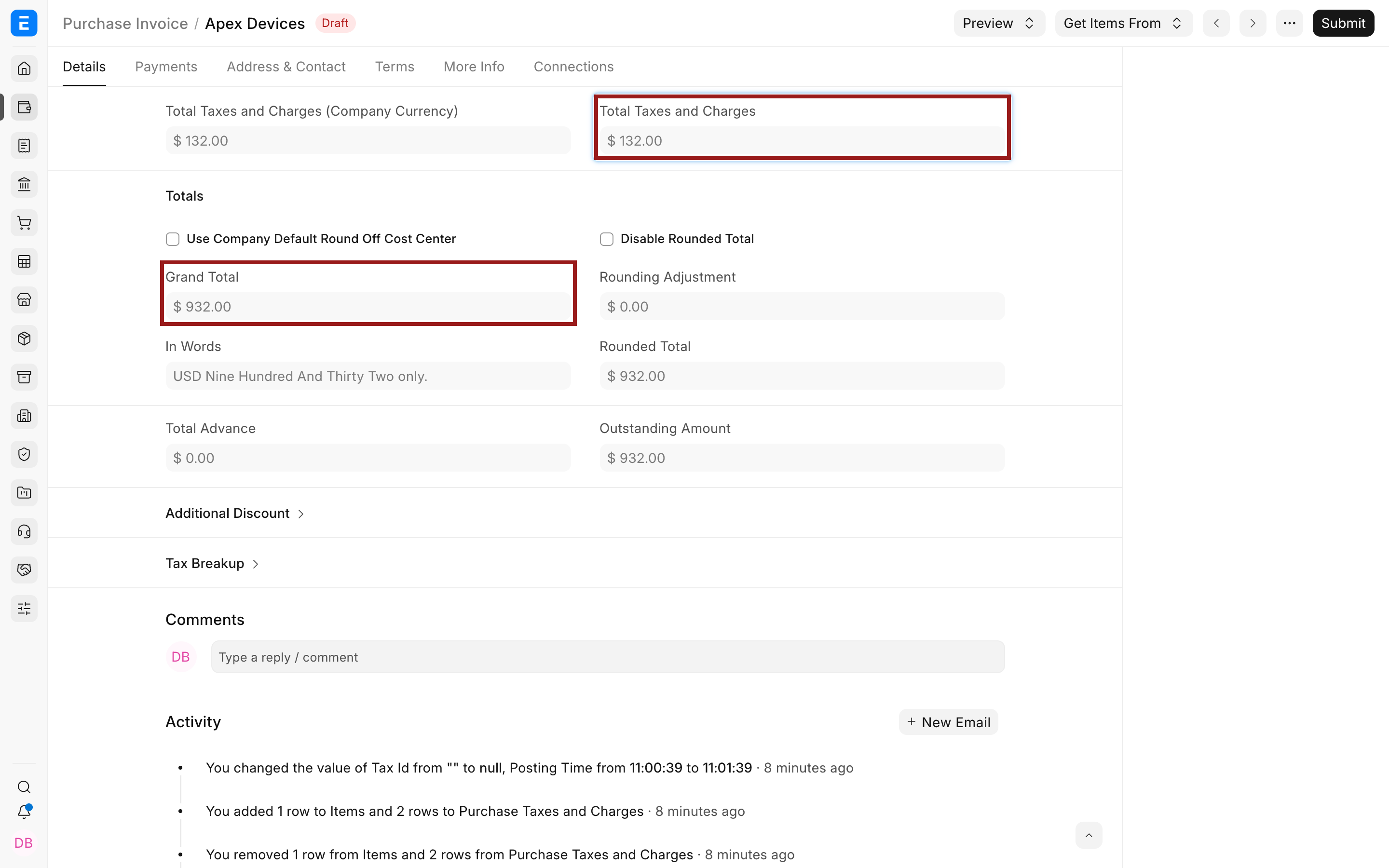
The supplier payable becomes:
$800 item value + $32 tax + $100 freight = $932 payable
The $100 freight is also allocated into inventory valuation.
Understand the accounting and stock effect
A submitted purchase transaction may affect both the General Ledger and the Stock Ledger. The exact posting depends on whether stock is updated through a Purchase Receipt, through Update Stock on a Purchase Invoice, or through another perpetual-inventory workflow.
| Treatment | Payable effect | Inventory-value effect |
|---|---|---|
| Total | Included in the document's payable | Not allocated by this row |
| Valuation | Excluded from this document's payable | Allocated to received items |
| Valuation and Total | Included in the document's payable | Allocated to received items |
The valuation amount is distributed across eligible items according to ERPNext's valuation logic. Review the item valuation and ledger entries after submitting a controlled test. Do not infer the final accounting entry only from Grand Total.
When to use a Landed Cost Voucher instead
Use a Landed Cost Voucher when additional costs become known after the receipt, come from another supplier, or must be allocated across one or more submitted receipts or invoices. It is designed to update the landed value of received stock.
Use the purchase tax table when the charge is known while creating the transaction and belongs naturally on that document. Avoid recording the same freight through both methods, because that can capitalize the cost twice.
Verify the result before wider use
Create a draft with one item and easy numbers. Then:
- Confirm the item Net Total.
- Review each tax row's Amount and Total.
- Compare the Grand Total with the expected supplier payable.
- Submit the controlled transaction.
- Open Accounting Ledger and confirm the payable and tax postings.
- Open the stock ledger or valuation report and confirm the inventory effect.
If a template is reused automatically, test it before setting it as the company default or applying it through a Tax Rule.
Troubleshooting
Freight increased the supplier payable unexpectedly
Open the freight row and check Consider Tax or Charge for. Use Valuation instead of Valuation and Total only when the amount must not be payable on this document and the accounting source is handled elsewhere.
Freight did not increase item valuation
The row may be set to Total. Confirm that it is Valuation or Valuation and Total, that the transaction updates or receives stock, and that the selected account and item are eligible for the intended treatment.
The payable is correct but the freight cost has no accounting source
A Valuation-only row does not make the amount payable to this supplier. Record the actual carrier or other cost source through the appropriate document, or use a Landed Cost Voucher when that better matches the workflow.
Inventory appears to include the charge twice
Check whether the same cost was included in a valuation tax row and again in a Landed Cost Voucher. Keep only the posting that reflects the real source and timing of the charge.
Frequently asked questions
Should recoverable tax be included in valuation?
Usually a recoverable input tax is not part of inventory cost, but treatment depends on local rules and your accounting policy. Confirm the setup with your accountant.
Can a fixed freight charge use Valuation and Total?
Y
es. Set Type to Actual, enter the freight amount, and use Valuation and Total when the supplier charges it and it must also form part of inventory value.
Does Valuation-only mean the freight is free?
- It means the amount is not payable on this particular purchase document. The actual payment or supplier liability must be recorded through its proper source.
Is Consider Tax or Charge for available on sales transactions?
The valuation choice is relevant to purchase-side stock cost. Sales tax rows primarily affect the transaction total rather than incoming inventory valuation.
Can I change the setting after submission?
Submitted accounting and stock transactions should not be edited casually. Cancel and amend where permitted, or use the appropriate correction process after reviewing the ledger impact.