ERPNext

ERPNext

Open in ChatGPT
Ask ChatGPT about this page
Open in Claude
Ask Claude about this page

Booking Customer Deducted TDS in Payment Entry in ERPNext

When a Customer withholds tax from a payment, the bank receives less than the invoice value. Record the cash received, allocate the invoice, and post the withheld amount to the correct tax receivable account.

Before you begin

Confirm the correct Company, currency, receivable or payable account, and bank or cash ledger. Use submitted source documents and keep the bank reference or remittance advice available.

Use Booking Customer Deducted TDS in Payment Entry in ERPNext

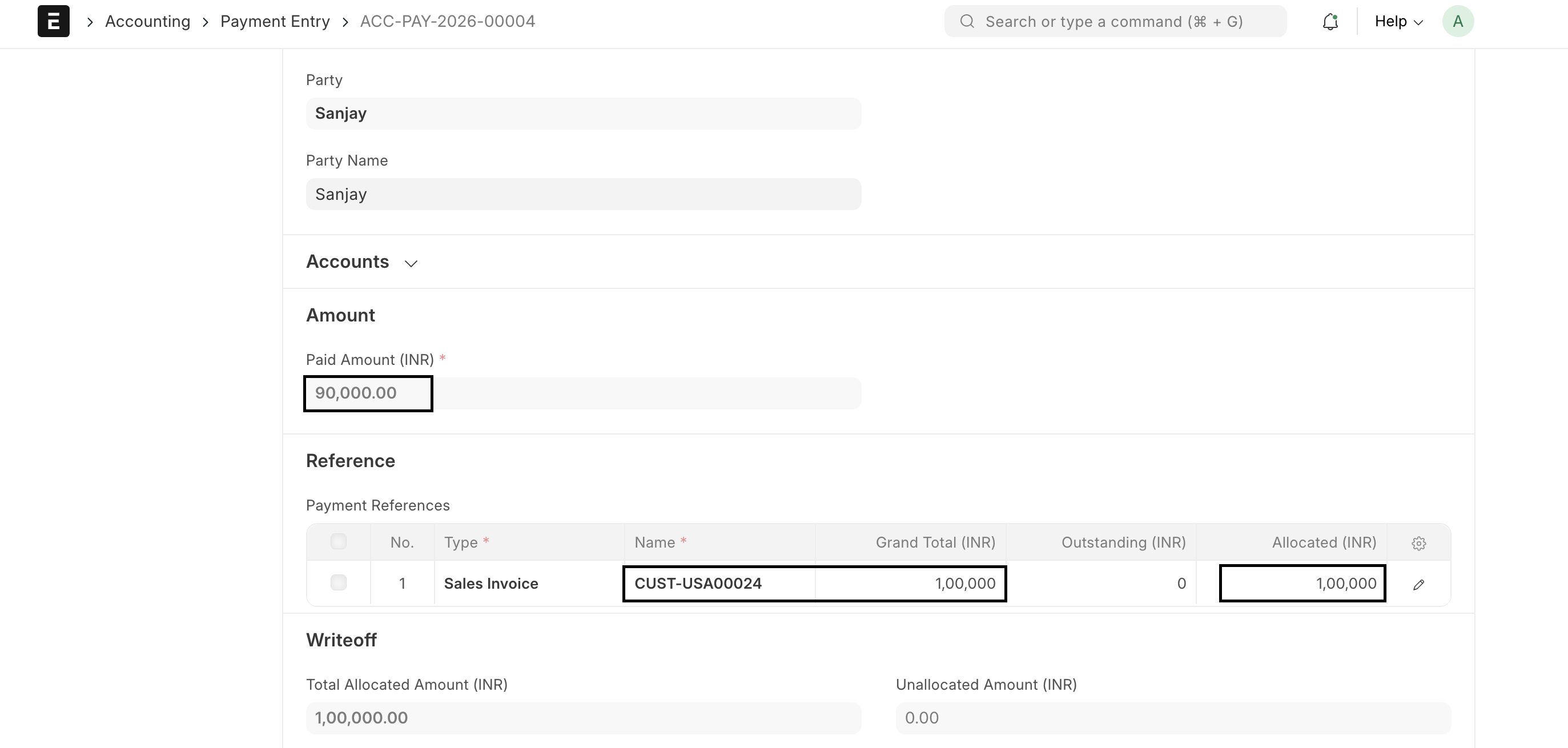
  1. Create a Receive Payment Entry and fetch the Sales Invoice.
  2. Enter the net amount received in the bank.
  3. Allocate the invoice amount being settled.
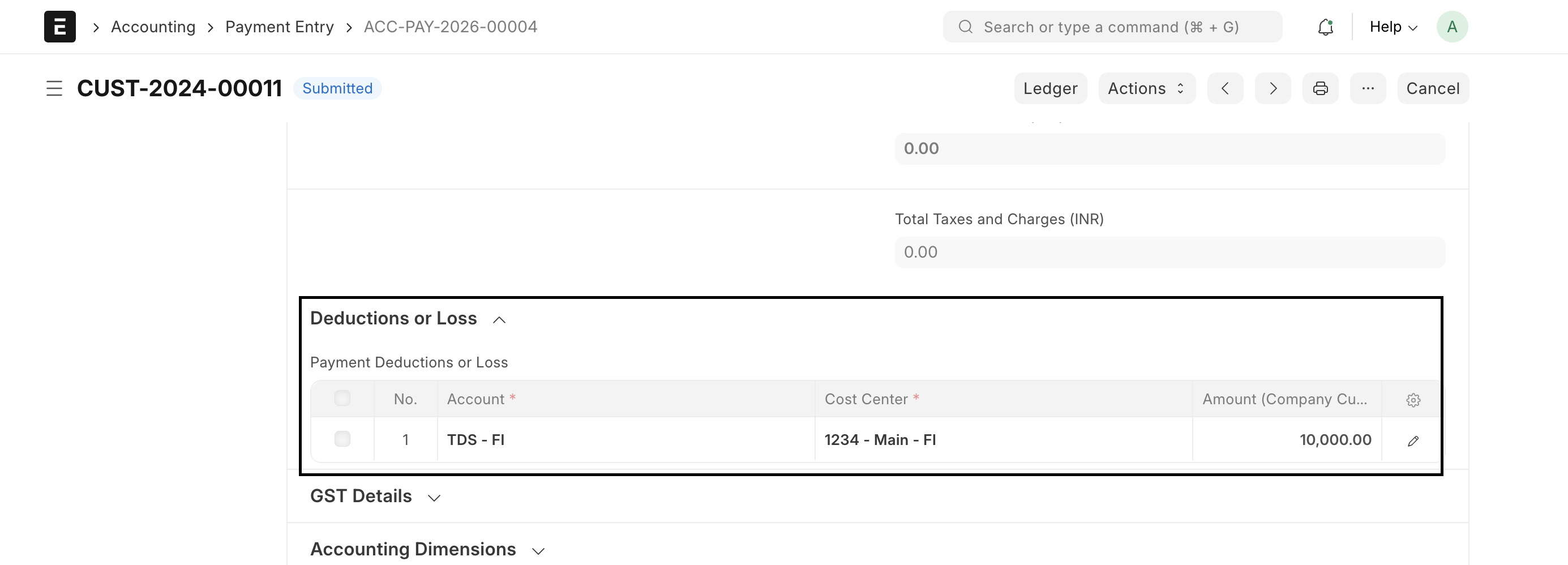
  4. Add the withheld amount in Deductions or Loss using the approved tax receivable account.
  5. Attach or reference the withholding certificate when available.
  6. Confirm that the Difference Amount is zero and submit.

Booking Customer Deducted TDS in Payment Entry in ERPNext in ERPNext

Important fields and what they mean

Field What it controls
Paid Amount Net cash received.
Allocated Amount Invoice amount cleared.
Account Tax receivable ledger for the withheld amount.
Amount Tax withheld by the Customer.
Reference Certificate or remittance evidence.

What happens after you submit or process

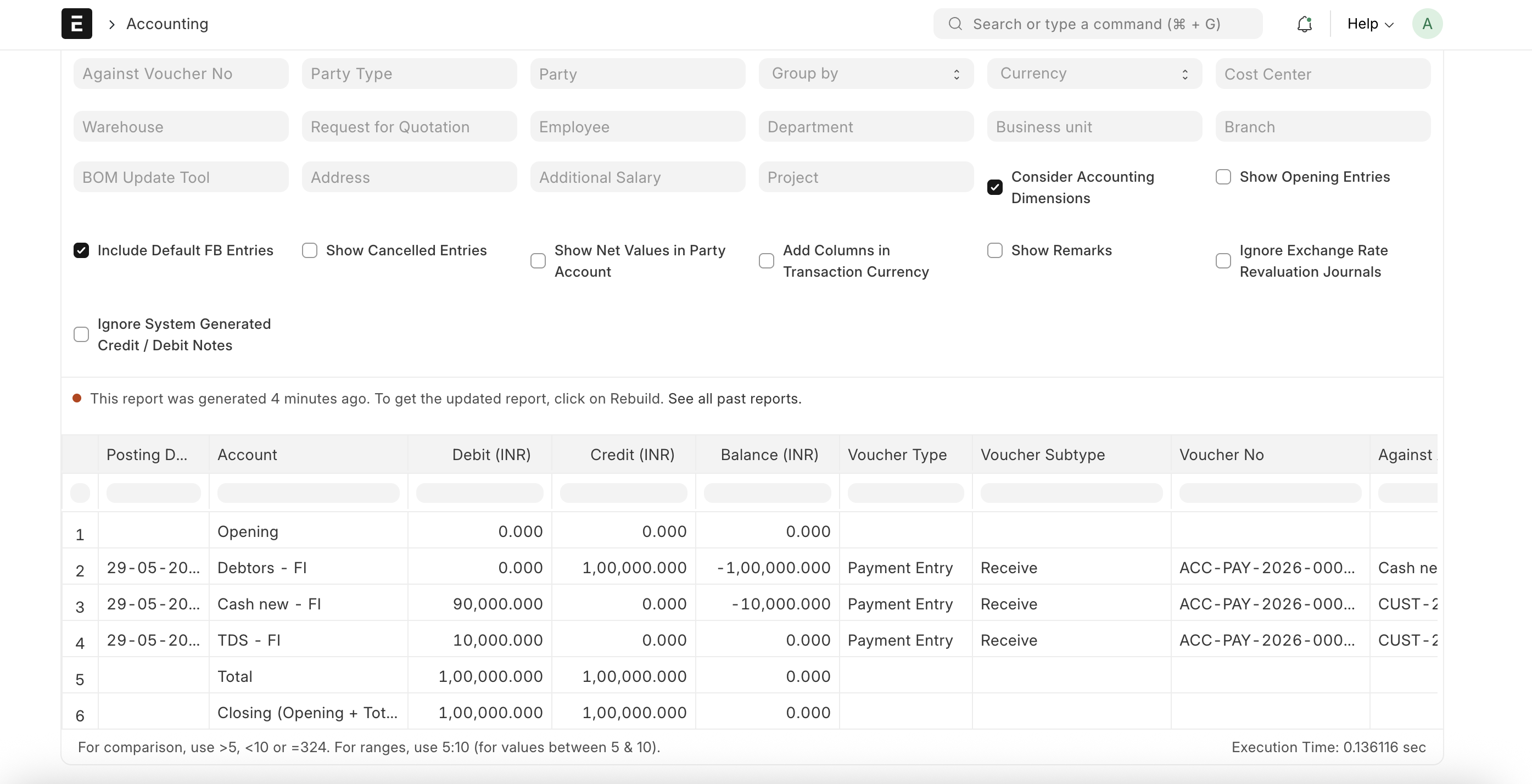
ERPNext updates the relevant accounting records and, where applicable, the outstanding or unallocated amounts. Review the General Ledger, party ledger, and source document status before treating the workflow as complete. A saved draft does not affect the ledger.

Troubleshooting

The invoice remains partly outstanding after the customer deducts tax

The bank receipt and tax deducted must together clear the invoice. Record the withheld amount against the correct tax receivable or recoverable account instead of allocating only the cash received.

The withholding entry credits or debits the wrong account

Review whether you are recording customer-deducted tax or supplier withholding. Customer-deducted tax is commonly a recoverable asset, while tax withheld from a supplier is commonly a liability. Confirm the local accounting treatment with your adviser.

The deduction amount is calculated on the wrong base

Check the calculation type, rate, actual amount, partial-payment behavior, and regional tax configuration. Do not reuse a supplier withholding setup without verifying that it fits customer-deducted tax.

Frequently asked questions

Should the Payment Entry amount equal the invoice or the bank receipt?

Record the actual cash received in the bank amount. Use the supported deduction or tax fields so the cash plus recoverable tax clears the invoice.

Is customer-deducted tax an expense?

It is often a recoverable tax asset, but the treatment depends on local law and whether the amount can be claimed. Use an expense account only when advised that it is not recoverable.

Can the deduction be recorded after the Payment Entry was submitted?

Correct the transaction through cancellation and amendment or another approved accounting adjustment. Do not edit posted ledger values directly.

Why does this differ from withholding tax on supplier payments?

In a customer receipt, your customer has withheld money from you. In a supplier payment, your company withholds money owed to the supplier and may owe it to a tax authority.

Last updated 2 hours ago
Was this helpful?
Thanks!