


















After Nova Industries closes a month, an accountant discovers that a submitted invoice was wrong. Quietly replacing its original ledger rows would make the audit trail impossible to trust because reviewers could no longer see what was posted first.
ERPNext's immutable ledger keeps the original accounting and stock entries and records matching reversals when a transaction is cancelled. Corrections are made through traceable follow-up documents instead of silently rewriting history.
This design makes period reviews, audits, and reconciliations more reliable because every posting and reversal remains visible.
Why the ledger is protected
Accounting and stock transactions form ordered histories. A backdated change can affect later records:
- Under FIFO valuation, inserting or changing an earlier stock movement can change which inventory layers are consumed later.
- Under moving-average valuation, it can change later valuation rates and Cost of Goods Sold.
- A changed invoice or tax entry can alter reports or tax declarations for an earlier period.
- Recomputing every later stock or accounting entry can be expensive on a large database.
The General Ledger and Stock Ledger therefore retain traceable posting rows and use supported correction and reposting logic rather than inviting users to edit or delete ledger entries directly.
What happens when you cancel a transaction
Consider a submitted Journal Entry that debits Office Maintenance Expense by $120 and credits Nova Operating Bank by $120. Cancelling the document changes its status to Cancelled.
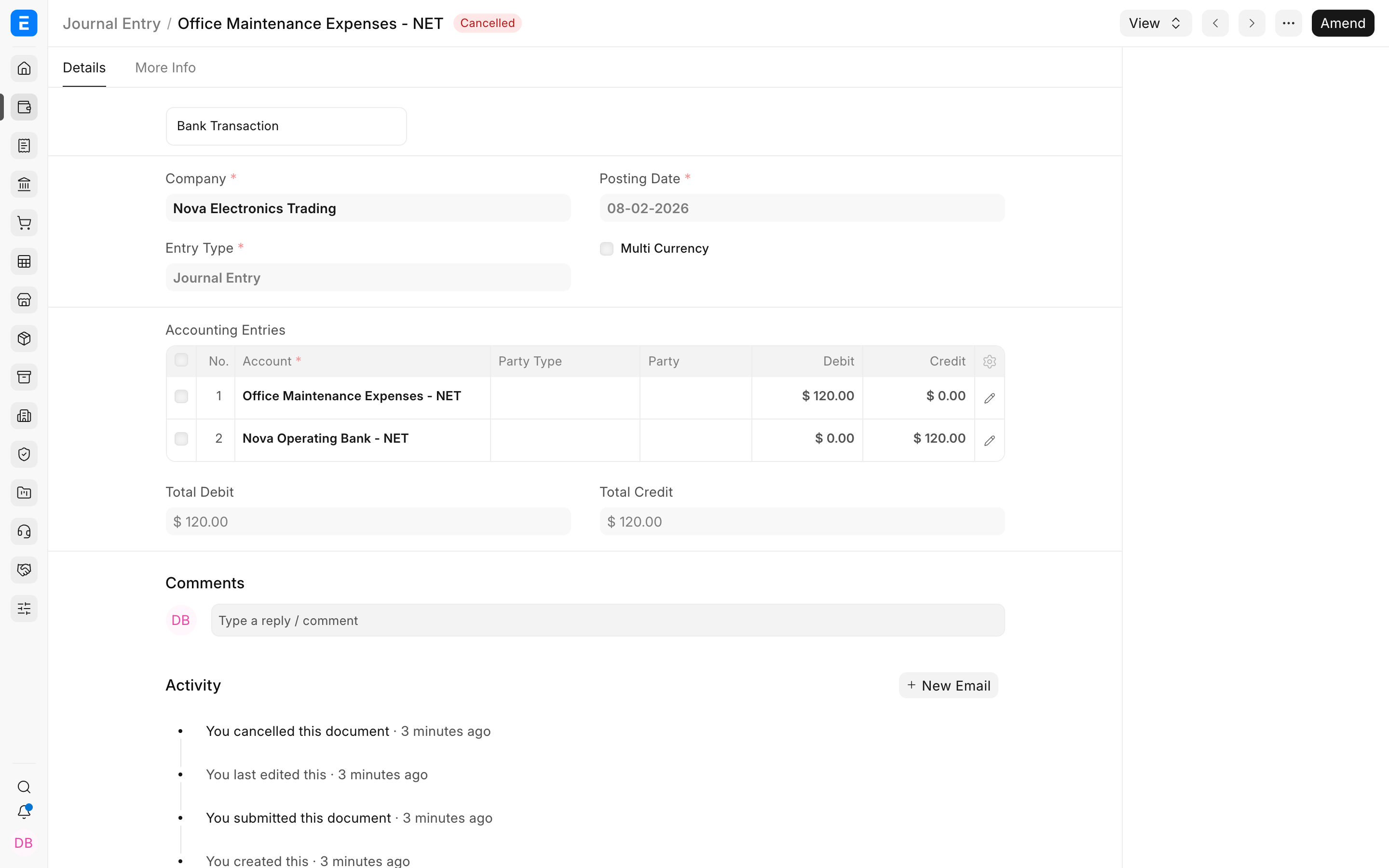
ERPNext retains the original debit and credit and adds opposite rows for the same voucher. The combined effect is zero, but the audit trail still shows what was posted and how it was cancelled.
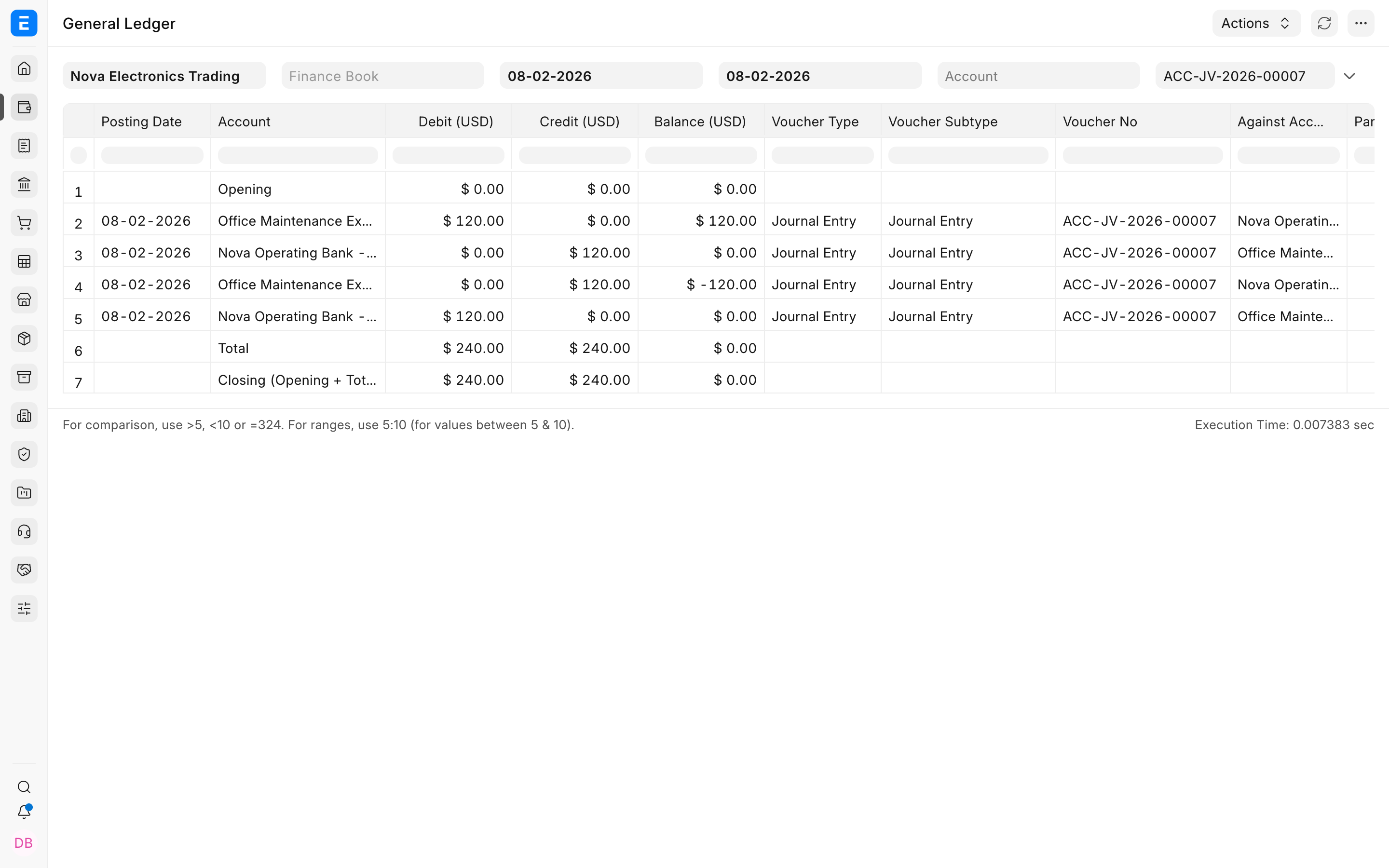
In the General Ledger report, enable Show Cancelled Entries to see these rows. Without that filter, cancelled rows are excluded from normal balances so the report shows only active accounting effects.
The same principle applies to posting documents such as a Payment Entry, Sales Invoice, and Purchase Invoice. The exact linked records and reversal logic depend on the document.
Why cancelled transactions cannot normally be deleted
A cancelled posting document remains the source of its original and reversal ledger rows. Deleting it would break that audit trail and remove the business context behind the entries. ERPNext therefore prevents normal deletion of cancelled documents linked to ledger entries.
If a document is wrong, use its supported correction workflow:
| Situation | Recommended correction |
|---|---|
| Draft is wrong | Edit or delete the draft before submission. |
| Submitted invoice is wrong | Cancel and amend when the period and links permit it. |
| Customer returns goods | Create a return or Credit Note. |
| Supplier return or rate correction | Create the appropriate return or Debit Note. |
| Journal needs an opposite entry without cancellation | Use Reverse Journal Entry and review the generated draft. |
| Source document is correct but generated accounting is stale | Use Repost Accounting Ledger after diagnosis. |
Do not delete GL Entry or Stock Ledger Entry rows through the database or API. Those rows are system-generated evidence, not transaction-entry forms.
Backdated stock transactions and reposting
The original immutable-ledger release placed a strict restriction on stock transactions dated before a later movement for the same item and warehouse. For example, after posting Item A at 19-06-2020 23:00:10, an earlier posting could be blocked because recalculating all later FIFO or moving-average values was expensive.
Current ERPNext builds include controlled stock-reposting infrastructure. A permitted backdated stock transaction can create a Repost Item Valuation job so later Stock Ledger Entries are recalculated in sequence. Whether the transaction is accepted also depends on Stock Settings, negative-stock rules, frozen periods, Accounting Period restrictions, serial and batch constraints, and other validations.
This means you should not assume that every backdated stock transaction is always prohibited, or that every backdated transaction is safe. Enter transactions promptly and in chronological order. When a backdated correction is unavoidable:
- Confirm that the posting period is open under Freeze Accounting Entries and Accounting Period.
- Check the item, warehouse, batch, serial number, posting date, and posting time.
- Submit the smallest necessary correction.
- Allow any Repost Item Valuation job to complete.
- Verify the Stock Ledger, Stock Balance, valuation rate, stock value, and affected accounting reports.
Large or old corrections can require substantial processing. Test them on a restored backup when they can materially change valuation or closed reports.
Corrections in a closed period
Immutable-ledger behavior does not replace period controls. A submitted Period Closing Voucher, frozen date, or Accounting Period can block cancellation, amendment, or reposting.
Do not change a closed period simply to make an error disappear. Decide with your accountant whether to reopen the period under controlled approval, post an adjustment in the current open period, issue a return or credit note, or create a reversal Journal Entry. The correct treatment depends on reporting and regulatory requirements.
Verify the audit trail
After any correction:
- Open the source document and confirm its status and amended-from or return reference.
- Use View > Ledger or filter the General Ledger by voucher number.
- Enable Show Cancelled Entries when you need to inspect reversal rows.
- For stock documents, review the Stock Ledger Report and any Repost Item Valuation record.
- Confirm that active balances are correct and that original plus reversal rows net to zero where expected.
- Recheck the Profit and Loss Statement, Balance Sheet, stock valuation, tax reports, and outstanding balances affected by the change.
Troubleshooting
A cancelled voucher does not appear in the General Ledger
Enable Show Cancelled Entries in the report filters. Cancelled rows are hidden from the normal report because their net accounting effect is zero.
ERPNext will not let me delete a cancelled transaction
This is expected when the document has linked ledger entries. Keep the cancelled source document as part of the audit trail. Create the corrected document through amendment, return, or another supported workflow.
A backdated stock transaction is blocked
Read the validation message before changing settings. Check later stock movements, negative stock, batches or serial numbers, frozen dates, closed Accounting Periods, and permissions. Do not alter the posting time merely to bypass valuation controls.
Stock values changed after a backdated posting
The repost recalculated later FIFO or moving-average values. Wait for Repost Item Valuation to finish, then compare the Stock Ledger before and after the inserted transaction and verify related Cost of Goods Sold entries.
A cancellation is blocked by a closed period
Follow your approved period-correction policy. You may need accounting authorization to reopen the period or to post a current-period reversal or adjustment instead.
FAQs
Is immutable ledger a blockchain?
No, It is ERPNext's application-level audit and posting design. It retains and reverses ledger effects through database records; it is not a distributed blockchain network.
Can System Manager delete GL Entries directly?
Normal business corrections should never be made by deleting GL Entries. Correct the source document through a supported workflow so linked ledgers and reports remain consistent.
Does cancelling a document erase its original accounting entry?
No, The original rows and opposite cancellation rows remain available as cancelled entries. Their combined effect is zero in active balances.
Are all backdated stock entries prohibited?
No, Current ERPNext can process permitted backdated entries through controlled valuation reposting, but validations and period controls still apply. Backdating can change later valuations and should be used carefully.
Is Repost Accounting Ledger the same as cancelling a transaction?
No, Cancellation removes the active business and accounting effect through reversal logic. Reposting regenerates ledger entries from a source document that remains submitted and valid.