


















Multi Currency Accounting
Nova Industries manufactures electronics, buys components abroad, and distributes finished products in several currencies.
Nova buys components and sells finished products internationally. A customer may need an invoice in EUR, a supplier may expect payment in JPY, and Nova must still report one consistent set of books in USD. Multi-currency accounting keeps each foreign amount together with its Company-currency value.
For example, Nova invoices EuroTech Retail for EUR 1,200 at 1 EUR = 1.15 USD. The customer sees EUR 1,200 while ERPNext records USD 1,380 for reporting. This page explains how Company, account, transaction, and pricing currencies work together from setup through payment and revaluation.
The three currencies to distinguish
| Currency | What it controls |
|---|---|
| Company currency | The base accounting currency configured on the Company. Financial statements and base debit and credit values use it. |
| Account currency | The fixed currency of a ledger in the Chart of Accounts. A bank, receivable, or payable account should represent one currency. |
| Transaction currency | The currency shown on the invoice, order, or quotation. Its amount is converted to Company currency using the document's Exchange Rate. |
A Price List adds another pricing currency. If it differs from the transaction currency, Price List Exchange Rate converts item prices separately from the document's accounting conversion rate.
Before you begin
Enable the required Currency records. Decide whether each Customer and Supplier will normally transact in one foreign currency or several currencies. Agree on the source and approval policy for exchange rates, the realized Exchange Gain/Loss account, the unrealized Exchange Gain/Loss account, and the revaluation frequency.
Do not change an Account's currency after ledger entries exist. Current ERPNext prevents this because old balances would become ambiguous. Create a correctly denominated account instead.
Set up foreign-currency accounts
Create separate ledgers for each currency that must retain an account-currency balance. Examples include a EUR bank account, EUR receivable account, and EUR payable account.
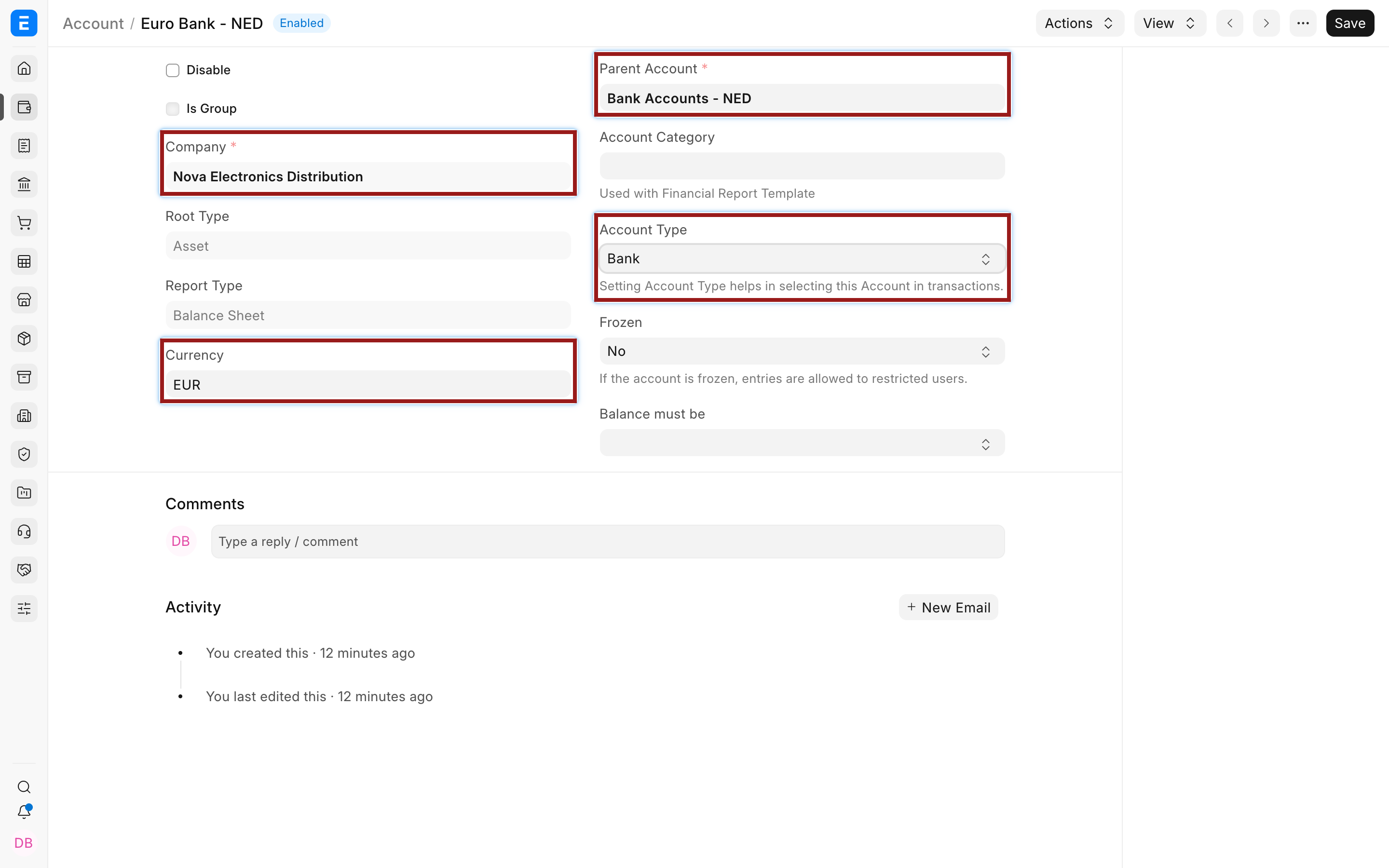
Each bank or cash account has one currency. If the real bank provides separate USD and EUR balances, represent them with separate ERPNext accounts. This keeps Bank Reconciliation and audit trails intelligible.
Configure Customers and Suppliers
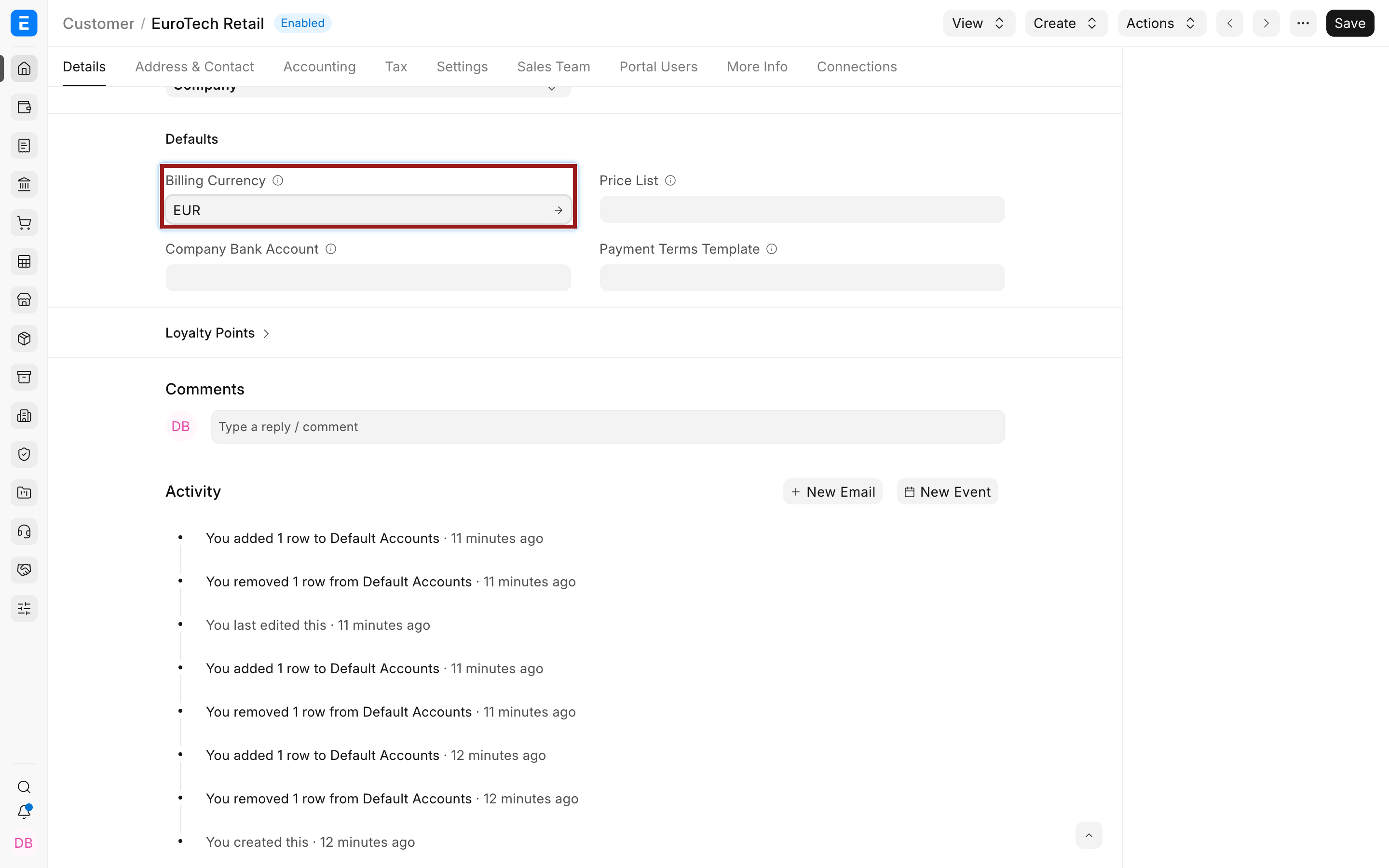
Set a foreign Customer's Billing Currency, then add the matching receivable account in the Customer's Default Accounts child table. For a Supplier, use Billing Currency and the Per-Company Accounts table with the matching payable account.
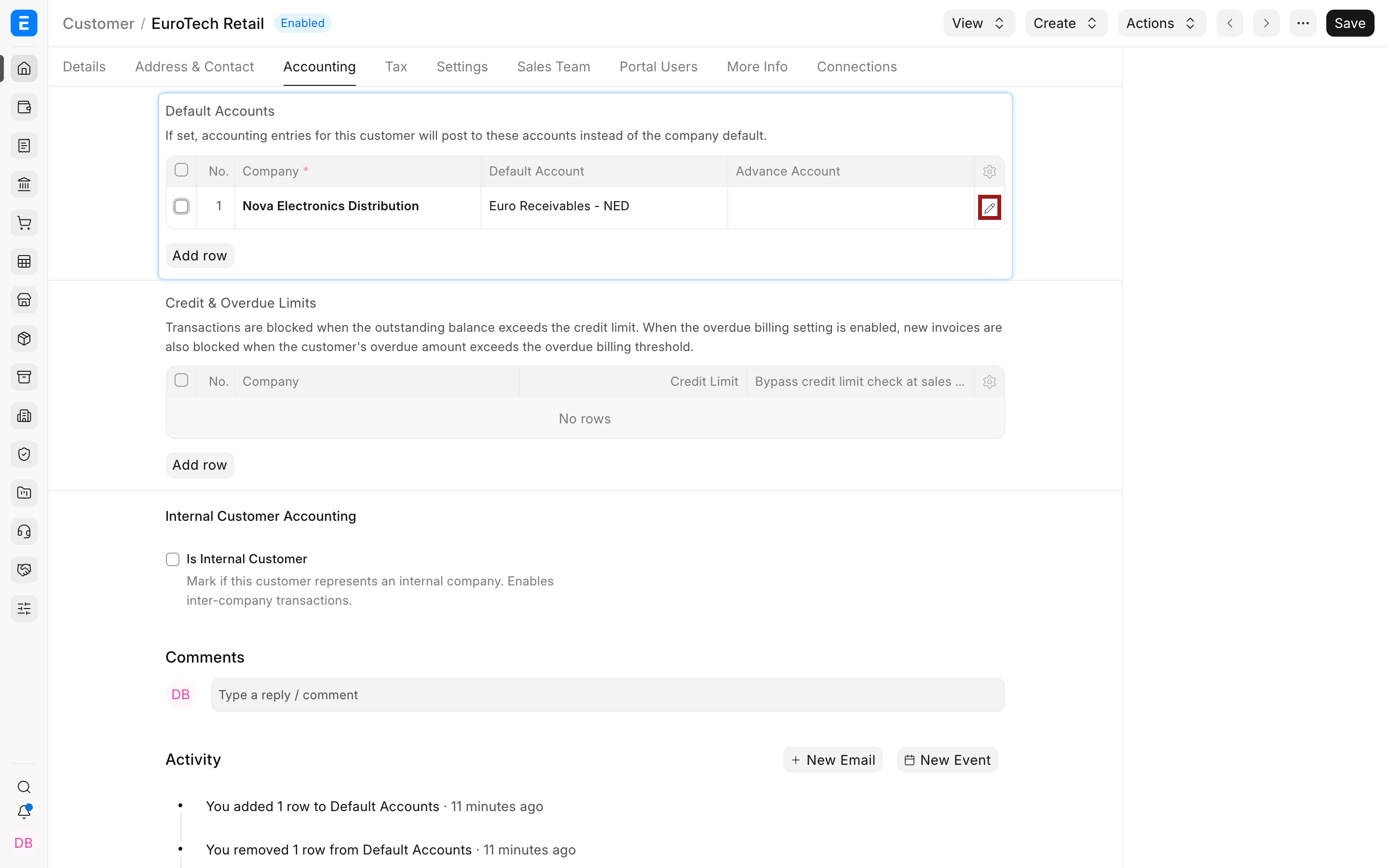
Select the highlighted pencil to open the full child-row editor.
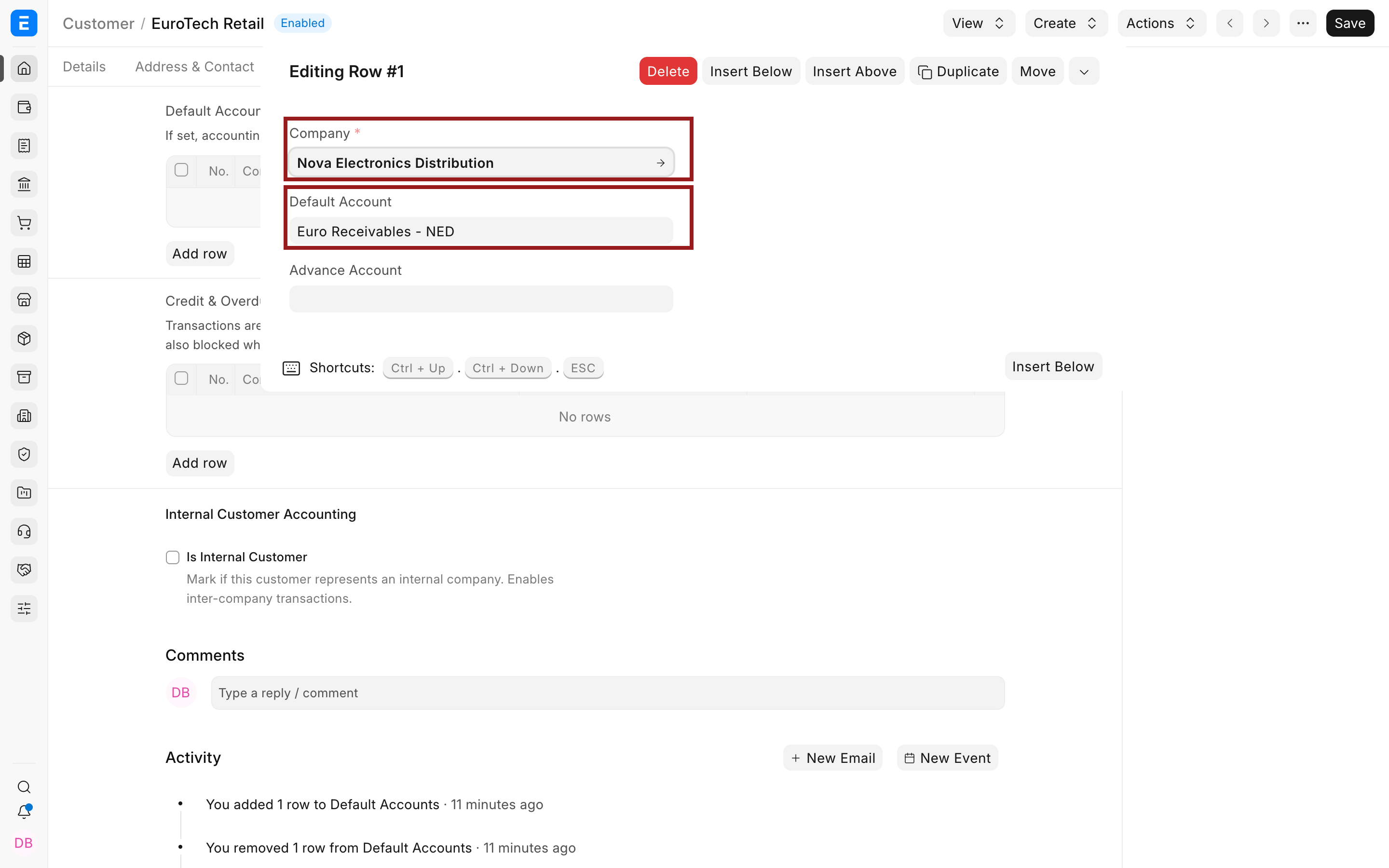
If a party account is in a foreign currency, the transaction must normally use that currency. If the account is in Company currency, Allow multi-currency invoices against single party account can permit invoices in other currencies, but the General Ledger entry remains in the party account's currency. Use that option only after testing invoicing, payment, ageing, and reconciliation behavior for your process.
Configure exchange-rate behavior
Use Currency Exchange for approved manual rates. If no eligible stored record exists, ERPNext can call the provider configured in Currency Exchange Settings. Accounts Settings controls stale records and the posting date inherited by exchange-gain-or-loss entries.
For the demo, the approved rate is 1 EUR = 1.15 USD.
Create a foreign-currency Sales Invoice
- Create a Sales Invoice for the foreign Customer.
- Confirm the transaction Currency and Exchange Rate.
- Select a Price List and verify its currency and conversion rate.
- Confirm that Debit To is the intended receivable account.
- Add items, taxes, terms, and the payment schedule.
- Compare the transaction and Company-currency totals before submission.
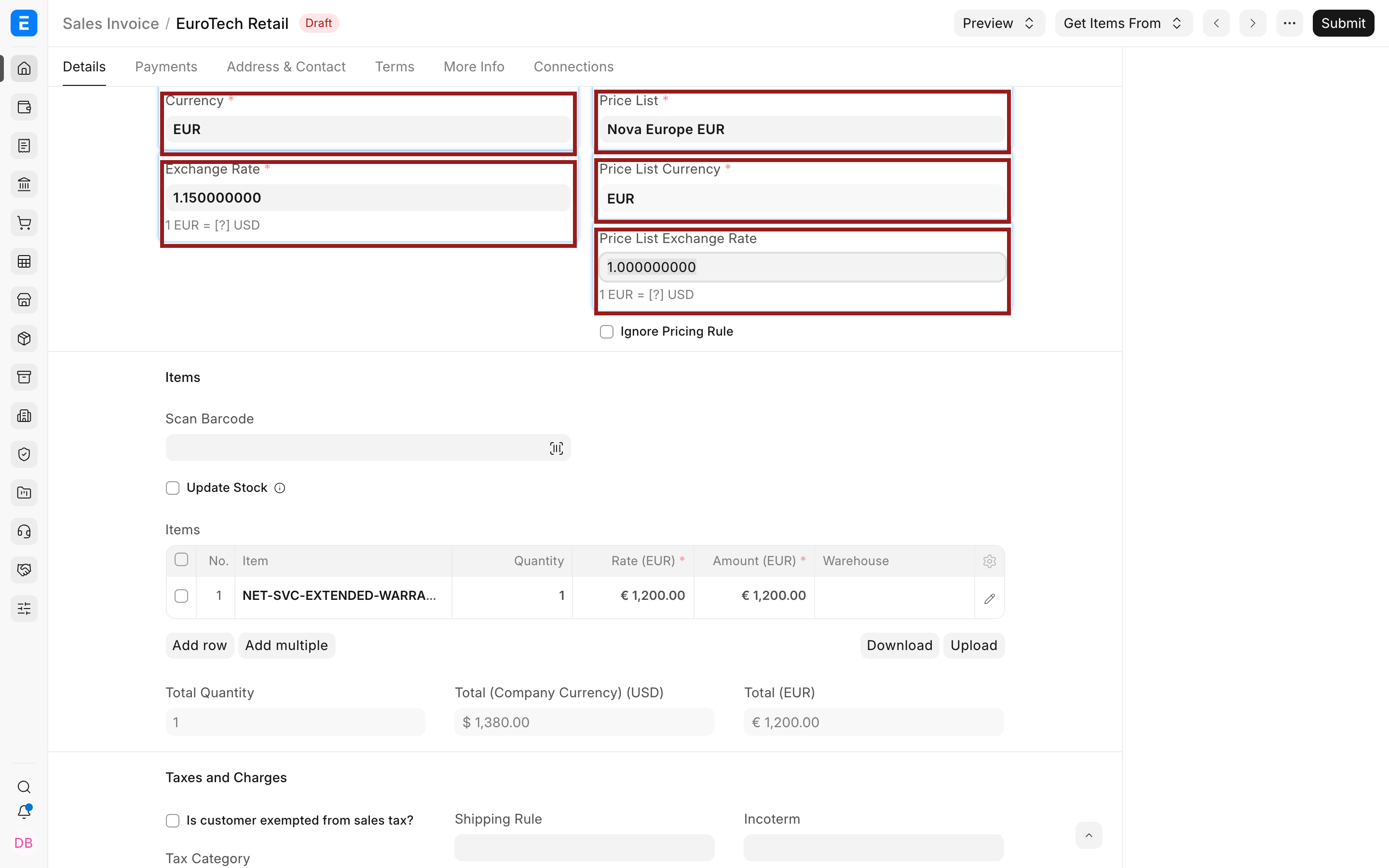
The Exchange Rate converts EUR 1,200 to USD 1,380. The Price List Exchange Rate is 1 because both the Price List and invoice use EUR.
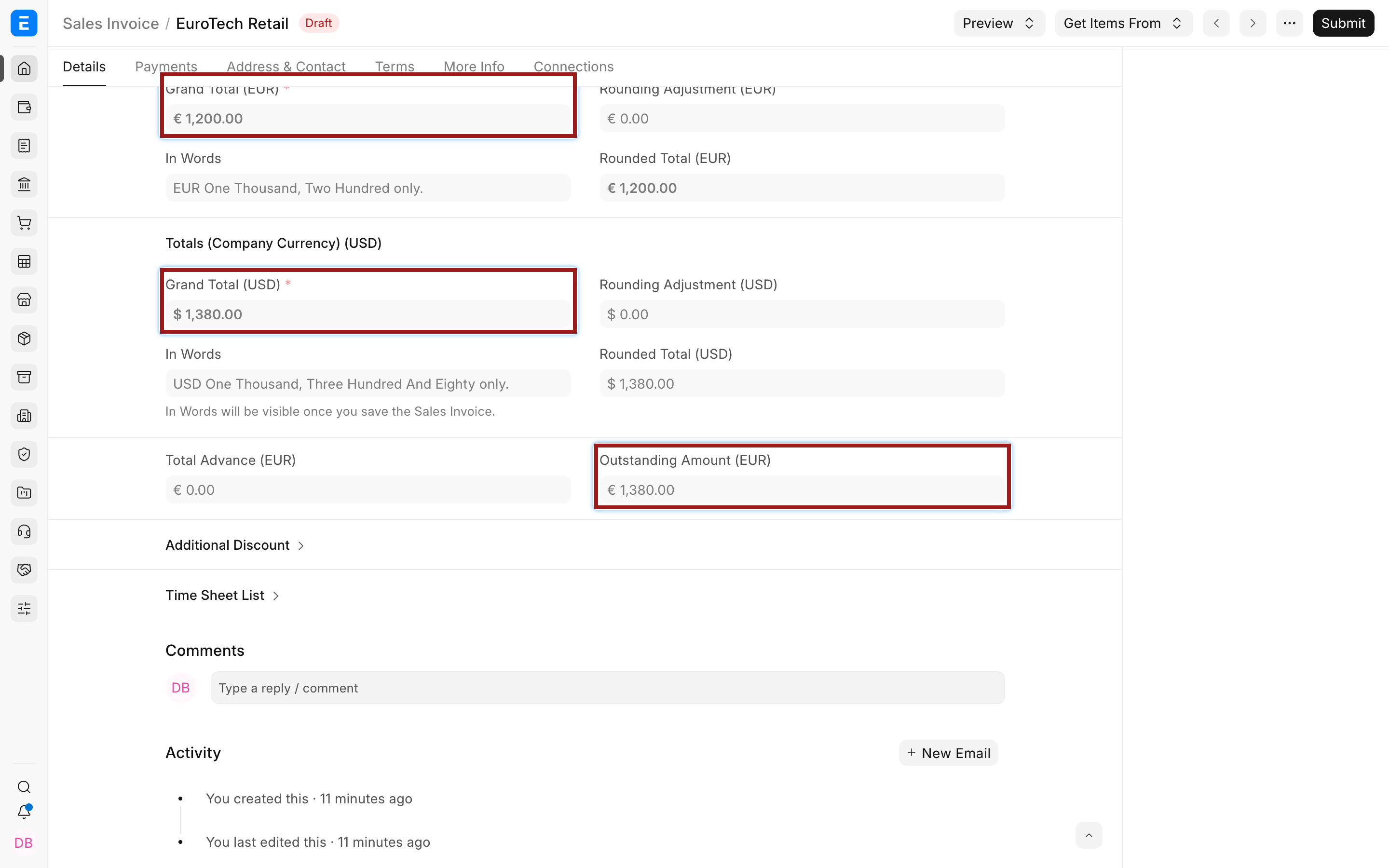
On submission, the receivable is maintained in the account currency and base debit and credit values are recorded in USD. The Accounts Receivable and Payable report shows party or account-currency amounts according to its filters.
Record foreign-currency purchases and payments
A Purchase Invoice follows the same pattern using the Supplier's payable account and buying rate. Outstanding and advance values follow the party account currency.
In a Payment Entry, currencies come from the selected accounts. Receiving EUR from a EUR receivable into a USD bank produces a paid amount in EUR, a received amount in USD, and a source exchange rate.
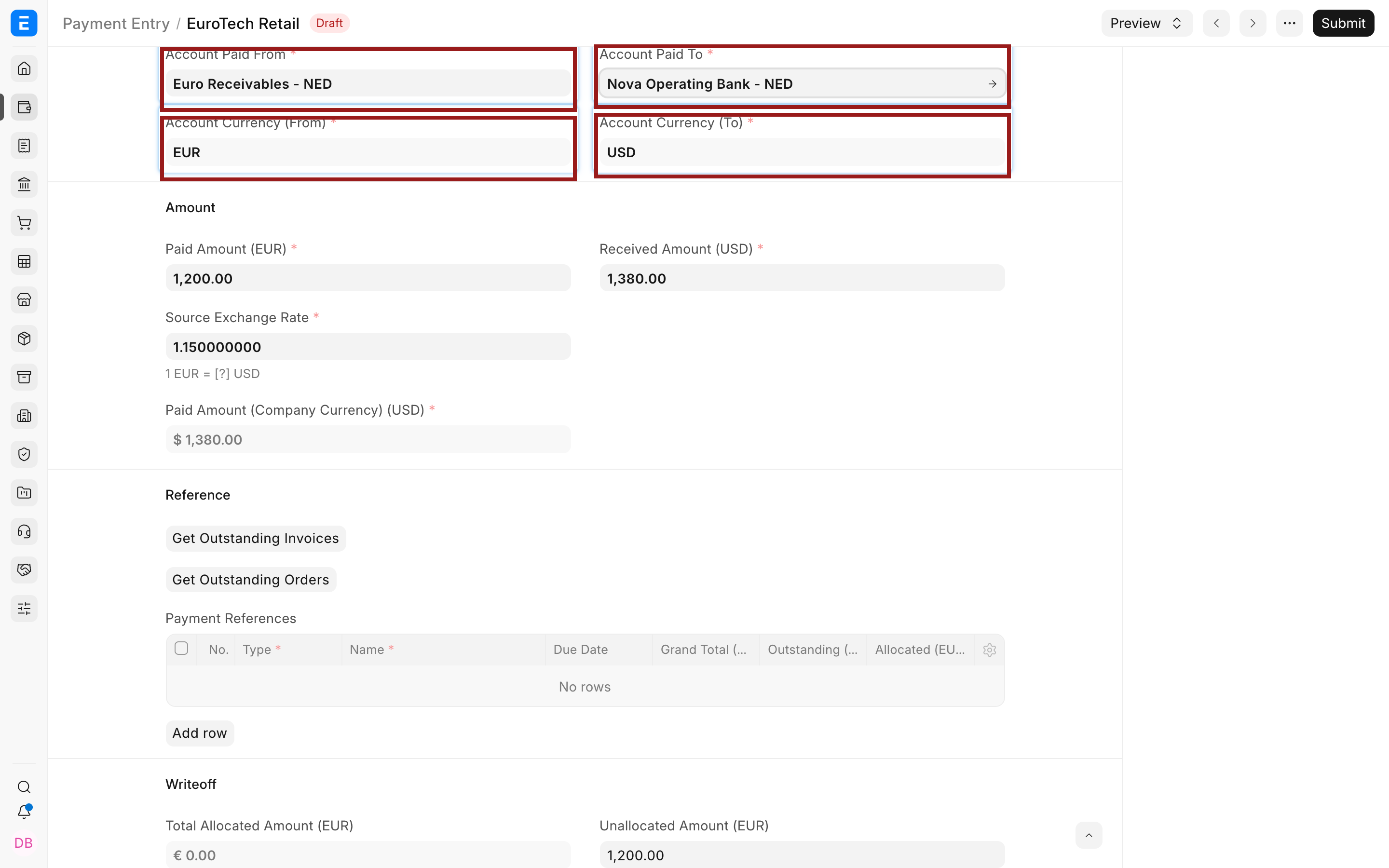
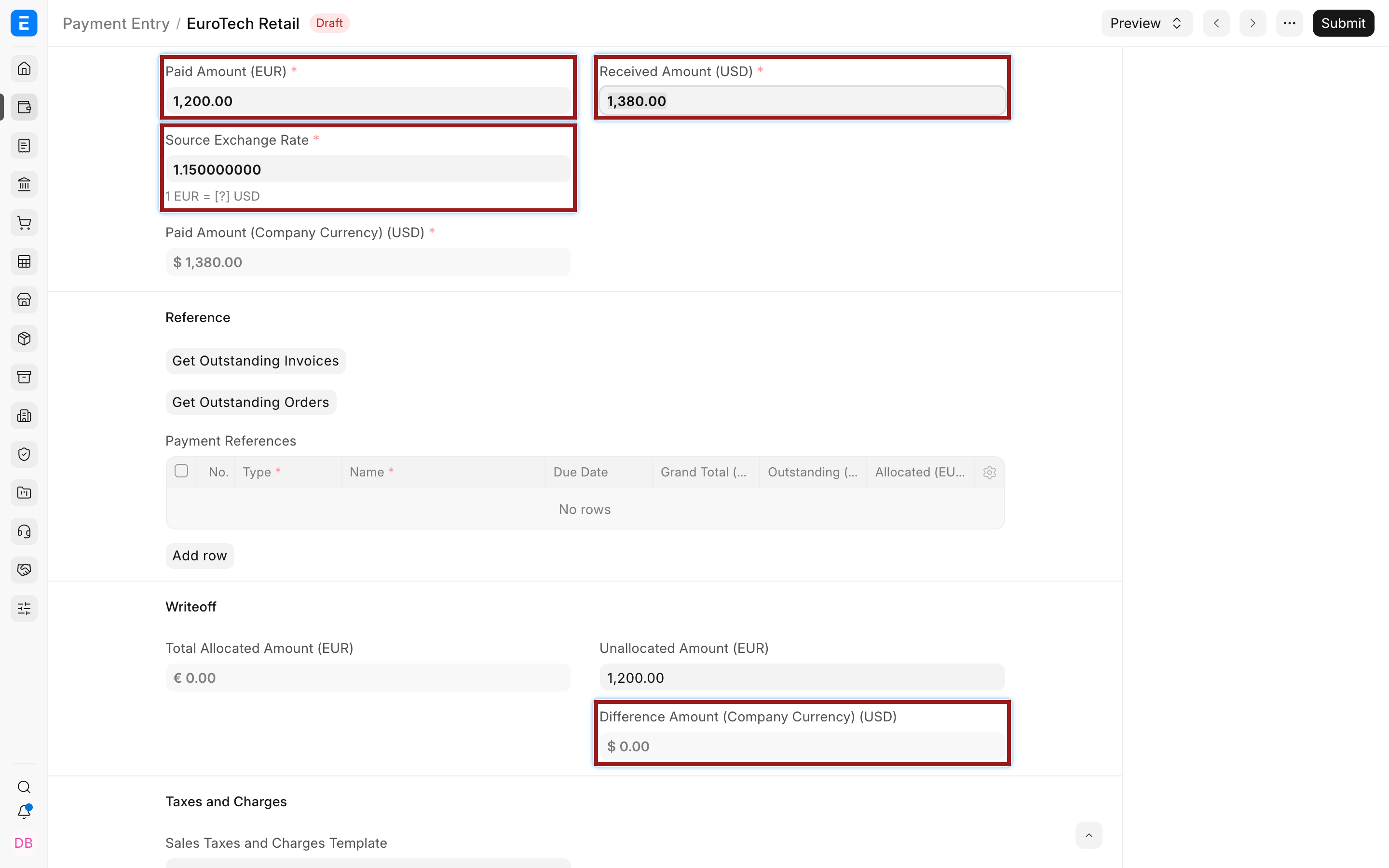
When the payment rate differs from the invoice rate, ERPNext can calculate a realized exchange difference. Use Set Exchange Gain/Loss where available, then inspect the Payment Deductions or Loss row and make the Difference Amount zero before submitting. Do not put a bank charge into the exchange account merely because it appears on the same bank statement. Bank fees and exchange differences are different expenses.
Use multi-currency Journal Entries
Select Multi Currency on a Journal Entry when account rows use different currencies. Enter debit or credit in each account's currency and verify the exchange rate and calculated Company-currency amount. A Journal Entry requires deliberate debit and credit selection, so prefer Payment Entry for normal customer and supplier payments.
Revalue open foreign balances
Exchange-rate movement after a transaction creates two kinds of difference:
| Difference | When it arises | Typical tool |
|---|---|---|
| Realized | An invoice or payable is settled at a different rate | Payment Entry and Exchange Gain/Loss |
| Unrealized | A foreign balance remains open at a reporting date | Exchange Rate Revaluation |
Revaluation changes the Company-currency carrying value. It does not change the foreign amount. For example, EUR 1,000 remains EUR 1,000 while its USD value moves from USD 1,100 to USD 1,150.
Verify reports
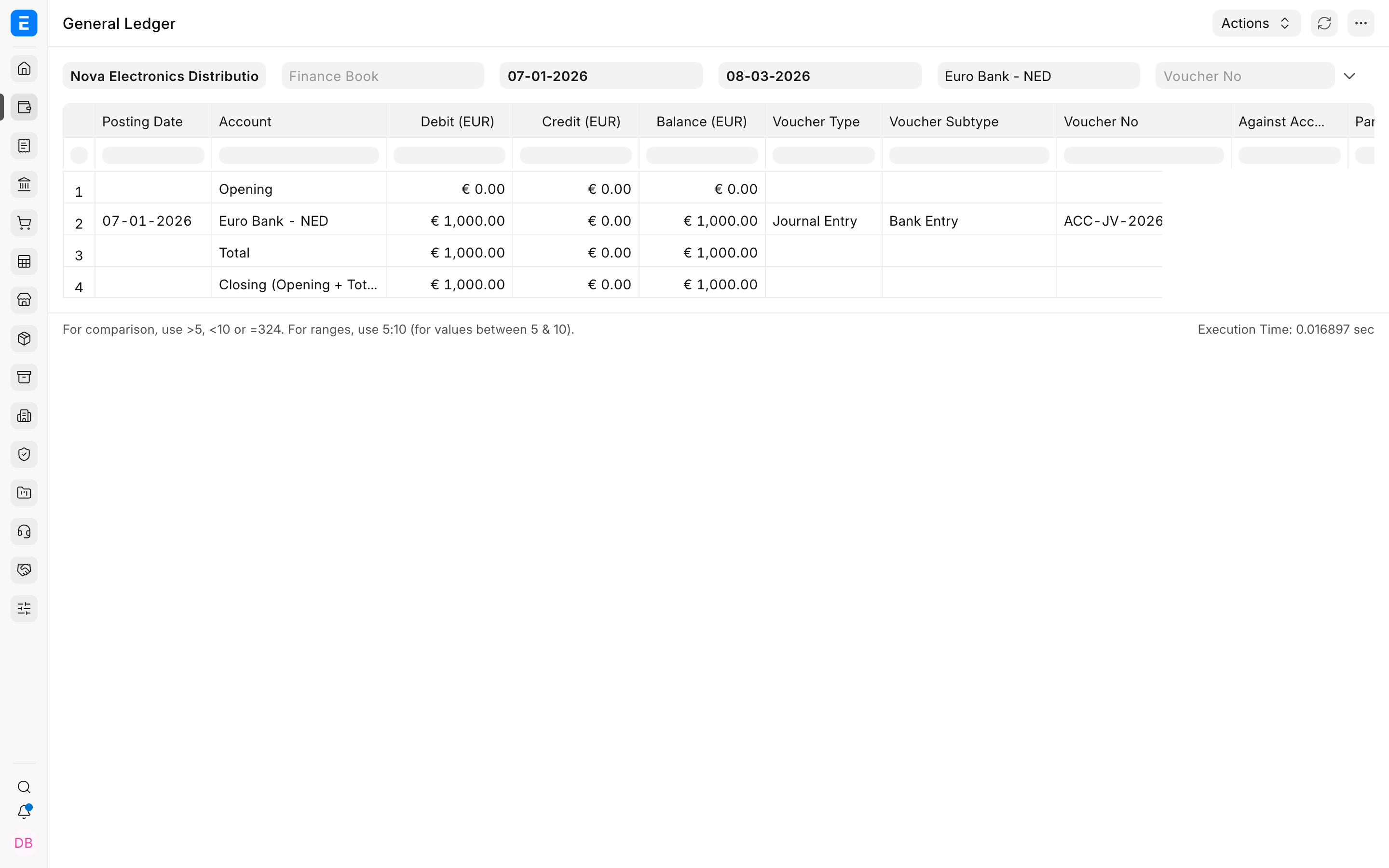
Filter the General Ledger by the foreign account to view debit, credit, and balance in account currency. Financial statements remain grounded in Company currency, while the Accounts Receivable and Payable report exposes party and account-currency values.
Troubleshooting
The party can be selected but the invoice currency is rejected
Check Billing Currency, the default receivable or payable account, and that account's currency. The transaction currency must be compatible with the party account unless the single-party-account option applies.
Payment Entry shows the wrong currency
The paid-from and paid-to account currencies determine the amount fields. Select the intended bank, cash, receivable, or payable account instead of trying to type an independent Payment Entry currency.
The foreign balance is zero but Company currency is not
This can occur after currency movements. Run Exchange Rate Revaluation at the reporting date and inspect the zero-balance treatment introduced for this situation.
FAQs
Can one bank account hold several currencies?
One ERPNext Account has one account currency. Use separate ledger accounts for separately maintained bank currency balances.
Can one Customer receive invoices in several currencies?
It is possible in specific configurations, including the single-party-account setting, but a dedicated receivable account per regularly used currency gives clearer account-currency balances and payment behavior.
Why is an exchange rate required even if payment will happen later?
ERPNext must record the Company's base-currency value on the invoice date. The payment can use a later rate, with the difference recorded as realized gain or loss.
Does revaluation change the invoice amount?
No, it adjusts the base-currency carrying value of eligible accounts. The original invoice and foreign-currency amount remain unchanged.
Can I change an account from USD to EUR after posting entries?
No, create a new EUR account and move future activity to it. Consult your accountant before transferring an existing balance.