


















Non Conformance
A Non Conformance is an observation that can be filed by any person in the organization to note non compliance to a specific procedure.
Once Quality Procedures are defined, the goal of a quality focussed organization is to ensure that they are followed. This ensures consistent quality and parameters as per the customer's expectation. If these procedures are not followed, an observation is recorded via a Non Conformance, also called NC in quality systems.
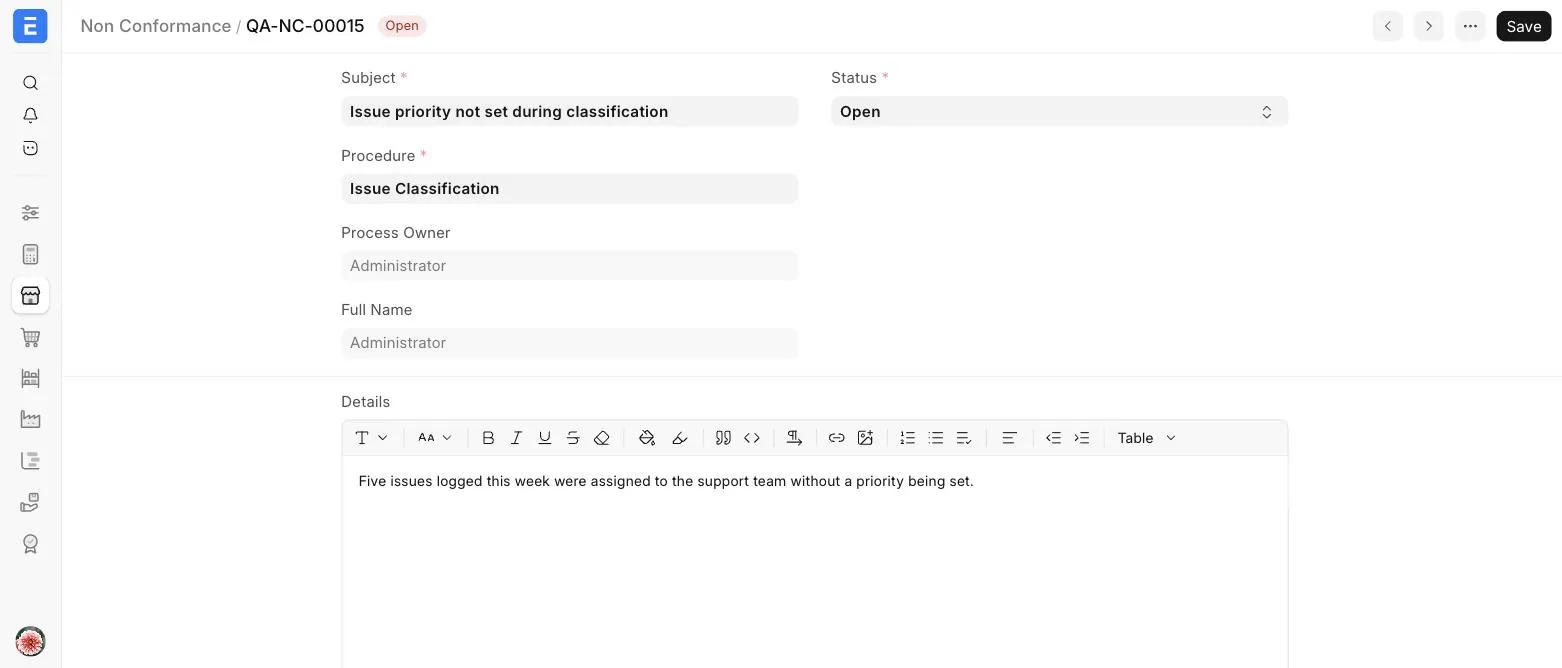
In ERPNext, you can create a Non Conformance by selecting the Quality Procedure against which it was observed, maintain its status and record corrective and preventive actions.
To access Non Conformance, go to:
Quality > Non Conformance
1. Prerequisites
2. How to Create a Non Conformance
- Go to the Non Conformance list and click on Add Non Conformance, or open the Quality Procedure and click on + next to Non Conformance in its dashboard.
- Enter a Subject for the observation.
- Select the Procedure against which it was observed. The Process Owner of the procedure and their Full Name are fetched automatically.
- Record your observations in the Details field.
- Record the Corrective Action and Preventive Action, if any.
- Update the Status to 'Open', 'Resolved' or 'Cancelled'.
- Save.
3. Related Topics
Last updated 2 weeks ago
Was this helpful?