


















Procurement Tracker Report
Imagine a production manager asks when an urgently needed component will arrive. The buyer knows that a requirement was raised and an order was placed, but checking several Material Requests and Purchase Orders one by one takes time. The manager needs one view that connects the requirement, supplier commitment, expected date, and actual delivery date.
The Procurement Tracker brings open Material Request and Purchase Order lines into one report. It helps Nova Industries find requirements that are still pending, compare estimated and ordered cost, and spot orders that are late or not yet delivered. It is a monitoring report, not a complete map of every document in the buying cycle.
Run the Procurement Tracker
- Open Buying > Reports > Procurement Tracker.
- Select the Company.
- Choose a date range that includes the Material Request or Purchase Order transaction date.
- Add a Cost Center or Project filter when you need a narrower operational view.
- Refresh the report.
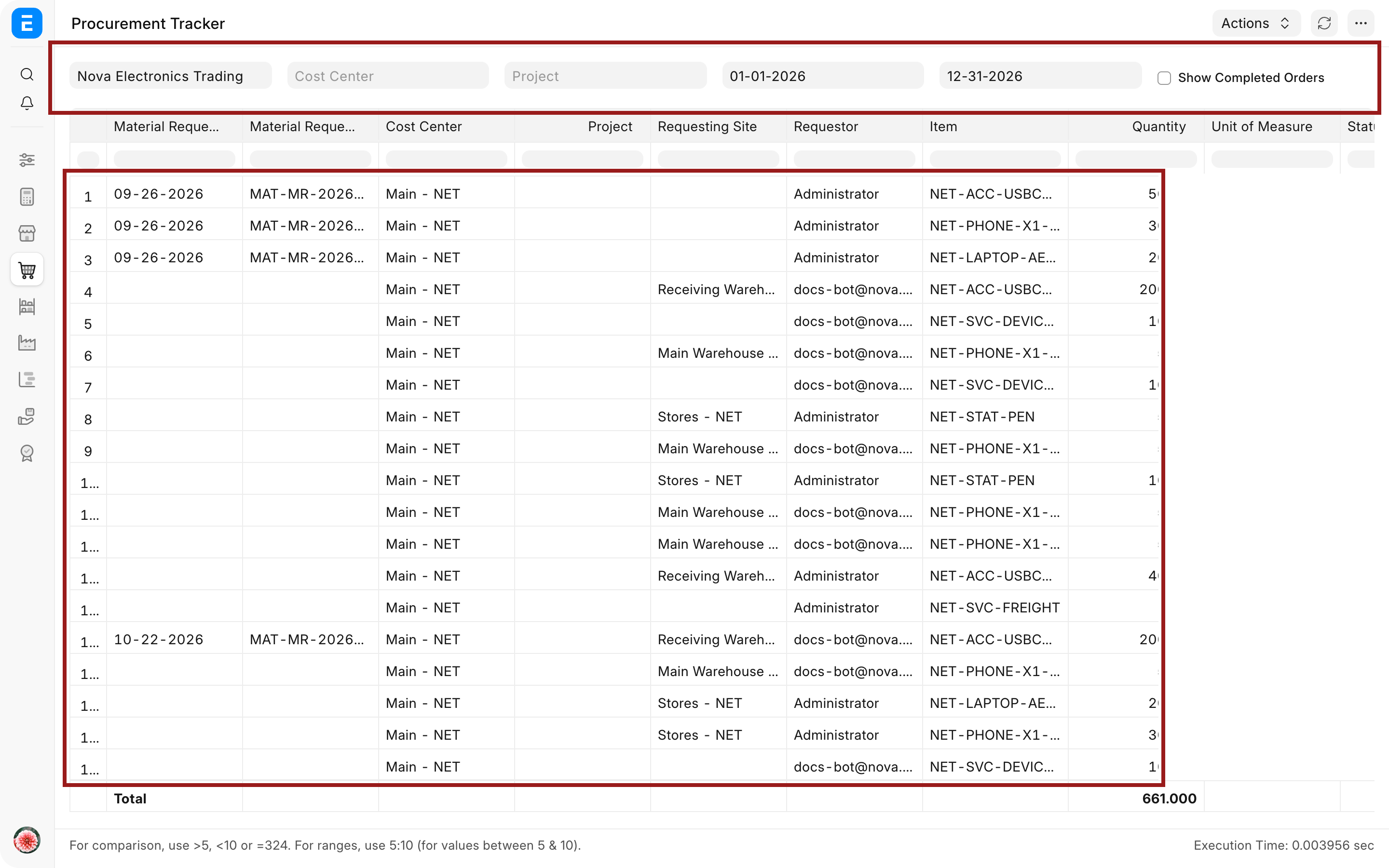
The report includes submitted Material Request lines that have not been ordered and open Purchase Order lines. Closed, completed, and cancelled Purchase Orders are excluded.
Understand the columns
| Column | What it answers |
|---|---|
| Material Request Date and No | Which internal requirement started the purchase? |
| Requesting Site and Requestor | Where is the Item needed, and who raised the requirement? |
| Item, Quantity, and UOM | What quantity is being requested or ordered? |
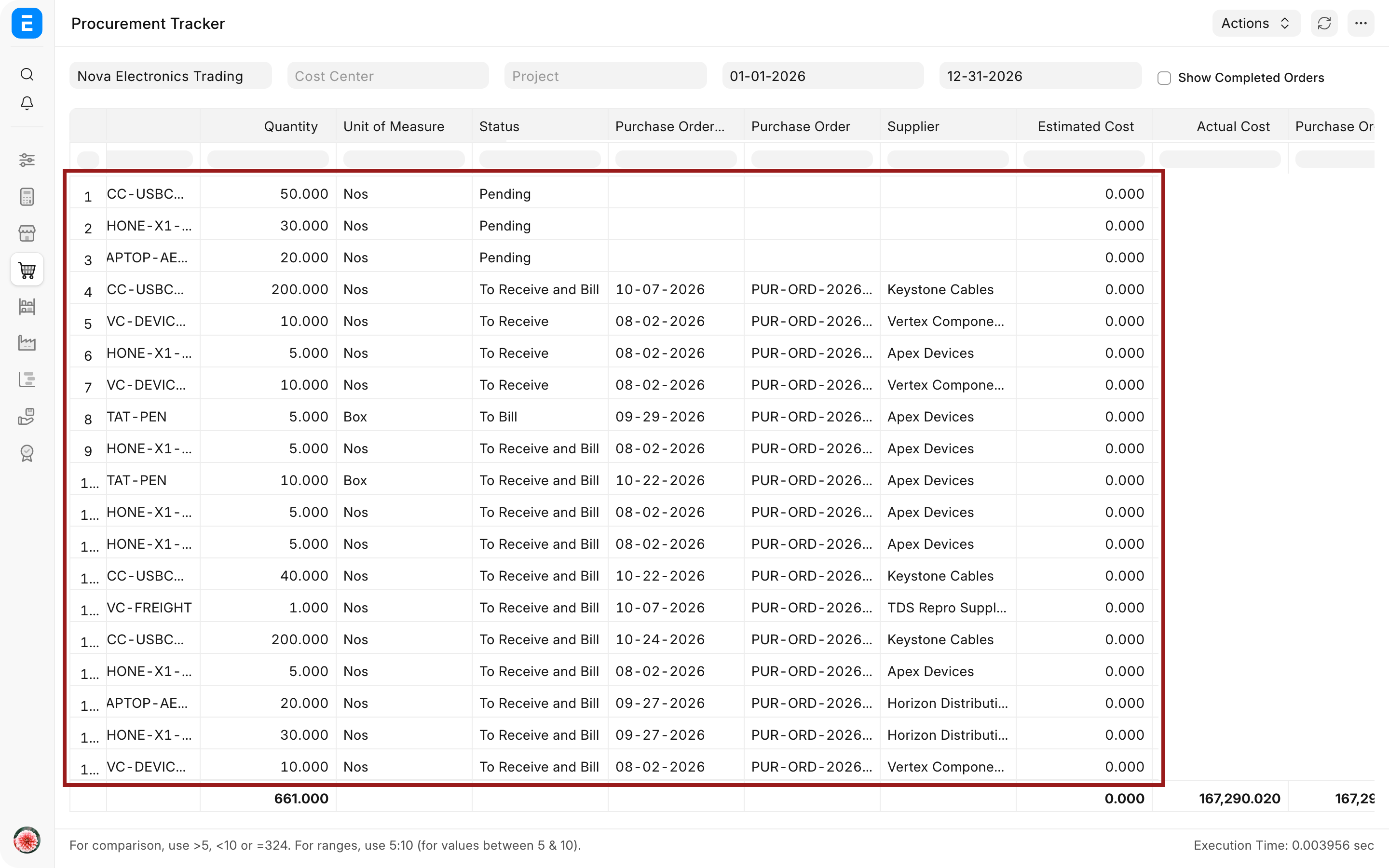
| Status | Is the line still pending, ordered, or waiting for receipt or billing? |
| Purchase Order Date and No | Which supplier commitment covers the line? |
| Supplier | Who is expected to fulfil the order? |
| Estimated Cost | What did the Material Request estimate? |
| Actual Cost | What has been billed against the linked Purchase Order item, or what is the order amount when no linked invoice amount is available? |
| Purchase Order Amount | What value was committed on the Purchase Order line? |
| Expected Delivery Date | When did Nova ask the Supplier to deliver? |
| Actual Delivery Date | What receipt date is linked to the open Purchase Order item? |
Scroll horizontally to reach the Purchase Order, Supplier, cost, and delivery columns.
Read a pending requirement
A row with a Material Request but no Purchase Order means the requirement has not yet progressed into an open order. Open the linked Material Request and check whether it is approved, whether quantity remains to be ordered, and whether the purchasing team still intends to act on it.
Do not create a dummy Purchase Order merely to remove a row from the report. Cancel or stop an invalid requirement through the supported business process.
Read an open Purchase Order
Suppose Nova ordered 200 adapters from Keystone Cables. The row shows the Supplier, ordered quantity, order value, expected delivery date, status, and any linked actual delivery date. This lets the buyer identify a late order without opening every transaction.
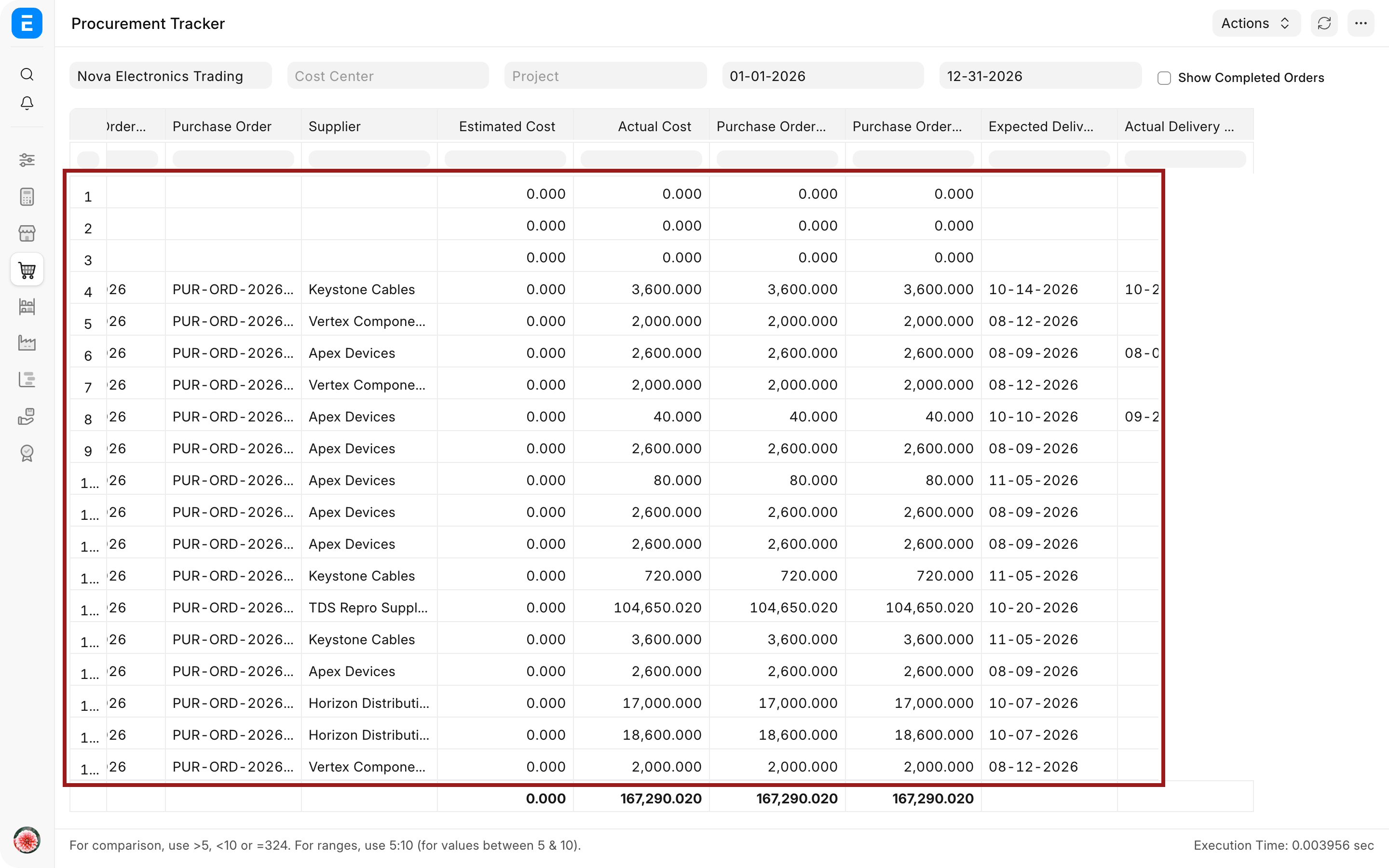
Open the linked Purchase Order when you need authoritative received and billed percentages, partial-document details, returns, or item-level source references. Use Accounts Payable and Payment Ledger reports for settlement status.
Understand what the report does not show
The Procurement Tracker does not display Request for Quotation or Supplier Quotation stages. It also does not provide Purchase Receipt and Purchase Invoice document numbers as separate columns. It derives actual delivery dates and costs from linked receipt and invoice data where available.
Use the source Purchase Order, Purchase Receipt, Purchase Invoice, or a more focused report when you need document-level audit details.
Troubleshooting
A Purchase Order is not connected to its Material Request
Open the Purchase Order item row and verify the Material Request and Material Request Item references. A directly created Purchase Order can be valid, but it cannot be retroactively matched by similar Item names or quantities alone.
The Actual Delivery Date is blank
The order may not have a submitted linked Purchase Receipt, the receipt may be cancelled or completed in a way excluded by the current report logic, or the Purchase Order item reference may be missing. Review the Purchase Receipt item row and the Purchase Order connection.
Actual Cost differs from the order amount
The report can use the billed amount from a linked Purchase Invoice item. Partial billing, price differences, or missing item references can make it differ from the Purchase Order amount. Open the linked documents before treating the difference as an error.
The report is blank
Expand the date range, verify Company permissions, and remove restrictive Cost Center or Project filters. Confirm that submitted pending Material Requests or open Purchase Orders exist in that period.
Frequently asked questions
Does the report show the entire RFQ-to-payment cycle?
The report does not show the entire RFQ-to-payment cycle. It focuses on Material Requests and open Purchase Orders, with cost and delivery information derived from linked transactions.
Can a direct Purchase Order appear without a Material Request?
A direct Purchase Order can appear without a Material Request. The Material Request columns can be blank while the open Purchase Order details still appear.
Why is a completed Purchase Order missing?
The report is designed for active procurement monitoring and excludes closed, completed, and cancelled Purchase Orders.
Can I create or approve documents from this report?
The report is analytical and does not approve documents. Open the linked source document to take action.
Investigate a pending row through Material Request, Purchase Order, Purchase Receipt, and Purchase Invoice. Use Request for Quotation and Supplier Quotation for sourcing context, Accounts Payable and Payment Ledger for liabilities, Stock Ledger for physical movement, and Buying Reports for alternative analytical views.