


















Calculating Freight in taxes in ERPNext
Imagine Keystone Cables sells Nova Industries goods worth $3,600 and charges $120 freight. A 6% tax applies to the freight service. If Nova records the entire amount as one unexplained charge, the supplier payable, tax ledger, and inventory valuation may be wrong.
Set up freight according to what it represents. A freight amount may increase the Supplier total, the value of stock, or both. Its tax must use the correct tax account and calculation basis.
Choose the accounting treatment first
| Business treatment | Taxes and Charges behavior | Result |
|---|---|---|
| Freight is payable to the Supplier and not capitalized | Add to Total | Increases payable, not stock valuation |
| Freight is part of bringing stock to its location | Add to Valuation | Increases stock value, not supplier total through that row |
| Freight is payable and capitalized | Add to Total and Valuation | Increases both payable and inventory value |
| Freight is invoiced later by another party | Landed Cost Voucher | Allocates the later cost to received stock |
Confirm the required tax treatment with your accountant. Tax names and rates depend on the company's jurisdiction and installed compliance app.
Add freight and tax in a purchase transaction
- Create or choose the freight expense or charge account and the applicable tax account.
- Open the Purchase Order or Purchase Invoice.
- Add a Taxes and Charges row for the freight amount.
- Choose whether the row affects Total, Valuation, or both.
- Add the tax row after the freight row.
- Set Type to calculate the tax on the relevant previous row or total.
- Set Row ID when the tax must use the freight row as its basis.
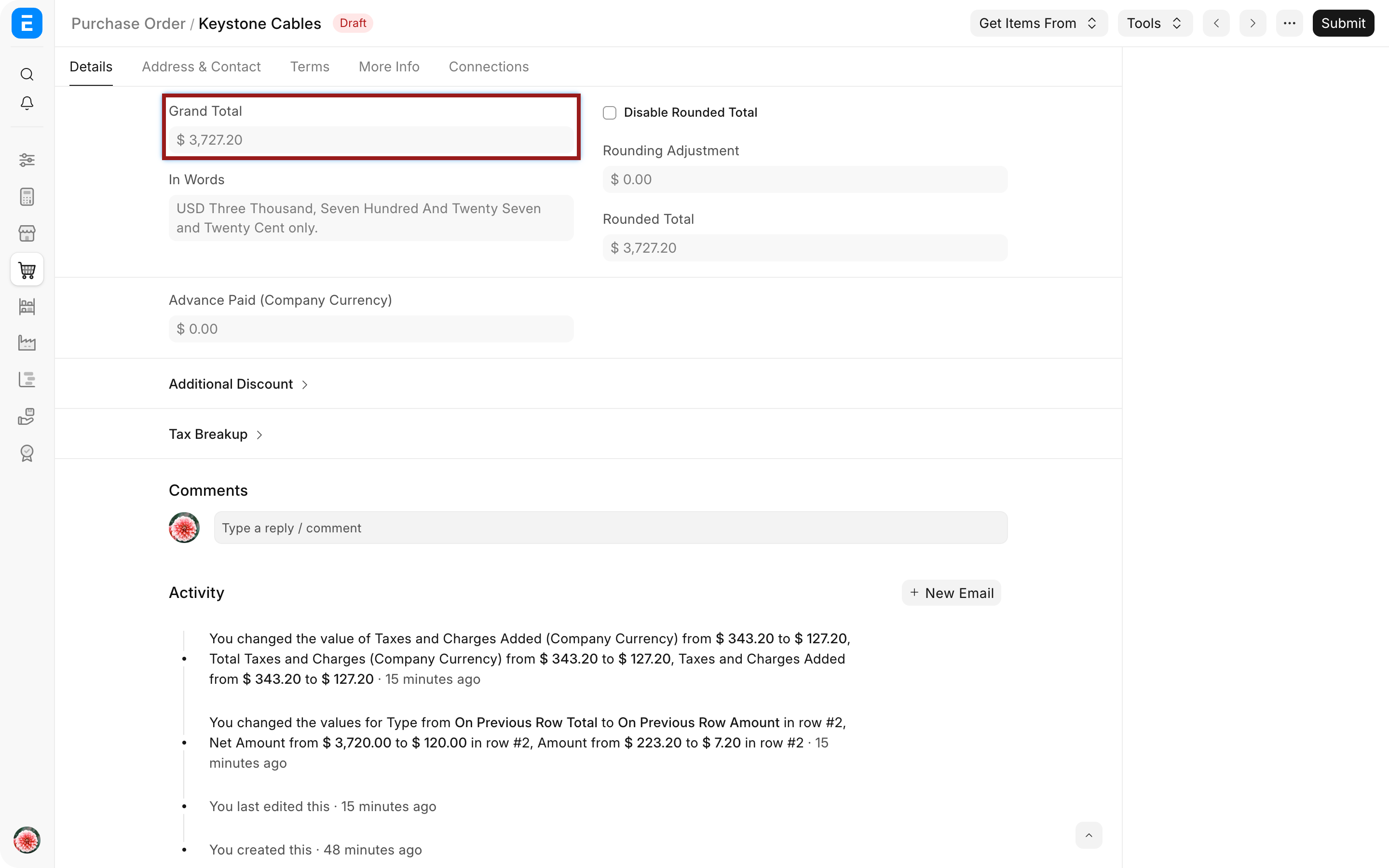
- Review the row amounts, tax amount, Grand Total, and valuation effect.
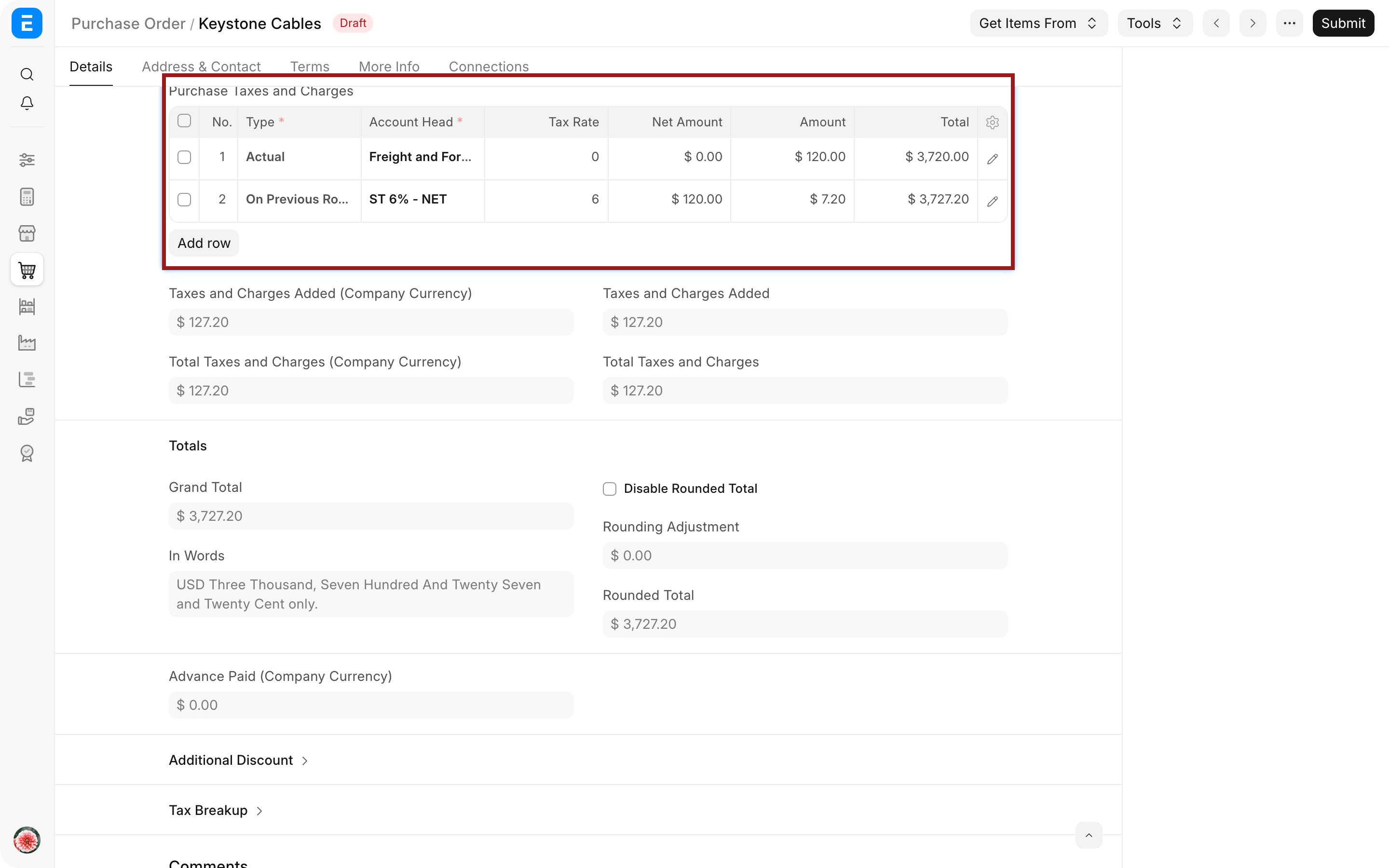
For $120 freight taxed at 6%, the freight tax is $7.20. Check that the Grand Total and valuation totals reflect the intended treatment rather than assuming that a correct-looking final number has posted to the correct accounts.
Use a freight Item when appropriate
A non-stock service Item can represent freight when the Supplier invoices it as a distinct line. Set an appropriate expense account and applicable Item Tax Template, then add the Item to the Purchase Invoice.
This is useful when line-level tax reporting is required. A Taxes and Charges row is often simpler for document-level charges. Use one consistent approach that matches your compliance and reporting needs.
Troubleshooting
Tax is calculated on the goods and freight together
Check the tax row's Type and Row ID. Use a previous-row calculation when only the freight row should be taxed.
Freight increased the Supplier payable but not stock value
Review whether the charge is configured to affect Valuation. For a cost known after receipt, use a Landed Cost Voucher instead of rewriting a submitted receipt.
Stock value increased but the Supplier total did not
The row may be set to Valuation only. Use Total and Valuation when the same Supplier charge should affect both, subject to accounting policy.
The tax posts to the wrong account
Check Account Head, Company, account type, tax category, and regional settings. Correct the setup rather than manually forcing a balancing row.
Frequently asked questions
Should freight always be included in inventory valuation?
Freight should not always be included in inventory valuation. Capitalize costs that are directly attributable to bringing inventory to its present location and condition, according to your accounting policy. Administrative or unrelated delivery costs may remain expenses.
Can freight be added after the Purchase Receipt?
Freight can be added after receipt through a Landed Cost Voucher when the cost becomes known later and should be allocated to received stock.
Can a Shipping Rule add freight automatically?
A Shipping Rule can select a charge based on net value or net weight. Review the resulting Taxes and Charges row before submission.
Configure reusable charges with a Purchase Taxes and Charges Template, then review Types in Tax Template, Include Tax or Charge in Valuation or Total, and Apply Tax on Another Tax or Charge. Apply the result in a Purchase Order or Purchase Invoice, verify received stock through Purchase Receipt, use a Landed Cost Voucher for later costs, automate value bands with a Shipping Rule, and confirm policy in Buying Settings.