


















Employee Grade
The six Production engineers at the Nova Industries Pune plant are on the same pay level. From 1 December 2026 they all move to the Nova Production Monthly salary structure, and each starts on a base of 1,800. Rather than enter the structure and the base six times, HR puts the engineers in one grade, E2 - Engineer, and assigns the structure to the whole grade in one go.
An Employee Grade is a level, band or pay scale that groups employees of similar seniority. You set it on each Employee. A grade can hold a default Salary Structure and a default base pay, and Frappe HR uses the grade to filter employees in its payroll and HR tools. Grades are not tied to a company, so all companies on the site share the same list.
Before you begin
- To set a default structure, the Salary Structure is submitted and active, here Nova Production Monthly.
- You have the HR User or HR Manager role.
Create an Employee Grade
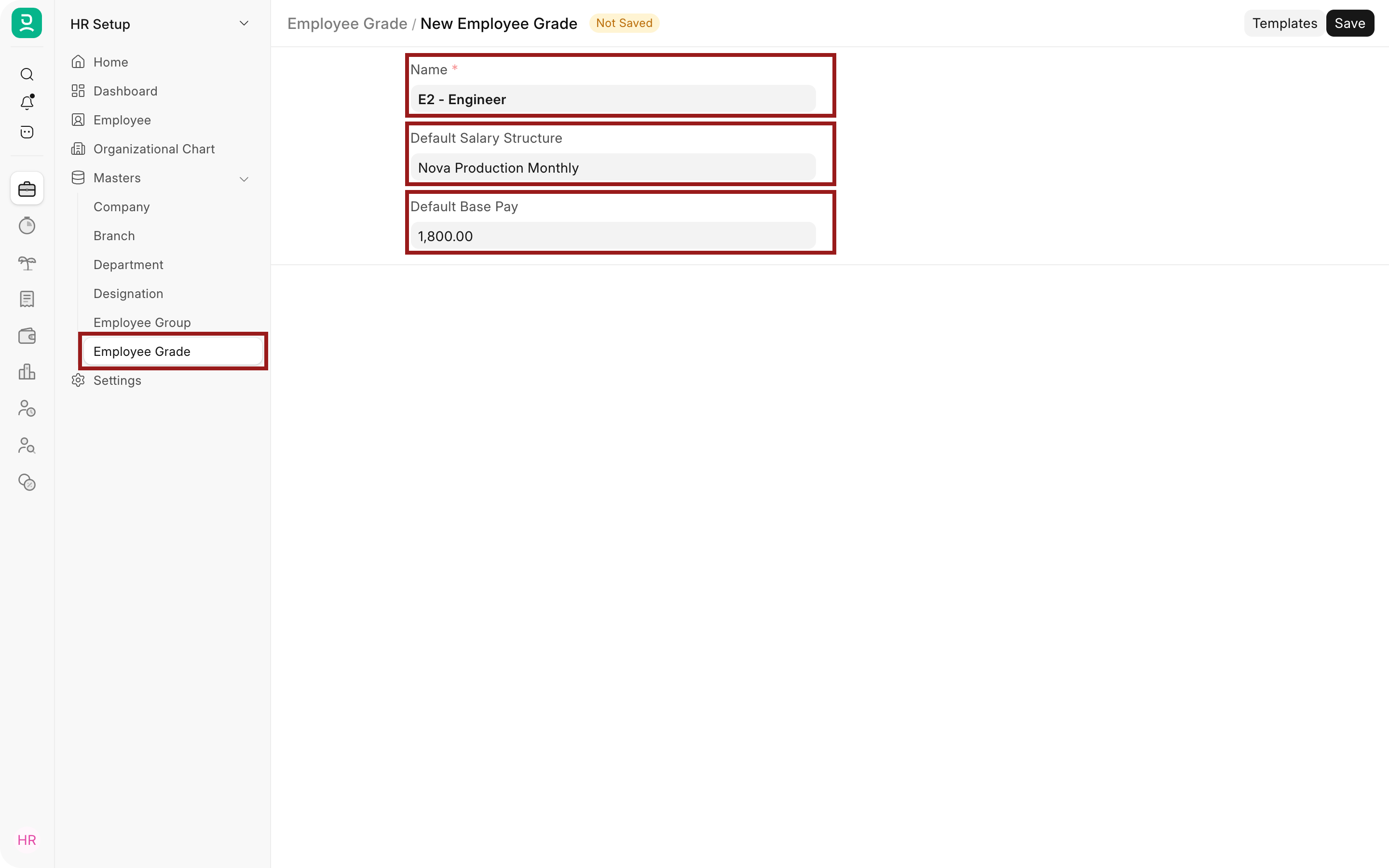
- Open the HR Setup workspace and select Employee Grade under Masters. Select Add Employee Grade.
- Enter the Name of the grade, here E2 - Engineer. The name is also the record's ID, so it must be unique.
- Optionally, select the Default Salary Structure, here Nova Production Monthly. Only submitted, active structures are offered.
- Enter the Default Base Pay, here 1,800. This field appears once a default structure is selected, and its currency is the structure's currency. Save.
Then set the grade on each employee in the Grade field of the Employee record, here the six engineers. To change the grade of an existing employee from a date, use an Employee Promotion.
Assign a salary structure to a grade
The grade's defaults are used when you create a Salary Structure Assignment. To assign the structure to the whole grade at once, use Bulk Salary Structure Assignment.
- Open the Payroll workspace and select Bulk Salary Structure Assignment. Select the Salary Structure, here Nova Production Monthly, the From Date, here 1 December 2026, and the Company.
- Under Quick Filters, select the Employee Grade, here E2 - Engineer. The table lists the Active employees of that grade, and the Base of each is filled in from the grade's Default Base Pay.
- Change the Base or Variable of any employee if needed, select the employees and select Assign Structure.
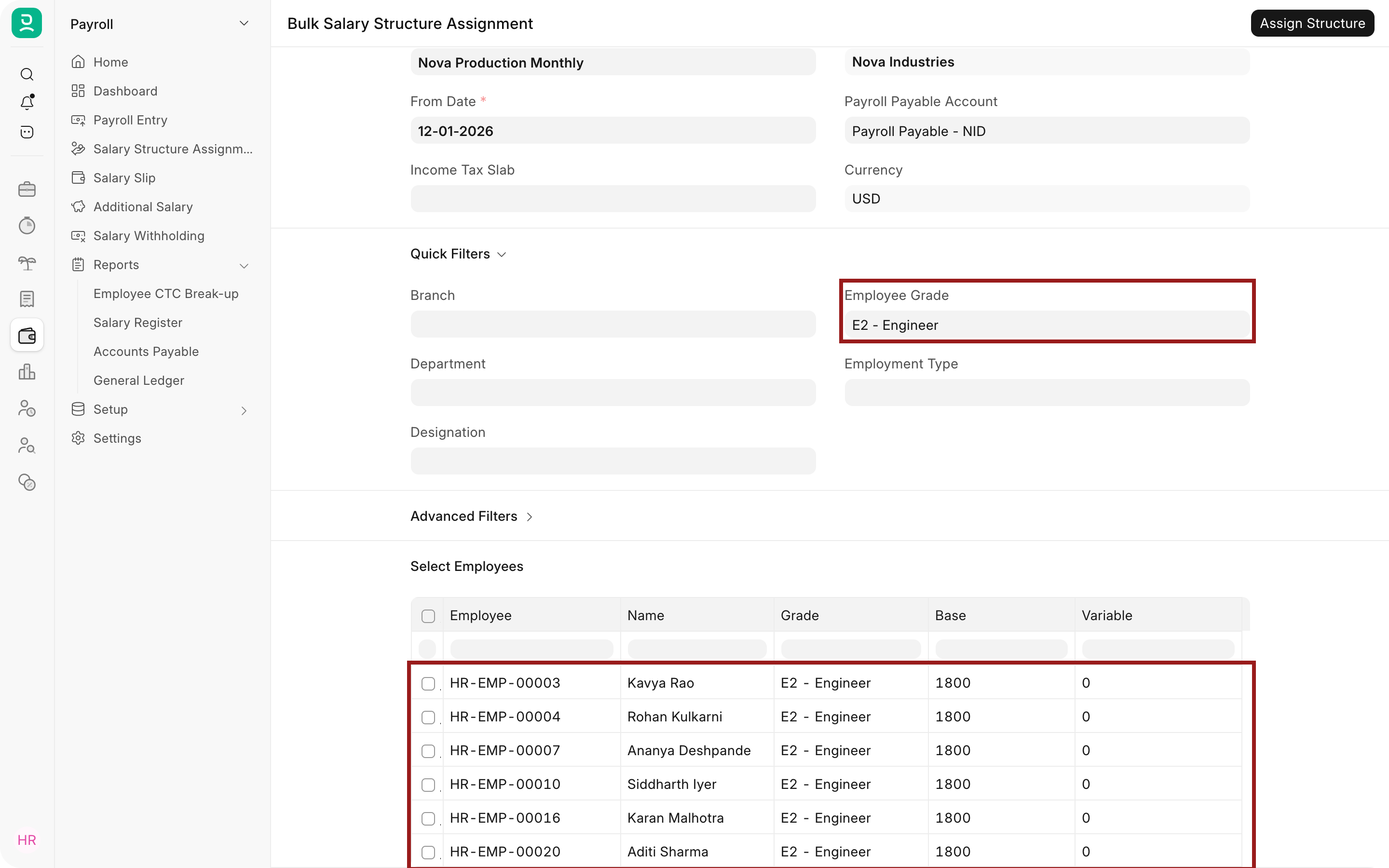
Employees who already have a submitted assignment from the same date are not listed. An employee without a grade, or whose grade has no base pay, gets a Base of 0, which you enter by hand.
A single Salary Structure Assignment uses the grade too. When you select the Employee, their Grade is filled in, and the Salary Structure and Base are filled in from the grade's Default Salary Structure and Default Base Pay if they are empty. You can change both before you submit. On the Salary Structure, the grades that use it as default are listed in its connections.
Where the Employee Grade is used
| Where | What the Grade does |
|---|---|
| Salary Structure Assignment | Fills in the Salary Structure and Base from the employee's grade. |
| Job Offer | When you select a grade, the Base is filled in from its Default Base Pay, unless the offer calculates components from the CTC. |
| Payroll Entry, Leave Control Panel, Shift Assignment Tool, Employee Attendance Tool | Narrows the list of employees to one grade. |
| Templates for Employee Onboarding and Employee Separation | Makes a template apply to one grade. The grade's connections list these templates and its employees. |
Troubleshooting
The Default Base Pay field is missing
The field appears only when a Default Salary Structure is selected. Select the structure first.
The salary structure is not offered
Only submitted structures with Is Active set to Yes can be the default. Submit the structure, or set it to active.
An employee is not listed in Bulk Salary Structure Assignment
The employee is not Active, joins after the From Date, leaves on or before it, belongs to another company, or already has a submitted assignment from that date. Check the Employee record and the filters.
Frequently asked questions
Does changing the grade's base pay change existing assignments?
Existing Salary Structure Assignments keep their base. The new amount is used in new assignments, in Bulk Salary Structure Assignment and when you select the grade on a Job Offer.
Can a grade have a different base pay for each company?
A grade has one base pay, in the currency of its default structure. Create a grade for each company or currency if the amounts differ.