


















Every submitted accounting transaction in ERPNext creates balanced debit and credit entries in the General Ledger. You normally do not post those lines yourself. You create the business document, such as a Sales Invoice or Payment Entry, and ERPNext uses its accounts and amounts to create the ledger effect.
This page follows one small business from owner funding to purchasing, selling, paying expenses, and closing a period. The examples explain the accounting logic behind the documents without requiring you to memorize journal-entry rules.
Before you begin
Set up the company's Chart of Accounts, default receivable and payable accounts, bank or cash accounts, stock accounts, income accounts, and expense accounts. Configure items and warehouses when you keep perpetual inventory.
Use the company's accounting currency consistently in these examples. Multi-currency transactions add exchange-rate and exchange-gain-or-loss entries, but the debit and credit principles remain the same.
Understand debit and credit
A debit is not automatically good or bad, and a credit does not necessarily mean money received. They are the two sides of a balanced accounting entry.
| Account type | Increase is normally recorded as | Decrease is normally recorded as | Common examples |
|---|---|---|---|
| Asset | Debit | Credit | Bank, Cash, Accounts Receivable, Stock in Hand, Equipment |
| Expense | Debit | Credit | Rent, Salaries, Cost of Goods Sold |
| Liability | Credit | Debit | Accounts Payable, Loans, Tax Payable |
| Equity | Credit | Debit | Capital Stock, Retained Earnings |
| Income | Credit | Debit | Sales, Service Income |
Every posting must balance: total debits equal total credits. ERPNext validates this before a posting document can be submitted.
1. Record the owner's investment
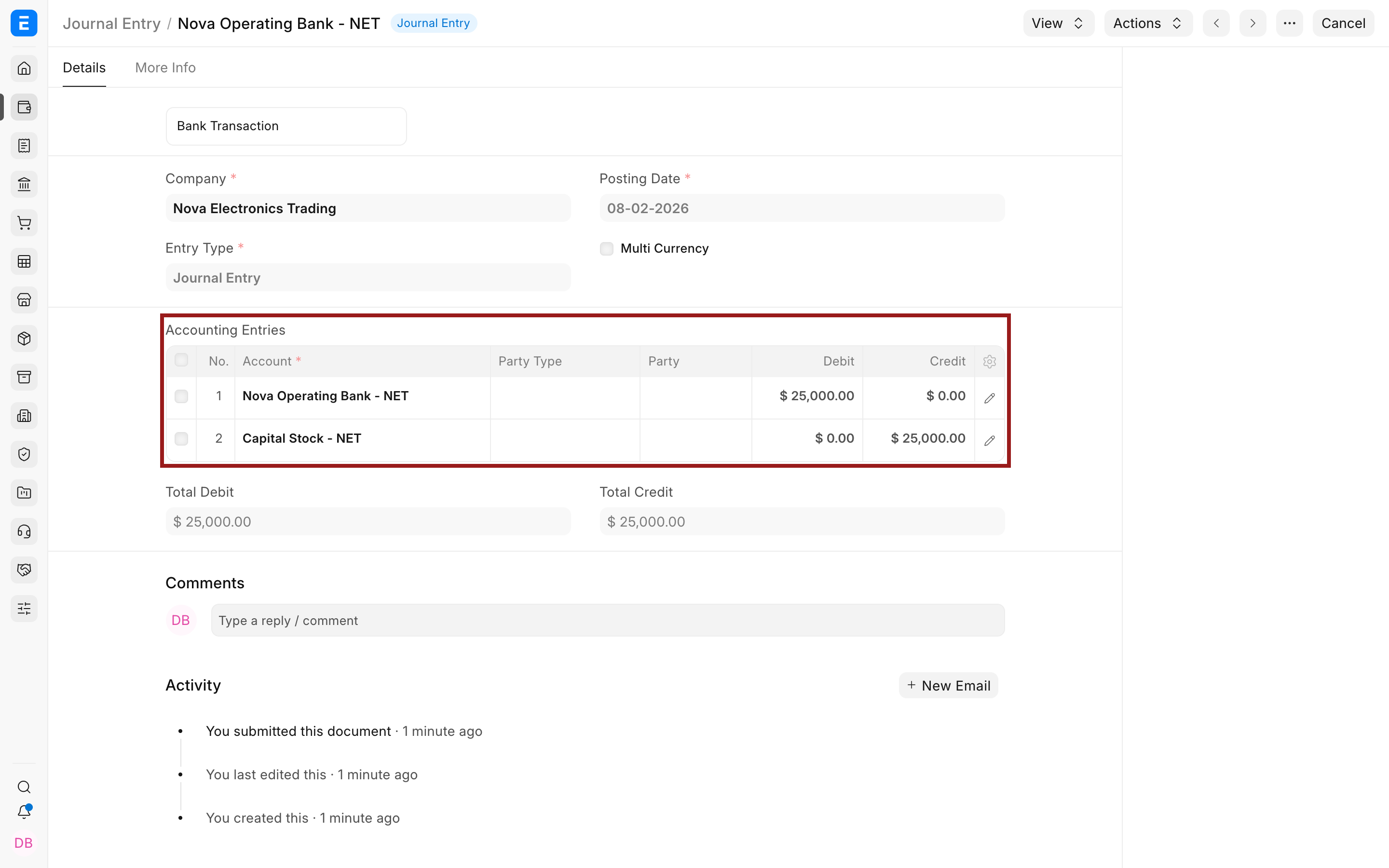
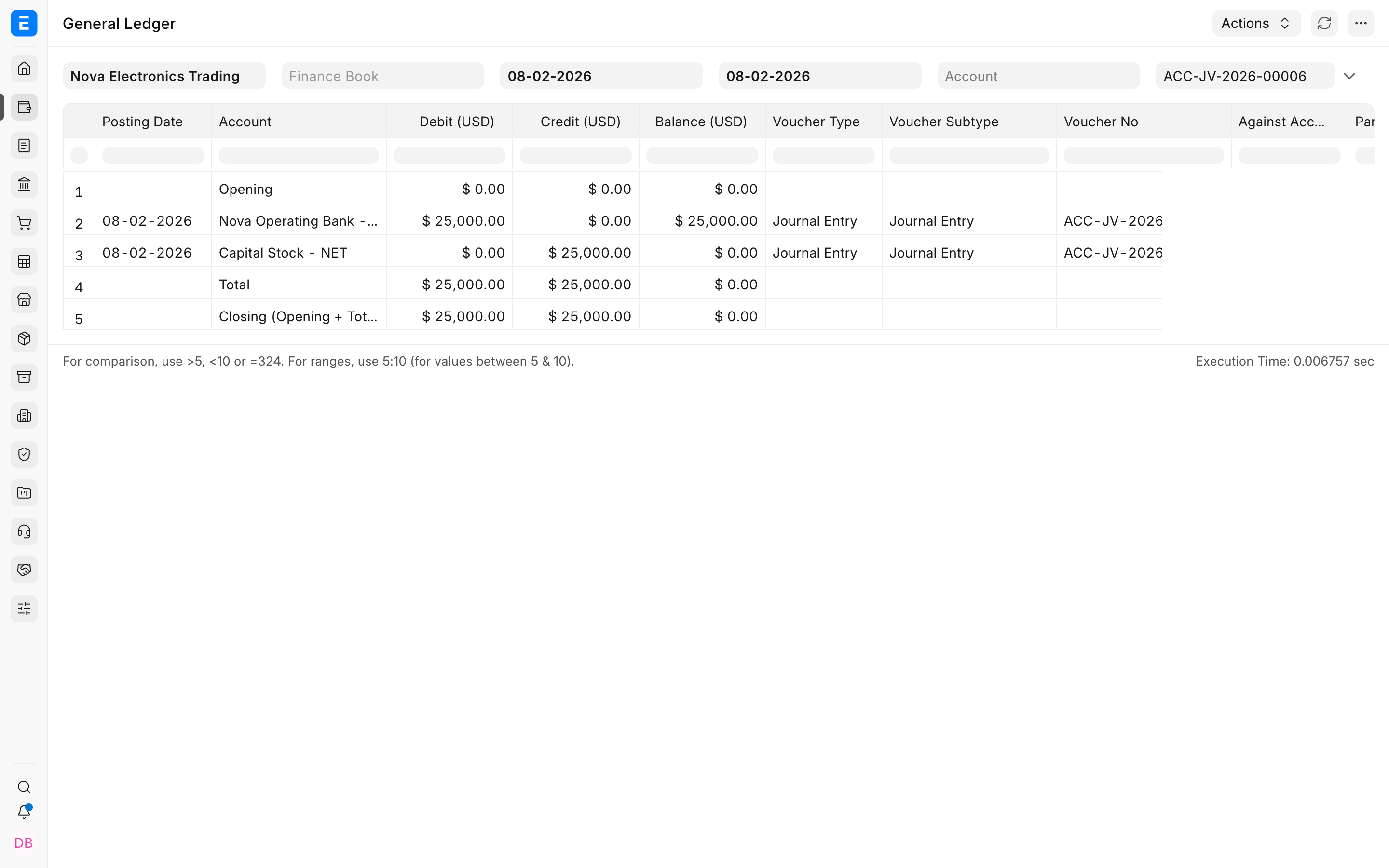
Suppose the owner invests $25,000 in Nova Electronics Trading. The company now has $25,000 more in its bank, and the owner's equity in the business increases by the same amount.
| Account | Debit | Credit | Why |
|---|---|---|---|
| Nova Operating Bank | $25,000 | The company's bank asset increases. | |
| Capital Stock | $25,000 | The owner's equity increases. |
Record this with a Journal Entry because it is owner funding, not a customer or supplier payment against an invoice.
After submission, View > Ledger shows the two balanced General Ledger lines.
2. Buy equipment and inventory
Assume Nova buys equipment for $2,800 and phone inventory for $2,200. It pays $2,000 immediately and owes the supplier $3,000.
The purchase increases assets:
| Account | Debit | Credit |
|---|---|---|
| Equipment | $2,800 | |
| Stock in Hand | $2,200 | |
| Bank | $2,000 | |
| Accounts Payable | $3,000 |
Equipment is a fixed asset because the business expects to use it for more than one accounting period. Inventory is a current asset because it is held for sale. Bank decreases for the amount paid now, while Accounts Payable records the unpaid supplier balance.
In ERPNext, use a Purchase Receipt to receive stock when your process separates receipt from billing. Use a Purchase Invoice to recognize the supplier liability. If Update Stock is selected on the Purchase Invoice, the invoice can also receive stock without a separate Purchase Receipt.
The example Purchase Invoice records real NovaPhone inventory from a supplier.
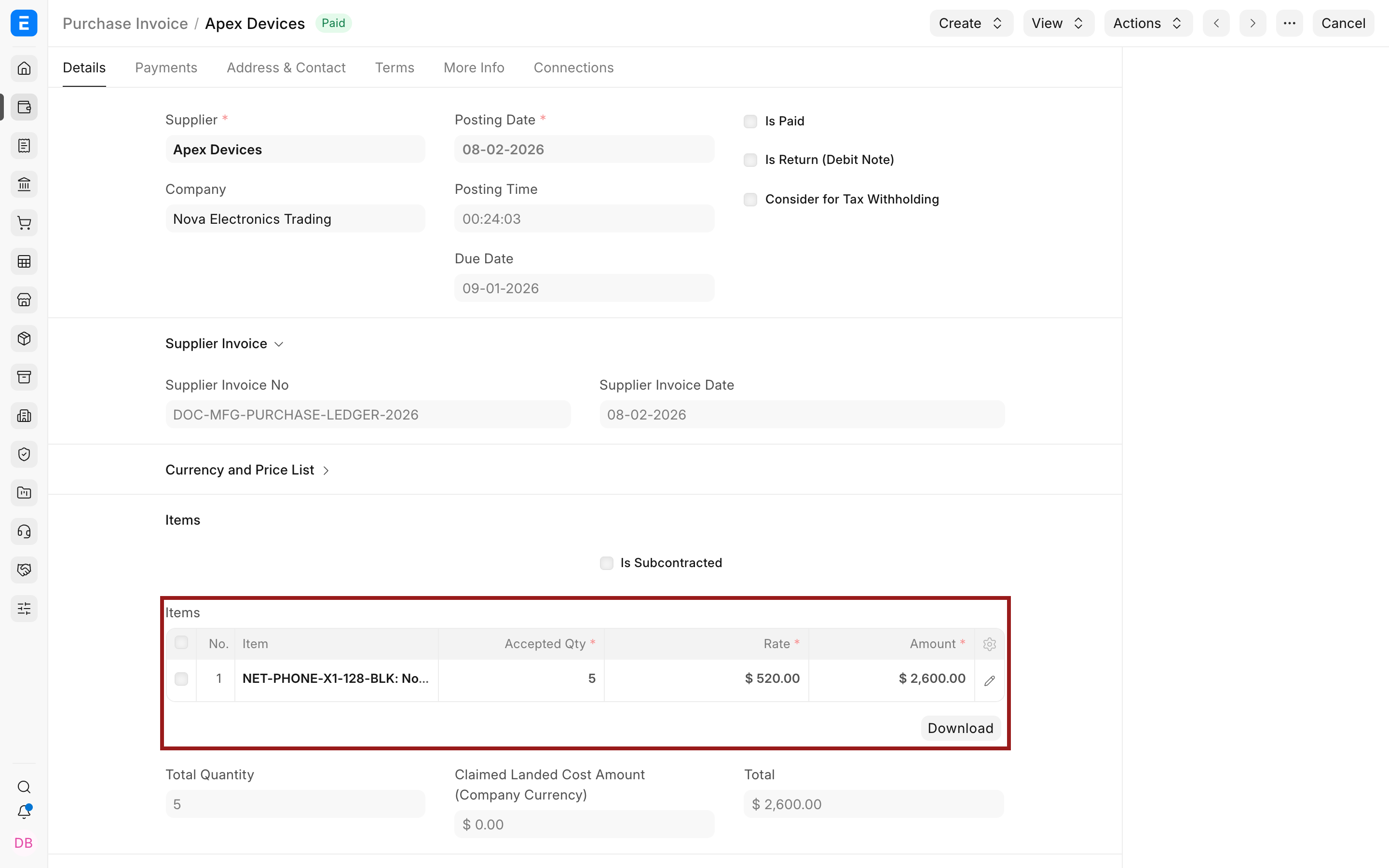
Use a Payment Entry for the $2,000 paid now and allocate it to the supplier invoice. ERPNext debits Accounts Payable and credits Bank for the payment. The remaining $3,000 stays outstanding until it is paid or otherwise adjusted.
3. Sell inventory
Suppose Nova sells 325 units during the day for net sales of $1,625. The inventory cost of those units is $800. A stock sale normally has two accounting effects.
Recognize the sale
| Account | Debit | Credit |
|---|---|---|
| Bank or Accounts Receivable | $1,625 | |
| Sales | $1,625 |
If the customer pays immediately, Bank or Cash is debited. If payment is due later, Accounts Receivable is debited. Sales income is credited in both cases.
Recognize the inventory consumed
| Account | Debit | Credit |
|---|---|---|
| Cost of Goods Sold | $800 | |
| Stock in Hand | $800 |
The expense records what the sold items cost the business. The stock credit reduces the inventory asset. ERPNext calculates this amount from stock valuation; it is not necessarily the same as the selling price.
A Sales Order records the commercial commitment but does not post revenue. A Delivery Note posts the stock and Cost of Goods Sold effect for a perpetual-inventory sale. A Sales Invoice posts revenue, tax, and the customer receivable. When Update Stock is selected, the Sales Invoice can also post the stock effect without a separate Delivery Note.
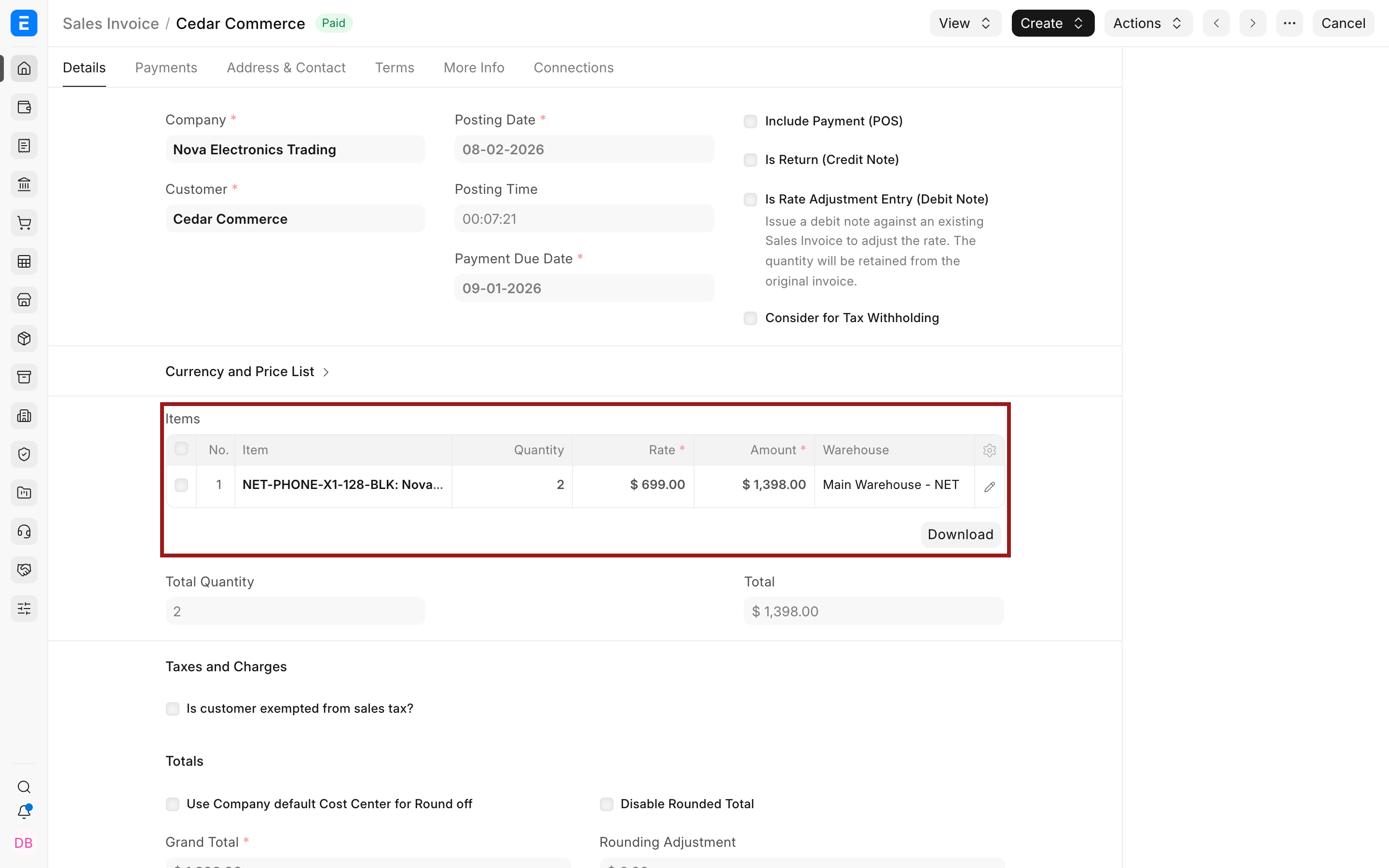
The dot before an Item Code shows stock availability at a glance: green means in stock and red means out of stock.
When the customer pays, submit a Payment Entry linked to the invoice. ERPNext debits Bank and credits Accounts Receivable, reducing the invoice's outstanding amount.
4. Record operating expenses
Assume monthly rent is $5,000 and salaries are $8,000. When they are paid from the bank:
| Account | Debit | Credit |
|---|---|---|
| Rent Expense | $5,000 | |
| Salary Expense | $8,000 | |
| Bank | $13,000 |
Expenses increase with debits, while the bank asset decreases with a credit. Use the most specific standard document available. Payroll documents should record salary liabilities and payments; a Purchase Invoice can record a supplier-billed expense; a Journal Entry can record a valid adjustment or expense for which no dedicated operational document is appropriate.
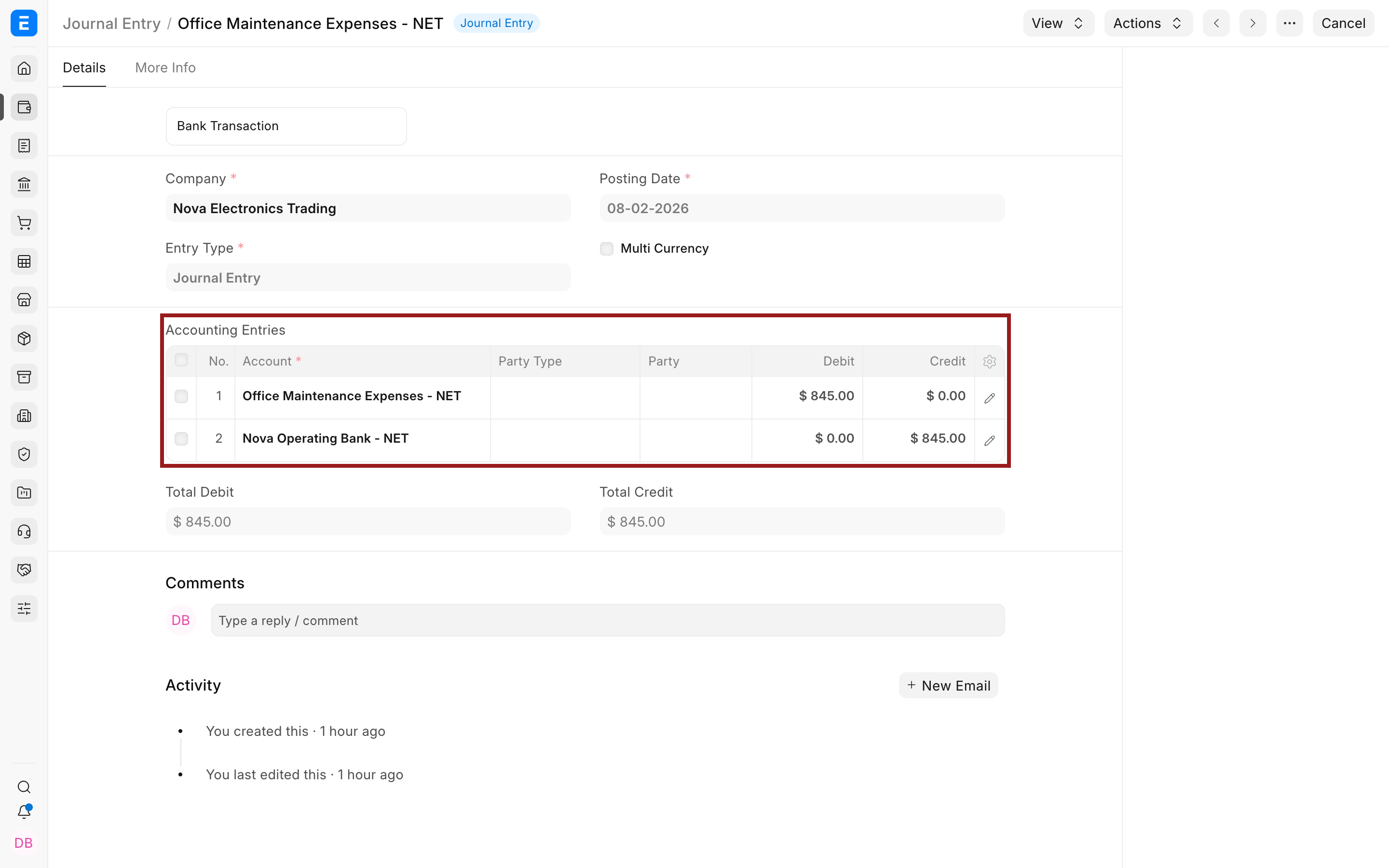
The following Journal Entry records $845 of office maintenance paid from Nova's operating bank account.
5. Understand profit during the period
Purchases of raw material or inventory continue to increase Stock in Hand until that stock is sold or consumed. Sales increase income, while Cost of Goods Sold, rent, salary, and other operating costs increase expenses.
Suppose the month's net sales are $40,000 and total expenses are $20,000. The Profit and Loss Statement reports a $20,000 profit for the period. This profit increases the owners' claim on the business, but it remains in the income and expense accounts until the period is closed.
The Balance Sheet shows what the business owns and owes at a point in time. For example, after the transactions above, the company may hold $44,000 in cash and $1,000 in raw-material inventory, alongside its equipment, receivables, payables, and equity. The exact balances depend on every transaction posted during the period.
6. Close the period
Use a Period Closing Voucher after reports have been reviewed and adjustments are complete. It transfers the net balance of income and expense accounts to an Equity or Liability closing account, normally Retained Earnings.
For a $20,000 profit, the simplified closing logic is:
| Account | Debit | Credit |
|---|---|---|
| Profit or Loss | $20,000 | |
| Retained Earnings | $20,000 |
A loss reverses the direction. ERPNext calculates the actual entries from all Profit and Loss accounts for the selected period.
Select the company, fiscal year, period start and end dates, and the closing account. Review the Profit and Loss Statement and General Ledger before submitting.
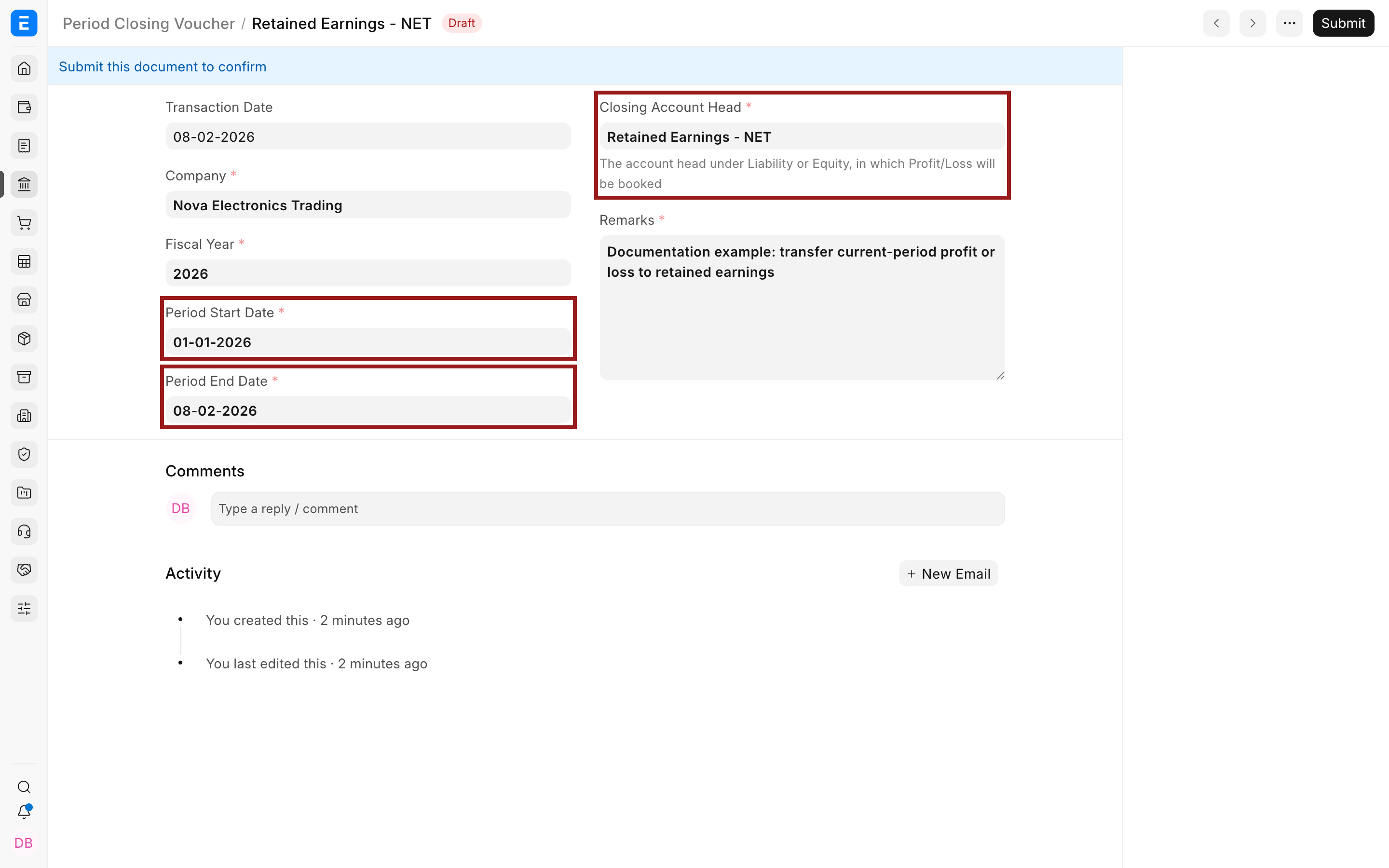
After submission, income and expense balances are closed into the selected balance-sheet account for that period. Do not use a closing voucher merely to hide an unexplained difference. Correct source transactions and complete approved adjustments first.
Which ERPNext document should you use?
| Business event | Usually use | Main accounting effect on submission |
|---|---|---|
| Customer commits to buy | Sales Order | No General Ledger entry |
| Ship stock | Delivery Note | Debit Cost of Goods Sold; credit Stock in Hand |
| Bill a customer | Sales Invoice | Debit Accounts Receivable; credit income and tax liabilities |
| Receive customer money | Payment Entry | Debit Bank or Cash; credit Accounts Receivable |
| Receive stock | Purchase Receipt | Debit Stock in Hand; credit Stock Received But Not Billed |
| Record a supplier bill | Purchase Invoice | Debit stock, asset, or expense; credit Accounts Payable |
| Pay a supplier | Payment Entry | Debit Accounts Payable; credit Bank or Cash |
| Record an adjustment or owner funding | Journal Entry | Accounts depend on the event; debits and credits must balance |
| Transfer period profit or loss | Period Closing Voucher | Close income and expense balances into Retained Earnings or another approved closing account |
Prefer operational documents over manual Journal Entries for routine sales, purchases, and payments. They preserve the customer, supplier, item, stock, tax, outstanding, and reconciliation details that a bare journal entry does not provide as clearly.
Verify accounting entries
Open a submitted posting document and select View > Ledger. Alternatively, run the General Ledger report and filter by company, voucher type, or voucher number.
Check that:
- Total debit equals total credit.
- The party and control account are correct.
- Income, expense, stock, bank, and tax accounts match the transaction.
- Cost Centers and accounting dimensions are present where required.
- The posting date and fiscal year are correct.
- The transaction appears correctly in the Profit and Loss Statement and Balance Sheet.
Troubleshooting
A Sales Order does not appear in the General Ledger
This is expected. A Sales Order is a commitment, not a revenue posting. Submit the appropriate Delivery Note and Sales Invoice, or a Sales Invoice with Update Stock, to record the accounting effect.
The Sales Invoice shows revenue but no stock or Cost of Goods Sold entry
Check whether stock was already posted by a Delivery Note. If there is no Delivery Note, confirm that Update Stock was selected on the Sales Invoice and that the item maintains stock.
A supplier invoice posts directly to an expense instead of inventory
Check whether the item maintains stock, the perpetual-inventory configuration, the selected warehouse, and the item's accounts. Service and non-stock items normally post to expense accounts rather than Stock in Hand.
The invoice is paid, but an outstanding amount remains
Open the Payment Entry and confirm that the invoice is included in References with the correct allocated amount. Use Payment Reconciliation when a standalone or advance payment needs to be allocated later.
A report balance differs from the transaction
Confirm the report company, date range, finance book, currency, Cost Center, and other filters. Then open the source voucher's ledger and trace every posting. Do not edit General Ledger rows directly.
FAQs
Do draft documents affect the General Ledger?
No, Drafts can calculate totals for review, but posting documents affect the ledger only after submission.
Why does a credit sale debit Accounts Receivable?
Accounts Receivable is an asset because the customer owes the company money. The asset increases with a debit, while Sales income increases with a credit.
Why are inventory purchases not immediately an expense?
Unsold inventory is an asset. Its cost becomes Cost of Goods Sold when the inventory is sold or otherwise consumed, allowing the expense to be matched with the related revenue.
Can I use a Journal Entry instead of invoices and Payment Entries?
Technically, some balances can be posted through a Journal Entry, but routine operational transactions should use their dedicated documents. Dedicated documents update outstanding balances, party ledgers, stock, taxes, payment references, and operational reports more safely and clearly.
Can I submit another transaction after a Period Closing Voucher?
ERPNext applies closing-period controls to protect the closed accounts. Follow your organization's approved reopening or adjustment process rather than inserting transactions into a closed period casually.